How to Use AI for Market Research: Tools, Prompts and a Workflow That Avoids Bad Data
AI can compress weeks of desk research into hours, but it can also invent numbers. A practical workflow for using ChatGPT, Gemini, Perplexity, NotebookLM and other tools for market research, with prompts and verification steps.
On this page
- Key takeaways
- What AI is good at in market research
- The main tools and what each does best
- A market research workflow with AI
- Step 1 and 2: Frame the decision and questions
- Step 3: Run AI desk research
- Step 4: Verify every key fact
- Competitor analysis with AI
- Analysing your own data: reviews, tickets and surveys
- Primary research: use AI to prepare, not to pretend
- Market sizing with AI
- Writing the research brief
- Privacy and data safety
- Useful prompts for market research
- Turning research into visibility
- Worked example: researching a new market
- A source table you can copy
- Choosing the right tool for each question
- Market research on a small budget
- Using AI for ongoing market monitoring
- Common mistakes
- Frequently asked questions
- Sources
Last updated: 4 November 2026
Quick answer: AI is excellent at the slow parts of market research: gathering public information, summarising long documents, clustering customer feedback, drafting survey questions and comparing competitors. Use deep research features in ChatGPT, Gemini or Perplexity for desk research with cited sources; NotebookLM or Claude Projects to analyse your own documents; and spreadsheet AI to analyse survey data. But treat every number an AI gives you as unverified until you open the source. The safest workflow is: frame a precise question, run AI research, check every key fact against its original source, add primary research with real customers, then use AI to synthesise the findings into a brief.
Key takeaways
- AI speeds up desk research, competitor scans, feedback analysis and report writing.
- Deep research modes browse many sources and cite them, but citations still need checking.
- AI-generated market sizes and statistics are a common source of errors; always trace them to the original.
- AI cannot replace talking to real customers; use it to prepare and analyse interviews, not to imagine them.
- Keep sensitive data out of consumer AI tools unless your plan and policies allow it.
What AI is good at in market research
Market research covers a wide range of tasks, from estimating market size to understanding why customers churn. AI tools are not equally useful for all of them. Here is an honest breakdown.
| Task | How useful AI is | Main risk |
|---|---|---|
| Desk research on a market or trend | Very useful, especially deep research modes | Outdated or misread sources |
| Competitor analysis from public information | Very useful | Missing recent changes, confusing similarly named companies |
| Summarising reports, filings and transcripts | Very useful | Missed nuance, wrong figures |
| Clustering reviews, survey answers and support tickets | Very useful | Overconfident themes from small samples |
| Drafting surveys and interview guides | Useful | Leading or biased questions |
| Market sizing | Useful for structure, risky for numbers | Invented or misattributed figures |
| Predicting customer behaviour | Limited | Plausible but untested assumptions |
| Replacing real customer interviews | Not suitable | Synthetic answers that sound real but are not |
The main tools and what each does best
Features change often, so check each vendor’s current plans before relying on a specific capability. Our AI subscription price comparison tracks the main plans.
ChatGPT deep research
ChatGPT’s deep research mode browses many web pages, reads them and produces a long, cited report on a question. It is well suited to broad desk research such as “summarise the state of the cold chain logistics market in India, with sources”. Results take several minutes and work best with a precise, scoped question. See our guide to deep research in ChatGPT, Gemini and Perplexity.
Gemini Deep Research
Google’s Gemini offers a similar deep research feature that builds a research plan, browses sources and writes a report you can export to Google Docs. It is convenient if your team works in Google Workspace. See how to use Gemini.
Perplexity
Perplexity answers questions with inline citations by default, which makes it fast to check sources. Its research modes go deeper on complex questions. It is useful for quick fact-finding and for seeing which sources dominate a topic. See how to use Perplexity.
NotebookLM
NotebookLM answers questions based only on the documents you upload, such as reports, interview transcripts or filings, with citations to the exact passages. This makes it one of the safest tools for analysing your own research material, because answers are grounded in your sources. See how to use NotebookLM.
Claude Projects
Claude can work with long documents and keep project files and instructions together, which helps when analysing many transcripts or reports for one study. See how to use Claude Projects.
Spreadsheet AI
ChatGPT, Claude, Gemini in Google Sheets and Copilot in Excel can analyse survey exports, categorise open-ended answers and build pivot tables. See ChatGPT for Excel and AI tools for data analysis.
Search and trend tools
Google Trends, Search Console, keyword research tools and social listening tools provide real behavioural data that AI can then help you interpret. See our list of keyword research tools.
A market research workflow with AI
Here is a workflow we use and recommend. It keeps AI in the roles it does well and puts people in charge of judgement and verification.
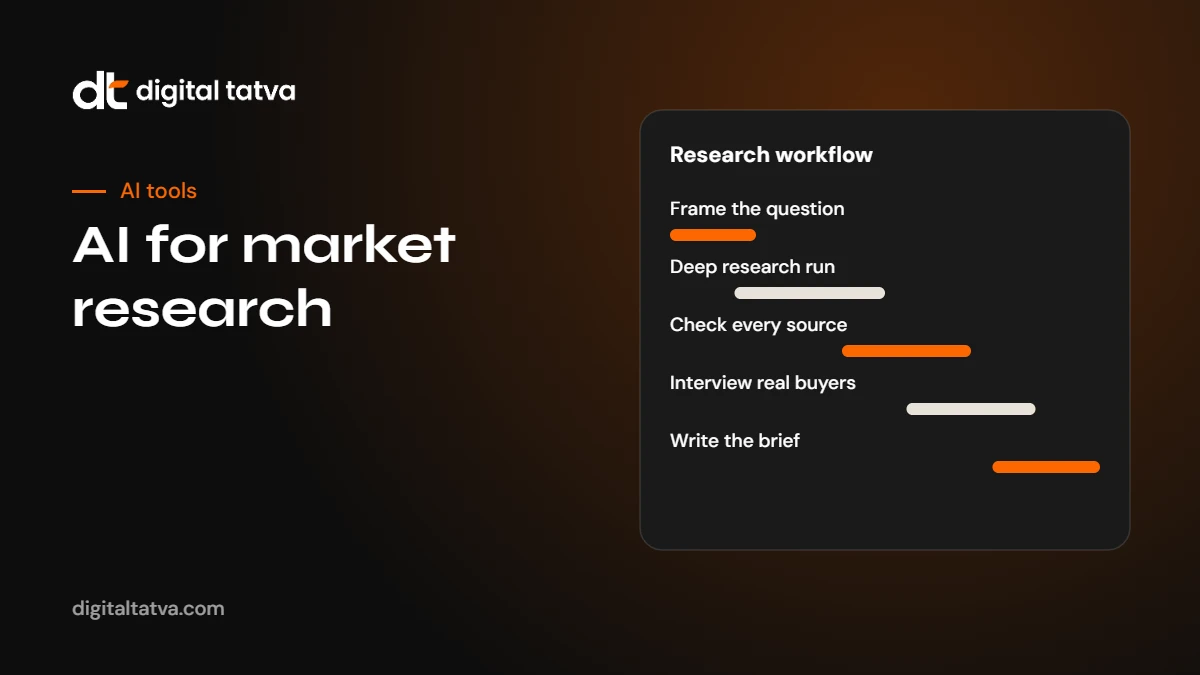
- Frame the decision. Write down the business decision the research supports, such as “Should we launch our product in the UAE in 2027?” Research without a decision tends to sprawl.
- List the questions. Break the decision into specific questions: market size, buyer segments, competitors, pricing, regulation, channels.
- Run AI desk research. Use a deep research mode for each major question, asking for sources and dates.
- Verify key facts. Open every source behind a number or claim you will use. Discard what you cannot confirm.
- Do primary research. Interview customers, run a survey or test demand. Use AI to prepare guides and analyse results.
- Synthesise. Use AI to draft a brief from your verified material only, then edit it yourself.
- Record sources and assumptions. Keep a source list and note which figures are estimates.
Step 1 and 2: Frame the decision and questions
A precise question gives far better AI output than a broad one. Compare:
- Weak: “Tell me about the Indian skincare market.”
- Better: “For a direct-to-consumer brand selling sunscreen to women aged 22 to 35 in Indian metro cities, what are the main competitors, typical price points per 50 ml, main sales channels and recent regulatory changes affecting sunscreen labelling? Cite sources with dates.”
Ask AI to help you break the decision into questions:
Prompt: “I need to decide whether to launch [product] in [market] in [year]. List the 10 research questions I must answer to make this decision, grouped into market, customers, competitors, pricing, channels and risks. For each, suggest the type of source that would answer it best.”
Step 3: Run AI desk research
For each question, run a deep research query. Good research prompts:
- Specify geography, time period and segment.
- Ask for sources with publication dates.
- Ask the AI to separate facts from estimates and flag conflicting figures.
- Ask for gaps: what could not be found.
Prompt: “Research [question] for [geography] focusing on [period]. Use reputable sources such as government statistics, industry associations, company filings and established publications. For each key figure, give the source, publication date and whether it is a measurement or an estimate. List any conflicting figures and explain the differences. End with what you could not find.”
Step 4: Verify every key fact
This is the step most people skip, and it is where most AI research errors come from. AI tools can misread tables, attribute a figure to the wrong source, cite an outdated report or, occasionally, produce a figure with no real source at all.
- Open the source. Do not trust the summary. Find the figure in the original document.
- Check the date. Market data from three years ago may be useless.
- Check the definition. “Market size” can mean revenue, volume or users, and different reports define markets differently.
- Prefer primary sources. A government dataset or company filing beats a blog post quoting a press release about a report.
- Be wary of paywalled market reports. AI often finds headline figures from report summaries without the methodology. Treat them as rough indicators.
- Record what you checked. A simple source table with claim, source, date and status saves time later.
Watch out: The most dangerous AI research error is a precise-looking number that nobody can trace. If a figure cannot be found in a credible original source, do not use it.
Competitor analysis with AI
AI is very good at building a first competitor overview from public information: websites, pricing pages, reviews, job postings, press releases and filings.
Prompt: “Create a comparison of [competitor A], [competitor B] and [competitor C] for [market]. Include target customers, main products, pricing as shown on their official websites with the date checked, key features, positioning statements, channels, recent news from the last 12 months and common themes in public reviews. Cite every source and flag anything you could not confirm.”
Then check each competitor’s website yourself, especially prices and features, which change often. Review platforms and community discussions show how customers really see competitors. See AI research tools for more options.
Do not forget to check how AI assistants themselves describe your competitors and you. Ask the questions your buyers ask and see who is recommended. Our guide on checking whether ChatGPT recommends your brand explains how, and it is itself useful market research.
Analysing your own data: reviews, tickets and surveys
Some of the most valuable research data already sits in your business: customer reviews, support tickets, sales call notes, NPS comments and survey answers. AI can turn thousands of comments into clear themes in minutes.
- Export the data to a spreadsheet, removing names, phone numbers and other personal details.
- Ask AI to propose categories from a sample of 200 to 300 comments.
- Refine the categories yourself so they make business sense.
- Ask AI to classify all comments into the final categories, with sentiment.
- Spot-check 50 classifications manually to confirm accuracy.
- Count and chart the themes, and pull representative quotes.
Prompt: “Here are 250 customer comments. Propose 8 to 12 categories that capture the main themes, with a short definition and two example comments for each. Keep categories mutually exclusive and specific.”
Primary research: use AI to prepare, not to pretend
Some tools offer “synthetic customers”: AI personas that answer survey questions. They can help you test whether a question is confusing, but they are not real customers and should never be reported as research findings. Real insight comes from people.
AI can help you:
- Draft interview guides with open, non-leading questions.
- Check surveys for bias, double-barrelled questions and unclear wording.
- Transcribe interviews with meeting assistants. See AI meeting assistants and transcription tools.
- Summarise and compare transcripts in NotebookLM or Claude, with quotes linked to their source.
- Translate questions and answers for multilingual research, with a fluent reviewer.
Prompt: “Review this interview guide for a study on why small restaurants stop using online ordering platforms. Flag leading questions, jargon and questions that ask two things at once. Suggest neutral rewrites and three follow-up probes for each main question.”
Market sizing with AI
Market sizing is where AI is most tempting and most risky. Use it to build the structure of an estimate, not to supply the answer.
- Top-down: start from a credible total (for example, number of registered businesses in a sector from government data) and narrow down by segment.
- Bottom-up: multiply the number of target customers by expected adoption and average spend.
Prompt: “Help me build a bottom-up market size estimate for [product] in [market]. List the inputs I need, suggest credible public sources for each, and show the formula. Do not fill in numbers you cannot source; mark them as assumptions for me to check.”
Put the model in a spreadsheet, source every input, and show low, mid and high cases.
Writing the research brief
Once your material is verified, AI is very good at turning it into a clear brief. Give it only your verified notes and source table, and ask for a structure:
- The decision and recommendation in two sentences.
- Key findings with sources.
- Customer insights with quotes.
- Competitor overview table.
- Risks and open questions.
- Appendix of sources and assumptions.
Then edit it yourself. The judgement in the recommendation must be yours.
Privacy and data safety
- Remove personal data from customer feedback before uploading it to AI tools.
- Check whether your AI plan uses your data for training and whether business plans offer stronger protections. See AI data privacy for business.
- Do not upload confidential documents, contracts or unreleased financials to consumer tools without approval.
- Follow your company’s AI policy. If you do not have one, start with our AI usage policy template.
Useful prompts for market research
- “What are the main customer segments for [product] in [market]? For each, describe needs, buying triggers and typical objections, and cite sources.”
- “List regulatory requirements that affect selling [product] in [market], with links to official sources.”
- “Summarise the last 12 months of news about [industry] in [market]. Group by theme and include dates and sources.”
- “From these 40 interview summaries, list the top five unmet needs, how many interviewees mentioned each and two quotes for each.”
- “Compare pricing models used by [competitors]: per user, per usage, flat fee or freemium. Use official pricing pages and give the date checked.”
- “What questions do buyers in [category] ask before purchasing? Group them by stage: awareness, consideration and decision.”
For more prompt ideas, see our prompt engineering guide and ChatGPT prompts for marketing.
Turning research into visibility
Good market research often produces insights other people want to read: original survey results, benchmarks or trend analysis. Published responsibly, these can become content that AI assistants cite, which helps your brand get named in AI answers. Our guide to original research for AEO explains how to publish data that AI engines quote, and our five elements framework shows where it fits in a wider AI visibility strategy.
Worked example: researching a new market
Here is an illustration of the workflow in practice. A Gujarat-based maker of stainless steel kitchenware wants to know whether to start selling directly to consumers in the UAE.
- Decision: launch a direct-to-consumer online store for the UAE within 12 months, or not.
- Questions: market size for cookware in the UAE, main competitors and price points, preferred sales channels (own site versus marketplaces), import duties and labelling rules, shipping costs and timelines, and what buyers value.
- Desk research: a deep research run for each question, asking for dated sources and flagging estimates.
- Verification: the team opens every source behind a key figure. Two market size figures turn out to come from paywalled report summaries with different definitions, so they are recorded as rough ranges, not facts. Customs rules are confirmed on official government pages.
- Competitor scan: AI builds a table of eight competitor brands with prices from their official sites and marketplace listings, which the team checks and updates.
- Primary research: twelve interviews with UAE-based customers and two distributors, prepared with an AI-reviewed interview guide and analysed in NotebookLM.
- Brief: AI drafts a six-page brief from the verified notes. The founders edit it and decide to start with a marketplace presence before building their own store.
The research took about two weeks instead of the six or more the team expected, and every number in the brief had a source.
A source table you can copy
| Claim | Source | Date | Type | Checked by | Status |
|---|---|---|---|---|---|
| Example: number of registered restaurants in a city | Official statistics portal | 2025 | Measurement | Initials | Confirmed |
| Example: market size estimate | Research firm press release | 2024 | Estimate | Initials | Use as range only |
| Example: competitor price | Competitor pricing page | Date checked | Measurement | Initials | Confirmed |
Keeping a table like this makes your research easy to audit, update and reuse.
Choosing the right tool for each question
- Broad, unfamiliar topic: a deep research mode, then verify.
- Quick fact with a source: Perplexity or an assistant with search.
- Your own documents: NotebookLM or Claude Projects.
- Numbers and tables: spreadsheet AI with your exported data.
- Customer voice: real interviews and surveys, analysed with AI.
- Search behaviour: Google Trends, Search Console and keyword tools, interpreted with AI.
Market research on a small budget
Small businesses do not need expensive research agencies to make better decisions. A free AI assistant, Google Trends, your own sales and review data, and five to ten conversations with real customers can answer most practical questions, such as which product to launch next or which city to expand into. The key is discipline: a clear question, verified sources and honest notes about what you still do not know.
Write the decision and its evidence down, even on one page. Next year, you will be able to see what you got right and what to research better.
Using AI for ongoing market monitoring
Market research is not only a one-off project. AI can help you keep an eye on your market continuously.
- Weekly news summaries: ask an AI assistant with search for news on your industry and competitors in the last seven days, with sources.
- Review monitoring: export new reviews of your products and competitors monthly and ask AI to summarise new themes.
- Search trend checks: review Google Trends and Search Console queries quarterly and ask AI to interpret changes.
- AI answer monitoring: track how AI assistants describe your category and which brands they recommend. This shows how buyers’ first impressions are forming. See AI share of voice.
Common mistakes
- Using AI-generated statistics without checking the source.
- Asking vague questions and accepting vague answers.
- Treating synthetic personas as real customer research.
- Uploading personal customer data to consumer AI tools.
- Letting the AI write the recommendation without human judgement.
- Forgetting to date the research, so it is reused long after it is stale.
Frequently asked questions
Can AI do market research?
AI can do much of the desk research, summarising and analysis involved in market research, often much faster than a person. It cannot replace verification or conversations with real customers.
Which AI tool is best for market research?
Deep research modes in ChatGPT, Gemini and Perplexity are strong for desk research. NotebookLM and Claude are good for analysing your own documents. Spreadsheet AI helps with survey and feedback data.
Are AI market size figures reliable?
Not on their own. AI can misread or misattribute figures. Always trace key numbers to a credible original source and check the date and definition.
Can AI replace customer interviews?
No. AI can help you prepare interview guides and analyse transcripts, but synthetic answers are not real customer insight.
Is it safe to upload customer data to AI tools?
Remove personal data first and check your AI plan’s data policies. Business plans often offer stronger protections, but follow your company’s policy.
How should I cite AI research in a report?
Cite the original sources you verified, not the AI tool. Note which figures are estimates and when the research was done.
Sources
- Deep research FAQ, OpenAI Help Center
- NotebookLM, Google
- Google Trends, Google
Product details, prices and features are checked at the time of writing and can change. Sources are linked in the text so you can check them yourself.
How does your brand appear in AI answers?
We test the questions your buyers ask across the major AI assistants and search engines, then show you what to fix first.
Get an AI Visibility Audit