How to Use Google Gemini: A Complete Beginner Guide
Learn how to use Google Gemini from scratch: sign in, pick Flash-Lite, Flash or Pro, use Deep Research, Canvas, Gems and Live, and choose a plan with India prices.

On this page
- Key takeaways
- How to use Gemini: quick start in 6 steps
- Gemini models explained: Flash-Lite, Flash and Pro
- The Gemini features beginners should learn first
- Gemini prompts to copy for work, study and daily life
- How to use Gemini on Android, iPhone and Chrome
- Gemini free vs paid plans: which do you need?
- Common Gemini mistakes and how to avoid them
- Frequently asked questions
- Next steps: build a Gemini habit
To use Google Gemini, go to gemini.google.com or open the Gemini app on Android or iPhone, sign in with your Google account, and type, speak or upload a photo or file to ask your question. Pick a model from the menu in the text box (Flash-Lite for speed, Flash for most tasks, Pro for hard problems), and use tools like Deep Research, Canvas, Gems and Gemini Live from the same screen. The free plan covers all of this with usage limits, and Google AI plans raise those limits.
This complete beginner guide shows how to use Gemini step by step, which features matter most, prompts to copy, how the free and paid plans differ (with India prices), and the mistakes to avoid. It reflects the Gemini app as of October 2026.
Key takeaways
- Gemini is free on the web and in the app with a Google account. The free plan includes Gemini 3.6 Flash, varying access to 3.1 Pro, image creation, Deep Research, Gemini Live, Canvas and Gems.
- Choose Flash-Lite, Flash or Pro from the model menu in the text box. If you hit your limit on a paid plan, you can keep chatting with Flash-Lite.
- Gemini Live lets you talk naturally and share your camera or screen on your phone.
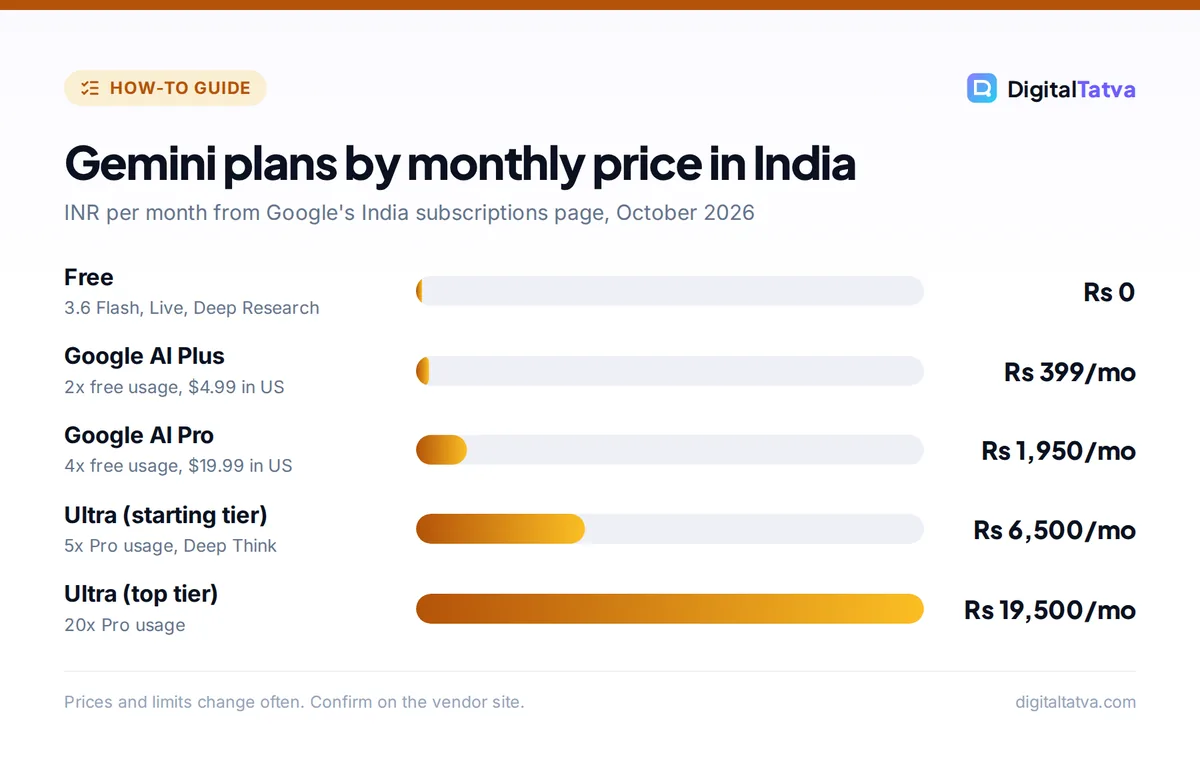
- Google AI Plus costs Rs 399 a month in India and Google AI Pro costs Rs 1,950 a month, with double and four times the free usage.
- Gemini supports more than 70 languages, including Hindi, Gujarati, Tamil, Telugu, Bengali and Marathi.
How to use Gemini: quick start in 6 steps
These steps work on any computer or phone. Menus move between updates, so look for the labels described here rather than exact positions.
- Open Gemini. Go to gemini.google.com in any browser, or install the Gemini app on Android or iPhone. On many Android phones, Gemini is already the built-in assistant.
- Sign in with your Google account. Use a personal Gmail account. Work or school accounts work too, but your admin controls which features you get. You must be 13 or older in most countries, and 18 or older in the UK, Switzerland and the European Economic Area.
- Pick a model. Click the model name in the text box and choose Flash-Lite, Flash or Pro. Flash is the best default for beginners.
- Ask your first question. Type a clear request such as “Plan a healthy vegetarian meal plan for a week, under Rs 3,000, with a shopping list.”
- Add files or photos. Click the plus button to upload a PDF, image or document, or take a photo, and ask Gemini about it.
- Refine and save. Ask follow-ups, then copy the answer, export it to Google Docs, or share the chat.
If you want a deeper look at quality and weak spots before you commit, read our full Google Gemini review.
Gemini models explained: Flash-Lite, Flash and Pro
Google’s Gemini help center describes three models in the app. You need to be signed in to switch between them.
| Model | What Google says it is for | Use it when |
|---|---|---|
| Flash-Lite | Speed and everyday tasks like summarizing and brainstorming | Quick answers, short summaries, idea lists |
| Flash | Balance of speed and reasoning for simple to complex problems | Most writing, planning and study tasks |
| Pro | Most advanced: complex math, coding, long files, images and video; slower | Hard problems, long documents, careful analysis |
The free plan runs on Gemini 3.6 Flash with varying access to Gemini 3.1 Pro, so Pro access depends on demand and your usage. Paid plans give more Pro use. You may have heard about Gemini 4 Argon: Google announced it on 30 September 2026, but it is limited to vetted cybersecurity defenders and is not in the Gemini app on any plan yet. Our explainer on Gemini 4 Argon tracks its rollout.
The Gemini features beginners should learn first
Deep Research
Deep Research browses many websites and writes a structured report with sources. Choose Deep Research from the tools menu, describe what you need (“Compare the top 5 accounting apps for Indian freelancers, with prices and GST features”), approve the research plan, and wait a few minutes. It is included on the free plan with limits.
Canvas
Canvas opens a side-by-side editor for writing and code. Ask Gemini to draft a blog post, resume or simple web page in Canvas, then edit it directly or highlight a section and ask for changes. It is ideal for documents you will polish over several rounds.
Gems
Gems are custom versions of Gemini with saved instructions. Create a Gem for a repeat job, such as “Instagram caption writer for my bakery, friendly tone, Hinglish, three hashtags.” Next time, open the Gem and just paste the product details.
Gemini Live
Gemini Live is a natural voice conversation on your phone. Tap the Live icon and talk; you can interrupt or change topics. On Android you can share your camera or screen, so you can point at a broken appliance or a confusing form and ask for help. Google says Live can remember key details across sessions and can check Calendar, Keep, Tasks, Maps and YouTube. Live is not available in the web app. Our comparison of Gemini Live vs ChatGPT Voice vs Alexa Plus shows how it stacks up.
Images, video and Notebook
- Images: choose Images in the sidebar, or just ask “create an image of…” Gemini uses Nano Banana 2 for generation and editing. Our guide to editing photos with Nano Banana in Gemini covers this in detail.
- Video: Create video in the sidebar uses Gemini Omni, but it needs a Google AI plan and is not available to users under 18. For longer projects, our guide to Google Flow and Veo goes further.
- Gemini Notebook: the research notebook formerly called NotebookLM, which answers only from sources you upload. See our NotebookLM and Gemini Notebook guide.
Gemini prompts to copy for work, study and daily life
Gemini gives better answers when you state the task, the context and the format. These prompts are a good starting point, and our prompt engineering guide explains the techniques.
| Goal | Best tool | Prompt |
|---|---|---|
| Summarize a PDF | Chat with upload | “Summarize this rental agreement in 8 bullet points and flag anything unusual.” |
| Understand a video | Chat | “Summarize the key steps in this YouTube tutorial: [link].” |
| Market research | Deep Research | “Research demand for millet snacks in Indian metro cities, with sources.” |
| Write and edit | Canvas | “Draft a 600-word About page for my interior design studio in Ahmedabad.” |
| Study | Guided Learning | “Teach me trigonometry ratios step by step and quiz me after each step.” |
| Translate | Chat | “Translate this notice into simple Marathi for shop staff.” |
Tip: For YouTube summaries, you must be signed in with Gemini Apps Activity turned on. Gemini uses the video’s public information, so it works best on videos with clear speech or captions.
How to use Gemini on Android, iPhone and Chrome
Gemini works almost everywhere you already use Google:
- Android: open the Gemini app, or hold the power button (or say “Hey Google”) on phones where Gemini is the default assistant. You can ask about what is on your screen.
- iPhone: install the Gemini app from the App Store and sign in. Gemini is also available inside the Chrome app on iOS.
- Chrome on desktop: Gemini in Chrome can summarize and compare your open tabs. It launched in India on 11 March 2026 with support for many more languages, including Hindi.
- Gmail, Docs and Sheets: Gemini features inside Workspace apps depend on your plan. Our guide to using Gemini in Gmail, Docs and Sheets covers them step by step.
Gemini supports more than 70 languages in over 230 countries and territories, including Assamese, Bengali, Gujarati, Hindi, Kannada, Malayalam, Marathi, Odia, Punjabi, Tamil, Telugu and Urdu. For other regional language tools, see our list of AI tools for Indian languages.
Gemini free vs paid plans: which do you need?
Prices below are from Google’s official Gemini subscriptions page and its India version.
| Plan | USD price | India price | Usage vs free | Highlights |
|---|---|---|---|---|
| Free | $0 | Rs 0 | Standard | 3.6 Flash, some 3.1 Pro, images, Deep Research, Live, Gems, 15 GB |
| Google AI Plus | $4.99/mo | Rs 399/mo | 2x | Video generation, Gemini in Gmail and Docs, 400 GB |
| Google AI Pro | $19.99/mo | Rs 1,950/mo | 4x | More Pro access, 1M token context, Flow credits, 5 TB |
| Google AI Ultra | $99.99 or $199.99/mo | Rs 6,500 or Rs 19,500/mo | 5x or 20x Pro | Deep Think, Gemini Spark first access, 20 TB+ |
Most beginners should stay on the free plan for a few weeks. Upgrade to AI Plus if you keep hitting limits or want Gemini in Gmail and Docs, and to AI Pro if you work with long documents or need regular Pro model access. Our Gemini pricing guide breaks down every plan in detail.
Save money: Jio’s offer gives eligible Jio users 18 months of Google AI Pro free with an active unlimited 5G plan of Rs 349 or above, and Google’s India page offers students AI Plus at no cost for one year while the promotion lasts. Our guide to free AI Pro plans in India explains how to claim them.
Common Gemini mistakes and how to avoid them
- Uploading too much at once: Gemini accepts up to 10 files per prompt and up to 100 MB per non-video file. Split large batches.
- Staying in one endless chat: start a new chat for each topic so old context does not leak into new answers.
- Trusting every fact: Gemini can be wrong. Use the double-check option or ask for sources on anything important.
- Sharing sensitive data: on personal accounts, chats may be reviewed to improve Google’s products depending on your activity settings. Check Gemini Apps Activity in settings and keep confidential client data out.
- Using Pro for everything: Pro is slower and uses more of your allowance. Use Flash for everyday tasks and save Pro for hard ones.
Comparing assistants? Our ChatGPT vs Gemini comparison and Claude vs Gemini guide show where each one wins.
Frequently asked questions
Is Google Gemini free to use?
Yes. Gemini is free with a Google account on the web and in the Android and iPhone apps. The free plan includes Gemini 3.6 Flash, varying access to 3.1 Pro, image creation, Deep Research, Gemini Live, Canvas and Gems, with usage limits. Paid Google AI plans start at $4.99 a month, or Rs 399 in India.
How much does Gemini cost in India?
Google’s India subscriptions page lists Google AI Plus at Rs 399 a month, Google AI Pro at Rs 1,950 a month and Google AI Ultra at Rs 6,500 or Rs 19,500 a month. Jio users on eligible 5G plans can get AI Pro free for 18 months, and students may qualify for a free year of AI Plus.
Which Gemini model should I use?
Use Flash for most everyday tasks such as writing, planning and study help. Switch to Flash-Lite when you want very fast answers to simple questions, and choose Pro for complex math, coding, long documents or careful analysis. Pro is slower and uses more of your plan’s allowance, so save it for harder work.
Can I use Gemini in Hindi and other Indian languages?
Yes. Gemini supports more than 70 languages, including Hindi, Bengali, Gujarati, Kannada, Malayalam, Marathi, Odia, Punjabi, Tamil, Telugu and Urdu. You can type or speak in these languages, and ask Gemini to translate between them. Some features, such as personalization in Gemini Live, launch in English first.
What is the difference between Gemini and Google Assistant?
Gemini is Google’s AI assistant that can hold conversations, write, analyze files and create images, while Google Assistant was built mainly for quick commands. On most newer Android phones, Gemini now handles the assistant role, so you can open it with the power button or voice and still control alarms, apps and smart home devices.
Next steps: build a Gemini habit
Start with one daily task, such as summarizing emails, planning meals or studying a topic, and use Flash on the free plan. Once that feels natural, try Deep Research for bigger questions and create a Gem for any task you repeat. Upgrade only when limits get in your way. Google changes Gemini features, models and prices often, so confirm the current details on Google’s official subscriptions page before you pay.
Pricing and features are checked at the time of writing and can change. Some links may be affiliate links, which never affect our verdicts.