Prompt Engineering Guide: 12 Techniques That Actually Work
12 prompt engineering techniques that work in ChatGPT, Claude and Gemini, with before and after examples, a reusable template and a worked prompt caching cost example.

On this page
Prompt engineering is the skill of writing instructions that get reliable, useful output from AI models like ChatGPT, Claude and Gemini. The techniques that actually work are simple: be specific about the goal, give context, show examples, structure the prompt with clear sections, break big tasks into steps, and test prompts against clear success criteria. Both OpenAI and Anthropic recommend these same core practices in their official guides.
Below are 12 techniques, each with a short explanation, a before and after example, and when to use it. They work in chat apps and in the API, and several of them also lower your token bill.
Key takeaways
- Most bad outputs come from vague prompts. State the goal, audience, format and length every time.
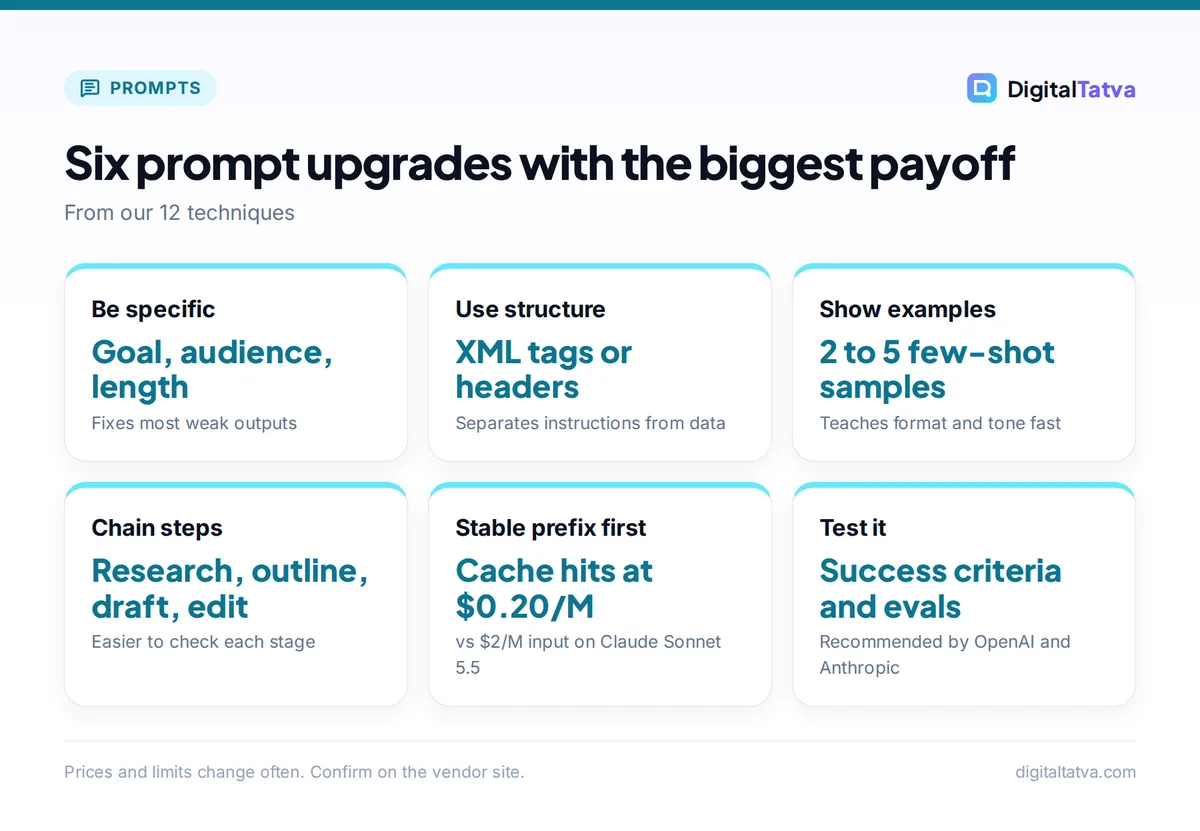
- Examples (few-shot prompting) and clear delimiters such as XML tags or Markdown headers are the two highest-impact upgrades.
- Reasoning models want high-level goals; faster GPT-style models want explicit, step-by-step instructions, according to OpenAI’s guide.
- Put stable instructions at the start of the prompt. It improves consistency and lets prompt caching cut the cost of repeated input by about 90% on most models.
- Define success criteria and test prompts before relying on them. Sometimes switching models solves the problem faster than rewriting the prompt.
What prompt engineering is (and is not)
A prompt is everything you send the model: instructions, context, examples and the question. Prompt engineering means designing that input deliberately so the output is accurate, consistent and in the format you need. It is not about magic phrases or secret tricks. Modern models are good at following plain instructions; most of the gains come from removing ambiguity.
Anthropic’s documentation makes a useful point: “Not every success criteria or failing eval is best solved by prompt engineering.” Sometimes you can improve speed and cost more easily by picking a different model. Keep that in mind before spending an afternoon polishing one prompt. Our guide to picking the cheapest AI model for each task helps with that decision.
The 12 prompt engineering techniques
| # | Technique | Best for | Effort |
|---|---|---|---|
| 1 | Be specific about the goal | Every prompt | Low |
| 2 | Give context and the reason | Writing, analysis | Low |
| 3 | Assign a role | Expert tone, reviews | Low |
| 4 | Use delimiters and structure | Long prompts, pasted data | Low |
| 5 | Show examples (few-shot) | Format, style, classification | Medium |
| 6 | Specify the output format | Tables, JSON, reusable output | Low |
| 7 | Break tasks into steps (chaining) | Complex, multi-stage work | Medium |
| 8 | Match the prompt to the model type | Reasoning vs fast models | Low |
| 9 | Ground answers in sources | Facts, research, support | Medium |
| 10 | Put stable instructions first | Apps, repeated prompts | Low |
| 11 | Ask for critique, then revise | Drafts, plans, code | Low |
| 12 | Define success criteria and test | Production prompts | High |
1. Be specific about the goal
Say exactly what you want, who it is for, how long it should be and what “good” looks like. Vague prompts force the model to guess, and its guesses are average by design.
Before: “Write about email marketing.”
After: “Write a 150-word LinkedIn post for small ecommerce founders explaining one reason their welcome emails underperform. End with a question. Plain, confident tone, no hashtags.”
Anthropic lists clarity first among its techniques for a reason: it fixes more problems than anything else on this list.
2. Give context and explain why
Models perform better when they understand the purpose behind a rule. Instead of “keep it short”, say “keep it under 50 words because it will appear in a mobile push notification.” The model can then make sensible choices in situations your rule did not cover.
Useful context includes your audience, the business goal, constraints (budget, brand rules, legal limits), and what has already been tried.
3. Assign a role
Role prompting means telling the model who to be: “You are a senior B2B copy editor” or “You are a skeptical CFO reviewing this proposal.” Anthropic includes role prompting among its core techniques. A role sets vocabulary, depth and point of view in one line.
Roles work best when paired with a task and criteria. “You are a tax expert” alone adds little; “You are a tax expert. Identify the three riskiest assumptions in this plan and explain each in one sentence” adds a lot.
4. Use delimiters and structure
When a prompt mixes instructions, documents and examples, separate them clearly. OpenAI’s prompt engineering guide recommends Markdown headers and XML tags as delimiters, and Anthropic’s docs also cover XML structuring.
<instructions>
Summarize the customer feedback below into 5 themes.
For each theme give a count and one representative quote.
</instructions>

<feedback>
[paste feedback here]
</feedback>
Structure stops the model from confusing your data with your instructions, which matters even more when you paste long documents. Our explainer on the context window covers how much text models can handle at once.
5. Show examples (few-shot prompting)
Few-shot prompting means including a few examples of the input and the output you want. Both OpenAI and Anthropic recommend it. Examples communicate format, tone and edge cases faster than paragraphs of description.
Classify each review as Positive, Negative or Mixed.

Review: "Fast delivery, but the size runs small."
Label: Mixed

Review: "Exactly as pictured, will buy again."
Label: Positive

Review: "[new review]"
Label:
Use 2 to 5 varied examples. If all your examples look alike, the model may copy their surface features (length, opening words) rather than the pattern you care about.
6. Specify the output format
Tell the model exactly how to shape the answer: a table with named columns, a numbered list, JSON with specific keys, or plain text under a word limit. If the output feeds another tool or a spreadsheet, a precise format saves cleanup time.
Example: “Return a Markdown table with columns: Tool, Best for, Starting price, Free plan (Yes/No). No text before or after the table.”
7. Break tasks into steps (prompt chaining)
Complex tasks go better as a sequence of smaller prompts, where each output feeds the next. Anthropic calls this prompt chaining. For a blog post, that might be: research, then outline, then draft one section at a time, then edit. Each step is easier to check and fix.
We use this exact approach in our guide on writing a blog post with AI that ranks. Within a single prompt, you can also number the steps you want the model to follow.
8. Match the prompt to the model type
OpenAI’s guide draws a helpful distinction. Treat reasoning models like “a senior co-worker”: give them the high-level goal and let them work out the steps. Treat fast GPT-style models like “a junior coworker”: give explicit, detailed instructions.
Anthropic’s docs describe a related technique, letting the model think (chain of thought), where you ask it to reason before answering. With models that already have built-in reasoning or adjustable effort settings, you often get more by raising the effort level than by writing “think step by step”. For quick, cheap models, spelling out the steps still helps.
9. Ground answers in sources
AI models can state false facts confidently. To reduce this, give the model the source material and tell it to answer only from that material. Add an escape hatch: “If the answer is not in the documents, say so.” In writing workflows, ask the model to put [CHECK] wherever it lacks a fact rather than inventing one.
For research with live citations, a search-connected tool helps. Upload reference documents into a workspace so they stay available: our guides to Claude Projects and building a custom GPT show how.
10. Put stable instructions first
In apps and API work, keep the part of the prompt that never changes (role, rules, examples, reference docs) at the start, and put the changing part (the user’s question) at the end. OpenAI’s guide notes that developer messages are “prioritized ahead of user messages”, and recommends keeping reusable content at the start of the prompt for caching.
That second point saves real money. Prompt caching only works when the start of the prompt is identical across requests. Here is a worked example with Claude Sonnet 5.5, which costs $2 per million input tokens, $2.50 per million for a 5-minute cache write and $0.20 per million for a cache hit:
- A 10,000-token system prompt sent 1,000 times without caching: 10M tokens x $2 = $20.00 in input costs.
- With caching (assuming the cache stays warm): one write of 10,000 tokens at $2.50 per million = $0.025, plus 999 cache hits of 10,000 tokens (9.99M tokens) at $0.20 per million = about $2.00. Total: about $2.02.
That is roughly 90% off the repeated part of the prompt. See our full guide to prompt caching for the rules on each platform, and the official Claude API pricing page for current rates.
Save money: Shorter prompts are cheaper prompts. Remove repeated instructions, trim pasted documents to the relevant parts, and ask for concise output. Our guide to reducing token usage in ChatGPT and Claude has more techniques, and what tokens are explains how usage is counted.
11. Ask for critique, then revise
Models are often better critics than first-draft writers. After a draft, ask the model to review it against your criteria: “List the three weakest points in this proposal from the client’s perspective, then rewrite to fix them.” This two-pass approach catches gaps, generic phrasing and logic errors.
Give the critic a specific lens (a skeptical buyer, a compliance reviewer, a beginner reader). “Make it better” produces cosmetic edits; “make it convincing to a CFO who thinks this is too expensive” produces real changes.
12. Define success criteria and test
For any prompt you will reuse, especially in a product, decide what success means and test against it. Anthropic lists three prerequisites before prompt engineering: a clear definition of success criteria, ways to test against them empirically, and a first draft prompt. OpenAI similarly recommends building evals (repeatable tests) before changing production prompts.
In practice: collect 10 to 20 real inputs, including tricky ones, write down what a good answer looks like for each, and run every prompt change against the full set. You will quickly see whether a “better” prompt actually helps or just fixes one case while breaking another.
A reusable prompt template
This template combines most of the techniques above. Copy it, fill the brackets and delete what you do not need.
<role>You are [role] helping [audience].</role>

<goal>[What you want and why it matters.]</goal>

<context>[Background, constraints, what has been tried.]</context>

<sources>[Pasted documents or data. Answer only from these.]</sources>

<examples>[1 to 3 examples of good output.]</examples>

<format>[Exact structure, length and tone.]</format>

If information is missing, write [CHECK] instead of guessing.
For ready-made prompts built on these principles, browse our ChatGPT prompts for marketing, Claude prompts for writing and AI prompts for small business owners. Image prompts follow different rules; see our Midjourney prompts with styles and parameters.
Common prompt mistakes to avoid
- Stacking contradictions: “Be detailed but brief” leaves the model guessing. Pick one, or define both with numbers.
- Negative-only instructions: “Do not be boring” is weaker than describing what you do want.
- Hiding the task at the end of a long paste: put clear instructions in their own tagged section.
- Endless chats: very long conversations drift and cost more. Start a fresh chat with a clean summary when a thread gets long.
- Trusting output blindly: always verify facts, numbers and code, however good the prompt.
- Over-engineering: a 2,000-word prompt for a simple task often performs worse than three clear sentences.
Tip: When a prompt fails, ask the model why: “What in my instructions was unclear or led you to this answer?” It often points straight to the ambiguity.
Prompt engineering in ChatGPT vs Claude vs Gemini
The core techniques transfer across all major models, but there are small differences in emphasis. OpenAI’s guide highlights developer vs user message roles and the reasoning vs GPT model distinction. Anthropic’s docs emphasize XML structuring, role prompting and prompt chaining, and point to a “Prompting best practices” guide as the living reference for its latest models. Gemini responds well to the same structured approach.
Write prompts that are clear to a smart human, and they will work on every model. Then fine-tune for the model you use most. Our comparison of ChatGPT vs Claude covers which handles long instructions and documents better, and the OpenAI prompt engineering guide is worth reading in full. If you build apps, our guide on estimating AI API costs shows how prompt length affects your bill.
Frequently asked questions
What is prompt engineering in simple words?
Prompt engineering is writing clear, structured instructions so an AI model gives you the output you actually want. It covers stating the goal, giving context, showing examples, choosing a format and testing results. It is less about secret phrases and more about removing ambiguity, the same way you would brief a capable new colleague.
Is prompt engineering still useful with newer AI models?
Yes, though the focus has shifted. Newer reasoning models need less step-by-step hand-holding and do better with clear goals and context. But specificity, examples, structure, grounding in sources and testing still make a large difference, and both OpenAI and Anthropic continue to publish prompt engineering guidance for their latest models.
What is few-shot prompting?
Few-shot prompting means including a few examples of inputs and the outputs you want inside your prompt. The model learns the pattern, format and tone from the examples. It is one of the most effective techniques for classification, rewriting in a house style and producing consistent structured output. Two to five varied examples usually work well.
Can good prompts reduce AI costs?
Yes. Shorter, focused prompts use fewer tokens, and asking for concise output cuts output tokens, which cost more than input. In API apps, placing stable instructions at the start enables prompt caching. With Claude Sonnet 5.5, a cache hit costs $0.20 per million tokens versus $2 for regular input, a 90% saving on repeated content.
Do I need to learn coding for prompt engineering?
No. Most prompt engineering happens in plain language inside chat apps like ChatGPT, Claude and Gemini. Coding helps only if you build apps on the API, run automated tests on prompts, or connect AI to other tools. Even then, the prompt itself is written in normal sentences, with tags or headers for structure.
Next steps
Pick one task you do with AI every week and rewrite its prompt using techniques 1, 4, 5 and 6: a specific goal, clear structure, two examples and an exact output format. Save the result as a template and reuse it. Once that works, try chaining and self-critique on a bigger task, and if you build with the API, add caching and a small test set. Model prices and features change quickly, so confirm current rates on each vendor’s pricing page before you plan costs.
Pricing and features are checked at the time of writing and can change. Some links may be affiliate links, which never affect our verdicts.



