How to Pick the Cheapest AI Model for Each Task
A task-by-task guide to the cheapest AI model that still does the job, with real per-million-token prices, a routing example that cuts costs 76% and a simple testing method.

On this page
- Key takeaways
- Cheapest AI model for each task: quick cheat sheet
- Every major AI model ranked by price per million tokens
- Cost per task, not cost per token
- Cheapest AI model by task, explained
- Worked example: how routing cuts a $600 bill to $144
- How to test whether a cheaper model is good enough
- Cheapest options if you do not use the API
- Frequently asked questions
- Our verdict: build a model ladder
The cheapest AI model is rarely one model: it is the least expensive model that still does each task well. As of September 2026, OpenAI’s GPT-6 Luna ($0.10 input and $0.50 output per million tokens) is the cheapest major-lab pick for classification, tagging, extraction and simple chat. Gemini 3.1 Flash-Lite and DeepSeek’s Flash model are close rivals. Step up to GPT-6.1 Sol or Claude Sonnet 5.5 ($2 and $10) for writing and coding, and save premium models like Claude Opus 5.5 or GPT-6 Astra for hard reasoning.
Matching the model to the task can cut an API bill by 70% or more, as the worked example below shows. This guide gives you a task-by-task cheat sheet, the real prices behind it, and a simple way to test whether a cheaper model is good enough.
Key takeaways
- Budget models (GPT-6 Luna, Gemini 3.1 Flash-Lite, DeepSeek Flash) handle tagging, extraction, routing and FAQ-style chat for well under $2 per million output tokens.
- Mid-tier models (GPT-6.1 Sol, Claude Sonnet 5.5) at $2 input and $10 output are the best value for writing, coding and support.
- Premium models cost 2 to 5 times more than mid-tier. Use them only where a wrong answer is expensive.
- Routing 80% of traffic to a budget model and 20% to a mid-tier model cut a sample $600 monthly bill to $144.
- Batch processing (50% off) and prompt caching stack on top of model choice for even lower costs.
Cheapest AI model for each task: quick cheat sheet
Here is our recommended starting point for each common job. “Cheapest pick” is the lowest-cost model we would trust for that task; “step up to” is where to go if quality falls short. All prices are USD per 1 million tokens on standard API pricing.
| Task | Cheapest pick | Price (input / output) | Step up to |
|---|---|---|---|
| Classification, tagging, sentiment | GPT-6 Luna | $0.10 / $0.50 | Claude Haiku 4.5 ($1 / $5) |
| Data extraction to JSON | GPT-6 Luna | $0.10 / $0.50 | GPT-6.1 Sol ($2 / $10) |
| FAQ chatbot, simple support | GPT-6 Luna or Gemini 3.1 Flash-Lite | $0.10 / $0.50 or $0.25 / $1.50 | Gemini 3.8 Flash ($0.75 / $3.75) |
| Summarizing long documents | GPT-6 Luna (input heavy) | $0.10 / $0.50 | Claude Sonnet 5.5 ($2 / $10) |
| Marketing copy and blog drafts | Gemini 3.8 Flash | $0.75 / $3.75 | Claude Sonnet 5.5 or GPT-6.1 Sol |
| Everyday coding help | GPT-6.1 Sol or Claude Sonnet 5.5 | $2 / $10 | Claude Opus 5.5 ($4 / $20) |
| Complex reasoning, agents | Claude Opus 5.5 | $4 / $20 | GPT-6 Astra or Claude Fable 5.1 ($10 / $50) |
| Speech to text | GPT-Transcribe | $0.0045 per minute | GPT-Live-Transcribe ($0.017 per minute) |
| Text to speech (budget) | Google Cloud TTS Standard | $4 per 1M characters | Neural2 ($16) or Chirp 3: HD ($30) |
Note: Gemini 3.8 Flash costs $0.75 input and $3.75 output only until 31 December 2026. From 1 January 2027 the price doubles to $1.50 and $7.50, so revisit your choice at the end of the year.
Every major AI model ranked by price per million tokens
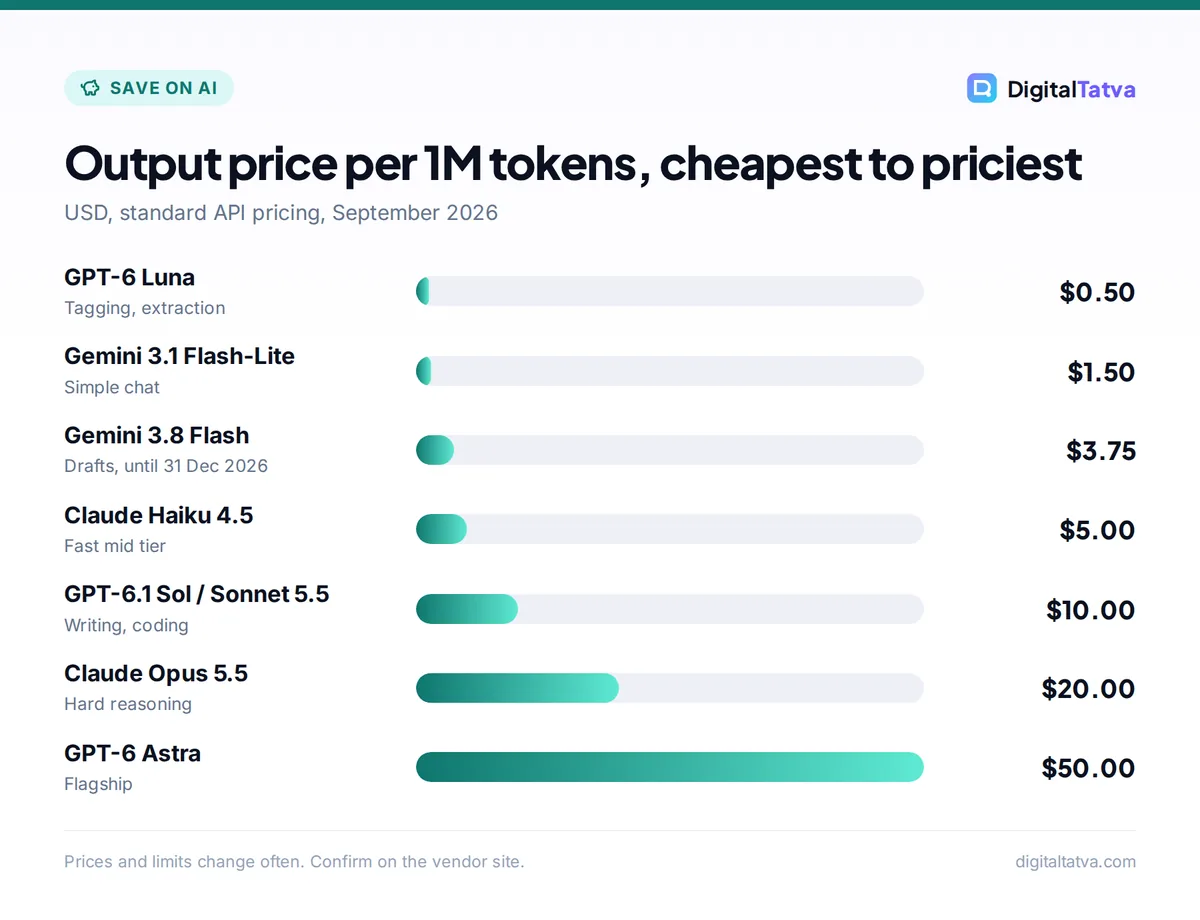
To pick the cheapest model for a task, you first need the full price ladder. This table lists current text models from OpenAI, Anthropic, Google and DeepSeek, from cheapest to most expensive output. If per-million pricing is new to you, start with our plain English guide to tokens.
| Model | Input per 1M | Output per 1M | Tier |
|---|---|---|---|
| GPT-6 Luna (OpenAI) | $0.10 | $0.50 | Budget |
| DeepSeek Flash, off-peak (cache miss) | $0.15 | $0.60 | Budget |
| DeepSeek Flash, peak (cache miss) | $0.30 | $1.20 | Budget |
| Gemini 3.1 Flash-Lite (text input) | $0.25 | $1.50 | Budget |
| Gemini 3.5 Flash-Lite | $0.30 | $2.50 | Budget |
| Gemini 3.8 Flash (until 31 Dec 2026) | $0.75 | $3.75 | Fast mid |
| Claude Haiku 4.5 | $1.00 | $5.00 | Fast mid |
| GPT-6.1 Sol | $2.00 | $10.00 | Mid |
| Claude Sonnet 5.5 | $2.00 | $10.00 | Mid |
| Gemini 3.1 Pro preview (prompts up to 200K) | $2.00 | $12.00 | Mid |
| Claude Opus 5.5 | $4.00 | $20.00 | Premium |
| GPT-6 Astra | $10.00 | $50.00 | Flagship |
| Claude Fable 5.1 | $10.00 | $50.00 | Flagship |
DeepSeek’s peak hours are 01:00 to 04:00 and 06:00 to 10:00 UTC on weekdays, and off-peak is half price. For full rate cards, see our guides to OpenAI API pricing, Claude API pricing and Gemini API pricing. You can confirm Google’s rates on the official Gemini API pricing page.
Watch out: DeepSeek is the cheapest option in some tiers, but check its data handling against your privacy needs before sending customer data. Our DeepSeek vs ChatGPT comparison covers cost, quality and privacy side by side.
Cost per task, not cost per token
The cheapest model per token is not always the cheapest per finished task. Three things can flip the math.
Retries and fixes
If a budget model gets an extraction wrong 30% of the time and you rerun those cases on a mid-tier model, you pay twice for those requests. A model that is right first time can be cheaper overall, even at a higher token price.
Hidden reasoning tokens
Reasoning models bill their internal “thinking” as output. GPT-6 Astra at high or max effort can produce many more billed tokens than the visible answer. For simple tasks, a non-reasoning budget model or a low effort setting is usually far cheaper.
Long-context surcharges
On OpenAI’s GPT-6 and GPT-5.6 models, requests over 272K input tokens are billed at 2x input and 1.5x output for the whole request. Gemini 3.1 Pro charges $4 input and $18 output for prompts over 200K tokens. Claude’s 4.6 and later models have no long-context surcharge up to 1M tokens. For very long documents, that can make Claude Sonnet 5.5 the cheaper choice. Our context window guide explains the trade-offs.
Cheapest AI model by task, explained
Classification, tagging and routing
Sorting support tickets, labeling sentiment, or deciding which department an email belongs to are short-answer jobs. Output is a few tokens, so input price dominates. GPT-6 Luna at $0.10 per million input tokens is the clear pick. Classifying 100,000 emails of 300 tokens each is 30M input tokens, or $3, plus a few cents of output.
Data extraction
Pulling names, prices or dates from invoices and product pages into JSON is also a budget-model job. Give the model a strict schema and examples. If accuracy on messy documents is poor, step up to GPT-6.1 Sol for just the failed cases.
Customer support chat
For FAQ-style answers grounded in your help docs, GPT-6 Luna or Gemini 3.1 Flash-Lite are enough. For nuanced replies, refunds or upset customers, use Gemini 3.8 Flash or a mid-tier model. Our guide to AI customer support tools covers ready-made platforms if you would rather not build your own.
Summarizing long documents
Summaries are input heavy. A 33,000-token report summarized into 500 tokens costs about $0.0036 on GPT-6 Luna ((0.033 x $0.10) + (0.0005 x $0.50)) and about $0.071 on Claude Sonnet 5.5 ((0.033 x $2) + (0.0005 x $10)). Use Luna for internal skim summaries and Sonnet when nuance matters, such as legal or client-facing work.
Writing and marketing copy
Writing quality is where cheap models show their limits most. Gemini 3.8 Flash is a good low-cost option for first drafts, product descriptions and social posts. For long-form articles or brand voice work, Claude Sonnet 5.5 or GPT-6.1 Sol are worth the step up. A 1,000-word draft (about 1,333 output tokens) costs roughly 1.3 cents in output on either.
Coding
For code, a wrong answer wastes developer time, which costs more than tokens. Start with GPT-6.1 Sol or Claude Sonnet 5.5, and reserve Claude Opus 5.5 for large refactors and tricky debugging. Anthropic itself recommends starting with Opus 5.5 for most workloads, but at twice Sonnet’s price it is worth testing Sonnet first. If you code inside an editor, a subscription such as GitHub Copilot Pro at $10 a month may be cheaper than raw API calls; see our best AI coding assistants roundup.
Research with live web search
Search adds a per-call fee on top of tokens. OpenAI and Anthropic both charge $10 per 1,000 web searches. Google’s Grounding with Google Search gives 5,000 free requests per month shared across Gemini 3.x models, then $14 per 1,000. For low-volume research apps, Gemini’s free allowance makes it the cheapest choice.
Voice, transcription and images
- Transcription: OpenAI’s GPT-Transcribe costs $0.0045 per minute, so a one-hour meeting is about $0.27.
- Text to speech: Google Cloud TTS Standard voices cost $4 per million characters with a free monthly allowance, and Amazon Polly Standard is also $4. For more natural voices, compare options in our best AI voice generators list.
- Images: OpenAI’s gpt-image-2 is priced by image tokens ($8 input, $30 output per million), with no flat per-image rate published. For occasional images, free plans such as Adobe Firefly’s daily generations are cheaper. See our cheaper Midjourney alternatives.
Worked example: how routing cuts a $600 bill to $144
Say your app handles 100,000 requests a month, each with 1,500 input tokens and 300 output tokens. That is 150M input and 30M output tokens.
Everything on GPT-6.1 Sol: (150 x $2) + (30 x $10) = $300 + $300 = $600 a month.
Route 80% to GPT-6 Luna, 20% to GPT-6.1 Sol:
- Luna: 120M input x $0.10 = $12, plus 24M output x $0.50 = $12. Subtotal $24.
- Sol: 30M input x $2 = $60, plus 6M output x $10 = $60. Subtotal $120.
- Total: $144 a month, a 76% saving.
Run the non-urgent part through a Batch API at 50% off and the bill falls further. Our Batch API guide and prompt caching guide show how to stack these discounts.
A simple router in code
def pick_model(task_type, text_length):
    cheap = {"classify", "tag", "extract", "faq"}
    if task_type in cheap:
        return "gpt-6-luna"
    if task_type == "summarize" and text_length < 50_000:
        return "gpt-6-luna"
    if task_type in {"write", "code", "support"}:
        return "gpt-6.1-sol"
    return "claude-opus-5-5"  # hard reasoning only
Real routers often use the budget model itself to decide difficulty first, then escalate. Start simple and refine using your own error rates.
How to test whether a cheaper model is good enough
- Collect 30 to 50 real examples. Use actual inputs from your workflow, including tricky ones.
- Write down what “good” means. For extraction, that is exact field matches. For writing, a short checklist (tone, facts, length).
- Run the cheapest candidate first. Try the budget model, then the next tier up, on the same examples.
- Compare cost per correct result. Divide total cost by the number of acceptable outputs, not total outputs.
- Route by result. Keep the cheap model for task types it passes and escalate the rest. Re-test when prices or models change. Our guide to estimating AI API costs helps you project the monthly total.
Cheapest options if you do not use the API
Not everyone needs per-token pricing. For chat use, the cheapest path is often a free plan or a low-cost subscription.
- Free plans: ChatGPT Free offers unlimited text chats with GPT-5.6 Luna, Claude Free includes Sonnet and Haiku, and Gemini Free includes Gemini 3.6 Flash. Our list of the best free AI tools goes further.
- Low-cost plans: Google AI Plus costs $4.99 a month (Rs 399 in India) and ChatGPT Go costs $8 a month in the US.
- Run models locally: Ollama is free and open source for local use, so the only cost is your own hardware. See how to run an LLM locally.
Frequently asked questions
What is the cheapest AI model right now?
Among the major labs, OpenAI’s GPT-6 Luna is the cheapest current text model at $0.10 per million input tokens and $0.50 per million output tokens. DeepSeek’s Flash model is similarly cheap during off-peak hours at $0.15 input and $0.60 output. Gemini 3.1 Flash-Lite costs $0.25 and $1.50. All three suit simple, high-volume tasks.
Is the cheapest model good enough for writing?
For short, structured copy such as product descriptions, a budget or fast model like Gemini 3.8 Flash often works. For long articles, brand voice or persuasive writing, mid-tier models such as Claude Sonnet 5.5 or GPT-6.1 Sol produce noticeably better drafts and need fewer edits. The output cost difference on a single 1,000-word draft is about one cent.
Which is cheaper, Claude or ChatGPT API?
At the mid tier they match: GPT-6.1 Sol and Claude Sonnet 5.5 both cost $2 input and $10 output per million tokens. At the budget end OpenAI is cheaper, with GPT-6 Luna at $0.10 and $0.50 versus Claude Haiku 4.5 at $1 and $5. At the top end, Claude Opus 5.5 ($4 and $20) is cheaper than GPT-6 Astra ($10 and $50).
How can I make any AI model cheaper to run?
Use the Batch API for work that can wait, which is 50% off at OpenAI, Anthropic and Google. Cache repeated prompt prefixes, which cuts cached input by 90% or more on most models. Cap output length, since output costs about five times input. Finally, keep prompts short and send only relevant document sections.
Is DeepSeek safe to use for business tasks?
DeepSeek’s API is very cheap, but cost is only one factor. Review where your data is processed, the provider’s retention terms and your own compliance requirements before sending customer or confidential data. Many teams use DeepSeek for public or non-sensitive content and a major US provider for anything private. Check DeepSeek’s official terms before you decide.
Our verdict: build a model ladder
The cheapest AI setup is a ladder, not a single model. Use GPT-6 Luna or another budget model for classification, extraction and simple chat; GPT-6.1 Sol or Claude Sonnet 5.5 for writing, coding and support; and Claude Opus 5.5 or GPT-6 Astra only for the hardest problems. Test each step with real examples, then add batching and caching on top.
Model prices and promotions change often, so confirm current rates on each provider’s official pricing page before you commit to a setup.
Pricing and features are checked at the time of writing and can change. Some links may be affiliate links, which never affect our verdicts.



