10 Best AI Coding Assistants for Developers in 2026
The 10 best AI coding assistants for 2026, from GitHub Copilot and Cursor to Claude Code and Codex, with current prices, free plans and how usage limits work.

On this page
- Key takeaways
- Quick picks: the 10 best AI coding assistants compared
- The 10 best AI coding assistants in detail
- How to choose the right AI coding assistant
- How usage-based pricing changed AI coding tools
- AI coding assistant picks by persona
- Pricing notes and how to save
- Frequently asked questions
- Final verdict: which AI coding assistant should you pick?
The best AI coding assistants in 2026 are GitHub Copilot for most developers, Cursor if you want an AI-first code editor, and Claude Code if you prefer handing whole tasks to an agent in your terminal. OpenAI Codex is the best value if you already pay for ChatGPT, since it is included in every ChatGPT plan.
This guide ranks 10 AI coding assistants by who they suit, what they cost as of September 2026, and how their usage limits work, since most now meter heavy use by credits or API rates.
Key takeaways
- Best overall: GitHub Copilot Pro at $10/month, with 1,500 AI credits and unlimited code completions.
- Best AI editor: Cursor Pro at $20/month, with unlimited Tab completions and cloud agents.
- Best coding agent: Claude Code, included in Claude Pro at $20/month ($17/month billed annually).
- Best free options: Copilot Free (2,000 completions a month), Cursor Hobby and running open models locally with Ollama.
- Watch usage, not just price: heavy agent use is billed at API rates on most tools, so a $20 plan can cost far more in a busy month.
Quick picks: the 10 best AI coding assistants compared
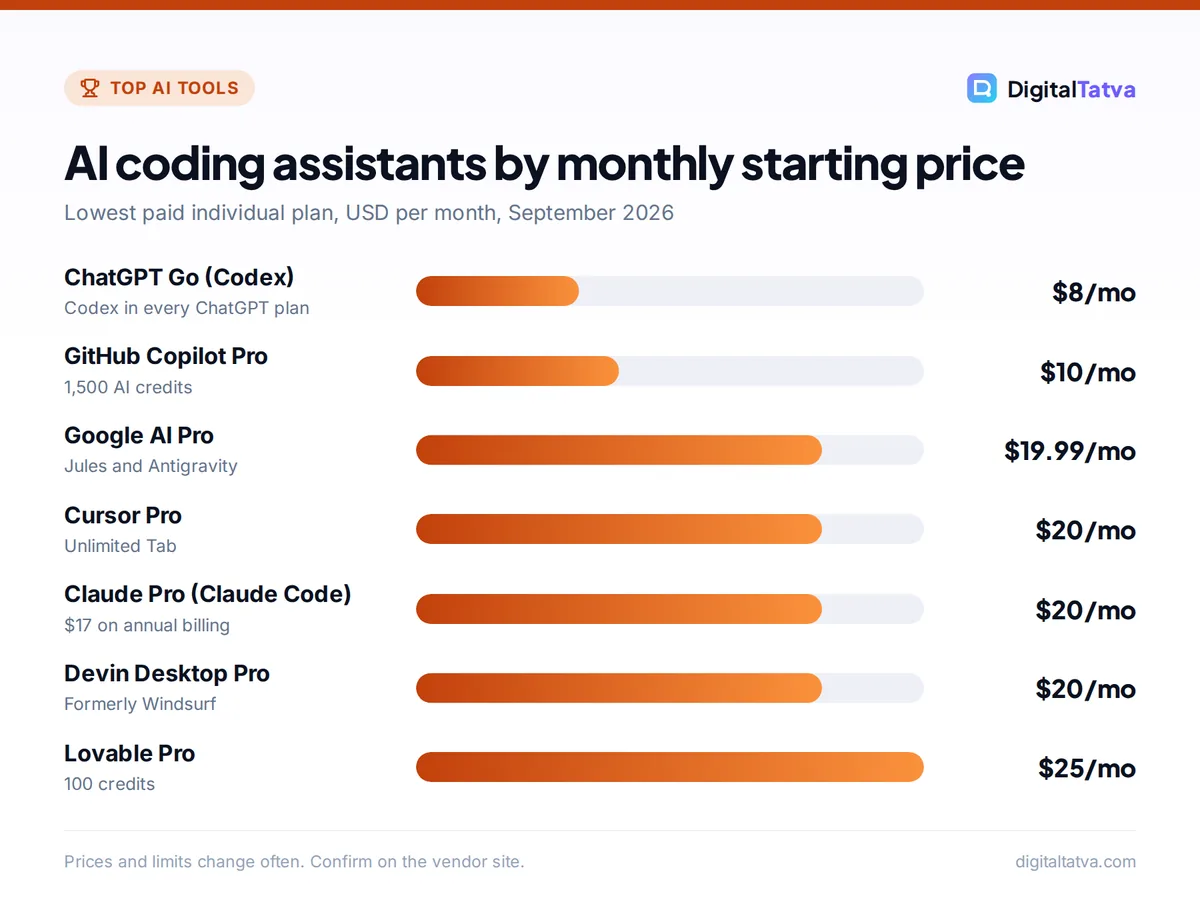
Shortlist two tools here, then read the cards below. “Starting price” is the lowest paid individual plan.
| Tool | Best for | Starting paid price | Free plan |
|---|---|---|---|
| GitHub Copilot | Most developers, any IDE | $10/mo (Pro) | Yes |
| Cursor | AI-first code editor | $20/mo (Pro), Rs 649/mo Start in India | Yes (Hobby) |
| Claude Code | Agentic coding in the terminal | $20/mo (Claude Pro) | No |
| OpenAI Codex | ChatGPT subscribers | $8/mo (ChatGPT Go) | Yes (limited) |
| Devin Desktop (formerly Windsurf) | Agent-heavy editor workflows | $20/mo (Pro) | Yes |
| Google Jules and Antigravity | Google AI subscribers | $19.99/mo (Google AI Pro) | Gemini API free tier |
| Replit | Build and host in the browser | $20/mo ($18 annual) | Yes (Starter) |
| Lovable | Non-coders building web apps | $25/mo ($21 annual) | Yes |
| Bolt.new | Fast full-stack prototypes | $25/mo (Pro) | Yes |
| Ollama | Private, local models | $20/mo (cloud Pro) | Yes (local use free) |
The 10 best AI coding assistants in detail
1. GitHub Copilot: Best overall AI coding assistant
- Starting price: $10/mo Pro
- Free plan: Yes (2,000 completions a month plus limited chat and agent use)
- Best for: professional developers and teams on GitHub
Copilot is still the easiest assistant to recommend. It works in the editors most developers already use, offers more than 30 models (including Claude, GPT, Gemini, Grok and Kimi) on every individual plan, and includes a coding agent that can pick up an issue and open a pull request.
The big change in 2026 is billing. Since June 1, Copilot uses AI credits instead of premium requests. Credits are consumed by token usage at each model’s published API rate, and extra credits cost $0.01 each. Code completions and Next Edit suggestions stay included and do not use credits. Pro at $10/month includes 1,500 credits, Pro+ at $39 includes 7,000, and the new Max tier at $100 includes 20,000. Business is $19 per seat with 1,900 pooled credits per user. Our GitHub Copilot pricing guide explains the credit math in full.
Skip it if: you want the AI to drive the whole editor. Cursor and Devin Desktop are built around that idea.
2. Cursor: Best AI-first code editor
- Starting price: $20/mo Pro (Start plan at Rs 649/mo in India)
- Free plan: Yes (Hobby, limited Agent requests, no card)
- Best for: developers who want AI woven into every edit
Cursor is a full code editor (based on VS Code) built around AI. Its Tab completions predict your next edit across files, and its Agent can plan and make multi-file changes. In everyday use, it feels faster than an extension bolted onto a normal editor.
Usage comes from two pools. The “Cursor Models” pool (Composer 2.5 and Grok 4.x) gets significantly more included usage. The “Other Models” pool (Claude, GPT and Gemini) is charged at each model’s API price, and on-demand usage continues at API rates after your allowance runs out. Cursor does not publish the dollar value of included usage, but says daily agent users typically spend $60 to $100 a month in total usage. Pro Plus ($60) and Ultra ($200) raise the allowance. Indian developers can use the Start plan at Rs 649/month (tax inclusive), limited to Cursor Models. See our Cursor pricing breakdown and our guide on how to use Cursor AI.
Skip it if: your team is locked into JetBrains or another non-VS Code editor.
3. Claude Code: Best for agentic coding in the terminal
- Starting price: $20/mo with Claude Pro, or $17/mo billed annually
- Free plan: No (not included in Claude Free)
- Best for: senior developers who delegate whole tasks
Claude Code is Anthropic’s coding agent. You run it in your terminal, describe a task, and it reads your codebase, edits files, runs commands and tests, and reports back. It suits refactors and bug hunts where you would rather review a diff than type every line. Most recent Claude models support a 1M-token context in Claude Code, so it can hold a large repository in view.
It is included in all paid Claude plans: Pro, Max, Team and Enterprise. The catch is that Claude Code shares one usage pool with chat. Pro sessions reset every five hours, and heavy agent sessions use that allowance quickly. Max starts at $100/month for 5x Pro usage, with a 20x tier at $200. You can also switch Claude Code to pay-as-you-go API credits, where Claude Sonnet 5.5 costs $2 per million input tokens and $10 per million output tokens. Read our Claude Pro vs Max comparison before upgrading.
Skip it if: you want inline autocomplete while you type. Pair it with Copilot or Cursor for that.
4. OpenAI Codex: Best value for ChatGPT subscribers
- Starting price: $8/mo (ChatGPT Go), $20/mo (Plus)
- Free plan: Yes, limited Codex access on ChatGPT Free
- Best for: developers who already pay for ChatGPT
Codex is OpenAI’s coding agent, and it is included in every ChatGPT plan: Free, Go, Plus, Pro, Business, Enterprise and Edu. If you already pay $20 a month for ChatGPT Plus, you get a capable coding agent at no extra cost.
Limits work per five-hour window and depend on the model. OpenAI’s estimates for Plus and Business range from 5 to 45 messages on GPT-6 Astra, 15 to 160 on GPT-6.1 Sol, and 350 to 3,000 on GPT-6 Luna. ChatGPT and Codex share the same limits, so a long chat session reduces your coding headroom. Pro (from $100/month) currently has no five-hour limit. Our ChatGPT pricing guide covers every plan.
Skip it if: you need the deepest editor integration. Codex works best for delegated tasks rather than line-by-line help.
5. Devin Desktop (formerly Windsurf): Best for agent-heavy editor work
- Starting price: $20/mo Pro
- Free plan: Yes (light agent quota, limited models)
- Best for: developers who want an agent-led editor from Cognition
Windsurf is now Devin Desktop. Windsurf’s pricing page redirects to Devin’s, and the editor was reportedly rebranded on June 2, 2026. It remains an AI-first editor with a strong agent.
The Free plan offers a light agent quota. Pro at $20/month adds higher quotas and frontier models, and Max at $200/month offers significantly higher quotas. Teams pay $80/month plus $40 per full developer seat, for up to 200 users. Quotas refresh daily and weekly, and extra usage is bought at API pricing. Older “$15 Pro with 500 credits” figures are outdated.
Skip it if: you want published usage numbers. Devin does not list credit amounts per plan.
6. Google Jules and Antigravity: Best for Google AI subscribers
- Starting price: $19.99/mo (Google AI Pro), Rs 1,950/mo in India
- Free plan: Gemini API free tier for Flash models
- Best for: developers already paying for Google AI Pro
Google bundles its coding tools into its consumer AI plans. Google AI Pro includes the Jules coding agent and entry-level rate limits in Google Antigravity. Google AI Ultra (from $99.99/month) gets the highest Jules and Antigravity limits.
If you are building your own tools, the Gemini API free tier covers Flash and Flash-Lite models, and Gemini 3.8 Flash costs $0.75 per million input tokens and $3.75 per million output tokens until December 31, 2026. Details are in our Gemini pricing guide.
Skip it if: you want one focused coding product. Google’s coding features are part of a much wider bundle.
7. Replit: Best for building and hosting in the browser
- Starting price: $20/mo Core, or $18/mo billed annually
- Free plan: Yes (Starter, 1 published app, daily Agent credits)
- Best for: students, hobbyists and small teams shipping web apps
Replit is a browser-based development environment with an AI Agent that builds, runs and deploys apps in one place. No local setup is needed.
Core includes $20 of credits for top models, plus up to 30 hours of chat and up to 60 projects in Free Mode. Pro at $100/month ($90 annual) adds $100 of credits, 10 parallel agents, up to 15 collaborators and 28-day database rollback. Agent work uses effort-based pricing: simple requests cost less, complex builds more, and Replit publishes no fixed per-checkpoint price.
Skip it if: you work on a large existing codebase. Local tools like Cursor or Claude Code fit better.
8. Lovable: Best for non-coders building web apps
- Starting price: $25/mo Pro (100 credits), or $21/mo annual
- Free plan: Yes (5 credits a day, up to 30 a month)
- Best for: founders and marketers building MVPs by chat
Lovable turns a chat conversation into a working web app. You describe the product, it writes the code, and you refine by asking for changes. It is closer to an app builder than a developer assistant, but it saves weeks of front-end work.
Pro tiers scale up to 10,000 credits at $2,250/month, and unused monthly credits roll over while your subscription stays active. Business starts at $50/month and adds SSO and team workspaces. Read our Lovable review or compare options in our list of the best AI app builders.
Skip it if: you are an experienced developer. You will get more control from Cursor or Claude Code.
9. Bolt.new: Best for fast full-stack prototypes
- Starting price: $25/mo Pro (from 10M tokens a month)
- Free plan: Yes (300K tokens a day, 1M a month)
- Best for: quick demos, landing pages and prototypes
Bolt.new builds and runs full-stack apps in the browser from a prompt. It is token-metered, which is easier to reason about than vague credits: Free gives 300K tokens a day up to 1M a month, and Pro removes the daily cap with 10M tokens a month or more. Teams costs $30 per member per month, and annual billing saves up to 28%.
Vercel’s v0 is a close alternative for UI work, with $5 of free monthly credits and a Plus plan at $30 per user per month.
Skip it if: you need to maintain the app long term. Export the code to a proper repository early.
10. Ollama: Best for private, local AI coding
- Starting price: Free locally; cloud Pro $20/mo or $200/year
- Free plan: Yes (local use is free and open source)
- Best for: privacy-sensitive code, offline work and tinkerers
Ollama lets you run open models on your own machine, so your code never leaves your laptop. That suits client code under strict NDAs and offline work.
Local use is free, but quality depends on your hardware and the model you choose. Ollama’s cloud plans add hosted models: Pro is $20/month with $60 of usage credits and 3 concurrent requests, and Max is $100/month with $300 of credits. Our guide on how to run an LLM locally with Ollama walks through setup.
Skip it if: you have a modest laptop and need top-tier results. Cloud tools are still stronger for hard tasks.
How to choose the right AI coding assistant
- Decide between autocomplete and agents. If you mainly want smarter suggestions as you type, Copilot or Cursor Tab is enough. If you want to hand off tasks and review diffs, look at Claude Code, Codex or Devin Desktop.
- Match your editor. Copilot plugs into most popular editors. Cursor and Devin Desktop replace your editor. Claude Code runs in the terminal alongside any editor.
- Check what you already pay for. ChatGPT Plus includes Codex, Claude Pro includes Claude Code, and Google AI Pro includes Jules. You may already have a coding agent.
- Estimate your agent usage. Light users fit inside a $10 to $20 plan. Daily agent users should budget for overage at API rates, or a higher tier.
- Trial on a real ticket. Give each tool the same bug from your backlog and compare how much you had to fix.
If you are deciding between the two most popular options, our Cursor vs GitHub Copilot comparison goes through features, pricing and limits side by side.
Tip: A good setup for many developers is one autocomplete tool plus one agent. For example, Copilot Pro ($10) for inline suggestions plus Claude Code through Claude Pro ($20) for bigger tasks gives you both styles for $30 a month.
How usage-based pricing changed AI coding tools
In 2025, most coding tools sold a fixed number of “fast requests”. In 2026, almost every major tool ties heavy usage to the underlying model’s API price, so the sticker price is a floor, not a ceiling. Copilot credits, Cursor’s Other Models pool and Devin’s extra usage all follow API rates, while Claude Code and Codex draw on chat limits that reset every five hours.
The practical lesson: cheaper models stretch your allowance much further. If you want to understand the token side of this, read our explainer on what tokens are in AI and our Claude API pricing guide.
Watch out: Old blog posts still quote 300 premium requests for Copilot Pro. That only applies to some annual subscribers until their term ends. New Copilot plans use AI credits.
AI coding assistant picks by persona
| You are | Recommended setup | Approximate monthly cost |
|---|---|---|
| Student | Copilot Student plan (free for verified students) or Cursor Hobby | $0 |
| Professional developer | Copilot Pro or Cursor Pro | $10 to $20 |
| Senior developer delegating tasks | Claude Code via Claude Pro, plus Copilot Pro | About $30 |
| Founder building an MVP | Lovable Pro or Bolt.new Pro | $21 to $25 |
| Engineering team | Copilot Business or Cursor Teams Standard | $19 to $40 per seat |
| Privacy-sensitive work | Ollama with a local model | $0 plus hardware |
Pricing notes and how to save
- Use free student and maintainer offers. GitHub offers a free Copilot Student plan for verified students, and verified teachers and maintainers of popular open source projects can get Copilot Pro free. See our roundup of AI student discounts.
- Use the cheap model for routine work. Save frontier models for hard bugs and architecture questions.
- Set spending limits. Copilot Business pools credits with admin controls, and Cursor bills on-demand usage in arrears, so set a cap before a long agent session surprises you.
Save money: Annual billing helps on some tools: Claude Pro drops to $17/month and Replit Core to $18/month. Copilot, Cursor and Devin do not show annual prices on the pages we checked, so stay monthly there until you know your usage. Our guide to saving money on AI subscriptions has more tactics.
Frequently asked questions
What is the best AI coding assistant in 2026?
GitHub Copilot is the best AI coding assistant for most developers because it works in popular editors, offers more than 30 models and costs $10 a month for Pro. Cursor is the best choice if you want an AI-first editor, and Claude Code is the strongest pick for delegating whole tasks to an agent. Try the free tiers on a real task before paying.
Is there a free AI coding assistant?
Yes. GitHub Copilot Free includes 2,000 code completions a month plus limited chat and agent use. Cursor Hobby is free with limited Agent requests, Replit Starter and Bolt.new have free plans, and Ollama lets you run open models locally at no cost. ChatGPT Free also includes limited Codex access. Verified students can get a free Copilot Student plan.
Is Cursor better than GitHub Copilot?
Cursor is better if you want AI built into every part of the editor, with strong multi-file edits and an agent. Copilot is better value at $10 a month, works across more editors and has unlimited completions on all plans. Cursor Pro costs $20 a month, and heavy agent use on Claude, GPT or Gemini models is billed at API rates.
How much does Cursor cost in India?
Cursor offers a Start plan in India at Rs 649 a month, tax inclusive, which uses the Cursor Models pool only (such as Composer 2.5). The global Pro plan costs $20 a month and includes access to Claude, GPT and Gemini models at API rates beyond your allowance. Check Cursor’s pricing page at checkout for the current local price.
Can AI coding assistants replace developers?
No. AI coding assistants speed up routine work such as boilerplate, tests and refactors, and agents can complete well-defined tasks. They still make mistakes, misread requirements and introduce subtle bugs or security issues. Review every AI change like a pull request from a new teammate, and run the tests before merging.
Final verdict: which AI coding assistant should you pick?
Start with GitHub Copilot Pro at $10 a month if you want a dependable assistant in the editor you already use. Choose Cursor Pro at $20 if you want the most AI-native editing experience, and add Claude Code through Claude Pro when you are ready to hand off whole tasks. If you already pay for ChatGPT, test Codex first, because it costs you nothing extra.
Non-coders building products should look at Lovable or Bolt.new, and anyone with strict privacy needs should try Ollama locally. Whatever you choose, watch your usage for the first month, since agent work billed at API rates is where costs climb. Pricing changes often, so confirm current plans on the GitHub Copilot plans page, Cursor’s pricing page and the official Claude pricing page before you subscribe.
Pricing and features are checked at the time of writing and can change. Some links may be affiliate links, which never affect our verdicts.



