Cursor vs GitHub Copilot: Which AI Coding Tool Should You Use?
Cursor vs GitHub Copilot in 2026: pricing, AI credits vs usage pools, agents, IDE support and team plans, plus a clear guide to which AI coding tool fits you.

On this page
- Key takeaways
- Quick verdict: Cursor or GitHub Copilot?
- Cursor vs GitHub Copilot comparison table
- Pricing compared: what you will actually pay
- AI features and code quality
- IDE support and workflow fit
- Team features, privacy and admin controls
- Free plans, students and India
- Choose Cursor if, choose GitHub Copilot if
- Frequently asked questions
- Our verdict
Choose Cursor if you want the deepest AI agent inside your editor and you are happy to switch to a VS Code style app. Choose GitHub Copilot if you want the cheapest good paid plan ($10 per month), you work in JetBrains, Visual Studio, Xcode or Eclipse, or your team already lives on GitHub. Both tools now bill heavy AI use by consumption, so the real question is how much agent work you do each month.
This comparison covers pricing, the AI features that matter day to day, IDE support, team controls and privacy, then gives a clear “choose X if” list for developers, freelancers and engineering teams.
Key takeaways
- Cursor is a standalone AI code editor; GitHub Copilot is a plugin that works in VS Code, Visual Studio, JetBrains IDEs, Eclipse, Xcode and Neovim, plus GitHub itself.
- Entry paid plans: Copilot Pro is $10 per month with 1,500 AI credits; Cursor Pro is $20 per month with unlimited Tab and extended Agent limits.
- Both moved to usage-based billing: Copilot uses AI credits (1 credit = $0.01 overage) since June 2026, and Cursor charges Claude, GPT and Gemini usage at API rates after included usage.
- Code completions are included on every Copilot plan and Tab is unlimited on Cursor Pro, so autocomplete never drives your bill on either tool.
- Our pick: Cursor for agent-heavy solo developers, Copilot for budget users, mixed-IDE teams and GitHub-centric workflows.
Quick verdict: Cursor or GitHub Copilot?
If you only read one section, read this. Cursor wins on agent depth: because it controls the whole editor, its Agent can plan a change, edit many files, run terminal commands and show you clean diffs, with checkpoints to roll back. Copilot wins on reach and price: it plugs into the IDE you already use, starts at $10, and connects natively to GitHub issues and pull requests.
For a solo developer doing serious feature work in a single codebase, Cursor usually feels faster. For a team with mixed editors, strict admin needs or tight budgets, Copilot is the safer default. Many developers start with Copilot Free and the Cursor Hobby plan side by side for a week, which costs nothing and settles the question on real code.
Cursor vs GitHub Copilot comparison table
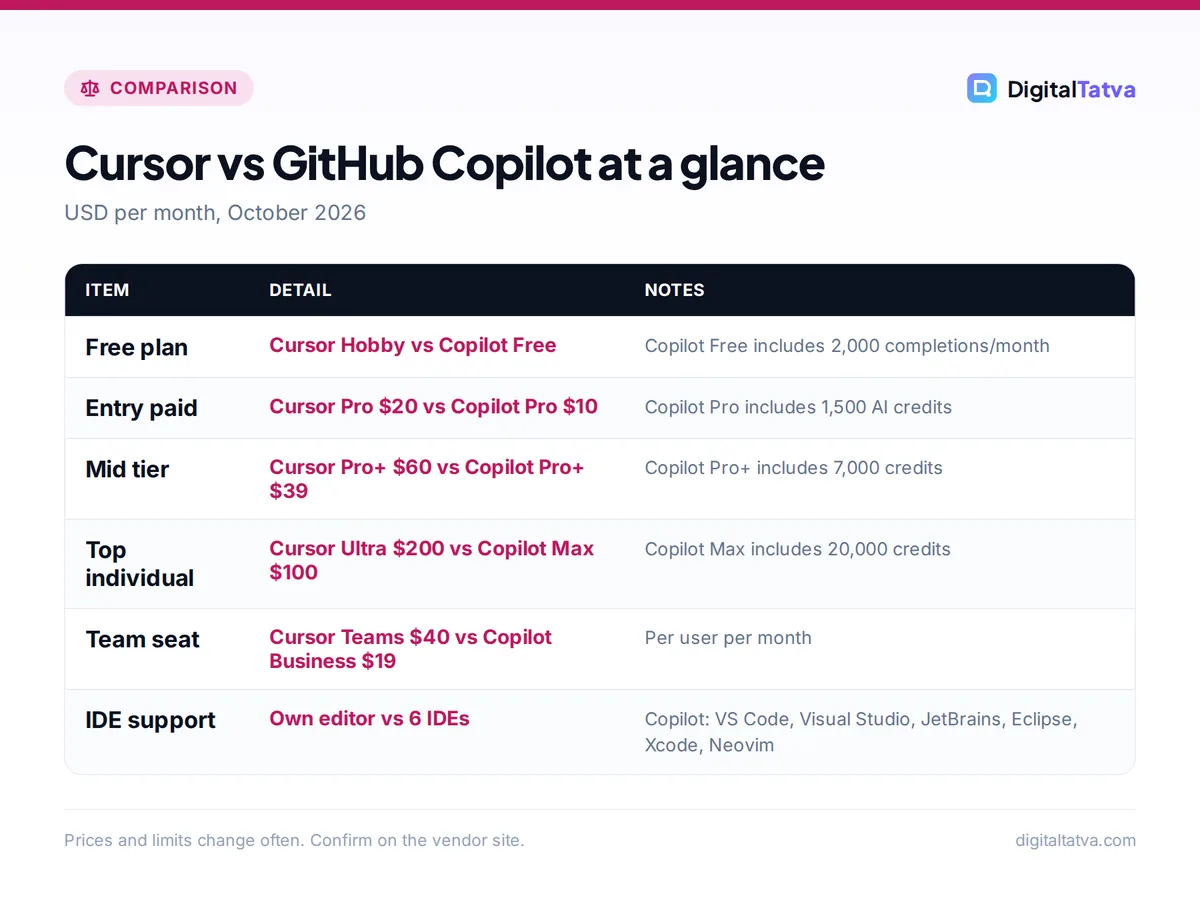
Here is how the two tools line up on the points most buyers care about, using prices from the official Cursor pricing page and GitHub’s Copilot plans page.
| Criteria | Cursor | GitHub Copilot |
|---|---|---|
| Type | Standalone AI editor (VS Code based) | Extension for many IDEs plus GitHub.com |
| Free plan | Hobby: limited Agent requests, no card | Free: 2,000 completions/month, limited chat and agent |
| Entry paid plan | Pro $20/month | Pro $10/month (1,500 AI credits) |
| Mid tier | Pro+ $60/month | Pro+ $39/month (7,000 credits) |
| Top individual tier | Ultra $200/month | Max $100/month (20,000 credits) |
| Team plan | Teams $40/user/month (Premium $120) | Business $19/seat, Enterprise $39/seat |
| India pricing | Start plan Rs 649/month incl. tax | USD only |
| How heavy use is billed | Two pools; other labs’ models at API rates | AI credits at model API rates, $0.01 per extra credit |
| Background agents | Cloud agents on paid plans | Coding agent on Free, Pro, Pro+ and Max |
| Best for | Agent-heavy work in one editor | Budget users, mixed IDEs, GitHub teams |
Pricing compared: what you will actually pay
Headline prices only tell half the story, because both tools now meter the expensive part (agent and chat use on frontier models) separately from autocomplete. If the idea of metered AI is new, our explainer on what tokens are in AI shows why long agent sessions cost more than quick questions.
GitHub Copilot: AI credits since June 2026
On June 1, 2026 Copilot replaced premium requests with AI credits. Credits are consumed by token usage at each model’s published API rate, while code completions and Next Edit suggestions stay included and never use credits. Pro gives 1,500 credits a month (1,000 base plus 500 flex), worth $15 of usage for a $10 plan. Pro+ gives 7,000 credits for $39, and Max gives 20,000 credits for $100. Extra credits cost $0.01 each.
Business is $19 per seat with 1,900 pooled credits per user, and Enterprise is $39 per seat with 3,900 credits per user. Our GitHub Copilot pricing guide works through the credit math plan by plan, including what happened to the old 300 premium requests.
Cursor: two usage pools
Cursor splits usage into a “Cursor Models” pool (Composer 2.5 and Grok 4.x), which gets significantly more included usage, and an “Other Models” pool (Claude, GPT and Gemini) charged at each model’s API price. Once included usage runs out, on-demand usage continues at API rates and is billed in arrears. Cursor does not publish the included dollar amount per plan, but its own guidance is that daily agent users typically spend $60 to $100 per month in total, and power users $200 or more.
Indian developers get a useful extra option: the Start plan at Rs 649 per month (tax inclusive) covers the Cursor Models pool only. Our Cursor pricing breakdown explains Hobby, Pro, Pro+, Ultra and Teams in detail.
A simple cost scenario
Take a freelancer who mostly uses autocomplete and asks the agent for help a few times a day. On Copilot Pro, autocomplete is free and light chat fits inside 1,500 credits, so the bill stays at $10. On Cursor Pro, unlimited Tab and Composer handle most of that work, so the bill stays at $20. Now take a developer who runs Claude or GPT agents for hours daily. Both tools will push past the base plan: Copilot through overage at $0.01 per credit or an upgrade to Pro+ or Max, and Cursor through on-demand usage toward the $60 to $100 range it describes. The per-token rates behind both are in our Claude API pricing and OpenAI API pricing guides.
Save money: On Cursor, default to Composer for routine edits and switch to frontier models only for hard problems. On Copilot, pick a cheaper model in chat for simple questions and keep agent tasks narrow. Our guide to reducing token usage applies to both tools.
AI features and code quality
Autocomplete
Both tools predict more than the next word. Cursor’s Tab suggests multi-line edits and jumps to the next likely edit location, and it is unlimited on Pro. Copilot’s completions and Next Edit suggestions do something similar and are included on every plan, with 2,000 completions a month on Free. In everyday use, Cursor’s Tab feels a little more aggressive and context aware inside one project, while Copilot is consistent across many editors.
Chat and agents in the editor
This is where the tools differ most. Cursor’s Agent opens in a side pane, searches the codebase, edits files, runs shell commands and saves checkpoints you can restore. It also has a Plan mode that writes an implementation plan before touching code, which is useful for bigger features. Copilot offers chat and agent mode in VS Code, Visual Studio and JetBrains IDEs, with lighter support in Eclipse and Xcode. It does the job well, but Cursor’s agent experience is more polished because the whole editor is designed around it.
Background agents and code review
Copilot’s coding agent can take a GitHub issue and work on it in the background, then open a pull request, and GitHub lists it on Free, Pro, Pro+ and Max. Pro+ adds third-party coding agent delegation. Copilot code review is also built into the GitHub pull request flow. Cursor answers with cloud agents on its paid plans and Bugbot, an agentic pull request reviewer that runs on usage-based billing for individuals and is included as a feature on Teams.
Model choice
Copilot offers more than 30 models on individual plans, including Claude, GPT, Gemini, Grok and Kimi. Cursor offers its own Composer 2.5 and Grok 4.x models in the cheaper pool, plus Claude, GPT and Gemini at API rates. In practice both give you the same frontier models; Cursor’s advantage is Composer as a low-cost daily driver, and Copilot’s is a wider menu without leaving your IDE.
IDE support and workflow fit
Cursor is an editor, not a plugin. It is built on the VS Code foundation, so extensions, themes and shortcuts carry over, but you do have to move into Cursor. If your team depends on JetBrains tools like IntelliJ or PyCharm, Visual Studio for .NET, or Xcode for iOS work, that is a real cost.
GitHub Copilot runs where you already work. GitHub’s feature matrix covers VS Code, Visual Studio, JetBrains IDEs, Eclipse, Xcode and Neovim, with VS Code, Visual Studio and JetBrains getting the fullest feature set and Neovim mainly code completion. It also works on GitHub.com, which matters for pull request reviews and issue-driven agent work.
Tip: If you already use VS Code, the switch to Cursor takes minutes because it can import your settings. Our step by step guide on how to use Cursor AI covers setup, rules and your first Agent task.
Team features, privacy and admin controls
For companies, the comparison shifts. Copilot Business at $19 per seat is less than half the price of Cursor Teams at $40 per user, and Copilot plugs into the GitHub organization your admins already manage. Credits are pooled across the team, which smooths out heavy and light users.
Cursor Teams offers centralized billing, usage analytics, team-wide privacy mode, SAML or OIDC single sign-on, a team marketplace for rules, skills and plugins, and Bugbot reviews. Teams Premium at $120 per user gives five times the Standard agent limits. Enterprise adds pooled usage, SCIM, repository, model and MCP access controls, and audit logs. If you are weighing seats across several AI tools, our explainer on AI team plans helps, and every team should pair either tool with a written AI usage policy.
Free plans, students and India
Both free plans are good enough to evaluate the tools. Copilot Free gives 2,000 completions a month plus limited chat and agent use. Cursor Hobby gives limited Agent requests and access to Composer, with no card required.
Students have strong options. GitHub offers a free Copilot Student plan for verified students, and verified teachers and maintainers of popular open source projects can get Copilot Pro free. Cursor’s official forum describes 12 months of Pro free for verified full-time students at accredited US universities. Our roundup of AI student discounts covers the eligibility rules. In India, Cursor’s Rs 649 Start plan is the cheapest way into a paid AI editor, while Copilot Pro at $10 is the cheapest way to get frontier models in your existing IDE.
Choose Cursor if, choose GitHub Copilot if
Choose Cursor if you
- Do agent-heavy work: multi-file features, refactors and test generation in one codebase.
- Already use VS Code and do not mind switching to a fork of it.
- Want a cheap daily model (Composer) plus frontier models when you need them.
- Are an Indian developer happy to start on the Rs 649 Start plan.
Choose GitHub Copilot if you
- Want the lowest paid price for frontier models: $10 per month.
- Use JetBrains, Visual Studio, Xcode or Eclipse and do not want to change editors.
- Run your team on GitHub and want issue-to-pull-request agents and built-in code review.
- Need cheaper seats for a large team: $19 per seat on Business.
Not a developer? Neither tool is the right starting point. Our list of the best AI app builders for non-coders is a better fit, and the full field of developer tools is ranked in our best AI coding assistants guide.
Frequently asked questions
Is Cursor better than GitHub Copilot?
For agent-heavy coding in a single editor, Cursor is usually better because its Agent, checkpoints and Plan mode are built into the whole app. GitHub Copilot is better value at $10 per month, works in many more IDEs and fits GitHub workflows. The best choice depends on whether you value agent depth or flexibility and price.
Is GitHub Copilot cheaper than Cursor?
Yes at the entry level. Copilot Pro costs $10 per month with 1,500 AI credits, while Cursor Pro costs $20. For teams, Copilot Business is $19 per seat versus $40 per user for Cursor Teams. Heavy users of frontier models will pay more than the base price on both, through credits on Copilot or on-demand usage on Cursor.
Can I use Cursor and GitHub Copilot together?
You can install the Copilot extension inside Cursor because Cursor is based on VS Code, but running two autocomplete engines at once usually creates clashing suggestions. Most developers pick one for autocomplete. A common pattern is using Copilot for pull request reviews on GitHub while coding day to day in Cursor.
Does GitHub Copilot work in JetBrains and Visual Studio?
Yes. GitHub’s feature matrix lists VS Code, Visual Studio, JetBrains IDEs, Eclipse, Xcode and Neovim. VS Code, Visual Studio and JetBrains get the fullest feature set, including chat, agent mode and code review, while Neovim mainly supports code completion. Cursor, by contrast, is its own editor and does not run inside JetBrains.
Which is better for beginners, Cursor or Copilot?
Beginners usually do well with GitHub Copilot Free or the Copilot Student plan, because it works in VS Code with no switching and the free tier is generous for learning. Cursor Hobby is also free and great for trying an agent. Beginners should review every AI change and make sure they understand the code before accepting it.
Our verdict
Cursor is the better AI coding experience for developers who spend their day asking an agent to build, refactor and test inside one project. GitHub Copilot is the better value and the better team default, thanks to its $10 entry price, $19 Business seats, broad IDE support and native GitHub integration. If you are unsure, run Copilot Free and Cursor Hobby on the same real task for a week, then pay for whichever you kept reaching for. Our full Cursor review goes deeper on Cursor’s strengths and weaknesses. Prices and usage rules change often, so confirm the current details on each vendor’s pricing page before you subscribe.
Pricing and features are checked at the time of writing and can change. Some links may be affiliate links, which never affect our verdicts.