10 Best Free AI Tools You Can Use Today
The 10 best free AI tools in 2026, from ChatGPT Free and Gemini to NotebookLM, Canva and Firefly, with what each free plan includes and where the limits bite.

On this page
The best free AI tools you can use today are ChatGPT Free for everyday questions and writing, Google Gemini for free research and image generation, and Claude Free for long documents. Add NotebookLM for studying, Canva Free for design and Grammarly Free for polishing, and you have a capable AI toolkit that costs nothing. You only need to pay once you keep hitting the free usage limits.
This guide lists 10 free AI tools that are genuinely useful on their free plans as of September 2026, what each free tier includes, and where the limits bite. We only include tools with a real free plan, not a three-day trial.
Key takeaways
- Best free AI chatbot: ChatGPT Free, with unlimited text chats on GPT-5.6 Luna.
- Most generous free bundle: Gemini Free includes Deep Research, image generation, Gemini Live and 15 GB of storage.
- Best free study tool: NotebookLM (now called Gemini Notebook) gives 100 notebooks and 3 Audio Overviews a day.
- Best free creative tools: Canva Free (up to 20 AI uses) and Adobe Firefly’s free daily generations.
- Free plans have limits: watch for daily caps, no commercial rights on some tools, and ads being tested on ChatGPT Free in the US.
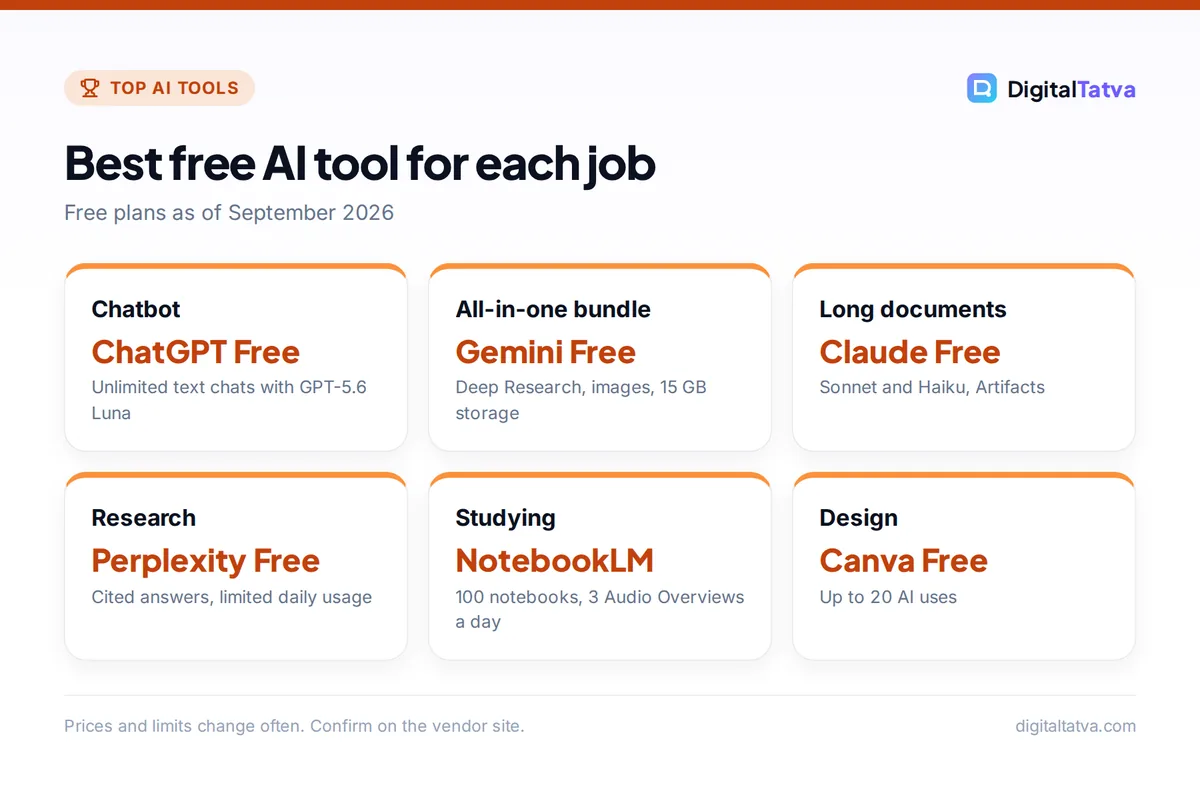
Quick picks: the 10 best free AI tools compared
Every tool below has a permanent free plan. The “paid upgrade” column shows what you would pay if you outgrow it.
| Tool | Best for | What the free plan includes | Paid upgrade from |
|---|---|---|---|
| ChatGPT | Everyday questions and writing | Unlimited text chats with GPT-5.6 Luna | $8/mo (Go) |
| Google Gemini | Research, images, Google users | Gemini 3.6 Flash, Deep Research, image generation | $4.99/mo (AI Plus) |
| Claude | Long documents and natural writing | Sonnet and Haiku, web search, Artifacts | $20/mo (Pro) |
| Perplexity | Search with citations | Cited answers, limited daily usage | $20/mo (Pro) |
| NotebookLM | Studying your own sources | 100 notebooks, 50 chats/day | Via Google AI plans |
| Canva | Social posts and simple design | Up to 20 AI uses, 5 GB storage | US$144/yr (Pro) |
| Adobe Firefly | AI images, video and audio | Free daily generations | $9.99/mo (Standard) |
| Grammarly | Grammar, tone and polish | 100 AI prompts/month | $12/mo annual (Pro) |
| Otter.ai | Meeting transcripts | 300 minutes/month | $8.33/mo annual (Pro) |
| GitHub Copilot | Coding help | 2,000 completions/month | $10/mo (Pro) |
The 10 best free AI tools in detail
1. ChatGPT Free: Best free AI chatbot for everyday use
- Price: $0
- Free plan includes: unlimited text chats with GPT-5.6 Luna
- Best for: students, office workers and anyone new to AI
ChatGPT Free is the easiest place to start. OpenAI’s pricing page lists unlimited text chats with GPT-5.6 Luna, plus limited file uploads, image creation, voice chats, deep research, memory and Codex access. That covers emails, summaries, explanations, brainstorming and quick translations.
The limits show up when you upload files or generate images often. OpenAI has also said it will test ads on the Free and Go plans in the US, while paid plans stay ad-free. If you outgrow Free, ChatGPT Go at $8/month raises limits and adds projects and custom GPTs. New users should read our complete ChatGPT beginner guide, and our explainer on ChatGPT limits by plan shows what to expect.
Skip it if: you need the strongest reasoning models. GPT-5.6 Sol is not available on Free.
2. Google Gemini Free: Most generous free AI bundle
- Price: $0
- Free plan includes: Gemini 3.6 Flash, Deep Research, image generation, 15 GB storage
- Best for: Google users, researchers and creators
Gemini’s free plan packs in a lot. You get Gemini 3.6 Flash with varying access to Gemini 3.1 Pro, image generation and editing, Deep Research (multi-step web research that produces a report), Gemini Live voice conversations, Canvas for drafting, Gems (saved custom assistants), Gemini Notebook and limited Google Flow access.
For many people, Gemini Free is the best free alternative to a paid chatbot. When you need more, Google AI Plus costs $4.99/month in the US and Rs 399/month in India, with 2x the free usage limits and Gemini inside Gmail and Docs. Students may qualify for a free year of a paid plan. See our Gemini pricing guide for every tier.
Skip it if: you dislike the Google ecosystem. Much of Gemini’s extra value comes from Google app integrations.
3. Claude Free: Best free AI for long documents and writing
- Price: $0
- Free plan includes: Sonnet and Haiku models, web search, file creation, Artifacts
- Best for: writers, consultants and anyone working with long files
Claude Free is the pick when you care about how the writing sounds. In everyday use, its drafts read more naturally than most free chatbots. The free plan includes chat on web, desktop and mobile, web search, file creation, code execution, memory, app connectors and Artifacts (interactive documents, charts and small apps built inside the chat).
Free uses the Sonnet and Haiku models, not Opus. The limit is usage: heavy users hit the cap faster than on ChatGPT Free, and you wait for it to reset. Our guide to Claude usage limits explains how to stretch them.
Skip it if: you need image generation. Claude does not create images.
4. Perplexity Free: Best free AI search engine
- Price: $0
- Free plan includes: AI search with citations, basic models, limited daily usage
- Best for: research, fact-checking and quick answers
Perplexity works like a search engine that writes the answer for you, with numbered citations to the sources. That makes it far easier to check facts than a chatbot that answers from memory. The free plan covers basic models with limited daily usage of the more advanced search modes.
Use it to gather sources, then move to ChatGPT or Claude for writing. Pro at $20/month adds deep research, a model picker and premium data sources. Our guide on how to use Perplexity for research covers search modes and tips.
Skip it if: you mainly want creative writing or long drafts.
5. NotebookLM: Best free AI tool for studying your own material
- Price: $0
- Free plan includes: 100 notebooks, 50 sources per notebook, 50 chats/day, 3 Audio Overviews/day
- Best for: students, researchers and anyone learning from documents
NotebookLM (Google’s help center now calls it Gemini Notebook) answers questions using only the sources you upload, such as PDFs, notes and web pages. Answers point back to the exact passage, which cuts down on made-up facts.
The free tier is generous: 100 notebooks, 50 sources per notebook, 50 chats a day, 3 Audio Overviews (podcast-style summaries) and 3 Video Overviews a day, 10 reports a day and 10 Deep Research runs a month. Higher limits come with Google AI subscriptions. Our guide on how to use NotebookLM for study and research walks through setup.
Skip it if: you need general knowledge answers. NotebookLM is built around your sources.
6. Canva Free: Best free AI design tool
- Price: $0
- Free plan includes: up to 20 uses of Standard or Premium AI, 5 GB storage, 1 Brand Kit
- Best for: social posts, flyers, simple presentations
Canva Free gives you templates, a drag-and-drop editor and a small AI allowance for generating images, drafting text and editing designs. For a small business or student, that covers most everyday graphics.
The 20 AI uses go quickly if you generate many images, so save them for tasks that are slow to do by hand. Canva Pro costs US$144/year (Rs 4,000/year in India) and gives 10x the AI allowance of Free. Note that Pro Lite in India keeps the same 20 AI uses as Free. Details are in our Canva pricing guide.
Skip it if: you need detailed photo editing. Firefly is better for that.
7. Adobe Firefly: Best free AI image and video generator
- Price: $0, no plan needed
- Free plan includes: free daily generations for image, video and audio
- Best for: creators who want quality images and short clips
Adobe Firefly offers free daily generations that refresh every day, covering images, video and audio. The free tier includes partner models such as Nano Banana and Luma Ray3.14, so you can try different styles in one place. Adobe does not publish the exact daily count.
Adobe states that outputs from its own Firefly models are safe for commercial use, which is unusual for a free tool. Partner model outputs may carry different terms. Paid plans start at $9.99/month for 2,000 credits. For more options, see our list of the best AI image generators.
Skip it if: you need a predictable volume every day. Free limits are not published.
8. Grammarly Free: Best free AI writing checker
- Price: $0
- Free plan includes: basic corrections, tone detection, 100 AI prompts/month
- Best for: emails, reports and anything you send to others
Grammarly checks spelling, grammar and tone in almost every app and browser text box. The free plan adds 100 AI prompts a month for rewriting or drafting, enough for occasional use.
It pairs well with a free chatbot: draft in ChatGPT or Claude, then let Grammarly catch errors and awkward phrasing. Pro costs $12/month on annual billing and adds full sentence rewrites and plagiarism checks. Our Grammarly review covers whether Pro is worth it.
Skip it if: you rarely write anything formal.
9. Otter.ai Basic: Best free AI meeting notetaker
- Price: $0
- Free plan includes: 300 transcription minutes/month, 30 minutes per conversation, 3 lifetime file imports
- Best for: freelancers, students and small teams
Otter records and transcribes meetings and lectures, then gives you a searchable transcript and summary. The free Basic plan includes 300 minutes a month, with each conversation capped at 30 minutes.
That cap is the main catch: an hour-long meeting gets cut off. Pro costs $8.33/user/month on annual billing ($16.99 monthly) for 1,200 minutes and 90 minutes per conversation, and students and teachers get 20% off. Compare it with its main rival in our Otter vs Fireflies comparison.
Skip it if: your meetings usually run longer than 30 minutes.
10. GitHub Copilot Free: Best free AI coding assistant
- Price: $0
- Free plan includes: 2,000 code completions/month, limited chat and agent use
- Best for: students, hobbyists and part-time coders
Copilot Free suggests code as you type and answers coding questions inside your editor. It includes 2,000 completions a month plus limited chat and agent usage, with access to models from several providers.
Verified students get a dedicated free Copilot Student plan, and verified teachers and maintainers of popular open source projects can get Copilot Pro free. Paid Pro costs $10/month. See our GitHub Copilot pricing guide for the new credit system.
Skip it if: you code full-time. You will run past 2,000 completions quickly.
More free AI tools worth knowing
These did not make the top 10 but have useful free tiers for specific jobs.
- ElevenLabs Free: 10,000 credits a month (about 10 minutes of text to speech). No voice cloning and no commercial license on the free plan.
- Leonardo.ai Free: 150 fast tokens a day for image generation. Leonardo keeps rights to use free-tier images, and generations are not private.
- Ideogram Free: slow generations each week for eligible accounts, and commercial use is allowed.
- Ollama: run open models on your own computer for free, with no data leaving your machine. Our guide on running an LLM locally with Ollama shows how.
- Zapier Free: 100 tasks a month and two-step automations, with Zapier Copilot included.
- Synthesia Basic: up to 10 minutes of AI avatar video a month with 9 avatars, no card required.
- Microsoft Copilot: the free web and mobile app offers chat and image generation with daily limits, according to third-party guides, but it does not work inside desktop Office apps.
How to build a free AI toolkit
You do not need ten accounts. Pick by the jobs you do each week.
- Choose one main chatbot. ChatGPT Free for all-round use, Gemini Free if you live in Google apps, or Claude Free if you write a lot.
- Add a research tool. Perplexity for web research with citations, or NotebookLM if you mostly study your own documents.
- Add one creative tool. Canva Free for layouts and social posts, Firefly for higher-quality images.
- Add a checker. Grammarly Free catches mistakes from you and from the AI.
- Rotate when you hit limits. When one tool’s free cap runs out, switch to another for the rest of the day instead of upgrading.
Tip: Students should check education offers before paying for anything. Google offers eligible college students a free year of a paid AI plan (AI Pro in the US, AI Plus in many other countries including India). Our list of AI student discounts and our roundup of the best AI tools for students have the details.
Free AI tools by persona
| You are | Free toolkit |
|---|---|
| Student | Gemini Free, NotebookLM, Grammarly Free, Otter Basic |
| Freelance writer | Claude Free, Perplexity Free, Grammarly Free |
| Small business owner | ChatGPT Free, Canva Free, Zapier Free |
| Content creator | Gemini Free, Adobe Firefly, Canva Free, ElevenLabs Free |
| Developer | GitHub Copilot Free, Ollama, Claude Free |
Small business owners can find more budget-friendly ideas in our guide to AI for small business.
Limits and catches of free AI plans
Free plans are good, but they are designed to push heavy users to pay. Know the trade-offs before you rely on one for work.
- Usage caps: most free tiers limit uploads, images, voice or advanced models per day or per session. You may be cut off mid-task.
- Weaker models: free plans often use smaller, faster models. ChatGPT Free uses GPT-5.6 Luna, and Claude Free does not include Opus.
- Commercial rights: some free plans, such as ElevenLabs Free, do not include a commercial license. Check before using output in client work or ads.
- Privacy: Leonardo Free generations are public, and free consumer plans may use your data differently from business plans. Do not paste confidential client data into a free tool without checking its policy.
- Ads: OpenAI is testing ads on ChatGPT Free and Go in the US.
Save money: If you keep hitting limits, the cheapest upgrades are Google AI Plus at $4.99/month and ChatGPT Go at $8/month. Both cost far less than a $20 plan. Our guide to free ChatGPT Plus alternatives compares more options before you pay.
Frequently asked questions
What is the best free AI tool?
ChatGPT Free is the best free AI tool for most people because it offers unlimited text chats with GPT-5.6 Luna and handles writing, questions and brainstorming well. Gemini Free is a close second with Deep Research, image generation and 15 GB of storage included. Claude Free is the best free choice for long documents and natural-sounding writing.
Is ChatGPT still free in 2026?
Yes. ChatGPT Free costs $0 and includes unlimited text chats with GPT-5.6 Luna, plus limited file uploads, image creation, voice chats, deep research and Codex access. OpenAI is testing ads on Free and Go in the US. Paid plans start with ChatGPT Go at $8 a month if you need higher limits.
Are free AI tools safe to use for work?
They can be, with care. Avoid pasting confidential client data, passwords or personal information into free consumer tools unless you have checked the provider’s data policy. Some free plans also lack commercial rights, such as ElevenLabs Free. For team use, business plans usually offer stronger data controls, such as not training on workspace data.
Which free AI tool is best for students?
NotebookLM is the best free study tool because it answers questions from your own notes and readings, with citations back to the source. Pair it with Gemini Free or ChatGPT Free for explanations and Grammarly Free for assignments. Eligible college students can also get a free year of a paid Google AI plan.
Can I use free AI image generators commercially?
It depends on the tool. Adobe states that outputs from its own Firefly models are safe for commercial use, and Ideogram’s free plan allows commercial use. Leonardo keeps rights to use free-tier images, and partner models inside Firefly may have different terms. Always check the license on the vendor’s site before using images in ads.
Final verdict: the free AI tools to start with today
Start with one free chatbot (ChatGPT, Gemini or Claude), add Perplexity or NotebookLM for research, and use Canva Free and Grammarly Free for design and polish. That toolkit costs nothing and covers most daily work for students, freelancers and small businesses.
Upgrade only when a free limit blocks you every week, and start with the cheapest tier that removes it. Free plans and limits change often, so confirm current details on each vendor’s site, such as the ChatGPT pricing page, Google’s Gemini subscriptions page and Canva’s pricing page, before you rely on them.
Pricing and features are checked at the time of writing and can change. Some links may be affiliate links, which never affect our verdicts.



