How to Use ChatGPT: A Complete Beginner Guide
Learn how to use ChatGPT from scratch: sign up, write better prompts, upload files, use projects and voice, and pick the right plan without overspending.

On this page
- Key takeaways
- What is ChatGPT and what can a beginner use it for?
- What you need before you start
- How to use ChatGPT step by step
- How to write prompts that get better answers
- Key ChatGPT features to learn next
- ChatGPT plans for beginners: which one do you need?
- Common beginner mistakes (and how to avoid them)
- Advanced tips once you are comfortable
- Frequently asked questions
- Next steps: start small, then build habits
To use ChatGPT, go to chatgpt.com or install the official app, sign in with an email, Google, Microsoft or Apple account, and type a question or task into the message box. ChatGPT replies in seconds, and you can keep the conversation going with follow-up messages to refine the answer. The free plan is enough to learn the basics, and you only need a paid plan once you hit limits or want the stronger reasoning models.
This beginner guide walks you through setup, writing good prompts, uploading files, using voice and images, organizing work with projects, and choosing between Free, Go, Plus and Pro. Everything here reflects the ChatGPT lineup as of September 2026, including the GPT-5.6 and GPT-6 model families.
Key takeaways
- ChatGPT Free gives unlimited everyday text chats with GPT-5.6 Luna, plus limited uploads, images, voice and deep research.
- Good results come from clear prompts: state the task, give context, describe the format you want, and iterate with follow-ups.
- Projects, custom GPTs and tasks keep repeat work organized. They start on the $8/month Go plan.
- Plus at $20/month unlocks GPT-5.6 Sol with deeper thinking and GPT-6 Astra in ChatGPT Work and Codex. Most beginners do not need Pro.
- Never paste passwords, card numbers or confidential client data, and always fact-check important answers.
What is ChatGPT and what can a beginner use it for?
ChatGPT is an AI assistant made by OpenAI. You talk to it in plain language, and it writes, explains, summarizes, translates, brainstorms, analyzes files and even writes code. Under the hood it runs large language models, which predict text based on patterns learned from huge amounts of data. That means it is fluent and fast, but it can also be confidently wrong.
For beginners, the most useful everyday jobs are:
- Writing help: emails, social captions, product descriptions, cover letters and first drafts of blog posts.
- Learning: “explain this like I am new to the topic” for anything from GST filing basics to machine learning.
- Summaries: paste an article or upload a PDF and ask for the key points.
- Planning: meal plans, travel itineraries, content calendars and study schedules.
- Data work: upload a spreadsheet and ask for totals, trends or a chart. Our guide on using ChatGPT for Excel and data analysis goes deeper.
If you are still deciding whether ChatGPT is the right assistant for you, our full ChatGPT review covers strengths and weak spots, and our comparison of ChatGPT vs Claude helps if writing quality is your main concern.
What you need before you start
You need very little to get going:
- A web browser (Chrome, Edge, Safari or Firefox) or the ChatGPT app for iPhone, Android, Mac or Windows.
- An email address, or a Google, Microsoft or Apple account for quick sign-in.
- A phone number may be requested for verification in some regions.
- Optional: a payment method if you later upgrade. Go, Plus and Pro are billed in USD, with local-currency billing in a limited set of countries.
Note: ChatGPT is available in every country where OpenAI supports it, including India. OpenAI has said it will test ads on the Free and Go plans in the US, while Plus, Pro, Business and Enterprise stay ad-free.
How to use ChatGPT step by step
Follow these steps for your first session. Menus move around between app updates, so the steps describe where things usually live rather than exact button names.
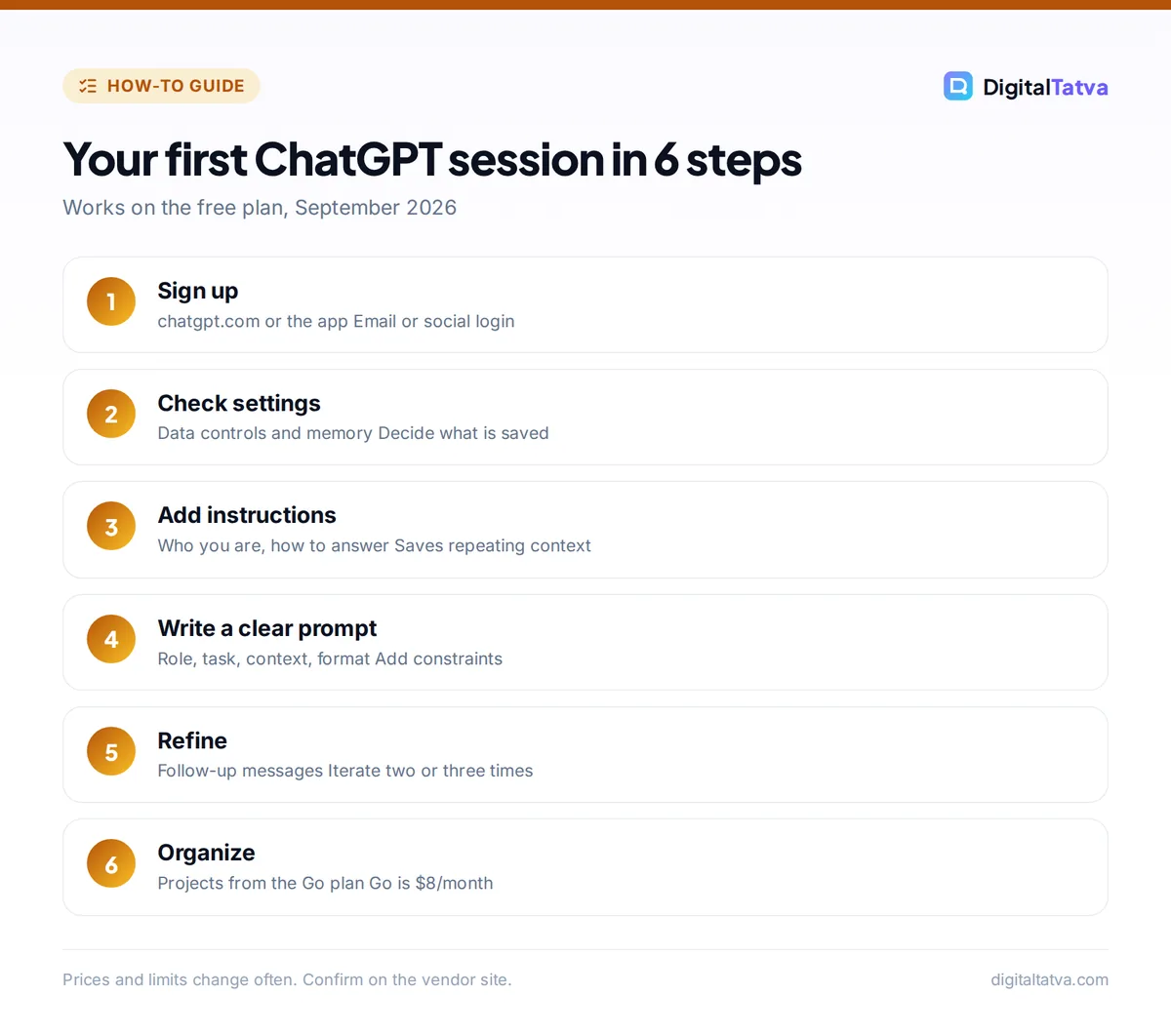
- Create your account. Open chatgpt.com or the app and choose the option to sign up. Pick email or a social login, confirm your email if asked, and add your name and date of birth. You land on a blank chat screen with a message box at the bottom.
- Check your settings first. Open your profile menu (usually your initials or photo in a corner) and go to settings. Look at data controls to decide whether your chats can be used to improve models, and check memory settings so you know what ChatGPT remembers about you between chats.
- Add custom instructions. In the personalization area of settings, tell ChatGPT who you are and how you want answers. For example: “I run a small bakery in Pune. Keep answers short, use simple English, and give prices in INR when relevant.” This saves you from repeating context in every chat.
- Type your first prompt. Click the message box and write a clear request, such as “Write three Instagram captions for a new mango cheesecake, friendly tone, under 30 words each, with one emoji each.” Press Enter to send.
- Refine with follow-ups. Do not start over if the answer is close. Reply with “Make the second one funnier” or “Shorter, and add a call to action.” ChatGPT keeps the context of the whole conversation.
- Upload a file or image. Use the attachment or plus icon next to the message box to add a PDF, spreadsheet, document or photo. Then ask a question about it, like “Summarize this contract in plain language and list any payment deadlines.”
- Try voice mode. On the mobile app, tap the voice icon to talk instead of type. It works well for brainstorming while walking or practicing a presentation. Voice is limited on Free and Go.
- Organize your chats. Use the sidebar to rename, search, archive or delete conversations. On Go and above, create a project to group related chats and files for one client or goal.
How to write prompts that get better answers
The single biggest skill in using ChatGPT well is prompting. A prompt is simply the instruction you give. Vague prompts get generic answers; specific prompts get useful ones. A simple formula works for most tasks: role, task, context, format, constraints.
| Part | What to include | Example |
|---|---|---|
| Role | Who ChatGPT should act as | “Act as an experienced email marketer.” |
| Task | The exact job | “Write a welcome email for new subscribers.” |
| Context | Audience, product, goal | “We sell handmade soaps to women aged 25 to 40 in India.” |
| Format | Length, structure, style | “Subject line plus 120-word body, warm tone.” |
| Constraints | What to avoid | “No discounts, no exclamation marks in the subject.” |
A few more habits make a big difference:
- Give examples. Paste a caption or email you liked and say “match this style.”
- Ask for options. “Give me five headline ideas” beats asking for one perfect headline.
- Ask it to ask you. End with “Ask me any questions you need before you start.” This surfaces missing details.
- Break big jobs into steps. Outline first, then draft each section, then edit.
Our prompt engineering guide explains 12 techniques in detail, and if you work in marketing, our list of ChatGPT prompts for marketing gives you ready-made templates to copy.
Tip: Long, rambling chats slowly get worse because ChatGPT has to juggle more context. When you switch topics, start a new chat. It also helps you stay under plan limits.
Key ChatGPT features to learn next
Choosing a model and thinking level
On Free, ChatGPT uses GPT-5.6 Luna, a fast model that handles everyday chats well. Paid plans unlock stronger options. Plus includes GPT-5.6 Sol with Medium and High thinking levels, which take longer but reason more carefully through hard problems like financial models, tricky code or multi-step planning. Look for the model picker near the top of the chat or in the message box. Use the fast default for quick tasks and switch to a thinking model only when the answer really needs it.
Deep research
Deep research lets ChatGPT browse many web pages, read them, and write a cited report. It is useful for market scans, competitor lists or background research. Free has limited access, Plus has expanded access, and Pro has the maximum. OpenAI does not publish exact counts per plan, so check your usage in the app.
Image creation
You can ask ChatGPT to create or edit images, such as a product mockup or a simple social graphic. Free has limited image creation, and paid plans allow more complex images. For a comparison with dedicated art tools, see our test of Midjourney vs ChatGPT image generation. Note that OpenAI discontinued Sora in 2026, so do not expect video generation from ChatGPT.
Projects, tasks and custom GPTs
Projects group chats, files and instructions for one piece of work, such as a client or a thesis. Scheduled tasks let ChatGPT run a prompt later or on a schedule, like a Monday morning news summary. Custom GPTs are reusable assistants you configure once with instructions and files. All three are available from the Go plan upward. Our step-by-step tutorial shows you how to create a custom GPT for your own workflow.
Memory
Memory lets ChatGPT remember facts you share, like your business name or writing preferences, across chats. You can view, edit or clear memories in settings. Free has limited memory, and higher plans keep more.
ChatGPT plans for beginners: which one do you need?
Start on Free. Upgrade only when you notice a specific limit getting in your way. Here is how the consumer plans compare as of September 2026.
| Plan | Price (USD) | Main models | Best for |
|---|---|---|---|
| Free | $0 | GPT-5.6 Luna | Learning, occasional personal use |
| Go | $8/month | GPT-5.6 Luna with Think | Regular users who want projects and custom GPTs on a budget |
| Plus | $20/month | GPT-5.6 Sol, GPT-6 Astra in ChatGPT Work and Codex | Freelancers, students, marketers using it daily |
| Pro | $100, $200 or $500/month | GPT-6 Pro (on Pro 100 and Pro 200), highest limits | Heavy professional use, research, coding |
| Business | $25/user/month ($20 annual), 2 seat minimum | GPT-5.6 Sol, GPT-6 Pro | Small teams that need admin controls and no training on data |
In India, Go launched at Rs 399 per month in August 2025, and third-party pages list Plus at around Rs 1,999 per month including GST. OpenAI’s current rupee prices could not be confirmed, so check the pricing page in the app before paying. For the full breakdown, read our guide to ChatGPT pricing in 2026, and if you are weighing a big upgrade, our analysis of ChatGPT Plus vs Pro will save you from overspending.
Save money: Go at $8/month includes projects, tasks and custom GPTs, which covers most of what beginners want from a paid plan. Only move to Plus when you need GPT-5.6 Sol’s deeper thinking or expanded deep research. US college students can claim four free months of Plus through OpenAI’s Back to School offer until October 31, 2026.
Common beginner mistakes (and how to avoid them)
- Trusting every answer. ChatGPT can invent facts, quotes, statistics or links. Always verify anything you will publish, send to a client or rely on for money, health or legal decisions.
- Pasting sensitive data. Do not share passwords, bank or card numbers, Aadhaar or PAN details, or confidential client files on a personal plan. Business plans do not train on workspace data, but good hygiene still matters. Our template for an AI usage policy helps teams set clear rules.
- One-line prompts. “Write a blog post” gives bland results. Add audience, goal, length and tone.
- Never iterating. The first answer is a draft. The real value comes from two or three rounds of feedback.
- Publishing raw AI text. Edit for your voice, add real examples, and check facts. This matters even more for SEO content.
- Hitting limits without knowing why. Big file uploads, image generation and deep research use more of your allowance. Our explainer on ChatGPT limits by plan shows how to stretch them.
Pros
- Generous free plan with unlimited everyday text chats
- Handles writing, analysis, images, voice and files in one place
- Apps on every major platform with synced history
- Low-cost Go plan for budget users
Cons
- Can produce confident but wrong answers
- Exact message limits are not published
- Ads are being tested on Free and Go in the US
- Best reasoning models need Plus or higher
Advanced tips once you are comfortable
- Build a personal prompt library. Save your best prompts in a note or a custom GPT so you can reuse them in seconds.
- Use projects for each client. Upload brand guidelines once, add instructions, and every chat inside that project starts with the right context.
- Ask for a critique. After ChatGPT drafts something, ask “Critique this as a skeptical editor, then rewrite it.” The second version is usually sharper.
- Chain tasks. Research with deep research, outline in one chat, then draft section by section. See our guide on writing a blog post with AI that actually ranks for a full workflow.
- Keep context lean. Summarize long chats and start fresh with the summary. Our tips to reduce token usage in ChatGPT and Claude apply to plan limits too.
- Try other tools for special jobs. For cited web research, Perplexity is often faster. Our tutorial on how to use Perplexity for research shows when it beats ChatGPT.
Frequently asked questions
Is ChatGPT free to use?
Yes. ChatGPT Free costs nothing and includes unlimited everyday text chats with GPT-5.6 Luna, plus limited file uploads, image creation, voice chats, deep research and memory. You only pay if you want higher limits or stronger models. Go costs $8 per month, Plus $20 per month, and Pro starts at $100 per month. OpenAI is testing ads on Free and Go in the US.
How do I use ChatGPT on my phone?
Download the official ChatGPT app from the App Store or Google Play and sign in with the same account you use on the web. Your chat history syncs across devices. The mobile app adds voice mode, which lets you speak naturally and hear replies, and you can snap a photo with the camera and ask questions about it, such as a menu, a bill or a math problem.
How much does ChatGPT Plus cost in India?
ChatGPT Plus is $20 per month in the US. Third-party sources list it at around Rs 1,999 per month including 18% GST in India, but OpenAI’s official rupee price could not be confirmed at the time of writing. Purchases are generally in USD, with local billing in a limited set of countries, so check the final amount in the app before you subscribe.
Can ChatGPT access the internet?
Yes. ChatGPT can search the web to answer questions about recent events, and deep research can read many pages and produce a cited report. Free users get limited deep research, while Plus and Pro get more. Always click through to the sources for anything important, because ChatGPT can still summarize a page incorrectly or rely on a weak source.
Is it safe to share my data with ChatGPT?
Treat ChatGPT like any cloud service. Avoid sharing passwords, ID numbers, card details or confidential client information on personal plans. In settings you can control whether your chats are used to improve models and manage memory. On Business and Enterprise plans, OpenAI does not train on workspace data, which makes them the better choice for company work.
Next steps: start small, then build habits
The fastest way to learn ChatGPT is to use it for one real task every day this week: an email on Monday, a summary on Tuesday, a spreadsheet question on Wednesday. Set up custom instructions, practice the role, task, context, format and constraints formula, and stay on the free plan until a limit actually slows you down. When that happens, Go is the cheapest step up and Plus is the sweet spot for daily professional use.
For official details, see OpenAI’s ChatGPT pricing page and the ChatGPT Plus help article. Pricing and plan features change often, so confirm the current details on OpenAI’s site before you subscribe.
Related reading:
Pricing and features are checked at the time of writing and can change. Some links may be affiliate links, which never affect our verdicts.



