How to Write a Blog Post With AI That Actually Ranks
A 9-step workflow to write a blog post with AI that ranks: search intent, cited research, section-by-section drafting, fact-checking and the edits Google rewards.

On this page
To write a blog post with AI that actually ranks, use AI for research, outlining and first drafts, but supply the parts it cannot: a clear search intent, your own experience and examples, verified facts, and a final human edit. Google does not penalize AI-assisted content by itself; it targets pages that add no value. Its official guidance on generative AI content warns that generating “many pages without adding value for users may violate Google’s spam policy on scaled content abuse.”
This guide walks through a 9-step workflow we use for search-focused posts, the tools for each step and what they cost, the mistakes that keep AI posts off page one, and a few advanced tips for getting cited in AI answers as well as Google.
Key takeaways
- Start with the searcher, not the prompt: pick one focus keyword, study the top results and decide what your post will add that they lack.
- Draft section by section with a detailed brief, not in one giant prompt. You get better structure and fewer generic paragraphs.
- Fact-check every number, price, date and claim against a primary source. AI models invent specifics confidently.
- Add first-hand experience, original examples and opinions. That is the “added value” Google and readers look for.
- A practical stack costs about $20 to $40 a month: one AI assistant, a free or low-cost editor, and an SEO tool only if search is core to your business.
What you need before you start
You do not need an expensive content platform. You need four things, most of which have free or cheap options.
| Job | Tool options | Starting price |
|---|---|---|
| Research with sources | Perplexity, ChatGPT or Gemini with web search | Free; Perplexity Pro $20/mo |
| Outlining and drafting | Claude, ChatGPT, Gemini | Free; Claude Pro $20/mo ($17 annual), ChatGPT Plus $20/mo |
| Editing and polish | Grammarly | Free (100 AI prompts/mo); Pro $12/member/mo on annual billing |
| SEO optimization (optional) | Surfer, Frase, Clearscope | Frase Starter $39/mo annual; Surfer Discovery $49/mo annual; Clearscope $129/mo |
Prices come from each vendor’s own pages, such as the Claude pricing page and the Surfer pricing page. Plus one thing no tool provides: your own knowledge of the topic. If you have never used the product, run the process or served the customer, collect notes from someone who has before you start. For a deeper comparison of writing tools, see our list of the best AI writing tools, and for optimization tools see the best AI SEO tools for Google and AI search.
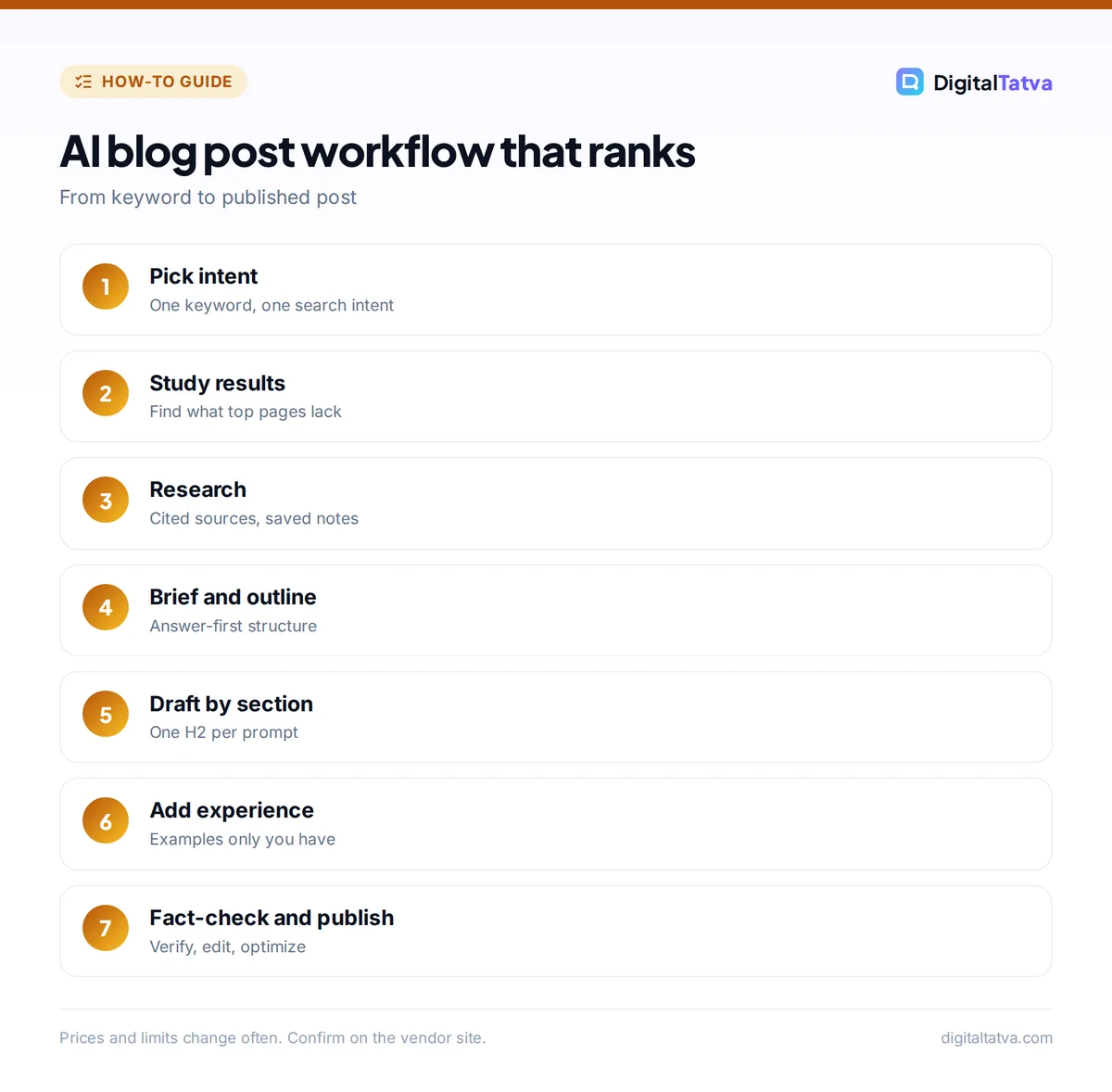
How to write a blog post with AI: 9 steps
- Pick one focus keyword and one search intent. Choose a keyword your audience actually searches and decide what they want: a how-to, a comparison, a price, a definition or a list. One post should satisfy one intent. If a keyword mixes intents (for example “Jasper pricing” vs “Jasper review”), pick one and write a separate post for the other.
- Study the top results. Search the keyword in Google and in an AI assistant. Note the format that ranks (list, guide, table), the subtopics every result covers, and the questions in “People also ask”. Then write down two or three things you can add: a worked example, a fresher price, a clearer table or a real opinion.
- Research with sources, not memory. Ask a search-connected assistant such as Perplexity for current facts with citations, then open the sources. Our guide on using Perplexity for research covers the best settings. Save verified facts, with URLs and the date you checked, in one notes document.
- Write a content brief. Give the AI your keyword, target reader, intent, angle, word count, required subtopics, facts list and tone. A brief of 200 to 400 words produces far better drafts than “write a blog post about X”. If you use Claude, store the brief and your style guide in a project; our guide to Claude Projects explains how.
- Generate and fix the outline. Ask for an H2 and H3 outline that answers the query in the first paragraph and covers every subtopic you noted. Then edit it yourself: merge thin sections, reorder by what the reader needs first, and add a section for your unique angle.
- Draft one section at a time. Paste the brief and outline, then ask for one H2 section per message. Review each before moving on. Section-by-section drafting keeps the model focused, avoids repetition and makes it easier to steer. Our collection of Claude prompts for writing and editing includes ready-made section prompts.
- Add experience and evidence. Insert what only you know: a screenshot description, a client example, a mistake you made, a price you paid, a test you ran. Replace vague claims (“many experts say”) with specifics and sources. This step is what separates a ranking post from a generic one.
- Fact-check and edit. Verify every number, name, date and quote against your notes. Cut filler phrases, shorten long paragraphs and read the post aloud. Run it through Grammarly or a similar editor for clarity and tone. Our Grammarly review explains what the free and Pro plans catch.
- Optimize and publish. Write a title and meta description by hand (AI suggestions are a starting point), add descriptive alt text, link to related posts on your site, and add an FAQ section that answers real questions. Google’s guidance asks for “accuracy, quality, and relevance” in titles, meta descriptions, structured data and alt text too, not just the body.
Tip: Ask the AI to list the claims in its own draft that need a source. It is a fast way to find invented statistics before your readers do.
Prompts that produce better drafts
Good prompts do most of the work. Here are three templates you can adapt. For the reasoning behind them, see our prompt engineering guide with 12 techniques that work.
Brief-to-outline prompt
You are an experienced editor for [site], writing for [reader].
Focus keyword: [keyword]. Search intent: [intent].
Our angle: [what we add that top results lack].
Must cover: [subtopics]. Facts to use: [pasted notes].
Create an H2/H3 outline. The first paragraph must answer the
query in 2 to 3 sentences. Flag any section that needs a source.
Section drafting prompt
Using the brief and outline above, write only the section
"[H2 heading]" in about [N] words. Short paragraphs, active voice,
no filler intro. Use only the facts provided; if a fact is
missing, write [CHECK] instead of guessing.
Self-critique prompt
Review this draft as a skeptical reader searching "[keyword]".
List: (1) where it fails to answer the query, (2) generic
sentences that could appear on any site, (3) claims without
sources, (4) missing subtopics from this list: [list].
The [CHECK] placeholder is the most important habit here. It stops the model filling gaps with plausible but false numbers.
Common mistakes that stop AI posts from ranking
- Publishing the first draft. Raw AI drafts tend to be generic, repetitive and padded. Readers notice, and so do ranking systems that reward helpful content.
- Scaling before quality. Generating dozens of thin posts in a week is exactly the pattern Google’s scaled content abuse policy describes. Ten strong posts beat a hundred weak ones.
- Trusting AI facts. Models confidently invent prices, statistics, quotes and features. Every specific must come from a source you opened.
- Ignoring intent. A beautifully written guide will not rank for a keyword where searchers want a price table or a product list.
- Burying the answer. If the answer sits in paragraph six, both readers and AI search engines skip you. Answer first, then explain.
- Using one giant prompt. Asking for 2,000 words in one go produces a structure the model chose, not one you planned. It can also push long research notes out of the model’s working memory; our explainer on the context window shows why.
Watch out: AI detectors are unreliable judges of quality, and passing one does not make a post rank. Spend the time on fact-checking and original examples instead of trying to “humanize” text.
Which AI tool to use for each step
You can do the whole workflow in one assistant, but each tool has a sweet spot.
- Claude is a strong choice for long drafts and editing passes, and Projects keep your brief and style guide in one place. See our Claude review for strengths and limits.
- ChatGPT is versatile, with web search, custom GPTs and image generation for featured images. Our comparison of ChatGPT vs Claude covers writing quality in detail.
- Perplexity is the fastest way to collect cited sources for the research step.
- Jasper suits marketing teams who need shared brand voices across many writers; read Jasper vs Copy.ai before you pay per seat.
- Surfer, Frase or Clearscope help match the subtopics and terms top results cover. They are worth it if you publish search content every week, not for an occasional post.
Save money: A solo blogger can run this entire process on Claude Pro at $17 a month (annual billing) plus Grammarly Free. Add an SEO tool only when organic search is driving real revenue.
Advanced tips: ranking in Google and AI answers
Write answer-first sections
AI search features and assistants often quote a short, self-contained answer. Start each H2 with one or two sentences that directly answer the heading, then expand. This also improves featured snippet chances.
Use tables and clear structure
Comparison tables, step lists and FAQ blocks are easy for both people and machines to parse. Put prices, limits and specs in tables rather than burying them in prose.
Show who wrote it and how
Add an author bio with real experience. Google also suggests considering “sharing information about how a piece of content was created”, for example a short note that AI assisted with research and drafting and a human edited and verified the post.
Refresh, do not just publish
Prices, features and model names change constantly in fast-moving topics. Schedule a quarterly review of your top posts and update facts, dates and image descriptions. A fresh, accurate post often outranks a newer but thinner one.
Add original visuals
A simple chart or diagram based on your own data gives readers something they cannot find elsewhere. If you generate images, our list of the best AI image generators covers the options, and remember to write accurate alt text.
Frequently asked questions
Can AI-written blog posts rank on Google?
Yes. Google evaluates content quality, not whether AI helped write it. What it targets is scaled content abuse: many pages generated without adding value for users. AI-assisted posts that answer the query well, contain verified facts and include original experience or examples can rank like any other content.
Which AI is best for writing blog posts?
Claude and ChatGPT are the most popular choices for drafting, and both cost $20 a month on their main paid plans (Claude Pro is $17 a month billed annually). Claude is often preferred for long drafts and editing; ChatGPT is more versatile. Pair either with Perplexity for cited research and an editor like Grammarly for polish.
Does Google penalize AI content?
Not automatically. Google’s guidance says AI content must follow the same Search Essentials and spam policies as any content. Problems start when sites generate large volumes of low-effort pages with little originality or added value. Focus on accuracy, usefulness and first-hand insight, and AI assistance is not a ranking problem.
How long should an AI-assisted blog post be?
Long enough to fully answer the query and no longer. Check the length of the top-ranking results as a guide; many in-depth guides run 1,500 to 2,500 words, while a simple definition might need 800. Padding a post with AI filler to hit a word count usually hurts readability and rankings.
Should I disclose that I used AI to write a post?
Google suggests considering sharing how content was created when it helps readers understand it. A brief note that AI assisted with research or drafting, and that a named human edited and fact-checked the post, builds trust. What matters most is that a real person takes responsibility for accuracy.
Next steps
Pick one keyword you want to rank for this month and run it through the 9 steps above, timing each one. Most people find research and editing take longer than drafting, which is exactly where your effort creates value. Once the workflow feels natural, build a reusable brief template and prompt set so every post starts from the same high bar, and borrow ideas from our ChatGPT prompts for marketing. Tool prices and plans change often, so confirm current pricing on each vendor’s site before you subscribe.
Pricing and features are checked at the time of writing and can change. Some links may be affiliate links, which never affect our verdicts.



