10 Best AI Image Generators in 2026
Midjourney, ChatGPT, Adobe Firefly, Ideogram and six more AI image generators ranked for 2026, with current prices, free plans and commercial use rules.

On this page
The best AI image generators in 2026 are Midjourney for artistic quality, ChatGPT for easy conversational editing, and Adobe Firefly for commercially safe images. Ideogram is the pick for text inside images such as posters and logos, and Canva is the most practical choice if you turn images straight into social posts. Gemini, Microsoft Copilot and Adobe Firefly all let you generate images for free every day.
Below we rank 10 image generators by what they do best, what they cost as of September 2026, and the licensing details that matter if you use images for clients or ads.
Key takeaways
- Best image quality: Midjourney V8.2, from $10/month ($8/month billed annually). There is no free trial.
- Easiest to use: ChatGPT, where you describe and refine images in plain conversation.
- Safest for commercial work: Adobe Firefly, trained on licensed and public domain content, from $9.99/month.
- Best free options: Gemini Free, Adobe Firefly’s daily free generations, and Ideogram Free (commercial use allowed).
- Check licensing: Leonardo’s free tier lets Leonardo reuse your images, and Midjourney requires Pro or Mega for companies with more than $1M in annual revenue.
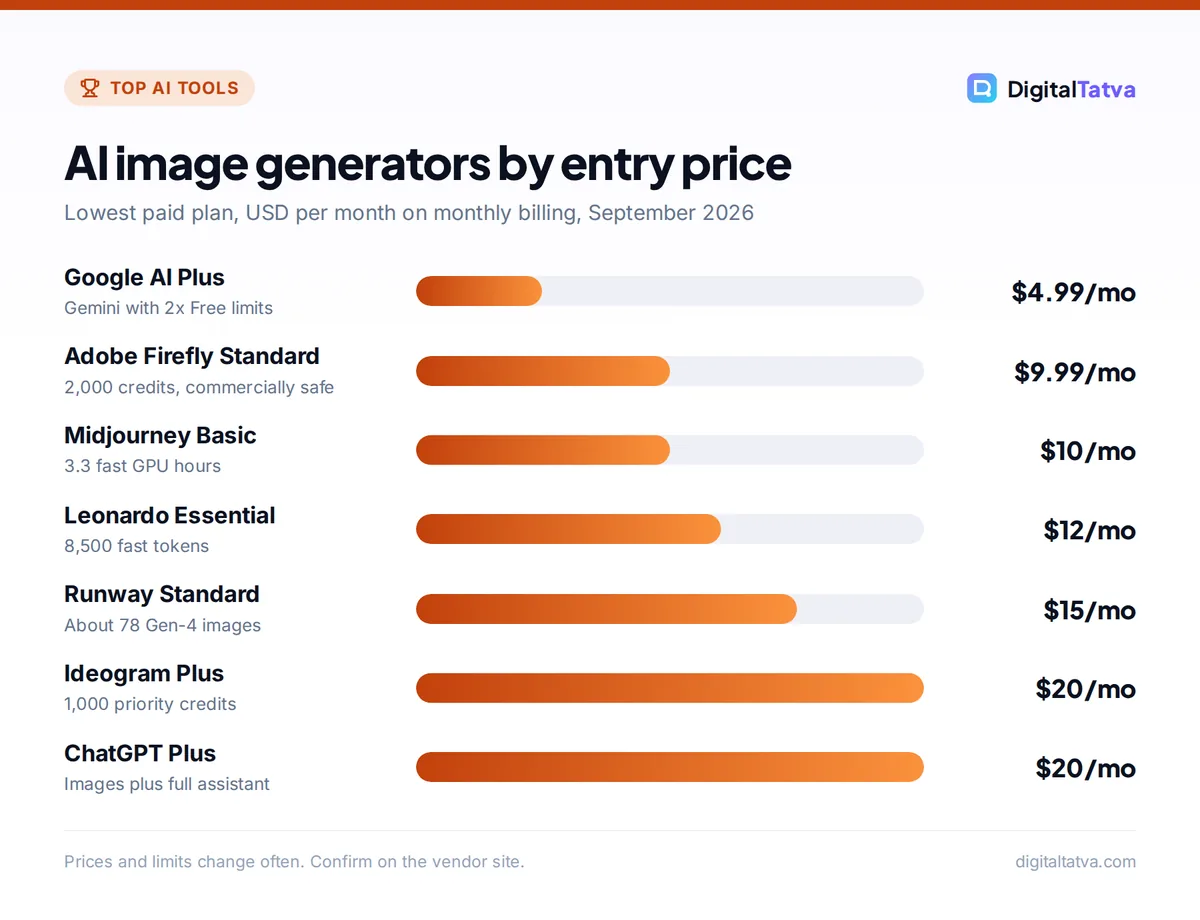
Quick picks: best AI image generators compared
| Tool | Best for | Starting paid price | Free plan |
|---|---|---|---|
| Midjourney | Artistic, high-end visuals | $10/mo ($8/mo annual) | No |
| ChatGPT | Conversational creation and edits | $8/mo (Go), $20/mo (Plus) | Yes, limited |
| Gemini | Free image generation and editing | $4.99/mo (AI Plus) | Yes |
| Adobe Firefly | Commercially safe images | $9.99/mo (Standard) | Yes, daily credits |
| Ideogram | Text in images, posters, logos | $20/mo ($15/mo annual) | Yes |
| Leonardo.ai | Game art and style control | $12/mo ($9.60/mo annual) | Yes, 150 tokens/day |
| Canva | Social graphics and marketing designs | $144/yr (Pro), Rs 4,000/yr in India | Yes, 20 AI uses |
| Runway | Images for video projects | $15/mo ($12/mo annual) | Yes, 125 one-time credits |
| Microsoft Copilot | Quick free images in Windows and Edge | $9.99/mo (M365 Personal) | Yes, daily limits |
| OpenAI Image API | Developers generating images at scale | Pay per token | No confirmed free tier |
The 10 best AI image generators reviewed
1. Midjourney: Best for artistic image quality
- Starting price: $10/mo Basic, or $96/year ($8/mo)
- Free plan: No free trial listed
- Best for: designers, illustrators, brand and concept artists
Midjourney still produces the most striking images out of the box. Its default model is V8.2, released on July 24, 2026, and it excels at lighting, texture, composition and cinematic mood. You can use it on the Midjourney website or through Discord.
Plans are based on fast GPU hours. Basic gives 3.3 fast hours (about 200 minutes) a month with no Relax mode. Standard at $30/month ($24 annual) adds unlimited image generation in Relax mode, which is the sweet spot for regular users. Pro ($60) and Mega ($120) add Stealth mode, so your images do not appear in the public gallery. Companies earning more than $1M a year must be on Pro or Mega. Midjourney also generates short videos of up to 21 seconds with extensions. See our Midjourney pricing breakdown and full Midjourney review.
Skip it if: you want a free tool or precise text in your images.
2. ChatGPT: Best for conversational image editing
- Starting price: $8/mo Go, $20/mo Plus
- Free plan: Yes, limited image creation
- Best for: marketers, bloggers, small businesses, beginners
ChatGPT is the easiest image generator to learn because you simply talk to it. Ask for a product mockup, then say “make the background warmer” or “add a headline at the top”, and it edits the same image. It follows complex, multi-part instructions well and handles readable text far better than older models.
Free users get limited image creation. Go raises image limits, Plus adds “more complex image creation”, and Pro offers unlimited and faster image generation. The big advantage is that images come bundled with a full writing and research assistant. Our Midjourney vs ChatGPT images comparison shows where each one wins.
Skip it if: you need a distinctive artistic style or fine control over variations and upscales.
3. Gemini: Best free AI image generator for everyday use
- Starting price: Free; AI Plus $4.99/mo (Rs 399/mo in India)
- Free plan: Yes, image generation and editing included
- Best for: students, casual creators, Google users
Google’s free Gemini plan includes image generation and editing, making it one of the most generous free options. You can upload a photo and ask for edits, such as swapping a background or changing an outfit, as well as generating images from scratch. Google’s Nano Banana image models also appear as partner models inside other tools such as Firefly and Runway.
Paid plans raise limits: AI Plus doubles Free usage and AI Pro ($19.99/month, Rs 1,950 in India) quadruples it, adding Flow credits for video. Our Gemini pricing guide compares the tiers.
Skip it if: you need a dedicated creative workspace with galleries, styles and upscaling.
4. Adobe Firefly: Best for commercially safe images
- Starting price: $9.99/mo Standard (2,000 credits)
- Free plan: Yes, free daily generations
- Best for: agencies, brands, Photoshop users
Adobe says outputs from its Firefly models are safe for commercial use, because they are trained on licensed and public domain content. Images also carry Content Credentials, a label that shows how the image was made. That makes Firefly the lowest-risk choice for client work and advertising. Note that images from partner models inside Firefly may have different terms.
Anyone can use free daily generations without a plan. Firefly Standard ($9.99/month) gives 2,000 credits plus unlimited standard image features like Generative Fill, and bundles Adobe Express Premium, Photoshop on web and mobile, and Adobe Fonts. Pro ($19.99) doubles credits to 4,000. Compare it with Canva in Canva vs Adobe Firefly.
Skip it if: you want the most artistic or experimental looks. Firefly plays it safe.
5. Ideogram: Best for text in images, posters and logos
- Starting price: $20/mo Plus, or $15/mo annual ($180/year)
- Free plan: Yes, weekly slow generations, commercial use allowed
- Best for: poster, thumbnail, logo and merchandise designers
Ideogram has built its reputation on typography. If your image needs a readable headline, a shop sign or a product label, it is one of the most reliable tools. Ideogram 4.0 launched in June 2026 and is reported to be released with open weights.
The free plan offers slow generations each week for eligible accounts, and Ideogram says you are free to use those images for any purpose, including commercial use. Free images are public, though. Plus gives 1,000 priority credits a month, unlimited slow generations and private images. Pro ($60/month, or $42 annual) gives 3,500 credits.
Skip it if: you mainly create photorealistic scenes without text.
6. Leonardo.ai: Best for game art and style control
- Starting price: $12/mo Essential, or $9.60/mo annual
- Free plan: Yes, 150 fast tokens per day
- Best for: game developers, illustrators, print-on-demand sellers
Leonardo offers more knobs than most tools: model choice, style presets, image guidance and consistent characters. It is popular with game artists and creators who need a coherent look across many assets. It also generates video.
The free plan gives 150 fast tokens daily, but images are not private and Leonardo keeps the right to use free-tier images. Paid plans give you full ownership and copyright. Essential includes 8,500 fast tokens a month, while Premium ($30, or $24 annual) adds unlimited relaxed generation on selected image and video models.
Skip it if: you want the simplest possible interface.
7. Canva: Best for turning AI images into finished designs
- Starting price: Pro US$144/year (Rs 4,000/year in India)
- Free plan: Yes, up to 20 AI uses
- Best for: social media managers, small businesses, teachers
Canva is not the best pure image generator, but it is the most practical. You generate an image and drop it straight into an Instagram post, presentation or flyer with your brand fonts and colors. Its AI tools are now grouped as Standard, Premium and Ultra AI, drawing from a shared allowance.
Canva Free includes up to 20 AI uses. Pro gives 10x more AI than Free, 5 Brand Kits and 100 GB of storage. India also has a Pro Lite plan at Rs 1,590/year, but it gets the same 20 AI uses as Free, so it is not an AI upgrade. Read our Canva pricing guide and Canva AI review.
Skip it if: image quality is your top priority.
8. Runway: Best for images that feed into video
- Starting price: $15/mo Standard, or $12/mo annual
- Free plan: Yes, 125 one-time credits
- Best for: video creators, filmmakers, motion designers
Runway is mainly a video platform, but its image generation is useful if you plan to animate stills. Standard’s 625 monthly credits cover about 78 Gen-4 images, or you can spend them on video. Runway also offers third-party models inside the app, including Nano Banana Pro for images. See the full Runway pricing explainer.
Skip it if: you only need still images. Credits are better spent elsewhere.
9. Microsoft Copilot: Best for quick free images on Windows
- Starting price: Free; Microsoft 365 Personal $9.99/mo
- Free plan: Yes, with daily limits
- Best for: Windows and Edge users who want fast, simple images
The free Copilot app and website include image generation with daily usage limits, which is handy for quick blog headers or slide visuals. Microsoft 365 subscribers also get Copilot inside Word and PowerPoint, so you can generate an image directly in a document. Our Microsoft Copilot pricing guide explains the plans.
Skip it if: you need consistent characters, styles or high-volume output.
10. OpenAI Image API: Best for developers and automation
- Starting price: pay per token (gpt-image-2)
- Free plan: No confirmed free API tier
- Best for: apps, ecommerce catalogs, automated content pipelines
If you want to generate product images, thumbnails or illustrations inside your own app, the OpenAI API’s gpt-image-2 model is a strong choice. It is billed per token: $8 per million image input tokens and $30 per million image output tokens on the Standard tier, with the Batch API cutting that in half. Per-image costs depend on size and quality, so use OpenAI’s calculator. Our OpenAI API pricing guide covers the details.
Skip it if: you do not write code. ChatGPT gives you the same kind of images through a chat window.
How to choose an AI image generator
Focus on four things: the look you need, how you will use the image, the licensing, and your volume.
- Match the style. Artistic, cinematic or editorial visuals suit Midjourney. Clean product shots and edits suit ChatGPT or Gemini. Posters with text suit Ideogram.
- Check commercial terms. For ads and client work, prefer paid plans. Firefly is the safest bet, while Midjourney, Leonardo and Ideogram paid plans also allow commercial use.
- Estimate your volume. A few images a week fit any free tier. Dozens a day point to Midjourney Standard with unlimited Relax mode.
- Think about the workflow after generation. If every image becomes a social post, Canva saves time. If images become video, Runway keeps everything in one place.
- Learn prompting. Describe subject, setting, lighting, lens or style, mood and aspect ratio. Our Midjourney prompt library and guide on how to use Midjourney help you get better results quickly.
Watch out: Free images on Midjourney’s lower tiers, Ideogram Free and Leonardo Free can be public. Do not generate confidential product designs or client concepts without a private or Stealth mode plan.
Pricing notes: what you really pay per image
Image generators price in very different units: GPU hours (Midjourney), credits (Firefly, Ideogram, Runway), tokens (Leonardo, OpenAI API) or shared AI allowances (Canva). That makes direct comparison tricky, so compare by how many images you actually need.
| Plan | Monthly price | What you get |
|---|---|---|
| Midjourney Basic | $10 ($8 annual) | 3.3 fast GPU hours, no Relax mode |
| Midjourney Standard | $30 ($24 annual) | 15 fast hours plus unlimited Relax images |
| Firefly Standard | $9.99 | 2,000 credits plus unlimited standard image features |
| Ideogram Plus | $20 ($15 annual) | 1,000 priority credits plus unlimited slow |
| Leonardo Essential | $12 ($9.60 annual) | 8,500 fast tokens, private, full ownership |
| Runway Standard | $15 ($12 annual) | 625 credits (about 78 Gen-4 images) |
Save money: Start on free tiers (Gemini, Firefly daily credits, Ideogram) and only pay when you hit limits every week. If Midjourney feels expensive, our list of cheaper Midjourney alternatives covers tools from $0 to $15 a month.
If you also plan to animate your images, see our ranking of the best AI video generators. And if you already pay for ChatGPT Plus, check our ChatGPT plan guide before adding a second image subscription, because Plus may be enough.
Frequently asked questions
What is the best AI image generator in 2026?
Midjourney is the best AI image generator for pure image quality and artistic style, with its V8.2 model. ChatGPT is best for ease of use and edits through conversation, while Adobe Firefly is best for commercially safe images. The right choice depends on whether you value looks, convenience or licensing most.
Is there a free AI image generator with no limits?
No mainstream tool offers truly unlimited free images. Gemini Free, Microsoft Copilot and Adobe Firefly give free generations with daily limits, Ideogram offers weekly slow generations, and Leonardo gives 150 fast tokens a day. For unlimited images, Midjourney Standard at $30 a month includes unlimited Relax mode generation.
Does Midjourney have a free trial?
Midjourney does not list a free trial on its plans page as of September 2026. The cheapest way in is the Basic plan at $10 a month, or $8 a month if you pay $96 for a year. If you want to test first, try Gemini or Ideogram for free, then move to Midjourney once you know you need it.
Can I use AI-generated images commercially?
Usually yes on paid plans, but terms vary. Midjourney allows commercial use on all paid plans, with Pro or Mega required for companies over $1M in revenue. Firefly outputs are described as safe for commercial use. Ideogram Free allows commercial use, but Leonardo Free lets Leonardo reuse your images. Always read the current terms.
Which AI image generator is best for Instagram and social media?
Canva is the most practical choice because you can generate an image and place it directly into a branded template sized for Instagram, LinkedIn or YouTube. For more striking visuals, create the image in Midjourney or ChatGPT and finish it in Canva. Ideogram is great when the post needs bold text inside the image.
Our verdict: which AI image generator to use
Pick Midjourney if image quality is your competitive edge and you create visuals every week. Pick ChatGPT if you want an all-in-one assistant that also makes and edits images. Choose Adobe Firefly for client and ad work where licensing matters most, Ideogram for anything with text, and Canva if images end up in social posts and presentations.
For zero spend, combine Gemini Free with Firefly’s daily credits and Ideogram Free. Prices and credit rules change often, so check the official Midjourney plans page, Adobe Firefly plans and Ideogram pricing before you subscribe.
Pricing and features are checked at the time of writing and can change. Some links may be affiliate links, which never affect our verdicts.



