10 Best AI Writing Tools in 2026 (Tested and Ranked)
We rank the 10 best AI writing tools for 2026, from Claude and ChatGPT to Jasper and Grammarly, with current prices, free plans and who each tool suits.

On this page
- Key takeaways
- Quick picks: the 10 best AI writing tools compared
- The 10 best AI writing tools in detail
- How to choose the right AI writing tool
- AI writing tools by persona
- Our workflow for writing a blog post with AI
- Pricing notes and how to save
- Frequently asked questions
- Final verdict: which AI writing tool should you pick?
The best AI writing tools in 2026 are Claude for long-form drafts, ChatGPT for all-round writing and brainstorming, and Gemini if you live in Google Docs and Gmail. Marketing teams that need brand voice controls should look at Jasper, while Grammarly remains the easiest way to polish anything you write. Most people only need one general assistant at $20 a month or less, plus a free editing tool.
This guide ranks 10 AI writing tools by who they suit, what they cost as of September 2026, and where each one falls short. Prices come from vendor pricing pages unless we say otherwise.
Key takeaways
- Best overall for long-form: Claude Pro at $20/month ($17/month billed annually) writes natural drafts and handles very long documents.
- Best all-rounder: ChatGPT Plus at $20/month, or ChatGPT Go at $8/month if you mainly need everyday writing help.
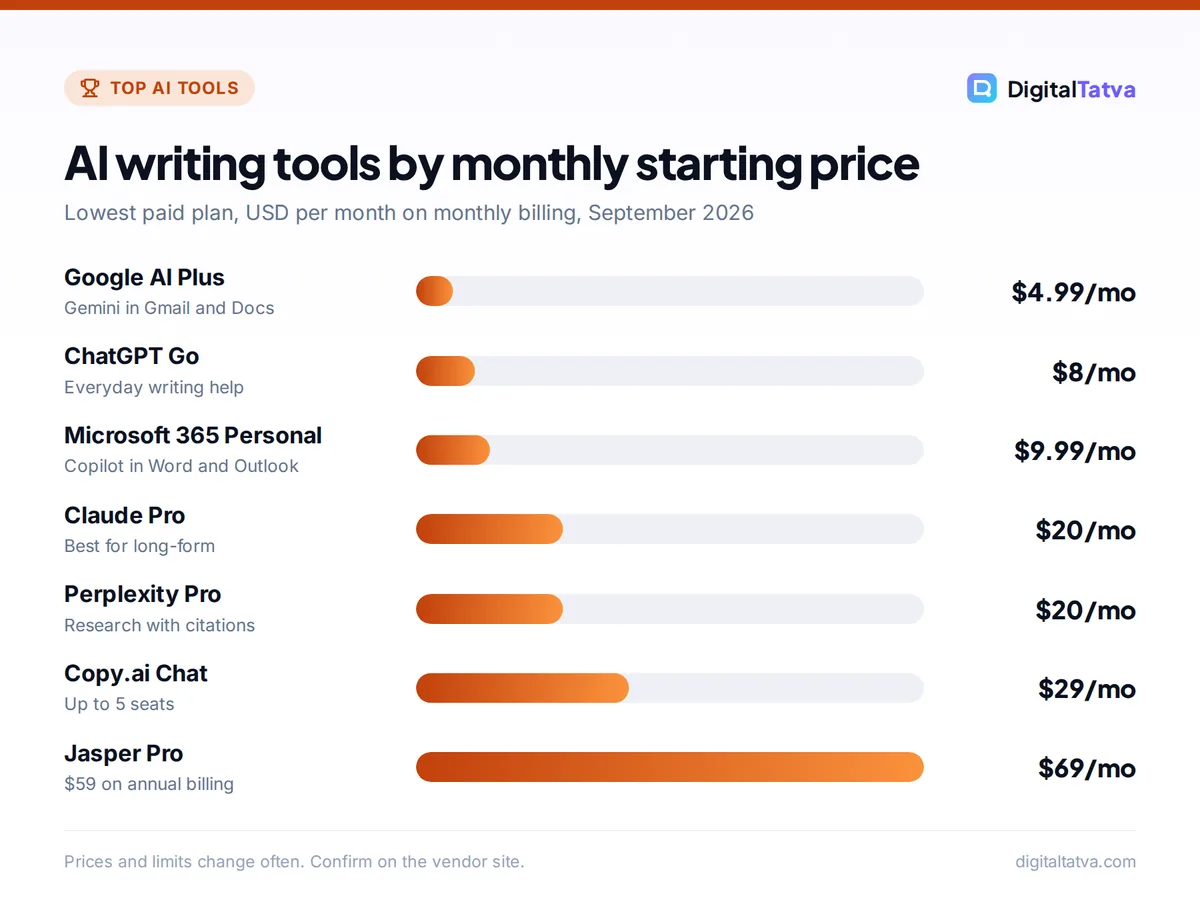
- Cheapest paid option: Google AI Plus at $4.99/month (Rs 399/month in India) adds Gemini inside Gmail and Docs.
- Best for teams: Jasper Pro at $59/seat/month billed annually, built around brand voices and marketing agents.
- Do not overbuy: a general assistant plus Grammarly Free covers most freelancers and small businesses.
Quick picks: the 10 best AI writing tools compared
Use this table to shortlist two or three tools, then read the detailed cards below. “Starting price” is the lowest paid plan on the vendor’s page. Where a vendor only shows an annual rate, we say so.
| Tool | Best for | Starting paid price | Free plan |
|---|---|---|---|
| Claude | Long-form drafts and editing | $20/mo ($17/mo annual) | Yes |
| ChatGPT | All-round writing and ideas | $8/mo (Go), $20/mo (Plus) | Yes |
| Gemini | Google Docs and Gmail users | $4.99/mo (AI Plus) | Yes |
| Jasper | Marketing teams and brand voice | $59/seat/mo annual | No (7-day trial) |
| Copy.ai | Sales and GTM workflows | $24/mo annual ($29 monthly) | Not listed |
| Grammarly | Editing, tone and polish | $12/mo annual | Yes |
| Notion AI | Writing inside a team workspace | $20/seat/mo (Business) | Limited trial |
| Surfer SEO | SEO blog content | $49/mo annual ($59 monthly) | No |
| Perplexity | Research-backed writing | $20/mo (Pro) | Yes |
| Microsoft 365 Copilot | Word and Outlook users | $9.99/mo (M365 Personal) | Yes (Copilot web) |
The 10 best AI writing tools in detail
1. Claude: Best for long-form writing and editing
- Starting price: $20/mo Pro, or $17/mo billed annually ($200/year)
- Free plan: Yes (Sonnet and Haiku models)
- Best for: bloggers, content writers, consultants, researchers
Claude from Anthropic is our top pick for anyone who writes long pieces. In everyday use, its drafts read more naturally and need fewer edits to remove the stiff, list-heavy tone that gives away AI text.
The free plan uses the Sonnet and Haiku models and includes web search, file creation and Artifacts. Pro adds Opus models, Projects (folders that keep your briefs and reference files attached to every chat) and more usage. Paid plans have a base context window of 200K tokens, and up to 1M tokens on Opus 5.5 and Sonnet 5.5, so you can paste an entire ebook or research pack. The catch is usage limits: Pro resets every five hours, and Anthropic’s own rough estimate is around 45 short messages per session. Heavy writers may need Max, which starts at $100/month. See our complete Claude pricing guide for every plan, including the reported India price of about Rs 2,000/month.
Skip it if: you need image generation or a large plugin ecosystem in the same app.
2. ChatGPT: Best all-round AI writing assistant
- Starting price: $8/mo Go, $20/mo Plus
- Free plan: Yes (unlimited text chats with GPT-5.6 Luna)
- Best for: marketers, students, generalists who write a bit of everything
ChatGPT is the most flexible writing tool on this list. It drafts, rewrites, summarizes, translates, generates images for your post and analyzes spreadsheets, all in one place. Custom GPTs let you save a reusable “writer” with your tone and formatting rules, and projects keep related chats together.
The Free plan gives unlimited text chats with GPT-5.6 Luna, which is enough for short emails and captions. Go at $8/month adds higher limits, longer memory, projects and custom GPTs. Plus at $20/month unlocks GPT-5.6 Sol with deeper thinking and GPT-6 Astra in ChatGPT Work, which noticeably improves long, structured drafts. OpenAI has said it will test ads on Free and Go in the US, while Plus and above stay ad-free. Our ChatGPT pricing breakdown covers the Pro tiers and Business seats in detail.
Skip it if: you find its default style too generic and do not want to spend time on prompts. Claude usually needs less steering for voice.
3. Gemini: Best for Google Workspace writers
- Starting price: $4.99/mo Google AI Plus (Rs 399/mo in India)
- Free plan: Yes (Gemini 3.6 Flash)
- Best for: people who draft in Google Docs and live in Gmail
Gemini’s advantage is location. On Google AI Plus, it sits inside Gmail and Docs, so you can draft a reply, rewrite a paragraph or summarize a long thread without copying text between tabs. AI Plus also includes 400 GB of storage, which makes it good value if you were going to pay for Google storage anyway.
Google AI Pro at $19.99/month (Rs 1,950/month in India) raises limits to 4x Free, adds a 1M-token context window, higher access to Gemini 3 Pro and Deep Search, and extends Gemini to Vids. The free tier runs Gemini 3.6 Flash with Canvas, a side-by-side editor that works well for drafting. Compare plans in our Gemini pricing guide.
Skip it if: you write mostly in Word or Notion. Much of the value comes from the Google app integrations.
4. Jasper: Best for marketing teams that need brand consistency
- Starting price: $59/seat/mo annual, $69 monthly (Pro)
- Free plan: No, 7-day free trial
- Best for: in-house marketing teams and agencies
Jasper is built for marketing output rather than general chat. The Pro plan includes Canvas, core marketing agents, 2 Brand Voices, 5 Knowledge assets (product and company information Jasper references), 3 Audiences, image generation, a browser extension and a plagiarism checker. The value is consistency: everyone on the team writes from the same voice and facts.
The Business plan is custom-priced with a 12-month minimum and adds advanced agents (including GEO, translation and research), a no-code agent builder, unlimited brand voices, an API and SSO. The older Creator plan no longer appears on the pricing page. For a head-to-head look, read Jasper vs Copy.ai compared.
Skip it if: you are a solo writer. At $59 or more per seat, a $20 general assistant with a saved brand prompt does most of the same work.
5. Copy.ai: Best for sales and go-to-market workflows
- Starting price: $24/mo annual ($288/year), $29 monthly (Chat plan)
- Free plan: Not shown on the pricing page
- Best for: small sales teams and GTM operators
Copy.ai has shifted from a copywriting app to a go-to-market platform. The Chat plan covers up to 5 seats with unlimited chat words and lets you switch between OpenAI, Anthropic and Gemini models, which is a good deal for a small team sharing one subscription.
The bigger plans (Growth at $1,000/month, Expansion at $2,000/month and Scale at $3,000/month, all billed annually) are about workflow credits: automated pipelines that research prospects, write outreach and repurpose content at scale.
Skip it if: you only want a writing assistant. The workflow features are where the money goes.
6. Grammarly: Best for editing, tone and final polish
- Starting price: $12/member/mo billed annually ($144/year)
- Free plan: Yes (100 AI prompts/month)
- Best for: anyone who writes emails, reports or client documents
Grammarly is not a draft generator first. It is the layer that checks what you and your AI tools produce, inside nearly every app and browser text box. The free plan includes basic corrections, tone detection and 100 AI prompts a month.
Pro adds 2,000 AI prompts per member per month, full sentence rewrites, tone adjustment, plagiarism and AI text detection, and a style guide. The old Premium plan has been merged into Pro, and the company behind Grammarly is now called Superhuman. Monthly billing is reported at about $30/month, so annual billing is far better value. Our in-depth Grammarly review covers whether Pro is worth it.
Skip it if: you only write occasional casual messages. The free tier is plenty.
7. Notion AI: Best for writing inside a team workspace
- Starting price: $20/seat/mo monthly, about $16 annual (Business)
- Free plan: Limited AI trial on Free and Plus
- Best for: teams that already run docs, wikis and projects in Notion
Notion AI writes where your notes already live. It can draft a page from meeting notes, summarize a project database, translate a doc or fill database properties automatically. Business also includes Notion Agent, AI Meeting Notes and Enterprise Search (in beta), which searches across connected tools.
Important change: full Notion AI now requires the Business plan. Free and Plus only get a limited trial, and the standalone add-on no longer appears on the pricing page. Our Notion AI pricing explainer walks through each plan.
Skip it if: you do not already use Notion. Paying for Business just for the AI is poor value next to Claude or ChatGPT.
8. Surfer SEO: Best for writing content that ranks
- Starting price: $49/mo annual, $59 monthly (Discovery)
- Free plan: No
- Best for: bloggers, SEO agencies, content marketers
Surfer is a content optimization tool with AI writing built in. It scores your draft against the pages already ranking for a keyword, suggests terms and headings to cover, and can generate outlines and full articles. Discovery includes 120 docs a month and tracks 10 pages.
Higher plans add AI search tracking, which monitors how your brand appears in answers from ChatGPT, Gemini and Google AI Overviews. Standard ($99/month annual) tracks 25 AI prompts weekly, and Pro ($182/month annual) adds daily tracking and internal linking suggestions. See how it stacks up in our roundup of the best AI SEO tools.
Skip it if: you do not publish SEO content regularly. It is overkill for emails and social posts.
9. Perplexity: Best for research-backed writing
- Starting price: $20/mo (Pro)
- Free plan: Yes, with limited daily usage
- Best for: journalists, analysts, students and B2B writers
Perplexity is an answer engine: every response comes with citations, so you can check facts before they end up in your article. Use it for the research phase, then move the verified notes into your writing tool of choice.
Pro includes 4,000 bonus credits monthly, deep research, a model picker and premium data sources such as PitchBook and Statista, which are valuable for market and industry writing. Max at $200/month is for heavy research users. Our Perplexity pricing guide explains whether Pro or Max makes sense.
Skip it if: you need polished long drafts. Perplexity is strongest at finding and summarizing sources, not at voice.
10. Microsoft 365 Copilot: Best for Word and Outlook users
- Starting price: $9.99/mo or $99.99/year (Microsoft 365 Personal)
- Free plan: Yes (Copilot web and app, not inside desktop Office)
- Best for: people who write documents in Word and email in Outlook
If your documents live in Word, Copilot is the most convenient option. Microsoft 365 Personal and Family now include Copilot inside the Office apps, so you can draft a proposal in Word or rewrite an email in Outlook without leaving the window. Microsoft 365 Premium at $19.99/month is aimed at people who want more AI usage. On Family, AI features are only for the subscription owner.
For businesses, Microsoft 365 Copilot Business is listed at $21/user/month on annual billing, and the enterprise add-on is $30/user/month paid yearly. Our Microsoft Copilot pricing guide sorts out the many plan names.
Skip it if: you work in Google Docs. Gemini is the better fit there.
How to choose the right AI writing tool
Start with what you write most often and where you write it, then pick the smallest plan that removes your daily friction.
- Define your main writing job. Long articles and reports point to Claude. A mix of emails, captions, ideas and quick research points to ChatGPT. SEO blog posts point to a general assistant plus Surfer.
- Check where you already work. If you spend the day in Gmail and Docs, Gemini saves the most time. In Word and Outlook, Microsoft 365 Copilot does. In Notion, Notion AI does.
- Decide if you need team features. Shared brand voices, admin controls and billing matter for teams of three or more. That is where Jasper, ChatGPT Business or Claude Team earn their price.
- Test on your real work. Use the free tier or trial on three actual tasks (a blog intro, a sales email and a rewrite of an old post). Compare how much editing each result needs.
- Pick monthly first, then switch to annual. Once a tool has earned a permanent place, annual billing usually saves money, for example $17 instead of $20 a month on Claude Pro.
If you are torn between the two leading assistants, our ChatGPT vs Claude comparison goes through writing quality, limits and features side by side.
Tip: The tool matters less than the brief. A prompt that includes your audience, goal, tone, a sample paragraph and a word count will beat a vague request on any tool. Our collection of Claude prompts for writing gives you ready-made templates.
AI writing tools by persona
| You are | Recommended setup | Approximate monthly cost |
|---|---|---|
| Student | ChatGPT Free or Gemini Free, plus Grammarly Free | $0 |
| Freelance writer | Claude Pro plus Grammarly Free | $20 ($17 on annual) |
| Blogger or SEO consultant | Claude Pro or ChatGPT Plus, plus Surfer Discovery | About $69 to $79 |
| Small business owner | Google AI Plus or Microsoft 365 Personal | $4.99 to $9.99 |
| Marketing team of 5 | Jasper Pro, or Claude Team or ChatGPT Business Standard seats | $20 to $59 per seat on annual |
| Sales team | Copy.ai Chat (up to 5 seats) | $24 to $29 |
Our workflow for writing a blog post with AI
A simple three-stage workflow works well: research sources with Perplexity, draft one section at a time in Claude or ChatGPT, then edit with Grammarly and optimize with Surfer if the post targets a keyword. Our guide on how to write a blog post with AI covers each stage with prompts.
Watch out: AI tools still invent facts, quotes and statistics. Always check numbers and names against a primary source before publishing, especially in health, finance and legal content.
Pricing notes and how to save
AI writing tools have become cheaper at the entry level, but costs add up quickly once you stack subscriptions. A few patterns are worth knowing before you pay.
- Annual billing saves real money. Claude Pro drops from $20 to $17 a month, Surfer Discovery from $59 to $49, and Copy.ai Chat from $29 to $24.
- Entry tiers are enough for many writers. ChatGPT Go at $8/month and Google AI Plus at $4.99/month handle everyday writing well.
- Usage limits, not features, push people to upgrade. If you keep hitting Claude’s five-hour limit, try spreading work across the day before jumping to a $100 plan.
- Students have options. Google offers eligible college students a free AI plan for a year (AI Pro in the US, AI Plus in many other countries including India), and OpenAI runs a US-only Back to School Plus offer until October 31, 2026. See our list of AI student discounts.
Save money: Before paying for a second writing tool, check whether your first one already does the job. Many people pay for ChatGPT Plus, Jasper and Grammarly Pro together when Claude or ChatGPT plus Grammarly Free would cover 90% of their work. Our guide to free ChatGPT Plus alternatives lists more zero-cost options.
Frequently asked questions
What is the best AI writing tool in 2026?
For most people, Claude is the best AI writing tool for long-form work because its drafts sound natural and it handles very long documents. ChatGPT is the best all-rounder if you also want images, data analysis and custom GPTs. Both start at $20 a month on their main paid plans, and both have useful free tiers you can test first.
Is there a completely free AI writing tool?
Yes. ChatGPT Free offers unlimited text chats with GPT-5.6 Luna, Claude Free includes Sonnet and Haiku with web search, and Gemini Free runs Gemini 3.6 Flash with Canvas. Grammarly Free adds basic corrections and 100 AI prompts a month. Together they cover most casual writing needs, though you will hit usage limits on heavy days.
Is Jasper worth it compared to ChatGPT or Claude?
Jasper is worth it for marketing teams that need shared brand voices, knowledge assets and marketing agents across several writers. For solo writers, it is usually not worth $59 or more per seat when a $20 general assistant with a saved style prompt produces similar drafts. Try the 7-day free trial on real campaign work before committing.
How much do AI writing tools cost in India?
Google AI Plus costs Rs 399 a month and Google AI Pro costs Rs 1,950 a month on Google’s India page. Claude Pro is reported at about Rs 2,000 a month including GST since July 2026. ChatGPT Plus is listed at around Rs 1,999 a month by third-party sources, but always check the local price at checkout.
Final verdict: which AI writing tool should you pick?
Start with Claude Pro if writing is your job and you produce long articles, reports or client documents. Choose ChatGPT Plus if you want one tool that writes, researches, makes images and analyzes data. If you mainly work in Google or Microsoft apps, Google AI Plus or Microsoft 365 Personal gives you AI where you already type, for less money.
Add Grammarly Free for polish and Surfer only if SEO is central to your business. Teams that need brand consistency across many writers should trial Jasper. Whatever you pick, test it on your real work for a week before paying annually. Pricing changes often, so confirm the current price on each vendor’s site, such as the official Claude pricing page, Jasper’s pricing page and Grammarly’s plans page, before you subscribe.
Pricing and features are checked at the time of writing and can change. Some links may be affiliate links, which never affect our verdicts.