40 Claude Prompts for Writing and Editing
40 ready-to-copy Claude prompts for blog posts, editing, emails, social copy, long documents and fiction, with notes on how to adapt each one to your own voice.

On this page
- Key takeaways
- How to use these Claude writing prompts
- Prompts to set up your voice and brief (1 to 5)
- Claude prompts for blog posts and articles (6 to 12)
- Claude prompts for editing and rewriting (13 to 20)
- Claude prompts for emails and business writing (21 to 26)
- Claude prompts for social media and marketing copy (27 to 32)
- Prompts for long documents and research-based writing (33 to 36)
- Claude prompts for fiction and creative writing (37 to 40)
- Why Claude for writing, and when to use something else
- Frequently asked questions
- Next steps: build your Claude writing kit
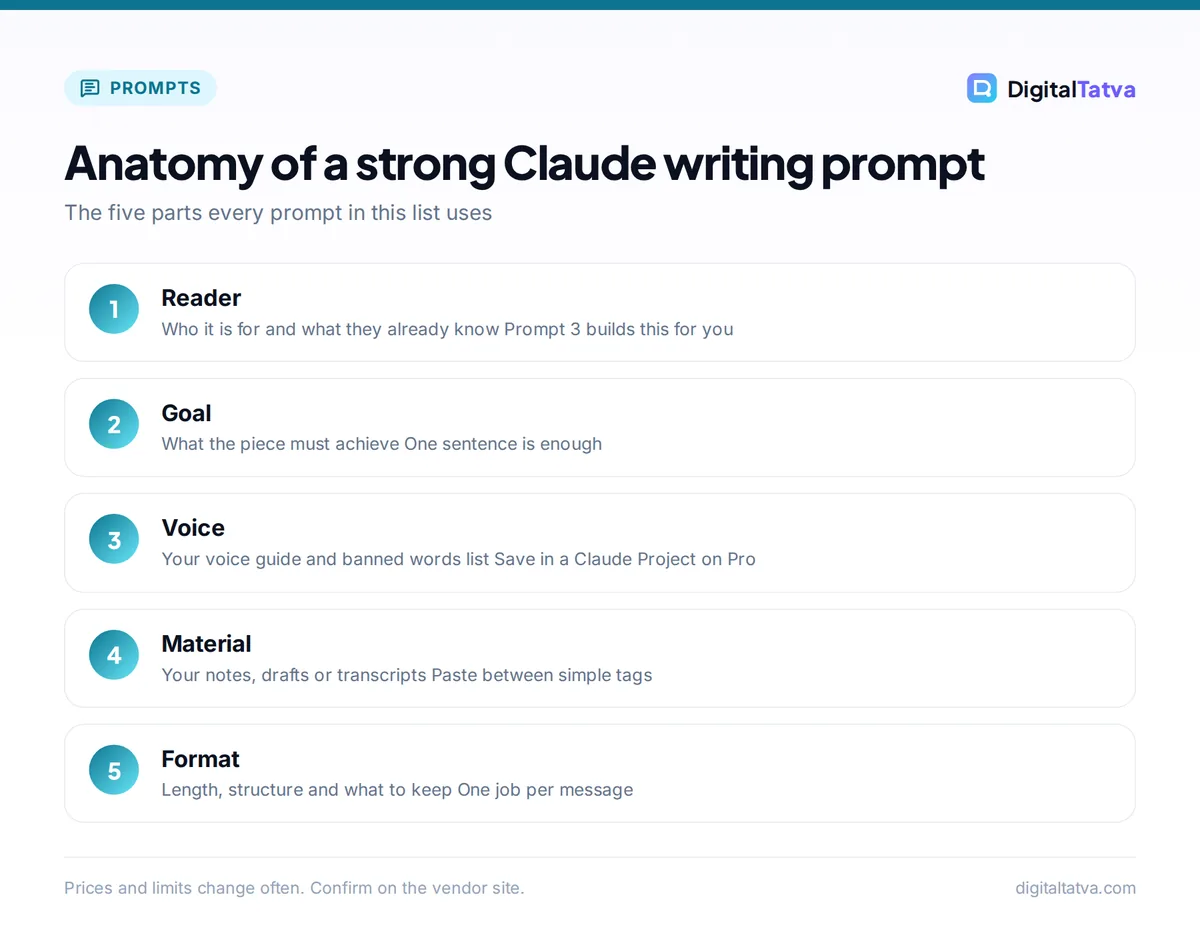
The best Claude prompts for writing give Claude four things: who the reader is, what the piece must achieve, the voice to use and the format you want back. Below are 40 ready-to-copy Claude prompts for drafting, editing, emails, social posts, long documents and fiction, each with a short note on how to adapt it. Copy a prompt, replace the words in [BRACKETS], and paste your own material where the prompt asks for it.
Every prompt works on the free Claude plan. Claude Pro ($20/month, or $17/month billed annually) adds Projects, Opus models and more usage, which helps if you write every day. We grouped the prompts by job so you can jump to what you need.
Key takeaways
- Claude writes best when you give it a reader, a goal, a voice and a format. Vague prompts get generic drafts.
- Paste real material (notes, transcripts, old posts) and ask Claude to work from it. This is where Claude is strongest.
- Edit in passes: structure first, then clarity, then line edits. One prompt per pass beats one giant prompt.
- Save your voice guide once in a Claude Project (Pro and above) so every new chat starts in your style.
- Always check facts, names and numbers in the output before you publish.
How to use these Claude writing prompts
Each prompt below is a template. Replace everything in [BRACKETS] with your details, and delete any line that does not apply. When a prompt says “paste below”, put your text after the prompt, ideally between simple tags such as <draft> and </draft> so Claude knows exactly where your material starts and ends.
Three habits make a big difference. First, ask for one job per message. Second, tell Claude what to keep as well as what to change. Third, reply with specific feedback (“shorter intro, fewer adjectives, keep the third example”) instead of starting over. If you want the theory behind these habits, our prompt engineering guide explains 12 techniques in plain English.
Which Claude plan do you need for writing?
| Plan | Price | What it means for writers |
|---|---|---|
| Free | $0 | Sonnet and Haiku models, web search, file creation, Artifacts and memory. Fine for occasional drafts and edits. |
| Pro | $20/month or $17/month annual | More usage, Opus models, Projects for saved voice guides, Claude Docs. Best for regular writers. |
| Max 5x | $100/month | 5x Pro usage per session. For full-time writers and agencies who hit Pro limits. |
| Max 20x | $200/month | 20x Pro usage per session. Heavy daily use across many projects. |
Our full Claude pricing guide covers Team plans and Indian rupee prices, and our Claude Pro vs Max comparison helps if you are unsure whether you need more usage.
Prompts to set up your voice and brief (1 to 5)
Run these first. They create reusable material that makes every later prompt better.
1. Build a voice guide from your own writing.
Below are three pieces I wrote that I am happy with. Analyze my writing voice: sentence length, vocabulary, tone, how I open and close, and words I never use. Turn it into a one-page voice guide with rules and short examples that another writer could follow. Paste below.
Use your best work. Three to five samples is enough.
2. Interview me before writing.
I need to write [TYPE OF PIECE] about [TOPIC] for [AUDIENCE]. Before you write anything, ask me up to 8 questions, one at a time, to collect the facts, opinions and examples you need. When I say “done”, write a creative brief from my answers.
This is the single best prompt for avoiding generic drafts, because the content comes from you.
3. Define the reader.
Describe the ideal reader for [PIECE]. Cover what they already know, what they are worried about, what would make them stop reading, and the one question they want answered. Keep it to 150 words.
4. Turn messy notes into a brief.
Here are my rough notes. Turn them into a writing brief with: goal, audience, key message in one sentence, 3 to 5 supporting points, tone, length and call to action. Flag anything that is missing or contradictory. Paste below.
5. Create a banned words list.
List 30 overused words and phrases that make writing about [TOPIC] sound generic or AI-written. For each, give a plainer alternative. I will add this list to every writing prompt.
Add the list and your voice guide to a Claude Project so you never paste them again. Our guide on how to use Claude Projects shows the setup.
Claude prompts for blog posts and articles (6 to 12)
6. Outline from search intent.
I am writing a blog post targeting the keyword “[KEYWORD]” for [AUDIENCE]. Describe what someone searching this wants to know. Then propose an outline with H2 and H3 headings, a one-line note on what each section covers, and the question each section answers.
7. Write the opening that answers first.
Write three alternative openings for a post titled “[TITLE]”. Each must answer the reader’s main question in the first two sentences, under 70 words, with no scene-setting or rhetorical questions.
8. Draft one section at a time.
Using the outline above and my voice guide, write only the section “[HEADING]”. Length: about [NUMBER] words. Include one concrete example. Use short paragraphs. Do not summarize at the end of the section.
Section-by-section drafting keeps quality high on long posts and makes edits easier. For the full process, see how to write a blog post with AI that actually ranks.
9. Turn expert notes into an article.
Below is a transcript of me explaining [TOPIC]. Turn it into a structured article of about [NUMBER] words. Keep my opinions, examples and phrases where they are strong. Do not add facts or statistics that are not in the transcript. Paste below.
10. Write an FAQ section.
Write 5 FAQs for an article about [TOPIC]. Use questions people actually type into Google. Answer each in 40 to 70 words, starting with a direct answer.
11. Strengthen the conclusion.
Rewrite the conclusion below so it gives a clear recommendation and one next step, without repeating the article. Maximum 100 words. Paste below.
12. Generate titles and meta descriptions.
Suggest 10 titles for this article under 60 characters, with the keyword “[KEYWORD]” near the start. Then write 3 meta descriptions of 140 to 155 characters. Avoid clickbait and exclamation marks.
Watch out: Claude can produce statistics and quotes that sound real but are not. Add “Do not invent facts, numbers or quotes. Mark anything that needs a source with [SOURCE NEEDED]” to any prompt that writes factual content.
Claude prompts for editing and rewriting (13 to 20)
Paste the full text and say exactly what to protect.
13. Structural edit.
Act as a senior editor. Read the draft below and comment only on structure: is the argument clear, is anything in the wrong order, what is missing, what can be cut. Give a numbered list of changes. Do not rewrite yet. Paste below.
14. Line edit with tracked reasons.
Line edit the text below for clarity and flow. Keep my voice and meaning. Show the edited version, then a short list of the 5 most important changes and why you made them. Paste below.
15. Cut by a third.
Cut the text below by about 30% without losing any key point or example. Remove repetition, filler and hedging first. Paste below.
16. Make it plain English.
Rewrite the text below for a reader with no background in [FIELD]. Explain any jargon once in plain words. Aim for short sentences. Keep it accurate. Paste below.
17. Change the tone.
Rewrite this in a [warmer / more formal / more confident / more playful] tone for [AUDIENCE]. Keep the structure and facts the same. Paste below.
18. Remove the AI sound.
The draft below sounds generic. Rewrite it so it sounds like a specific person with opinions. Replace vague claims with concrete details from the text, vary sentence length, and remove any words from my banned list. Paste below.
19. Proofread only.
Proofread the text below for spelling, grammar and punctuation in [US / UK] English. Do not change wording or style. List each correction as “original, corrected”. Paste below.
For constant in-app proofreading across email and documents, a dedicated checker can complement Claude; see our Grammarly review.
20. Critique as a skeptical reader.
Read this as a skeptical [TARGET READER]. Where would you stop believing me, get bored or have an objection? Quote the exact sentences and explain. Paste below.
Tip: Run prompts 13, 14 and 19 as three separate messages, in that order. Fixing structure after a line edit wastes work, and one combined “make this better” prompt usually produces a weaker result.
Claude prompts for emails and business writing (21 to 26)
21. Write a hard email.
Help me write an email to [PERSON AND RELATIONSHIP] about [SITUATION]. I want to [GOAL] while keeping the relationship good. Write two versions: one direct, one softer. Under 150 words each.
22. Reply to a long thread.
Summarize the email thread below in 3 bullet points, list any questions addressed to me, then draft a reply that answers them clearly. Paste below.
23. Proposal or pitch.
Draft a one-page proposal for [CLIENT] to deliver [SERVICE]. Sections: their problem, our approach, deliverables, timeline, price placeholder, next step. Use their language from the brief below. Paste below.
24. Report summary for executives.
Turn this report into an executive summary of under 200 words: the main finding, why it matters, and the decision needed. Then list 3 risks. Paste below.
25. Meeting notes to action email.
From the meeting notes below, write a follow-up email with decisions made, action items (owner and due date) and open questions. Keep it scannable. Paste below.
26. Cold outreach that sounds human.
Write a cold email to [ROLE] at [COMPANY TYPE] offering [OFFER]. Open with something specific to them: [DETAIL]. One clear ask. Under 100 words. No flattery or buzzwords.
Small business owners will find more sales and support templates in our 60 AI prompts for small business owners.
Claude prompts for social media and marketing copy (27 to 32)
27. LinkedIn post from an idea.
Write a LinkedIn post about [IDEA OR LESSON] in my voice. Start with a specific first line, not a question. Include one story or example, one practical takeaway and no hashtags in the body. 150 to 220 words.
28. Repurpose one article into many posts.
Turn the article below into: one LinkedIn post, a 5-post X thread, and 3 Instagram captions. Each must stand alone and use a different angle from the article. Paste below.
29. Hooks in bulk.
Write 15 opening lines for a post about [TOPIC] for [AUDIENCE]. Mix formats: a bold claim, a number, a mistake, a short story start, a contrarian view. Under 15 words each.
30. Landing page copy.
Write landing page copy for [PRODUCT] for [AUDIENCE]. Include headline, subheadline, 3 benefit blocks, objection handling, and a call to action. Base every claim on the product notes below; do not invent features. Paste below.
31. Product descriptions.
Write a product description of about 120 words for [PRODUCT] using these details: [FEATURES, MATERIALS, SIZES]. Lead with the main benefit for [CUSTOMER]. End with a short list of key specs.
32. Newsletter edition.
Draft this week’s newsletter for [AUDIENCE] from the links and notes below. Structure: a short personal intro, 3 items with a 2-sentence takeaway each, one tip, sign-off. Suggest 5 subject lines under 45 characters. Paste below.
For more marketing prompts, see our 75 ChatGPT prompts for marketing; nearly all of them work in Claude too. Our list of the best AI tools for social media covers design and scheduling tools to pair with this copy.
Prompts for long documents and research-based writing (33 to 36)
Paid Claude plans have a base context window of 200K tokens in chat, and Opus 5.5 and Sonnet 5.5 support up to 1M tokens. In practice, that means you can paste a long report, a book chapter or several transcripts in one go. Our explainer on the context window shows what those numbers mean in pages.
33. Write from sources only.
Using only the documents below, write a [LENGTH] briefing on [QUESTION]. After each claim, note which document it came from. If the documents do not answer something, say so instead of guessing. Paste below.
34. Compare documents.
Compare the two drafts below. List what changed, what was lost from version 1 that was worth keeping, and which version is stronger for [GOAL], with reasons. Paste below.
35. Style consistency check.
Check this long document against my style guide below. List every inconsistency in terms, capitalization, numbers, tone and headings, with the location. Do not rewrite. Paste below.
36. Long piece into a short version.
Turn the document below into a 600-word version for [AUDIENCE] who will read it on a phone. Keep the three most important points and one example. Paste below.
Save money: Long pastes use up your usage faster. Start a fresh chat for each new piece instead of continuing a very long thread, and paste only the sections Claude needs. Our guides to Claude usage limits and reducing token usage have more tactics.
Claude prompts for fiction and creative writing (37 to 40)
37. Story development partner.
I am writing a [GENRE] story about [PREMISE]. Ask me questions about the main character, their goal and what stands in the way. Then suggest three possible plot directions with a different ending for each.
38. Scene from a summary.
Write the scene where [EVENT], from [CHARACTER]’s point of view, in close third person. Show emotion through action and dialogue, not description. About 600 words. Match the tone of the sample below. Paste below.
39. Dialogue polish.
Improve the dialogue below so each character sounds distinct. [CHARACTER A] is [TRAITS]; [CHARACTER B] is [TRAITS]. Cut lines that only deliver information. Paste below.
40. Beta reader feedback.
Read this chapter as a beta reader who loves [GENRE]. Tell me where you were gripped, where you skimmed, what confused you and what you expect to happen next. Be honest and specific. Paste below.
Why Claude for writing, and when to use something else
In everyday use, Claude’s long drafts tend to need fewer edits, follow style instructions closely and handle large pasted documents well. That makes it our first choice for editing, ghostwriting from transcripts and long-form content. Our Claude review covers its strengths and limits in more depth.
Other tools win in some cases. ChatGPT has custom GPTs and image creation in the same app, and Gemini sits inside Gmail and Docs for Google Workspace users. If you are choosing between assistants, read ChatGPT vs Claude and Claude vs Gemini for writing, or browse the full list of the best AI writing tools.
Where these prompts work best
- Editing and rewriting your own drafts
- Turning notes, calls and transcripts into articles
- Long documents and source-based writing
- Matching a defined brand or personal voice
Where to be careful
- Fresh facts, prices and statistics (verify every one)
- Quotes and testimonials (never let AI invent them)
- Legal, medical or financial claims
- Publishing without a human read-through
Frequently asked questions
Are these Claude prompts free to use?
Yes. Every prompt in this list works on the free Claude plan, which includes the Sonnet and Haiku models, web search, file creation and Artifacts. You may hit usage limits faster on long documents. Claude Pro at $20/month adds more usage, Opus models and Projects, which let you save your voice guide and banned words list for every new chat.
Is Claude better than ChatGPT for writing?
For many writers, yes. Claude tends to follow tone and style instructions closely and produces long drafts that need less editing, which is why we prefer it for editing and long-form work. ChatGPT is stronger as an all-in-one tool with custom GPTs and image creation. Try the same prompt in both free plans with your own material and compare.
How do I make Claude write in my own voice?
Give it examples. Paste three to five pieces you wrote and use prompt 1 to turn them into a voice guide, then add a banned words list from prompt 5. Store both in a Claude Project on Pro or above so every chat starts with them. Give specific feedback on drafts, such as shorter sentences or fewer adjectives, rather than asking it to try again.
Can Claude edit a long document or a full book chapter?
Yes. Paid Claude plans have a base chat context window of 200K tokens, and Opus 5.5 and Sonnet 5.5 support up to 1M tokens, which is enough for long reports and full chapters. For best results, ask for one type of edit at a time, starting with structure, and tell Claude which parts to keep unchanged.
Does Claude make up facts in its writing?
It can. Like every AI model, Claude sometimes produces statistics, quotes or sources that sound right but are not. Ask it to write only from material you paste, tell it not to invent facts, and have it mark claims that need a source. Then verify every number and name yourself before you publish.
Next steps: build your Claude writing kit
Start with prompts 1, 2 and 5 to create your voice guide, interview habit and banned words list. Save them in a Claude Project if you are on Pro, then pick the five prompts you will use most and keep them in a note for quick copying. Check plan details on the official Claude pricing page and the Claude context window help article, since Claude plans and pricing change often and you should confirm the current details on Anthropic’s site before you subscribe.
Pricing and features are checked at the time of writing and can change. Some links may be affiliate links, which never affect our verdicts.