10 Best AI Tools for Social Media Marketing
The 10 best AI tools for social media marketing in 2026, from Canva, ChatGPT and Claude to Firefly, HeyGen and Zapier, with prices, free plans and a simple weekly workflow.

On this page
The best AI tools for social media in 2026 are Canva for designing posts, ChatGPT and Claude for captions and content calendars, Adobe Firefly and Ideogram for original images, CapCut and HeyGen for short videos, and Buffer or Hootsuite for scheduling. A solo creator or small business can run a solid social presence with Canva, one chatbot and a scheduler, often for under $30/month in total.
Below are the 10 AI social media tools we recommend, grouped by the job they do, with prices, free plan details and who should skip each one. We also share a simple weekly workflow that ties them together.
Key takeaways
- Canva is the one tool almost every social media marketer needs; Pro costs US$144/year or Rs 4,000/year in India.
- Use ChatGPT or Claude (both $20/month for their main paid plan, with free tiers) for captions, hooks, hashtags and monthly content calendars.
- Adobe Firefly outputs are designed to be commercially safe, with plans from $9.99/month.
- HeyGen’s free plan gives 3 short avatar videos a month; Creator starts at $29/month.
- Pair creation tools with a scheduler like Buffer or Hootsuite, and use Zapier to automate the busywork.
Best AI tools for social media: quick comparison
Prices below are official USD list prices from September 2026 where available. CapCut, Buffer and Hootsuite prices could not be confirmed on official pages for this article, so check them directly.
| Tool | Best for | Starting paid price | Free plan |
|---|---|---|---|
| Canva | Post and carousel design | Pro US$144/yr | Yes (20 AI uses) |
| ChatGPT | Captions and content ideas | Go $8/mo, Plus $20/mo | Yes |
| Claude | Brand voice and long posts | Pro $20/mo ($17 annual) | Yes |
| Adobe Firefly | Commercially safe images | Standard $9.99/mo | Yes (daily free generations) |
| Ideogram | Images with readable text | Plus $20/mo ($15 annual) | Yes |
| CapCut | Short-form video editing | Not verified officially | Yes |
| HeyGen | AI avatar videos | Creator $29/mo | Yes (3 videos/mo) |
| Buffer | Simple scheduling for small teams | Check vendor page | Yes |
| Hootsuite | Agencies and larger teams | Check vendor page | Trial |
| Zapier | Automating social workflows | Professional $19.99/mo (annual) | Yes (100 tasks/mo) |
The 10 best AI social media tools, reviewed
1. Canva: Best for designing social posts fast
- Starting price: Free; Pro US$144/year; Business US$250/year per person
- Free plan: Yes (up to 20 AI uses)
- Best for: Carousels, Reels covers, stories and ad creatives
Canva is the backbone of most small social media teams. Its templates are sized for every platform, and its AI tools can generate images, remove backgrounds, resize a design for different networks and draft copy inside the editor. The free plan includes up to 20 uses of Standard or Premium AI and one Brand Kit.
Pro gives 10x more AI than Free, 5 Brand Kits and 100 GB of storage for US$144/year. In India, Pro is Rs 4,000/year, and there is a cheaper Pro Lite at Rs 1,590/year, though Pro Lite keeps the same 20 AI uses as Free. Teams is closed to new sign-ups, so teams now choose Business at US$250 per person per year.
See our Canva pricing guide and our review of Canva’s AI design tools for a deeper look.
2. ChatGPT: Best for captions, hooks and content calendars
- Starting price: Free; Go $8/mo; Plus $20/mo
- Free plan: Yes
- Best for: Planning, caption variations, repurposing content
ChatGPT is the fastest way to go from a blank page to a month of post ideas. Give it your audience, offer and tone, then ask for a 30-day calendar with hooks, captions and suggested formats. It can also rewrite one blog post into a LinkedIn post, an X thread and three Instagram captions in a single prompt.
The free plan is fine for occasional use. Plus at $20/month adds more advanced models, expanded image creation and projects, which are useful for keeping a separate workspace per client or brand. Custom GPTs let you save your brand guidelines once and reuse them. Start with our 75 ChatGPT prompts for marketing.
3. Claude: Best for brand voice and thoughtful long posts
- Starting price: Free; Pro $20/mo or $17/mo annual
- Free plan: Yes
- Best for: LinkedIn thought leadership, newsletters, founder-led content
If your social strategy relies on long, personal posts, Claude is the better writer. It follows style instructions closely and its drafts usually sound less generic, which matters on LinkedIn where audiences quickly spot robotic copy.
Claude Pro includes Projects, where you can upload past high-performing posts and a brand voice document so every new draft starts from your style. Our set of Claude prompts for writing and editing includes templates for social copy.
4. Adobe Firefly: Best for commercially safe images
- Starting price: Free daily generations; Standard $9.99/mo; Pro $19.99/mo
- Free plan: Yes
- Best for: Brands that need safe-for-commercial-use visuals
Adobe says outputs from its Firefly models are safe for commercial use because the models are trained on licensed and public domain content. For brands worried about copyright, that is the main reason to choose Firefly over other image generators.
Anyone can use free daily generations. Firefly Standard at $9.99/month gives 2,000 generative credits plus Adobe Express Premium, which is useful for quick social templates. Firefly Pro at $19.99/month gives 4,000 credits and up to 40 five-second videos. Note that partner models inside Firefly may have different terms. Compare it with Canva in Canva AI vs Adobe Firefly, and see current plans on the official Firefly plans page.
5. Ideogram: Best for images with readable text
- Starting price: Free; Plus $20/mo or $15/mo annual
- Free plan: Yes (slow generations, public)
- Best for: Quote cards, announcement graphics, event posters
Many image generators still struggle with text inside images. Ideogram is known for getting words right, which makes it ideal for quote posts, sale announcements and event graphics. Its free plan allows commercial use, though free images are public.
Plus at $20/month ($15 annual) gives 1,000 priority credits per month, unlimited slow generations and private images. For more options, read our list of the best AI image generators.
6. CapCut: Best for editing short-form video
- Starting price: Not confirmed on an official page
- Free plan: Yes
- Best for: Reels, Shorts and TikTok-style edits
CapCut is popular with short-form creators thanks to its auto-captions, templates, trending effects and AI editing tools. You can go from raw phone footage to a captioned Reel in minutes.
We could not verify CapCut’s pricing on an official page for this article. A third-party source lists Standard at about $9.99/month and Pro at about $19.99/month, with prices varying by platform and region, so check inside the app before you subscribe. Also check whether CapCut is available in your country, since availability varies.
7. HeyGen: Best for AI avatar and talking-head videos
- Starting price: Free; Creator $29/mo; Pro $49/mo
- Free plan: Yes (3 videos/month, up to 1 minute, watermark)
- Best for: Explainers, product updates and multilingual clips
HeyGen turns a script into a video of a realistic presenter, using a stock avatar or a custom avatar of you. It is useful when you need regular talking-head content but cannot film every week, or when you want the same message in several languages.
The free plan allows 3 videos a month of up to one minute each, with a watermark and 1080p export. Creator at $29/month removes the watermark and allows videos up to 30 minutes, and Pro at $49/month adds 4K export. Compare it with its main rival in Synthesia vs HeyGen, or see all options in our list of the best AI video generators.
8. Buffer: Best simple scheduler for small businesses
- Starting price: Check the vendor pricing page
- Free plan: Yes (limited channels)
- Best for: Solo creators and small teams
Buffer keeps scheduling simple: connect your accounts, add posts to a queue and let it publish at the times you choose. Its built-in AI Assistant helps you draft and rewrite captions and adapt one post for several networks without leaving the scheduler.
Buffer charges per connected channel on its paid plans, so the cost grows with the number of profiles you manage. We have not verified its 2026 prices, so check Buffer’s pricing page. It is our pick for small businesses that want a clean, low-cost scheduler.
9. Hootsuite: Best for agencies and larger teams
- Starting price: Check the vendor pricing page
- Free plan: Free trial rather than a permanent free plan
- Best for: Agencies, multi-brand teams, social listening
Hootsuite is a full social media management suite with scheduling, a shared inbox, analytics, approvals and social listening. Its AI writing assistant, OwlyWriter, generates captions and post ideas, and the platform is built for teams that manage many accounts and clients.
It is more expensive than lightweight schedulers, so it makes most sense for agencies. We have not verified Hootsuite’s current prices, so confirm them on its pricing page. For agency setups, read our guide to AI for marketing agencies.
10. Zapier: Best for automating social media busywork
- Starting price: Free; Professional from $19.99/mo billed annually
- Free plan: Yes (100 tasks/month, two-step Zaps)
- Best for: Connecting forms, sheets, AI and social tools
Zapier connects your apps so repetitive tasks run on their own. For social media, common workflows include turning a new blog post into AI-drafted captions in a Google Sheet, sending new Instagram comments to Slack, or logging every published post in a content tracker.
The free plan gives 100 tasks a month with two-step Zaps. Professional starts at $19.99/month on annual billing and adds multi-step Zaps, premium apps and AI fields. Our tutorial on automating repetitive tasks with Zapier and AI shows how to build your first workflow.
A simple weekly AI workflow for social media
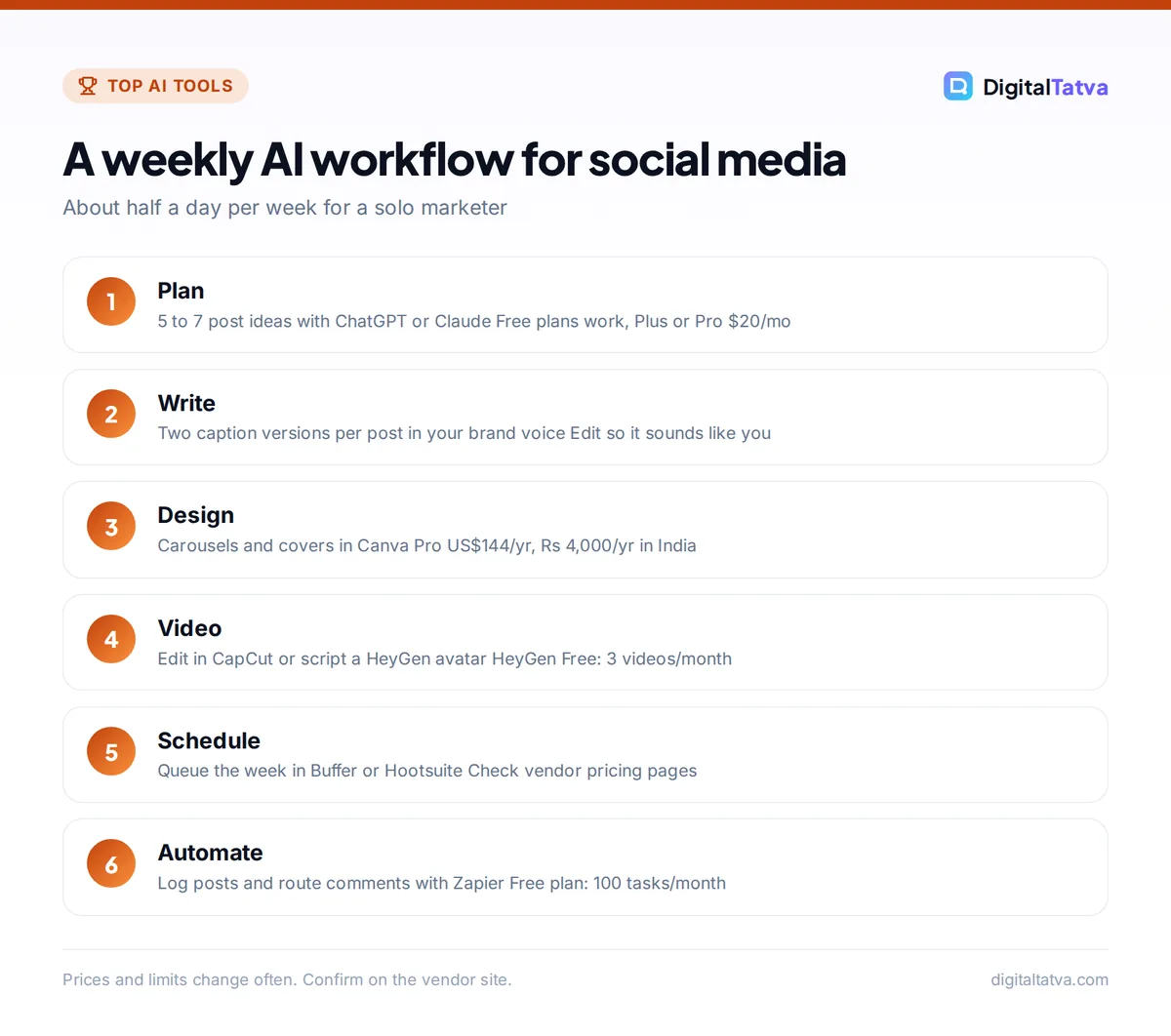
Tools only save time when they fit into a routine. Here is a workflow a solo marketer or small business owner can run in about half a day per week.
- Plan the week with a chatbot. Give ChatGPT or Claude your goals, audience and upcoming offers. Ask for 5 to 7 post ideas with hooks and suggested formats (carousel, Reel, quote card).
- Write the captions. Ask for two caption versions per post in your brand voice, plus a short list of relevant hashtags. Edit them yourself so they sound like you.
- Design the visuals. Build carousels and covers in Canva. Use Firefly or Ideogram when you need an original image or a graphic with text.
- Create the videos. Edit phone footage in CapCut, or script a HeyGen avatar video for explainers.
- Schedule everything. Load posts into Buffer or Hootsuite for the week, picking times when your audience is most active.
- Automate the follow-up. Use Zapier to log published posts and route new comments or leads to your inbox.
- Review results monthly. Paste your analytics export into a chatbot and ask which topics and formats performed best, then plan the next month around them.
Tip: Save a one-page brand voice guide (tone, words to use, words to avoid, three example posts) and paste it at the start of every caption prompt, or store it in a ChatGPT project or Claude Project. It is the single biggest improvement you can make to AI-written copy.
How to choose AI tools for social media
Start with the job, not the tool
Most marketers need three things: something to write, something to design and something to publish. Canva plus one chatbot plus one scheduler covers all three. Add video, image or automation tools only when a specific bottleneck appears.
Check commercial rights
If you post for a business or clients, make sure the images and videos you generate can be used commercially. Adobe states Firefly outputs are commercially safe, and Ideogram’s free plan allows commercial use. Check terms for every other tool, especially free tiers, and read our Midjourney vs ChatGPT image comparison if you are weighing other image tools.
Watch AI credit limits
Many design and video tools now meter AI with credits. Canva shares one AI pool across its tools, Firefly and HeyGen use monthly credits, and heavy video use drains credits fastest. Estimate how many posts and videos you publish per month before choosing a tier.
Keep a human in the loop
AI copy can sound generic, and AI images can include odd details. Review every post before it goes out, and keep your own stories, opinions and customer examples at the center of your content. That is what audiences follow you for.
Sample budgets for different users
| User | Suggested stack | Approximate cost |
|---|---|---|
| Beginner or student creator | Canva Free, ChatGPT Free, Buffer free plan, CapCut free | $0 |
| Solo creator or small business | Canva Pro, ChatGPT Plus or Claude Pro, a paid scheduler | About $32/mo plus scheduler |
| Small business in India | Canva Pro (Rs 4,000/yr), ChatGPT Go ($8/mo), a free scheduler plan | Under Rs 1,100/mo equivalent |
| Agency | Canva Business, Claude or ChatGPT team seats, Hootsuite, Zapier Professional, HeyGen | Varies by seats and clients |
The solo figure combines Canva Pro at US$144/year (US$12/month) with a $20 chatbot plan. For a broader view of low-cost stacks, see our guide on how small businesses can use AI without a big budget.
Save money: Pay annually for tools you use every week. Claude Pro drops from $20 to $17/month, Ideogram Plus from $20 to $15/month, and Zapier Professional is cheapest on annual billing.
Frequently asked questions
What is the best AI tool for social media marketing?
Canva is the most useful single AI tool for social media because it handles design, resizing, image generation and quick copy in one place. Pair it with ChatGPT or Claude for captions and planning, and a scheduler such as Buffer or Hootsuite. That three-tool stack covers what most small businesses and creators need every week.
Is there a free AI tool for creating social media posts?
Yes. Canva Free includes up to 20 AI uses, ChatGPT Free and Claude Free can write captions and calendars, Adobe Firefly offers free daily generations, and Ideogram’s free plan allows commercial use. HeyGen’s free plan makes 3 short avatar videos a month with a watermark. Together these cover a basic social presence at no cost.
Can AI write Instagram captions and hashtags?
Yes, and it does this well if you give it context. Share your audience, offer, tone and a few past captions you liked, then ask for two or three versions plus a short list of relevant hashtags. Always edit the result so it sounds like you, and avoid stuffing posts with too many hashtags.
Are AI-generated images safe to use for business?
It depends on the tool. Adobe says Firefly outputs are safe for commercial use, and Ideogram permits commercial use even on its free plan. Other tools may restrict commercial use on free tiers or have unclear terms. Check the licensing terms of each tool before using its images in ads or client work.
How much do AI social media tools cost in India?
Canva publishes rupee prices: Pro Lite is Rs 1,590/year, Pro is Rs 4,000/year and Business is Rs 6,800/year per person. Most other tools bill in USD, such as ChatGPT Go at $8/month and Firefly Standard at $9.99/month. A capable stack for a small business can cost under Rs 1,100/month equivalent.
Our verdict: the best AI social media stack
For most creators and small businesses, the winning combination is Canva Pro for design, ChatGPT or Claude for writing and planning, and Buffer for scheduling. Add Firefly or Ideogram for original images, CapCut or HeyGen for video, and Zapier once you have repetitive steps worth automating. Agencies should look at Hootsuite for team workflows and approvals.
Start free, build the weekly workflow above, and upgrade only the tool that slows you down most. Social media tool pricing changes frequently, so confirm current plans on each vendor’s official site before you buy.
Related reading:
Pricing and features are checked at the time of writing and can change. Some links may be affiliate links, which never affect our verdicts.



