How Small Businesses Can Use AI Without a Big Budget
How small businesses can use AI on a tight budget: a free AI stack, the best $5 to $30 a month upgrades, AI you already pay for, and a 30-day rollout plan.

On this page
- Key takeaways
- What AI can realistically do for a small business
- Level 1: the $0 small business AI stack
- Level 2: the $5 to $30 a month stack
- Use the AI you already pay for
- 8 practical ways to use AI in a small business
- A 30-day plan to roll out AI on a small budget
- When a team plan is worth it
- Common mistakes small businesses make with AI
- Frequently asked questions
- Next steps: build your low-budget AI setup this week
Small businesses can use AI without a big budget by starting with free plans, paying for one $8 to $20 a month assistant only when the free limits get in the way, and pointing that assistant at the three or four tasks that eat the most time each week: marketing copy, customer replies, proposals and admin. Most owners get real value for $0 to $30 a month. You do not need custom software, a data team or an enterprise contract.
This guide shows what AI is good at in a small business, which tools to use at each budget level, how to use the AI you may already pay for, and a simple 30-day plan to roll it out without wasting money. Prices are from vendor pages as of September 2026.
Key takeaways
- Start free: ChatGPT Free, Gemini Free, Claude Free, Canva Free and Zapier Free cover a surprising amount of daily work at no cost.
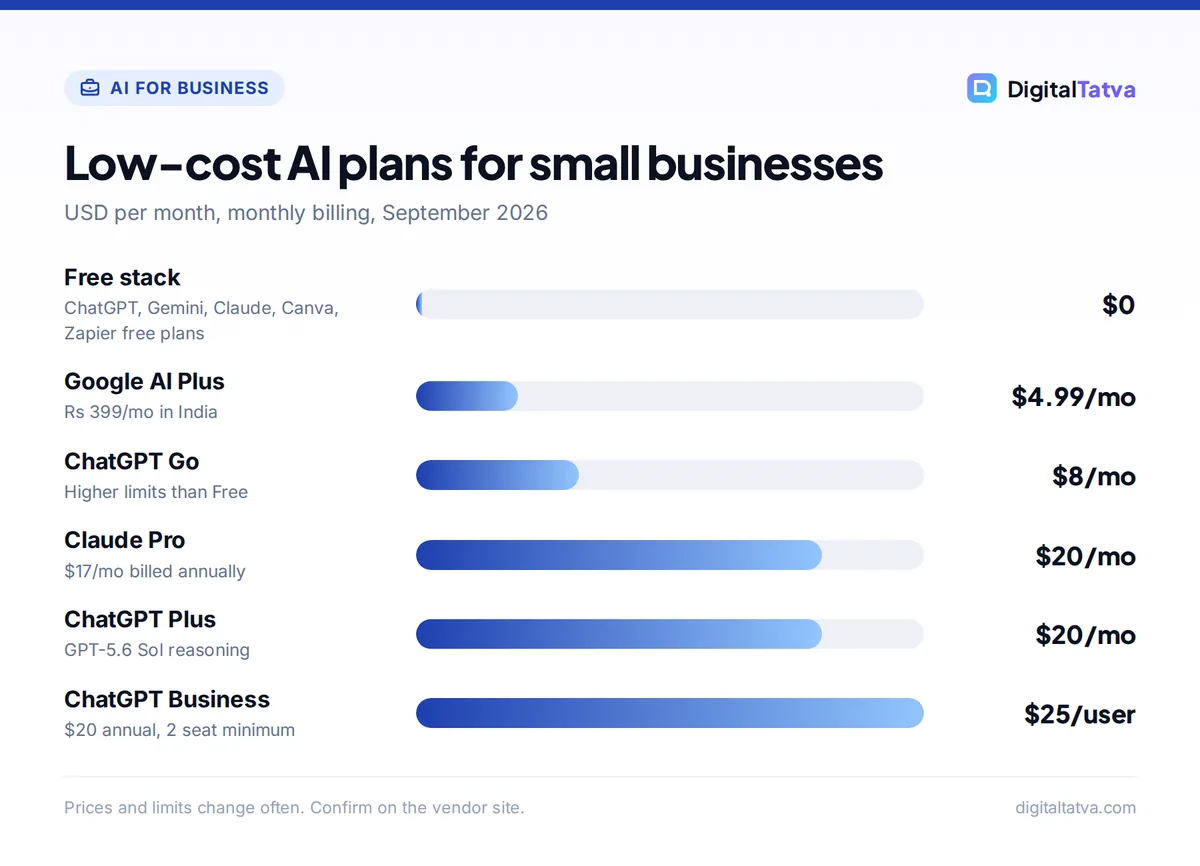
- Your first paid tool should be one assistant: Google AI Plus ($4.99/mo, Rs 399/mo in India), ChatGPT Go ($8/mo) or a $20 plan like ChatGPT Plus or Claude Pro.
- Check what you already pay for: Google Workspace Business plans now bundle Gemini, and Microsoft sells Copilot Business as an add-on for Microsoft 365.
- Pick tasks, not tools: the biggest wins come from repeatable jobs such as replying to enquiries, writing posts and turning meetings into follow ups.
- Protect customer data: keep personal and financial details out of free consumer tools and write a one-page AI policy before staff start using AI.
What AI can realistically do for a small business
Generative AI (tools like ChatGPT, Claude and Gemini that write, summarize and analyze text on request) works best as a fast first-draft assistant. It does not replace your judgment, but it can turn a 40-minute writing job into a 10-minute editing job. The tasks below are where small businesses usually see results first.
| Task | What AI does | Good low-cost tool | Typical cost |
|---|---|---|---|
| Marketing copy | Drafts posts, ads, emails and product descriptions | ChatGPT, Claude or Gemini | $0 to $20/mo |
| Social graphics | Generates images, resizes designs, writes captions | Canva | $0, or US$144/yr for Pro |
| Customer enquiries | Suggests replies, answers FAQs, sorts leads | Your assistant, or Tidio for a website chatbot | $0 to start |
| Proposals and quotes | Turns notes into a structured proposal | Claude or ChatGPT | $0 to $20/mo |
| Meeting notes | Transcribes calls and lists action items | Otter.ai or Fireflies.ai | $0 to start |
| Admin automation | Moves data between apps, sends alerts | Zapier or Make | $0 to start |
| Spreadsheets | Explains formulas, cleans data, spots trends | ChatGPT, Gemini or Copilot | $0 to $20/mo |
For a ranked shortlist of specific products, see our guide to the best AI tools for small business owners. This article focuses on how to spend as little as possible while still getting the benefit.
Level 1: the $0 small business AI stack
If your budget is zero, you can still build a capable toolkit. Free plans have caps, but a small team that uses AI a few times a day often stays inside them.
- ChatGPT Free: unlimited text chats with GPT-5.6 Luna, plus limited uploads, image creation and deep research. Good for emails, captions and quick questions. OpenAI is testing ads on Free in the US.
- Gemini Free: Gemini 3.6 Flash, image generation, Deep Research (a multi-step web research mode that writes a report) and 15 GB of storage. Strong if you already use Gmail and Google Drive.
- Claude Free: Sonnet and Haiku models with web search, file creation and Artifacts. In everyday use, Claude’s long drafts need fewer edits, which helps with proposals and policies.
- Canva Free: templates plus up to 20 uses of its AI tools, 5 GB storage and one Brand Kit.
- Zapier Free: 100 tasks a month on two-step automations, enough to test one or two ideas, such as saving form leads to a spreadsheet.
- Otter Basic: 300 transcription minutes a month, capped at 30 minutes per conversation.
Our full list of the best free AI tools you can use today covers more options, including free image and voice tools.
Tip: Use two free chatbots side by side. When ChatGPT Free limits your uploads or images for the day, switch to Gemini or Claude instead of upgrading.
Level 2: the $5 to $30 a month stack
Pay for one assistant once free limits slow you down every week. You rarely need more than one paid chatbot in a small business.
| Plan | Price | Best for |
|---|---|---|
| Google AI Plus | $4.99/mo (Rs 399/mo in India) | 2x Free usage limits plus Gemini in Gmail and Docs |
| ChatGPT Go | $8/mo | Higher limits than Free, projects, tasks and custom GPTs |
| Claude Pro | $20/mo, or $17/mo billed annually | Long documents, proposals, Projects and Opus models |
| ChatGPT Plus | $20/mo | GPT-5.6 Sol reasoning, deep research and image creation |
| Google AI Pro | $19.99/mo (Rs 1,950/mo in India) | 4x Free limits, Gemini in Gmail, Docs and Vids, 5 TB storage |
For a solo owner, ChatGPT Go or Google AI Plus is often enough. Choose a $20 plan when you write long proposals, analyze files or need the stronger models daily. Our ChatGPT pricing guide and Claude pricing breakdown explain the limits on each plan.
Add Canva Pro (US$144/year, or Rs 4,000/year in India) if you publish social content every week. It gives 10x the AI allowance of Canva Free and five Brand Kits, so your posts stay on brand. See our Canva pricing guide for the India Pro Lite option, which keeps the same 20 AI uses as Free.
Save money: Claude Pro drops from $20 to $17 a month on annual billing. Only switch to annual after you have used a plan for a month or two and know it fits. Our guide to saving money on AI subscriptions lists more tricks.
Use the AI you already pay for
Many small businesses already pay for AI without realizing it. Before buying a new tool, check your existing subscriptions.
Google Workspace
Google now bundles Gemini into its Workspace Business plans with no separate add-on. Starter includes limited Gemini in Gmail, Vids and the Gemini app. Standard and Plus add Gemini in Docs, Sheets, Slides, Drive, Meet and Chat, with expanded access to the Gemini app. Official per-user prices load dynamically, so check the Google Workspace pricing page for your country. Our walkthrough on using Gemini in Google Workspace shows where it helps most.
Microsoft 365
Microsoft 365 Copilot Business is an add-on for small and midsize businesses, listed at $21 per user per month on annual billing (shown at an $18 promotional price at the time of writing) or $25.20 on monthly billing. It works inside Word, Excel, Outlook and Teams. Microsoft also sells bundles such as Business Standard with Copilot at $23.50 per user per month on annual billing. Read our Microsoft Copilot pricing guide before you add seats, because the right bundle depends on which apps you use.
Watch out: Do not buy Copilot for everyone on day one. Give it to the two or three people who live in Excel and Outlook, measure the time saved for a month, then decide.
8 practical ways to use AI in a small business
These are the jobs where cheap AI tools pay off fastest. Each one works with a free or $20 plan.
- Write a month of social posts in one sitting. Give the assistant your offers, audience and tone, ask for 12 post ideas, then pick the best and design them in Canva.
- Draft replies to common enquiries. Paste your price list and policies into a saved project (ChatGPT Projects or Claude Projects) and ask for replies in your voice. You review before sending.
- Turn rough notes into proposals. Bullet the client’s needs, your scope and price, and ask for a clean proposal with a summary, timeline and terms.
- Summarize meetings into action items. Record calls with Otter or Fireflies and send the summary to the client the same day. Our Otter vs Fireflies comparison helps you choose.
- Automate lead capture. Connect your website form to a spreadsheet and a Slack or email alert with Zapier or Make. Our Zapier vs Make vs n8n comparison shows which is cheapest for your volume.
- Answer website questions with a chatbot. Tidio’s free plan includes 50 billable conversations, which is enough to test whether visitors use a chat widget. Bigger options are in our guide to AI customer support tools.
- Clean up spreadsheets. Ask the assistant to explain a formula, split names into columns or summarize sales by month.
- Write standard operating procedures. Describe how you do a task out loud, transcribe it, and ask AI to turn it into a numbered checklist for new staff.
Our collection of AI prompts for small business owners has ready-to-copy prompts for each of these jobs.
A 30-day plan to roll out AI on a small budget
The fastest way to waste money on AI is to buy several tools before you know what you will use them for. Follow this order instead.
- Week 1: list your time drains. Write down every task that takes more than an hour a week and involves writing, reading, copying data or replying to messages. Pick the top three.
- Week 1: set basic rules. Decide what data staff may not paste into AI tools (customer personal data, card details, passwords). Our AI usage policy template gives you a ready-made starting point.
- Week 2: test free plans. Try each of your top three tasks in two free chatbots. Note which one gives drafts that need the fewest edits.
- Week 3: save your context. Create a project or custom assistant with your brand voice, price list, FAQs and examples of good work, so you stop re-explaining your business in every chat.
- Week 4: pay for one tool and measure. Upgrade only the tool that won, and track minutes saved per task. If a $20 plan saves even two hours a month, it usually pays for itself. Our guide on measuring AI ROI gives a simple tracking method.
When a team plan is worth it
Once three or more people use AI for work, individual accounts get messy: no shared projects, no admin control, and staff mixing personal and business data. That is when a team plan makes sense.
- ChatGPT Business: $25 per user per month billed monthly, or $20 billed annually, minimum two seats. OpenAI says it does not train on workspace data, and admins get centralized billing and controls.
- Claude Team: Standard seats are $25 per member per month, or $20 billed annually, for 2 to 150 seats. Each Standard seat gets 1.25x Pro per-session usage.
- Notion Business: $20 per seat per month (about $16 annual) with full Notion AI, useful if your SOPs and projects already live in Notion.
Our explainer on AI team plans compares seat minimums, admin features and hidden costs in more detail. Nonprofits should also note that OpenAI offers discounts of up to 75% on ChatGPT Business and Enterprise.
Common mistakes small businesses make with AI
Do this
- Start with one task and one tool
- Give AI your real examples, prices and tone
- Check every fact, price and promise before it reaches a customer
- Review monthly which subscriptions people actually use
Avoid this
- Paying for three chatbots that do the same job
- Pasting customer personal data into free consumer tools
- Publishing AI text without a human edit
- Buying annual plans before a trial month
The other big mistake is expecting AI to know your business. A generic prompt gets a generic answer. Five minutes spent writing a short brief about your customers, offers and voice will improve every output after it.
Frequently asked questions
What is the cheapest way for a small business to start using AI?
Start with free plans: ChatGPT Free, Gemini Free, Claude Free, Canva Free and Zapier Free. Use them for a few weeks on your most time-consuming tasks. If free limits slow you down, the cheapest paid upgrades are Google AI Plus at $4.99 a month (Rs 399 in India) and ChatGPT Go at $8 a month.
Is ChatGPT Plus worth it for a small business?
ChatGPT Plus at $20 a month is worth it if you use AI daily for proposals, research or file analysis, because it adds GPT-5.6 Sol reasoning and expanded deep research. If you mainly write short emails and posts, ChatGPT Go at $8 a month or a free plan is usually enough. Try the cheaper option first.
Can AI replace staff in a small business?
For most small businesses, AI works better as an assistant than a replacement. It drafts, summarizes and sorts, but people still need to check accuracy, handle customers and make decisions. The realistic win is freeing your team from repetitive writing and admin so they spend more time on sales, service and delivery.
Is it safe to put customer data into AI tools?
Be careful. Avoid pasting customer personal details, card numbers or passwords into free consumer chatbots. Business plans such as ChatGPT Business state that workspace data is not used for training and add admin controls. Write a short AI usage policy so every staff member knows what they can and cannot share.
How much should a small business budget for AI each month?
A solo owner can do well on $0 to $20 a month. A small team typically spends around $25 per person for a team chatbot plan, plus optional tools like Canva Pro or an automation plan. Start low, measure time saved for a month, and add tools only when a specific task justifies them.
Next steps: build your low-budget AI setup this week
Pick your top three time-consuming tasks, test them in two free chatbots, and save your business context in a project. Pay for one assistant only when free limits block you, and add design or automation tools once the first one proves its value. That approach keeps your AI spend small and your results measurable.
AI plans and prices change often, so confirm current details on the ChatGPT pricing page and the Claude pricing page before you subscribe.
Pricing and features are checked at the time of writing and can change. Some links may be affiliate links, which never affect our verdicts.



