60 AI Prompts for Small Business Owners
60 copy-ready AI prompts for small business owners covering marketing, sales, customer service, website copy, operations, finance, hiring, WhatsApp and spreadsheets.

On this page
- Key takeaways
- Which AI tool should you use for these prompts?
- Setup and marketing prompts (1 to 8)
- Sales and outreach prompts (9 to 15)
- Customer service prompts (16 to 22)
- Website, SEO and listing prompts (23 to 28)
- Operations and productivity prompts (29 to 34)
- Finance and pricing prompts (35 to 40)
- Hiring, HR and strategy prompts (41 to 52)
- WhatsApp, data and spreadsheet prompts (53 to 60)
- How to get better results from business prompts
- Frequently asked questions
- Next steps: pick five prompts and start this week
The most useful AI prompts for business owners are short templates that give the AI your business context, one clear task and the format you want back. Below are 60 ready-to-copy AI prompts for small business owners, grouped by job: marketing, sales, customer service, website content, operations, finance, hiring, strategy, WhatsApp and spreadsheets. They work in ChatGPT, Claude and Gemini, including the free plans.
Replace the words in [BRACKETS] with your details. Better still, save the “business profile” from prompt 1 and paste it above any other prompt, so the AI always knows who you are, what you sell and who you sell to.
Key takeaways
- Start with prompt 1: a short business profile you reuse in every chat. It is the biggest single upgrade to AI output.
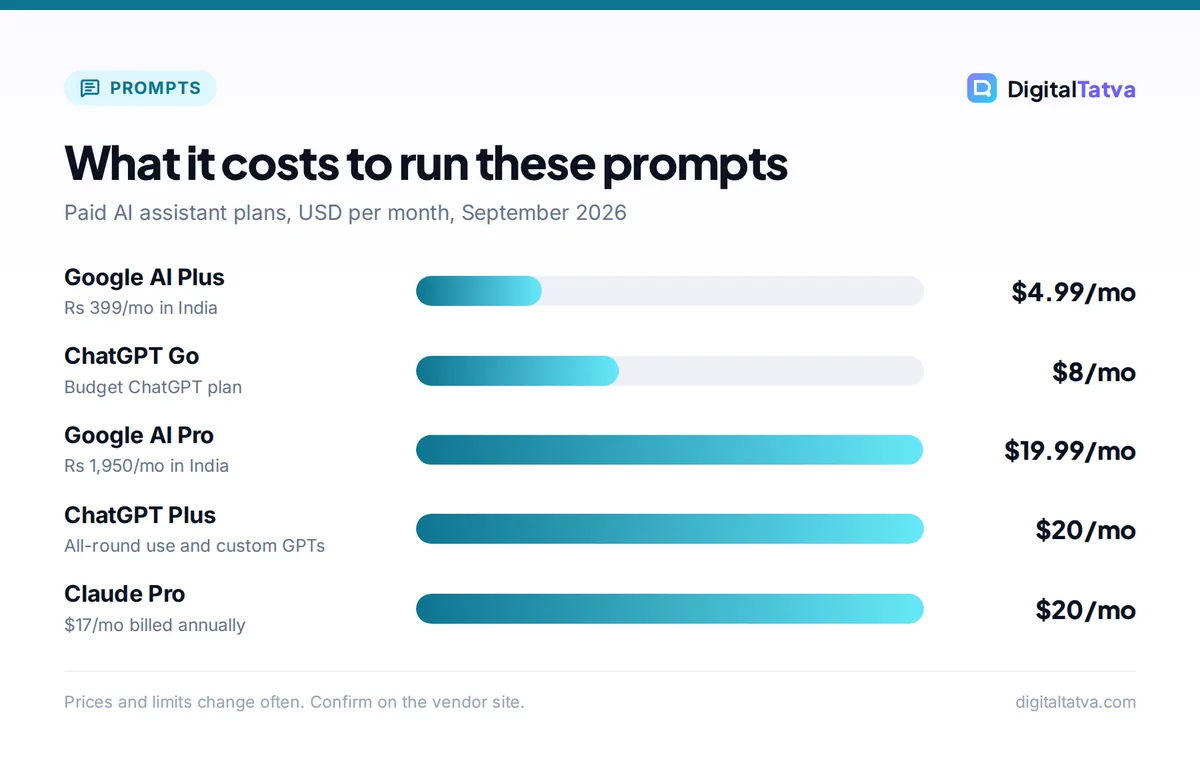
- All 60 prompts work on free plans. Paid plans from $4.99/month (Google AI Plus) to $20/month (ChatGPT Plus, Claude Pro) add higher limits and better models.
- Paste real material (reviews, invoices, sales data) and ask the AI to work from it rather than invent.
- Never paste customer card details, passwords or private personal data into a chatbot.
- Treat finance, legal and HR output as a first draft to check with a professional.
Which AI tool should you use for these prompts?
Any major assistant will handle these prompts. Pick based on budget and the apps you already use. For a wider view, see our guide on how small businesses can use AI without a big budget.
| Assistant | Free plan | Budget plan | Main plan | Best for |
|---|---|---|---|---|
| ChatGPT | Yes, unlimited GPT-5.6 Luna text chats | Go: $8/month (launched in India at Rs 399/month) | Plus: $20/month | All-round use, custom GPTs, images |
| Claude | Yes, Sonnet and Haiku models | None | Pro: $20/month or $17/month annual | Writing, long documents, editing |
| Gemini | Yes, Gemini 3.6 Flash | AI Plus: $4.99/month (Rs 399/month) | AI Pro: $19.99/month (Rs 1,950/month) | Gmail, Docs and Google Workspace users |
Plan details are in our guides to ChatGPT pricing and Gemini pricing, and on the official ChatGPT pricing page and Google’s India Gemini plans page.
Setup and marketing prompts (1 to 8)
1. Business profile (use first).
Interview me, one question at a time, to build a business profile: what I sell, prices, ideal customers, location, competitors, tone of voice and what makes us different. Ask up to 10 questions, then write the profile in under 200 words.
2. Monthly content calendar.
Using my business profile, create a 30-day social media calendar for [PLATFORM]. For each day give the post idea, format (carousel, Reel, photo, text) and a one-line hook. Tie posts to [OFFERS OR EVENTS THIS MONTH].
3. Captions in my voice.
Write 3 caption options for this post: [DESCRIBE PHOTO OR VIDEO]. Tone: [TONE]. Include one clear call to action and up to 5 relevant hashtags.
4. Offer and promotion ideas.
Suggest 10 promotion ideas for [BUSINESS] for [SEASON OR FESTIVAL]. For each, give the offer, who it targets, and a rough way to measure if it worked. Avoid deep discounts that hurt margins.
5. Ad copy variations.
Write 5 Facebook and Instagram ad variations for [PRODUCT] aimed at [CUSTOMER]. Each needs a headline under 40 characters, primary text under 125 characters and a call to action. Use different angles: price, quality, speed, trust, urgency.
6. Email newsletter.
Write a short monthly email for my customers covering: [NEWS, OFFER, TIP]. Friendly tone, under 200 words, one link. Suggest 5 subject lines.
7. Customer persona.
Based on these customer reviews and notes, describe my 2 main customer types: their goals, worries, where they find businesses like mine and what makes them buy. Paste below.
8. Competitor comparison.
Here is text from 3 competitor websites. Compare their offers, prices, messaging and gaps. Suggest 3 ways I can position my business differently. Paste below.
Need more? Our 75 ChatGPT prompts for marketing go deeper, and the Canva pricing guide helps you pick a design plan for the visuals.
Sales and outreach prompts (9 to 15)
9. Sales script.
Write a short phone or in-person sales script for [PRODUCT OR SERVICE]. Include an opening, 3 discovery questions, a 2-sentence pitch, and answers to the objections “too expensive” and “I need to think about it”.
10. Follow-up sequence.
Write 3 follow-up messages for a lead who asked for a quote but has not replied. Send on day 2, day 5 and day 10. Polite, short, each adding something new.
11. Quote or proposal.
Draft a quote email for [CLIENT] for [JOB]. Include scope, what is not included, price of [AMOUNT], timeline, payment terms and validity date. Professional and clear.
12. Cold outreach to local businesses.
Write a cold email to [TYPE OF BUSINESS] owners in [CITY] offering [SERVICE]. Mention one specific problem they likely have. One ask, under 100 words.
13. Upsell suggestions.
Here is my product and service list with prices. Suggest natural upsells and bundles for customers who buy each item, and a one-line way to offer each at checkout. Paste below.
14. Win back lost customers.
Write a message to customers who have not bought in [TIME PERIOD]. Remind them what they liked, share what is new and give a small reason to return. Under 80 words.
15. Referral request.
Write a short message asking happy customers for a referral or review. Make it easy: include where to leave a review and what to mention. Warm, not pushy.
Real estate and property businesses will find industry-specific templates in our guide to AI tools for real estate agents.
Customer service prompts (16 to 22)
16. Reply to a negative review.
Write a public reply to this review. Thank them, acknowledge the issue without arguing, explain what we will do, and invite them to contact [CONTACT]. Under 80 words. Review: [PASTE].
17. Reply to a positive review.
Write 5 different short thank-you replies for positive reviews that mention [PRODUCT OR STAFF NAME], so our replies do not all look the same.
18. FAQ page.
From these customer emails and messages, find the 10 most common questions and write clear answers using our policies below. Paste below.
19. Complaint handling script.
Write a step-by-step script for staff handling an angry customer about [ISSUE]. Include what to say, what not to say, and when to escalate to me.
20. Refund or return policy.
Draft a clear, friendly return and refund policy for [BUSINESS] based on these rules: [RULES]. Use plain language and short sections.
21. Delay or bad news message.
Write a message telling customers their order is delayed by [TIME] because of [REASON]. Apologize once, give the new date and offer [GESTURE].
22. Saved replies library.
Create 10 saved replies for common customer messages: pricing, opening hours, delivery areas, order status, booking changes, payment methods. Under 50 words each, using our details: [DETAILS].
Tip: Once your saved replies and FAQ are ready, you can load them into a support chatbot. Our guides to AI customer support tools and adding an AI chatbot to your website show how.
Website, SEO and listing prompts (23 to 28)
23. Home page copy.
Write home page copy for [BUSINESS] in [CITY]. Include a headline, subheadline, 3 benefits, a short about section, trust signals from my notes, and a call to action. Paste notes below.
24. Service page.
Write a service page for [SERVICE] targeting the search “[SERVICE] in [CITY]”. Cover who it is for, what is included, process, pricing guidance and 4 FAQs. About 600 words.
25. Product descriptions in bulk.
Write product descriptions of 60 to 80 words for each item below. Lead with the main benefit, then key details. Keep a consistent tone. Paste product list below.
26. Google Business Profile posts.
Write 4 Google Business Profile posts for this month: one offer, one update, one tip, one event. Under 100 words each with a call to action.
27. Blog post ideas.
Suggest 15 blog post ideas my customers would search for before buying [PRODUCT OR SERVICE]. For each, give a title and the question it answers.
28. About us story.
Turn these notes about how I started the business into a short, honest About Us story of about 200 words. No clichés. Paste notes below.
Selling online? Our guide to AI for ecommerce covers product pages, recovery emails and more.
Operations and productivity prompts (29 to 34)
29. Standard operating procedure.
Turn my rough description of how we [TASK] into a step-by-step SOP with a checklist, who is responsible and common mistakes. Paste description below.
30. Weekly plan.
Here are my tasks for the week. Sort them into must do, should do and delegate, then suggest a day-by-day plan with time blocks. Paste tasks below.
31. Meeting notes to actions.
Turn these meeting notes into a list of decisions, action items with owners and dates, and open questions. Paste notes below.
32. Supplier email.
Write an email to my supplier asking for [BETTER PRICE, FASTER DELIVERY, NEW TERMS]. Mention our order history of [DETAILS]. Firm but friendly.
33. Find tasks to automate.
Here is a list of my repeated weekly tasks. Which could be automated or handled by AI? For each, suggest the type of tool and the time it could save. Paste list below.
34. Staff training guide.
Create a one-page training guide for new staff on [TASK OR SYSTEM], with steps, dos and don’ts, and a 5-question quiz.
If prompt 33 finds good candidates, our tutorial on automating repetitive tasks with Zapier and AI walks you through your first workflow.
Finance and pricing prompts (35 to 40)
Watch out: AI can make arithmetic and tax mistakes. Use these prompts to understand and draft, then check figures yourself and confirm tax or legal points with your accountant.
35. Price setting.
My cost per unit for [PRODUCT] is [COST], competitors charge [RANGE], and my target margin is [PERCENT]. Suggest 3 pricing options with the reasoning and risks of each. Show the calculations.
36. Cash flow explained.
Here is my monthly income and expense summary. Explain in plain English where the money goes, what looks unusual, and 3 ways to improve cash flow. Paste summary below.
37. Payment reminder.
Write three payment reminder messages for an unpaid invoice of [AMOUNT], due [DATE]: friendly, firm, and final notice. Keep each under 80 words.
38. Cost cutting review.
Here is a list of my business subscriptions and regular costs. Flag overlaps, items to renegotiate and cheaper alternatives to research. Paste list below.
39. Break-even calculation.
My fixed costs are [AMOUNT] per month, my price is [PRICE] and variable cost is [COST] per unit. Calculate my break-even point and explain it simply. Show the formula.
40. Simple budget.
Create a simple monthly budget template for a [TYPE OF BUSINESS] with categories, a column for planned versus actual, and notes on what to watch.
To check whether your AI tools themselves pay off, see how to measure ROI from AI tools.
Hiring, HR and strategy prompts (41 to 52)
41. Job post.
Write a job post for a [ROLE] at [BUSINESS]. Include responsibilities, must-have skills, nice-to-haves, hours, pay range [RANGE] and how to apply. Friendly and clear.
42. Interview questions.
Suggest 10 interview questions for a [ROLE], including 3 practical scenario questions, and what a strong answer would include.
43. Onboarding checklist.
Create a first-week onboarding checklist for a new [ROLE], day by day.
44. Difficult conversation.
Help me plan a conversation with an employee about [ISSUE]. Give an opening line, key points, how to listen, and agreed next steps. Respectful and fair.
45. Team policy.
Draft a short, plain-language policy on [LEAVE, PHONE USE, REMOTE WORK] for a team of [NUMBER] people.
46. AI rules for staff.
Write simple rules for how my staff can use AI tools: what is allowed, what data must never be pasted, and who checks AI output before customers see it.
For a full version, use our AI usage policy template.
47. SWOT analysis.
Using my business profile, write a SWOT analysis. Then suggest the top 3 actions for the next 90 days based on it.
48. One-page business plan.
Turn my notes into a one-page business plan: problem, solution, customers, pricing, channels, costs, goals for 12 months. Paste notes below.
49. New product idea test.
I am thinking of launching [IDEA]. Act as a skeptical advisor. List the biggest risks, the questions I must answer first, and a cheap way to test demand in 2 weeks.
50. Quarterly goals.
Help me set 3 measurable goals for next quarter for [BUSINESS], each with a target, weekly actions and how I will track progress.
51. Customer feedback summary.
Summarize these customer reviews and survey answers. Group them into themes, rank them by how often they appear, and quote one example for each theme. Paste below.
52. Expansion decision.
I am deciding between [OPTION A] and [OPTION B]. Compare them on cost, risk, time, and fit with my business profile, then tell me which you would choose and why.
WhatsApp, data and spreadsheet prompts (53 to 60)
Many Indian small businesses sell mainly on WhatsApp. These prompts help with broadcast messages and catalog text, plus quick data work.
53. WhatsApp broadcast.
Write a WhatsApp broadcast message for [OFFER OR FESTIVAL]. Under 60 words, friendly, one emoji at most, clear price and how to order.
54. Catalog item text.
Write WhatsApp catalog descriptions for these products: name, 2-line description, price and key detail. Paste list below.
55. Bilingual message.
Rewrite this customer message in simple [HINDI, GUJARATI, TAMIL OR OTHER LANGUAGE] and keep an English version below it. Keep the tone warm. Message: [PASTE].
56. Order confirmation template.
Create order confirmation, dispatch and delivery templates for WhatsApp with placeholders for name, order number, items, amount and delivery date.
57. Spreadsheet formula.
In Google Sheets, column A has dates, B has product names and C has sales amounts. Write a formula to total sales for [PRODUCT] in [MONTH], and explain how it works.
58. Sales data insights.
Here is my sales data for the last [PERIOD]. Find my best and worst products, busiest days, and any trends. Present the findings as 5 bullet points and one suggested action. Paste data below.
59. Clean a messy list.
Clean this customer list: fix capitalization, remove duplicates, standardize phone numbers to [FORMAT], and flag incomplete rows. Return it as a table. Paste list below.
60. Monthly report.
Turn these monthly numbers into a short report for me and my partner: what went well, what did not, and 3 priorities for next month. Paste numbers below.
For bigger data jobs, see our guide on using ChatGPT for Excel and data analysis. Before pasting customer lists, remove phone numbers and names you do not need.
How to get better results from business prompts
- Always add context. Paste your business profile from prompt 1 at the top, or save it as a custom GPT or a Claude Project.
- Give real material. Reviews, price lists and notes produce specific output. Without them, the AI fills gaps with guesses.
- Ask for options. Three versions to pick from beat one version to fix.
- Edit before sending. Check names, prices, dates and promises. Customers will hold you to them.
To turn your best prompts into a reusable assistant, follow our guide on creating a custom GPT step by step. If you mostly write, our Claude prompts for writing and editing go deeper on drafting.
Frequently asked questions
What is the best AI tool for small business owners?
For most owners, ChatGPT is the easiest all-round choice, with a free plan, Go at $8/month and Plus at $20/month. Claude is better for long writing and editing, and Gemini suits businesses that live in Gmail and Google Docs, with AI Plus at Rs 399/month in India. All three run every prompt in this list.
Can I use these AI prompts for free?
Yes. Every prompt here works on the free plans of ChatGPT, Claude and Gemini. Free plans have usage limits, so heavy daily use may push you to a paid plan. Start free for a few weeks, note which prompts you use most, and upgrade only if you keep hitting limits.
Is it safe to put business data into AI chatbots?
Be selective. Do not paste passwords, card details or sensitive personal customer data. Remove names and phone numbers when you can. Business plans such as ChatGPT Business state that OpenAI does not train on workspace data, which suits teams handling client information. Set clear staff rules with an AI usage policy.
How do I make AI write in my business’s tone?
Use prompt 1 to build a business profile with your tone of voice, and paste three examples of messages or posts you like. Save this in a custom GPT, a Claude Project or a note you paste at the top of each chat. Then give specific feedback, such as shorter or more casual, instead of asking for a rewrite.
Next steps: pick five prompts and start this week
Do not try all 60 at once. Run prompt 1 today, then choose five prompts for the jobs that eat most of your week, such as captions, quotes, review replies or payment reminders. Save them in a note or a custom GPT and use them every day for two weeks. For tools to pair with these prompts, see our list of the best AI tools for small business owners. AI plans and prices change often, so confirm current pricing on the Claude, OpenAI and Google websites before you pay.
Pricing and features are checked at the time of writing and can change. Some links may be affiliate links, which never affect our verdicts.



