How to Add an AI Chatbot to Your Website
Add an AI chatbot to your website step by step: pick a platform like Tidio, Chatbase or Zapier Chatbots, train it on your content, embed it and keep costs low.

On this page
To add an AI chatbot to your website, sign up for a chatbot platform such as Tidio, Chatbase, Intercom Fin or Zapier Chatbots, train it on your website pages and FAQs, set its tone and handoff rules, then paste the embed code (a short script) into your site or install the platform’s WordPress or Shopify plugin. Most small businesses can launch a working bot in an afternoon on a free or low-cost plan.
If you have a developer, a second route is building your own chatbot on the OpenAI, Claude or Gemini API, which costs only cents per day in tokens at small-business volumes but takes more work. This guide covers both, with step-by-step instructions, real costs and the mistakes that make visitors close the chat window.
Key takeaways
- No-code platforms are the fastest route: train on your site, copy one embed snippet, done.
- Free plans exist: Tidio Free (50 billable conversations), Chatbase Free (50 message credits a month) and Zapier Chatbots Free (2 bots).
- Paid options range from Zapier Chatbots Pro at $13.33/month to usage pricing like Intercom Fin at $0.99 per resolution.
- A custom API bot can cost under $3 a month in tokens for 1,000 conversations on a budget model, plus developer time.
- Always set a human handoff, limit the bot to your own content and test with real customer questions before launch.
What you need before you start
- A clear goal. Answer FAQs, capture leads, book calls, or support existing customers. One main goal makes the bot much better.
- Your source content. FAQ page, pricing page, shipping and returns policy, service pages and help articles. The bot is only as good as this content.
- Access to your website. Admin access to WordPress, Shopify, Webflow, Wix or your site’s code so you can add a script or plugin.
- A handoff channel. An email inbox, helpdesk, WhatsApp number or Slack channel where a person picks up conversations the bot cannot handle.
- 20 real customer questions. Pull them from your inbox or DMs. You will use them to test.
Choose your chatbot platform
Here are the main options we recommend for small and mid-sized businesses, with prices from official pricing pages checked on 1 October 2026.
| Platform | Free plan | Paid from | Best for |
|---|---|---|---|
| Tidio (Lyro AI) | Yes, 50 billable conversations | Starter about $24.17/mo; Lyro add-on from $32.50/mo | Shops and small businesses that also want live chat |
| Chatbase | Yes, 50 message credits/mo, 1 agent | Hobby $40/mo (700 credits) | Bots trained on your own documents and pages |
| Zapier Chatbots | Yes, 2 bots | Pro $13.33/mo ($160/yr), 5 bots | Bots that trigger workflows such as creating CRM leads |
| Intercom Fin | No | $0.99 per resolution; helpdesk seats from $29 | Growing support teams with high chat volume |
| Custom build (API) | Pay per token | Cents to dollars a month in tokens | Businesses with a developer and custom needs |
Tidio’s listed Starter and Growth prices look like annual-billing rates, so expect monthly billing to cost more. Chatbase gives 20% off on annual plans. For a deeper look at support-focused tools, read our guide to AI customer support tools, and for general-purpose assistants see our list of the best AI chatbots.
Step by step: add a no-code AI chatbot to your website
The menus differ slightly between platforms, but the flow is the same everywhere.
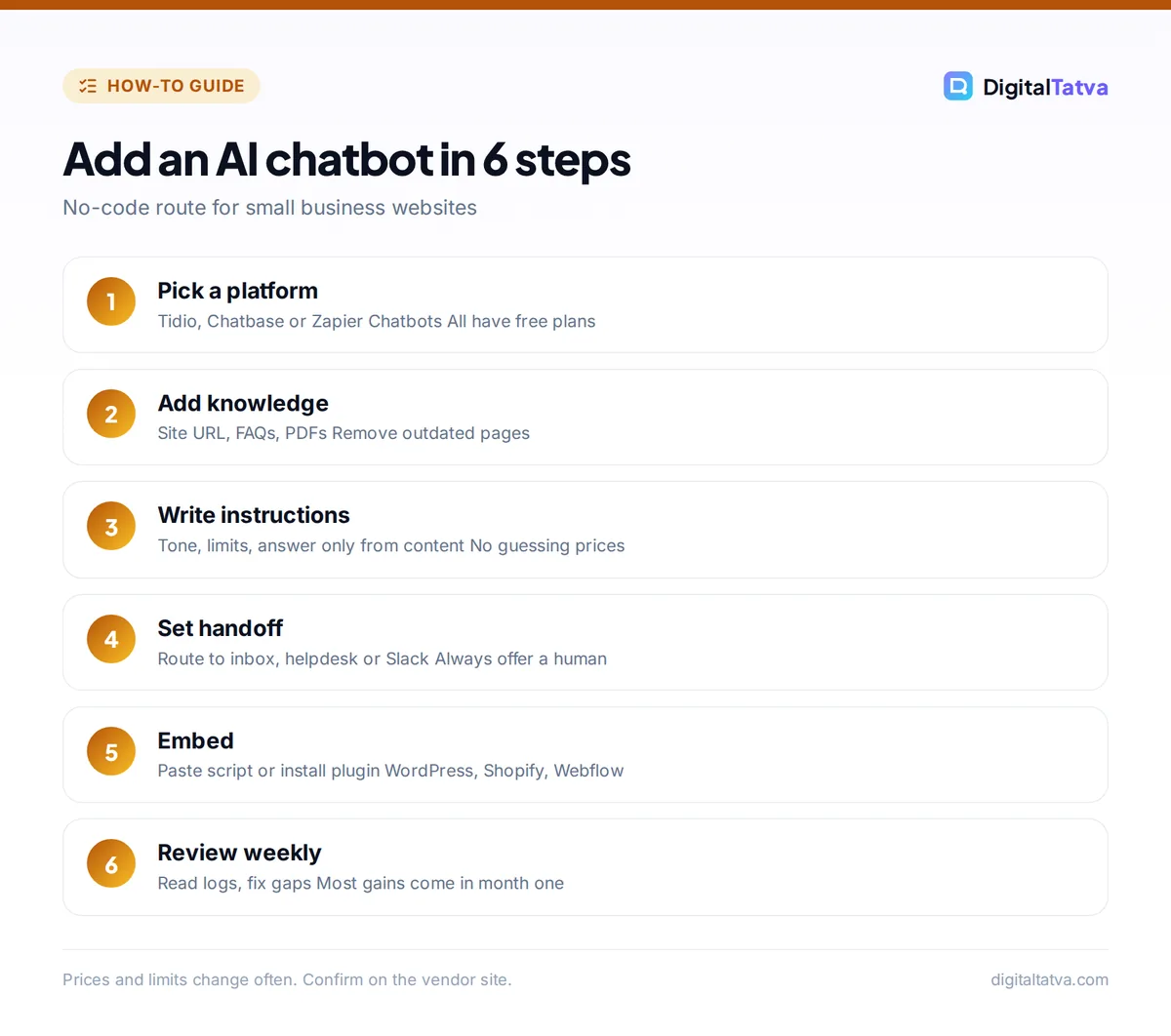
- Create an account and a new bot. Sign up on your chosen platform and create a new chatbot or AI agent. Give it a name that matches your brand, for example “Ask Digital Tatva”.
- Add your knowledge sources. Look for a “Sources”, “Knowledge” or “Train” section. Add your website URL so the tool crawls your pages, then upload PDFs or paste FAQ text. Remove outdated pages, old prices and internal documents before training.
- Write the instructions. In the “Instructions”, “Persona” or “System prompt” field, describe the bot’s job, tone and limits. Example: “You are a friendly assistant for a web design studio in Ahmedabad. Answer only from the provided content. If you do not know, say so and offer to connect the visitor with our team. Never quote prices that are not on our pricing page.”
- Set up lead capture and handoff. Turn on the option to collect name and email, and set rules to hand over to a human when the visitor asks for one, mentions a complaint or the bot cannot answer. Route handoffs to your inbox, helpdesk or Slack.
- Customize the widget. Set the colors, avatar, welcome message and suggested questions. A good welcome message tells visitors what the bot can help with, such as “Ask about pricing, delivery times or booking a call”.
- Test with real questions. Use the platform’s preview or playground to ask your 20 real questions. Note wrong or vague answers, then fix the source content or instructions and test again.
- Install on your website. Copy the embed code from the “Install”, “Deploy” or “Embed” section. On WordPress, paste it with a header and footer code plugin or install the platform’s official plugin. On Shopify, use the platform’s Shopify app. On Webflow, paste it in Site settings under custom code (footer). On a custom site, paste the script just before the closing body tag.
- Publish and check on mobile. Open your site on desktop and phone, make sure the bubble does not cover your buy button or cookie banner, and run a couple of live chats.
- Review conversations weekly. Read the chat logs, especially failed answers and handoffs, and add missing information to your knowledge sources.
Tip: Add a short “Common questions” page to your site with clear, direct answers. It improves both your chatbot and your visibility in Google and AI search.
Option 2: build a custom chatbot with an AI API
A custom bot gives you full control over the model, design, data and integrations. A developer typically builds a chat widget on your site, a small backend that stores your content, and a call to an AI model’s API that answers using the most relevant content snippets (this is called retrieval-augmented generation, or RAG). Never put your API key in the website’s front-end code; keep it on the server.
What a custom bot costs in tokens
Say you get 1,000 conversations a month, each with 6 visitor messages. Each reply sends about 3,000 input tokens (instructions, content snippets and chat history) and returns about 300 output tokens. That is 6,000 replies, or 18M input and 1.8M output tokens a month:
- GPT-6 Luna ($0.10 input, $0.50 output per 1M): $1.80 + $0.90 = $2.70 a month.
- Claude Haiku 4.5 ($1 input, $5 output per 1M): $18 + $9 = $27 a month.
- GPT-6.1 Sol ($2 input, $10 output per 1M): $36 + $18 = $54 a month.
Because the instructions repeat on every message, prompt caching can cut input costs further. Our explainer on prompt caching shows how, and our guides to OpenAI API pricing and Claude API pricing list every model’s rate. Use our guide to estimating AI API costs to plug in your own traffic.
Save money: Trim chat history to the last few messages and send only the top three content snippets per reply. Smaller prompts mean cheaper replies on every model.
No-code or custom: which should you choose?
| Factor | No-code platform | Custom API build |
|---|---|---|
| Setup time | An afternoon | Days to weeks |
| Running cost | Monthly plan or per-resolution fee | Tokens plus hosting |
| Skills needed | None | Developer |
| Control over model and data | Limited to platform options | Full |
| Live chat and handoff | Built in | You build or integrate it |
Connect your chatbot to the rest of your business
A chatbot pays off when its leads and questions flow into the tools you already use.
- CRM: send captured leads to HubSpot, Zoho or a Google Sheet. Zapier Chatbots can trigger Zaps directly; for other platforms, use a webhook with Zapier, Make or n8n. Our guide on automating tasks with Zapier and AI walks through a lead workflow.
- Booking: link to your calendar tool so qualified visitors can book a call in the chat.
- WhatsApp: many Indian customers prefer WhatsApp. Tools like WATI (Growth from $20/month billed annually) add AI on WhatsApp, with Meta message charges on top.
- Helpdesk: push unresolved chats into your support inbox so nothing gets lost.
To compare automation platforms for these connections, see our Zapier vs Make vs n8n comparison. Online stores can find more ideas in our guide to AI for ecommerce.
Common mistakes to avoid
- Training on everything. Old blog posts with outdated prices produce wrong answers. Curate your sources.
- No human handoff. A bot that traps frustrated visitors damages trust. Always offer a way to reach a person.
- Letting the bot guess. Instruct it to answer only from your content and to say “I don’t know” otherwise.
- Pop-ups that cover the page. Auto-opening chat windows on mobile annoy visitors. Use a small bubble and a short greeting.
- Collecting sensitive data. Do not ask for card numbers, ID numbers or health details in chat. Update your privacy policy to mention the chatbot and its AI provider.
- Set and forget. Review logs weekly for the first month; that is where you find the gaps.
Watch out: Your business is responsible for what the bot says. Add a line in the welcome message that it is an AI assistant, and set clear internal rules with our AI usage policy template.
Frequently asked questions
How much does it cost to add an AI chatbot to a website?
It can be free to start. Tidio, Chatbase and Zapier Chatbots all have free plans. Paid plans start around $13.33 a month for Zapier Chatbots Pro and $40 a month for Chatbase Hobby, while Intercom Fin charges $0.99 per resolution. A custom API bot can cost a few dollars a month in tokens, plus developer time.
Can I add an AI chatbot to WordPress without coding?
Yes. Create the bot on a platform like Tidio or Chatbase, then either install its official WordPress plugin or paste the embed script using a header and footer code plugin. No coding is needed. Test on mobile after installing, because some themes and cookie banners overlap the chat bubble.
Can I train a chatbot on my own website content?
Yes, that is how most business chatbots work. You add your website URL, upload PDFs or paste FAQ text, and the platform uses that content to answer. Remove outdated pages before training and instruct the bot to answer only from your content, so it does not invent prices or policies.
Is it better to use ChatGPT or a chatbot platform for my website?
For most businesses, a chatbot platform is better because it includes the website widget, training on your content, lead capture and human handoff out of the box. Building directly on the ChatGPT or Claude API gives more control and lower per-message costs, but you need a developer to build and maintain it.
Will an AI chatbot replace my support team?
Not completely. A well-trained bot can answer common questions around the clock and pass complex or emotional issues to people. Most businesses use it to reduce repetitive questions and capture leads after hours, while staff handle complaints, refunds and anything that needs judgment.
Next steps
Start with one goal, a free plan and your 20 real customer questions. Train the bot on clean content, set a human handoff, install the embed code and review conversations every week for the first month. If chat volume grows, compare dedicated support tools, and if you want the bot to feed your CRM, connect it with an automation platform from our list of the best AI automation tools. Small businesses can find more low-cost ideas in our guide to using AI without a big budget. Check the official Tidio pricing page and the official Chatbase pricing page for current limits, since chatbot pricing changes often and you should confirm it on the vendor site before you subscribe.
Pricing and features are checked at the time of writing and can change. Some links may be affiliate links, which never affect our verdicts.