Prompt Caching Explained: Cut API Costs on Repeated Prompts
How prompt caching works on Claude, OpenAI and Gemini, what cache writes and reads cost, and worked examples that cut a support bot's API bill by more than 70%.

On this page
- Key takeaways
- What is prompt caching and how does it work?
- Prompt caching prices on Claude, OpenAI and Gemini
- How Claude prompt caching works
- How OpenAI prompt caching works
- How Gemini context caching works
- Worked examples: how much prompt caching saves
- How to structure prompts for a high cache hit rate
- Does caching help in the Claude and ChatGPT apps?
- Frequently asked questions
- Next steps: turn on caching this week
Prompt caching lets an AI API reuse the part of your prompt that does not change between requests, such as a long system prompt, a product catalog or a contract, and bill it at a fraction of the normal input price. On Claude, OpenAI and Gemini, a cache hit costs between 2.5% and 10% of the standard input rate, so any app that sends the same long prefix over and over can cut its input bill by 70% to 90%.
The catch is that caching only works when the start of your prompt is byte-for-byte identical, and some providers charge extra to write the cache. This guide explains how prompt caching works on each platform, shows the real arithmetic with September 2026 prices, and gives you code you can copy.
Key takeaways
- Caching matches on the prefix: put fixed content (tools, system prompt, documents) first and changing content (the user question) last.
- Claude cache reads cost 0.1x input on most models and 0.05x on Opus 5.5, with writes at 1.25x (5 minutes) or 2x (1 hour).
- OpenAI caching is automatic on prompts of 1,024 tokens or more; GPT-5.6 and later charge 1.25x to write and 0.1x to read (0.05x on GPT-6.1 Sol).
- Gemini caches implicitly on 2.5 and newer models from 4,096 tokens on 3.x Flash, and offers explicit caches with an hourly storage fee.
- In our worked support bot example, caching cuts a Claude Sonnet 5.5 bill from $23.40 to $6.55 a day.
What is prompt caching and how does it work?
Every call makes the model process your entire prompt. If most of it is the same instructions you sent a minute ago, that work is repeated. Prompt caching stores the processed prefix so the next request can skip ahead.
A cache write is the request that stores the prefix, sometimes billed slightly above the input price. A cache read (cache hit) is any later request that reuses it, billed at a steep discount. If you are new to how input and output tokens are counted, our plain English guide to tokens covers the basics.
The prefix rule
All three major providers match caches on the beginning of the prompt, and the cached section must be exactly identical. One changed character near the top breaks the match for everything after it.
So order your prompt from most stable to least stable: tools and system prompt first, then shared documents, then conversation history, with the new user message last.
Cache lifetime
Caches do not last forever. Anthropic offers a 5-minute and a 1-hour cache. OpenAI keeps cached entries on GPT-5.6 and later models for 30 minutes after the last write or reuse. Gemini’s explicit caches default to a 1-hour time to live (TTL) that you can change. If no request uses the cache before it expires, the next call pays for a fresh write.
Prompt caching prices on Claude, OpenAI and Gemini
Here are the current rates in USD per 1 million tokens for the models most people use. Cache prices are expressed as a multiple of the model’s normal input price.
| Model | Input | Cache write | Cache read | Read discount |
|---|---|---|---|---|
| Claude Opus 5.5 | $4.00 | $5.00 (5 min), $8.00 (1 hr) | $0.20 | 95% off |
| Claude Sonnet 5.5 | $2.00 | $2.50 (5 min), $4.00 (1 hr) | $0.20 | 90% off |
| Claude Haiku 4.5 | $1.00 | $1.25 (5 min), $2.00 (1 hr) | $0.10 | 90% off |
| Claude Fable 5.1 | $10.00 | $12.50 (5 min), $20.00 (1 hr) | $0.25 | 97.5% off |
| OpenAI GPT-6.1 Sol | $2.00 | 1.25x input ($2.50) | $0.10 | 95% off |
| OpenAI GPT-6 Astra | $10.00 | 1.25x input ($12.50) | $1.00 | 90% off |
| OpenAI GPT-6 Luna | $0.10 | 1.25x input ($0.125) | $0.01 | 90% off |
| Gemini 3.8 Flash | $0.75 | Storage $0.50 per 1M per hour (explicit) | $0.075 | 90% off |
| Gemini 3.1 Pro (preview) | $2.00 | Storage $4.50 per 1M per hour (explicit) | $0.20 | 90% off (prompts up to 200K) |
Gemini 3.8 Flash prices apply until 31 December 2026. From 1 January 2027 the input price doubles to $1.50 and caching to $0.15, so budget for that if you are planning next year. For full price lists, see our guides to Claude API pricing, OpenAI API pricing and Gemini API pricing.
How Claude prompt caching works
Anthropic gives you the most control. You mark where the cacheable section ends with a cache_control block, and Claude caches everything up to that point. You can add the field once at the top level of the request for automatic caching, which places the breakpoint on the last cacheable block, or set up to 4 explicit breakpoints on individual blocks.
Minimum length and lifetime
- Minimum cacheable prompt: 512 tokens on Opus 5.5, Sonnet 5.5 and Fable 5.1, but 4,096 tokens on Haiku 4.5. Shorter prefixes are simply not cached.
- 5-minute cache: the default. Writes cost 1.25x input and break even after one read.
- 1-hour cache: set
"ttl": "1h". Writes cost 2x input and break even after two reads. - Lifetime starts at the beginning of the request. A response that takes 4 minutes to generate leaves only about 1 minute on a 5-minute cache.
Example: caching a system prompt in Python
import anthropic

client = anthropic.Anthropic()

response = client.messages.create(
    model="claude-sonnet-5-5",
    max_tokens=1024,
    system=[
        {
            "type": "text",
            "text": LONG_SUPPORT_PLAYBOOK,  # 10,000 tokens of fixed rules and FAQs
            "cache_control": {"type": "ephemeral", "ttl": "5m"}
        }
    ],
    messages=[
        {"role": "user", "content": "Can I change my delivery address after ordering?"}
    ]
)

u = response.usage
print(u.cache_creation_input_tokens, u.cache_read_input_tokens, u.input_tokens)
Check the three usage fields on every response while you test. cache_creation_input_tokens shows a write, cache_read_input_tokens shows a hit, and input_tokens is the uncached part after the last breakpoint. If reads stay at zero on the second identical call, something in your prefix is changing.
What breaks a Claude cache
Claude builds the cache in a fixed order: tools, then system, then messages. A change at one level invalidates that level and everything after it. Editing a tool definition clears the whole cache. Editing the system prompt clears system and messages. Changing tool_choice, adding or removing images, or changing thinking or effort settings clears at least the messages section.
Watch out: A timestamp, request ID or the user’s name inside your system prompt will silently kill every cache hit. Move dynamic values into the final user message instead.
How OpenAI prompt caching works
OpenAI caching is automatic. You do not mark anything in the request: if the start of your prompt matches a recent one and the prefix is at least 1,024 tokens long (on GPT-5.6 and later), the matching part is billed at the cached rate.
On GPT-5.6 and later models, cached reads cost 0.1x the input rate, and GPT-6.1 Sol goes further at 0.05x ($0.10 per million). These newer models also charge a cache write at 1.25x the normal input rate, which earlier models did not. Cached entries stay valid for 30 minutes after the last write or reuse, which is friendlier than Anthropic’s 5-minute default for apps with uneven traffic.
Use prompt_cache_key for multi-tenant apps
If you serve many customers from one prompt template, the optional prompt_cache_key parameter separates cache accounting by customer or user. Here is a minimal example:
from openai import OpenAI

client = OpenAI()

response = client.responses.create(
    model="gpt-6.1-sol",
    instructions=SHARED_INSTRUCTIONS,   # same text on every call, placed first
    input="Summarize this ticket: " + ticket_text,
    prompt_cache_key="tenant-acme"
)
If you build OpenAI-powered chat features, our guide to adding an AI chatbot to your website shows where this fits in a real deployment.
How Gemini context caching works
Google calls the feature context caching and offers two modes.
Implicit caching
Implicit caching is on by default for Gemini 2.5 and newer models, and Google passes the savings on automatically when a request hits the cache. The minimum is 4,096 tokens on Gemini 3.8, 3.7, 3.6 and 3.5 Flash and on 3.1 Pro Preview (2,048 on the older 2.5 models). Google’s advice matches the prefix rule: put large, common content at the start of the prompt and send requests with a similar prefix close together.
Explicit caching
For guaranteed reuse, create a cache object through the generateContent API, then reference it by name. You pay the reduced cached-token rate on each use plus storage for as long as the cache lives. The TTL defaults to 1 hour if you do not set one.
from google import genai
from google.genai import types

client = genai.Client()

cache = client.caches.create(
    model="gemini-3.8-flash",
    config=types.CreateCachedContentConfig(
        system_instruction="You answer questions about our product manual.",
        contents=[manual_file],
        ttl="3600s"
    )
)

response = client.models.generate_content(
    model="gemini-3.8-flash",
    contents="How do I reset the device to factory settings?",
    config=types.GenerateContentConfig(cached_content=cache.name)
)
Storage is cheap at small sizes. A 10,000-token manual cached on 3.8 Flash for 24 hours costs 0.01M x $0.50 x 24 = $0.12 in storage. Note that the newer Interactions API supports implicit caching only.
Worked examples: how much prompt caching saves
The numbers below use list prices. For a general budgeting method, see our guide to estimating AI API costs before you build.
Example 1: a support bot on Claude Sonnet 5.5
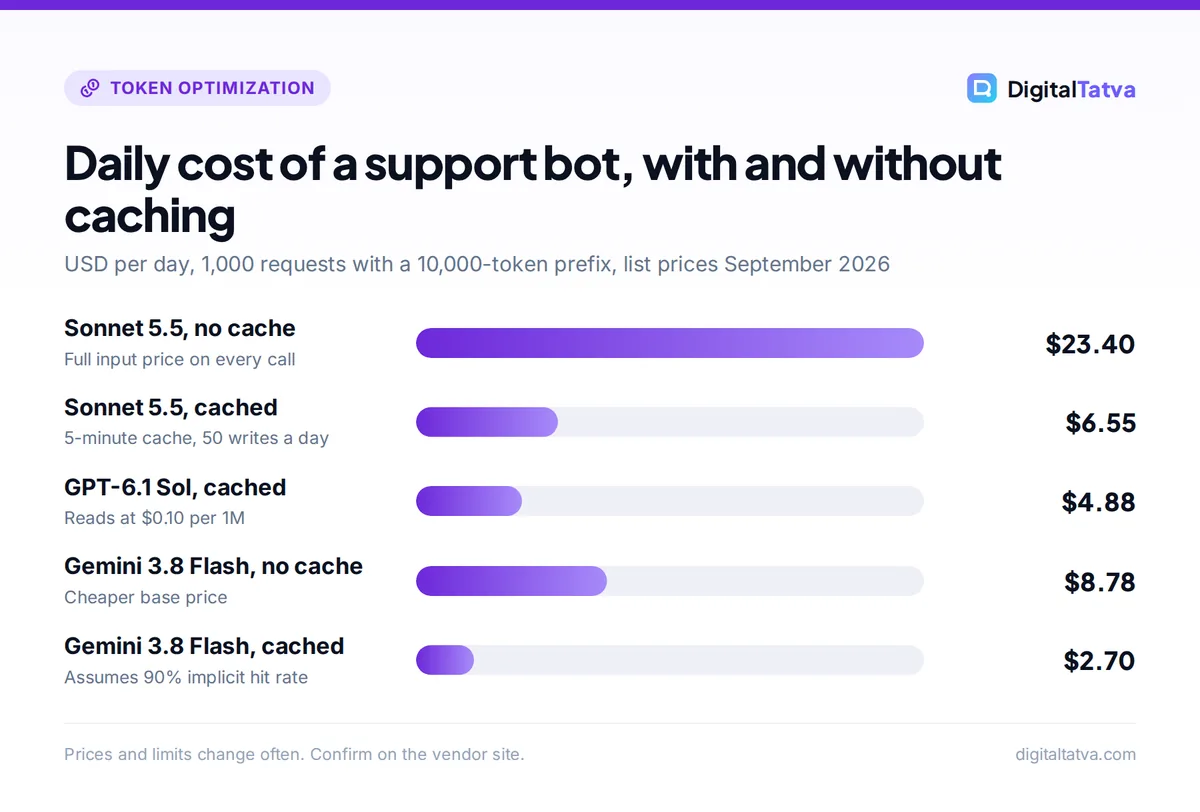
Each request sends a 10,000-token support playbook, a 200-token customer question and gets a 300-token answer. The bot handles 1,000 requests a day. To stay conservative, assume the 5-minute cache expires 50 times a day during quiet periods, so you pay 50 writes.
- Without caching: input 10.2M x $2 = $20.40, output 0.3M x $10 = $3.00. Total $23.40 a day (about $702 a month).
- With caching: writes 0.5M x $2.50 = $1.25, reads 9.5M x $0.20 = $1.90, fresh input 0.2M x $2 = $0.40, output $3.00. Total $6.55 a day (about $197 a month).
That is a 72% cut in the total bill and an 83% cut in input cost, from one configuration change. If you are choosing a support platform rather than building one, compare options in our roundup of AI customer support tools.
Example 2: the same bot on OpenAI GPT-6.1 Sol
GPT-6.1 Sol has the same $2 / $10 list price as Sonnet 5.5, but a cheaper $0.10 cache read and a 30-minute lifetime. Assume only 20 writes a day: writes 0.2M x $2.50 = $0.50, reads 9.8M x $0.10 = $0.98, fresh input 0.2M x $2 = $0.40, output $3.00. Total $4.88 a day, versus $23.40 uncached.
Example 3: questioning a 200,000-token contract on Opus 5.5
A lawyer asks 10 questions about one long contract over an afternoon. Without caching, each question resends the document: 10 x 0.2M x $4 = $8.00 in document input. With a 1-hour cache, the first call writes it at $8 per million (0.2M x $8 = $1.60) and the next nine read it at $0.20 (9 x 0.2M x $0.20 = $0.36). Document input drops to $1.96, a 75% saving. Opus 5.5 has a 1M context window with no long-context surcharge, which our context window guide explains in more detail.
Example 4: Gemini 3.8 Flash with implicit caching
Run the Example 1 workload on Gemini 3.8 Flash. Uncached: 10.2M x $0.75 = $7.65 input plus 0.3M x $3.75 = $1.125 output, so about $8.78 a day. If 900 of the 1,000 requests hit the implicit cache: hits 9M x $0.075 = $0.675, misses 1M x $0.75 = $0.75, fresh input 0.2M x $0.75 = $0.15, output $1.125. Total about $2.70 a day. Implicit hits are not guaranteed, so measure your real rate.
Save money: Caching stacks with batch discounts. Anthropic confirms that prompt caching and Message Batches discounts combine, and Gemini supports context caching on batch requests. Our Batch API guide shows how to pair the two for overnight jobs.
How to structure prompts for a high cache hit rate
- Freeze the top of the prompt. Put tool definitions, the system prompt and reference documents first, in the same order every time. Store them as constants, not strings you rebuild per request.
- Push variables to the end. User names, dates, order numbers and the question itself belong in the final message.
- Clear the minimum. Make sure the stable prefix is longer than the threshold: 512 tokens on Claude Opus 5.5 and Sonnet 5.5, 4,096 on Haiku 4.5 and Gemini 3.x Flash, 1,024 on OpenAI GPT-5.6 and later.
- Match the lifetime to your traffic. Steady traffic suits Claude’s 5-minute cache. Bursty work with gaps of 10 to 60 minutes suits the 1-hour cache or OpenAI’s 30-minute window.
- Measure hits. Log the cached token counts the API returns on every response and alert if they drop to zero after a deploy.
Good prompt structure also makes outputs more consistent. Our prompt engineering guide covers how to write a stable system prompt worth caching.
When prompt caching is not worth it
- Short prompts below the minimum length.
- One-off requests where the prefix is never reused within the cache lifetime. On Claude you would pay the 1.25x write and get nothing back.
- Workloads where output dominates the bill. Caching only discounts input, so if your app writes long answers, look at shorter outputs or a cheaper model first. Our guide to picking the cheapest AI model for each task helps here.
Does caching help in the Claude and ChatGPT apps?
Indirectly, yes. Anthropic says content in Claude Projects is cached and counts less against your usage limits when reused, so uploading core documents to a project instead of pasting them into each chat stretches your plan further. Our guide to using Claude Projects walks through the setup, and our explainer on Claude usage limits covers other ways to make your allowance last. For more chat-side tactics, read how to reduce token usage in ChatGPT and Claude.
Frequently asked questions
Is prompt caching automatic?
It depends on the provider. OpenAI caches automatically on prompts of 1,024 tokens or more for GPT-5.6 and later. Gemini 2.5 and newer models have implicit caching on by default. Claude needs a cache_control field, either once at the top level for automatic placement or on specific blocks, so you must opt in. Explicit caching on Gemini is also opt-in.
How much does prompt caching save?
Cache reads cost 0.1x the input price on most models, 0.05x on Claude Opus 5.5 and GPT-6.1 Sol, and 0.025x on Claude Fable 5.1. In practice, apps with a long fixed prefix often cut input costs by 70% to 90%. Total savings are lower when output tokens make up a large share of the bill.
How long does a prompt cache last?
Claude offers a 5-minute cache by default and a 1-hour option at a higher write price. OpenAI keeps entries on GPT-5.6 and later for 30 minutes after the last write or reuse. Gemini explicit caches default to 1 hour and you can set your own TTL, paying storage per hour. Implicit Gemini caches have no published lifetime.
Why am I not getting cache hits?
The most common cause is a prefix that changes between calls, such as a timestamp in the system prompt or tools listed in a different order. Other causes are a prefix below the minimum length, gaps longer than the cache lifetime, and on Claude, changing thinking, effort or image settings. Log the cached token counts to confirm.
Next steps: turn on caching this week
Prompt caching is the highest-return cost fix for most AI apps because it needs no change in model or quality. Start by moving every dynamic value to the end of your prompt, enable cache_control on Claude or confirm your prefix clears 1,024 tokens on OpenAI, then log cache hits for a few days. Read the official Claude pricing page, the OpenAI prompt caching guide and Gemini API pricing for the full details. Cache prices and minimums change often, so confirm current rates on each vendor’s site before you set a budget.
Pricing and features are checked at the time of writing and can change. Some links may be affiliate links, which never affect our verdicts.



