How to Create a Brand Identity With AI, Step by Step
Create a brand identity with AI in seven steps: strategy, name, logo, colors and fonts, image style, brand voice and a Canva Brand Kit, with tools and prices.

On this page
Last updated: 22 October 2026
Quick answer: To create a brand identity with AI, use ChatGPT or Claude to define your positioning, audience and personality, generate name and logo concepts with tools like Namelix, Looka or Ideogram, pick colors and fonts with AI suggestions, write a brand voice guide, and store everything in a Canva Brand Kit so every design stays consistent. Have a designer refine the final logo before you trademark it.
A brand identity is the set of visual and verbal elements (name, logo, colors, typography, imagery and voice) that make a business recognizable and consistent everywhere it appears. AI tools can now produce a usable first version of every element in a weekend, which is a big help for founders who cannot yet afford an agency.
This step-by-step guide shows how to build a complete brand identity with AI, which tools to use at each stage with October 2026 prices, and where human judgment and legal checks still matter.
Key takeaways
- Start with strategy (audience, positioning, personality) before generating any visuals.
- Looka’s Brand Kit subscription costs about $8 a month billed annually; one-time logo packages start around $35.
- Canva Pro (US$144 a year) holds up to 5 Brand Kits, and Canva AI 2.0’s Brand Intelligence applies your fonts and colors automatically.
- Purely AI-generated logos may not be protected by copyright in the US, so have a designer refine your final mark.
- Write a one-page brand guide so people and AI tools use the identity the same way.
What is a brand identity?
A brand identity is the combination of strategy, visual design and voice that expresses who a business is and how it should be recognized. It usually includes a name, logo, color palette, typography, image style, tone of voice and a brand guide that explains how to use them.
| Element | AI tools that help | Typical cost (October 2026) |
|---|---|---|
| Strategy and positioning | ChatGPT, Claude, Gemini | Free to $20/month |
| Name | Namelix, ChatGPT, Shopify generator | Free |
| Logo | Looka, Brandmark, Ideogram, Canva | Free to about $72 one-time |
| Colors and fonts | ChatGPT, Canva, Looka brand kit | Free to about $8/month |
| Brand voice | ChatGPT, Claude Projects, Jasper IQ | Free to $69/seat/month |
| Templates and guide | Canva Brand Kit, Canva AI | Canva Pro US$144/year |
How do you create a brand identity with AI, step by step?
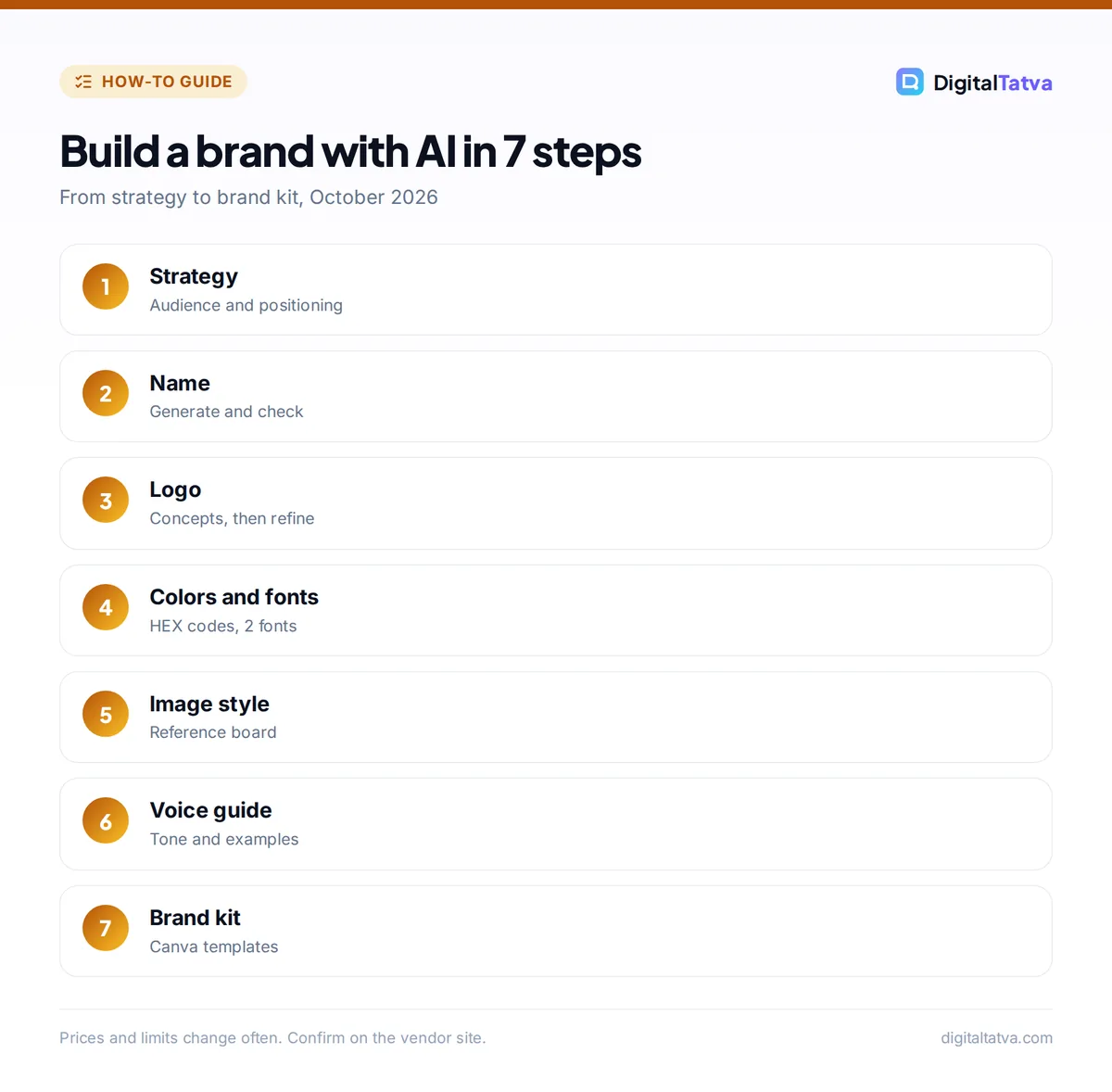
You create a brand identity with AI in seven steps: define the strategy, name the brand, design the logo, choose colors and fonts, set the image style, write the voice guide, and package it all in a brand kit. Each step builds on the one before, so do them in order.
Step 1: Define your brand strategy
Brand strategy is the foundation: who you serve, what you promise and how you differ from competitors. Ask an AI assistant to interview you, then summarize the answers.
Prompt: “Act as a brand strategist. Ask me 12 questions, one at a time, about my business, customers, competitors and goals. Then write a one-page brand strategy with: target audience, customer problem, positioning statement, 3 brand values, brand personality (3 adjectives) and 3 competitors with how we differ.”
Claude and ChatGPT both handle this well; compare them in ChatGPT vs Claude.
Step 2: Name the brand
Use your strategy document as the brief for naming tools. Namelix generates brandable names with domain checks, and ChatGPT can create names in several styles with meanings. Our guide to the best AI business name generators includes a full naming prompt and a trademark checklist.
Step 3: Design the logo
AI logo tools create dozens of concepts from your name, industry and style. Looka builds logos and a matching brand kit; Brandmark sells logos with a pay-once model and full copyright included; Ideogram is strong for text-in-image and wordmark ideas (free accounts get 30 credits a week, but free images are public). Generate widely, then narrow to two or three directions.
- Keep it simple: the logo must work at small sizes and in one color.
- Test variations: horizontal, stacked, icon only, light and dark backgrounds.
- Avoid look-alikes: run a reverse image search to make sure your concept does not resemble an existing brand.
See all options in our best AI logo generators list.
Step 4: Choose colors and typography
Ask AI to propose palettes tied to your personality, with exact HEX codes and accessibility notes. For example: “Suggest 3 color palettes for a calm, trustworthy fintech brand for young Indian professionals: 1 primary, 1 secondary, 1 accent and 2 neutrals with HEX codes, and check text contrast for accessibility.” Then pick one heading font and one body font that are free for commercial use, such as Google Fonts.
Step 5: Set your image style
Decide how photos and illustrations should look: lighting, colors, people or no people, flat or 3D illustration. Generate sample images with an AI image tool and save 6 to 10 as a reference board. Read best AI image generators to pick a tool, and if you sell products, see the best AI product photography tools.
Step 6: Write your brand voice guide
A brand voice guide explains how the brand sounds in writing, with tone words, do and do not examples, vocabulary and sample messages. AI drafts this quickly from your strategy and a few examples you like. Our detailed guide to training AI to write in your brand voice shows how to make AI tools follow it.
Step 7: Build a brand kit and templates
Put the logo files, colors, fonts, image references and voice guide in one place. Canva’s Brand Kit stores logos, colors and fonts (Pro includes up to 5 Brand Kits, Business up to 100), and Canva AI 2.0, launched on 16 April 2026, includes Brand Intelligence that applies your fonts, colors and style from the first draft. Create templates for social posts, presentations and documents so your team never starts from a blank page. Learn the tools in how to use Canva AI.
Which AI branding tools should you use?
The right AI branding tools depend on your budget and how much design control you want. Most founders can build a full identity with one assistant, one logo tool and Canva.
| Tool | Best for | Price |
|---|---|---|
| Looka | Logo plus brand kit in one place | Brand Kit about $8/month annual; logo packages about $35 and $72 |
| Brandmark | Pay-once logo with full copyright | One-time payment |
| Ideogram | Wordmarks and text-heavy concepts | Free 30 credits/week; Plus $20/month |
| Canva | Brand Kit, templates, Brand Intelligence | Free; Pro US$144/year |
| Google Pomelli | Extracting “Business DNA” from an existing website | Free Labs experiment (US, Canada, Australia, NZ) |
| ChatGPT or Claude | Strategy, names, palettes, voice | Free; paid plans $20/month |
Looka figures come from a September 2026 price tracker, so confirm on Looka’s site. For more design options, see best AI tools for graphic design.
Can you trademark an AI-generated logo?
You can often register a logo as a trademark if it is distinctive and not confusingly similar to existing marks, but copyright is a separate question: the US Copyright Office’s position is that purely AI-generated material is not protected by copyright without enough human creative input. That means a competitor could copy an unedited AI logo with less risk.
The practical fix is to use AI for concepts and have a human designer refine and redraw the final logo, which adds human authorship and usually improves quality. Read can you copyright AI content for the US and India positions. This is general information, not legal advice; speak to a trademark attorney before launch.
Watch out: Free Ideogram images are public, and some tools’ terms limit commercial use on free plans. Check the license of any tool before using its output as your logo.
Common mistakes when branding with AI
The most common AI branding mistakes are skipping strategy, accepting the first logo, and failing to document rules. These produce brands that look generic and drift over time.
- Visuals before strategy: a logo cannot fix unclear positioning.
- Trend-chasing: AI often defaults to gradients and generic icons; ask for timeless, simple options.
- Too many colors and fonts: keep to one primary color, one accent and two fonts.
- No usage rules: without a guide, every team member and AI tool improvises.
- Skipping checks: verify name and logo availability before printing anything.
When the identity is ready, launch it on a site built with one of the best AI website builders.
Frequently asked questions
Can AI create a complete brand identity?
Yes, AI can create a usable first version of every brand element: strategy, name, logo, palette, typography, image style and voice. The results are best as drafts. A designer should refine the logo, and a person should make the final strategic choices and check names and marks legally.
What is the best AI tool for branding?
There is no single best tool. Most founders get the best results by combining ChatGPT or Claude for strategy and voice, Looka or Ideogram for logo concepts, and Canva for the Brand Kit and templates. Looka is the best all-in-one option if you want a logo and kit together.
How much does it cost to build a brand with AI?
You can build a basic brand identity for free with ChatGPT, Namelix and Canva’s free plan. A more complete setup with a Looka logo package (about $35 to $72 one-time) and Canva Pro (US$144 a year) costs a few hundred dollars, far less than an agency.
Is an AI logo good enough for my business?
An AI logo is good enough to launch and test a business, but it may look generic and may not be protected by copyright if left unedited. When the business is growing, invest in a designer to refine the mark and register a trademark for long-term protection.
How do I keep my brand consistent across AI tools?
Create a one-page brand guide with colors, fonts, logo rules and voice examples, and load it everywhere: a Canva Brand Kit for design, a ChatGPT or Claude project for writing, and Jasper IQ or HubSpot’s brand settings if your team uses them.
Next steps
Block out one day: write your strategy with an AI interview, shortlist names and check availability, generate logo concepts, choose a palette and fonts, draft the voice guide and set up a Canva Brand Kit. Then share it with a designer for a final polish. Tool prices and plan limits change often, so confirm current details on each vendor’s website before you buy.
Sources
- Introducing Canva AI 2.0, Canva Newsroom, April 2026, checked 22 October 2026
- Looka plans and pricing, PricingSaaS, September 2026, checked 22 October 2026
- Ideogram personal plans, Ideogram, checked 22 October 2026
- Google Labs and DeepMind launch Pomelli, Search Engine Journal, October 2025, checked 22 October 2026
Pricing and features are checked at the time of writing and can change. Some links may be affiliate links, which never affect our verdicts.