Best AI Product Photography Tools for Ecommerce
The best AI product photography tools for ecommerce: Photoroom, Claid, Flair AI, Pebblely, ChatGPT and Gemini, with prices, free plans and shooting tips.

On this page
- Key takeaways
- What is AI product photography?
- Quick picks: best AI product photography tools
- The best AI product photography tools reviewed
- How do you take product photos for AI tools?
- Are AI product photos allowed on Amazon and other marketplaces?
- How do you choose the right tool?
- Frequently asked questions
- Our verdict
- Sources
Last updated: 22 October 2026
Quick answer: The best AI product photography tools in 2026 are Photoroom for background removal and batch edits, Claid for catalog-wide AI photoshoots and an API, Flair AI for designing custom scenes, Pebblely for quick lifestyle templates, and ChatGPT or Google Gemini for one-off creative shots. Photoroom has a free plan; most paid plans start around $7.50 to $9 a month billed yearly.
AI product photography tools turn a simple phone photo of a product into clean white-background listings, lifestyle scenes, model shots and ad creatives, without a studio. For ecommerce sellers on Shopify, Amazon, Flipkart or Instagram, this cuts the cost and time of product shoots dramatically.
This guide compares the best AI product photography tools with prices checked in October 2026, explains which tool fits which job, and shows how to shoot the input photo so AI results look real.
Key takeaways
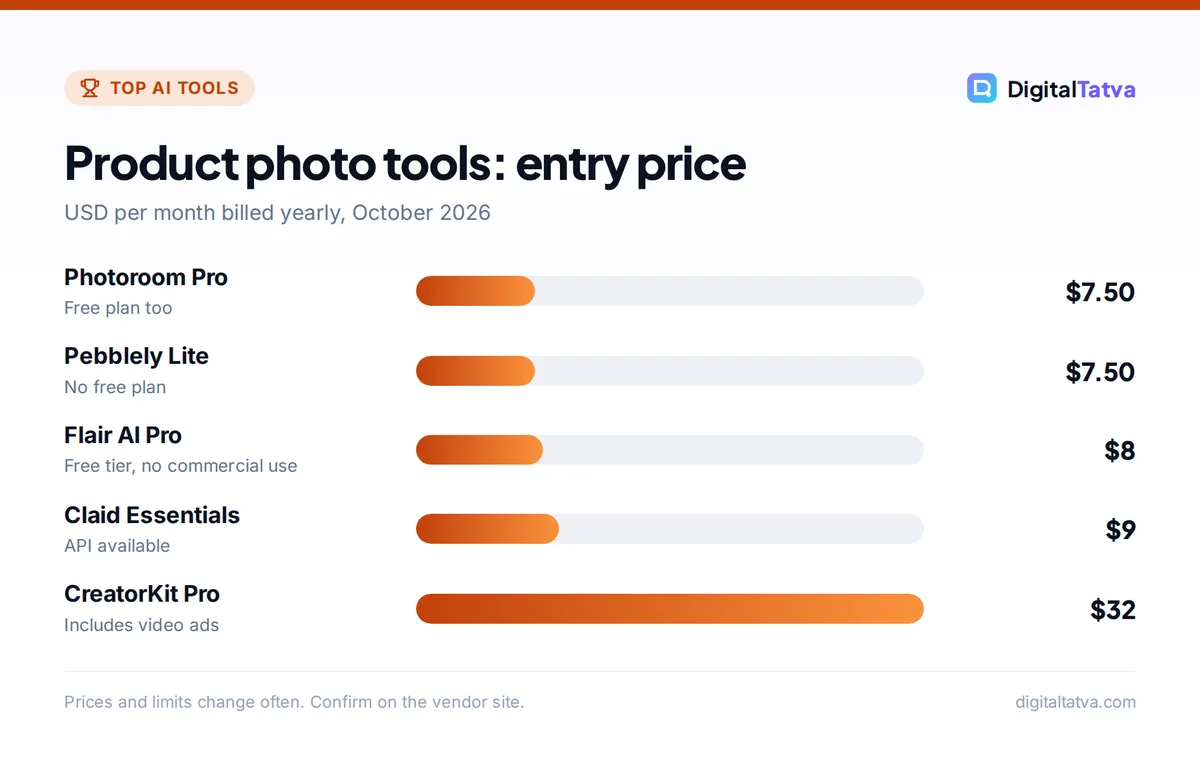
- Photoroom’s free plan includes basic background removal with a monthly export cap; Pro costs $12.99 a month or about $7.50 a month billed yearly.
- Claid starts at about $9 a month billed yearly and includes an API for catalog automation.
- Flair AI’s free tier gives 5 images and 1 custom model but no commercial license.
- ChatGPT and Gemini are best for creative concepts; dedicated tools are better for consistent catalogs.
- Never let AI change the product itself: color, size, label and texture must match what buyers receive.
What is AI product photography?
AI product photography is the use of AI image tools to remove backgrounds, generate realistic scenes, add shadows and reflections, place products on models or mannequins, and resize images for each marketplace, starting from a basic photo of the real product.
| Key fact | Detail (October 2026) |
|---|---|
| Typical starting price | About $7.50 to $9 per month billed yearly |
| Free options | Photoroom free plan, Flair AI free tier, ChatGPT and Gemini free plans |
| Common outputs | White backgrounds, lifestyle scenes, model shots, ghost mannequin, ads |
| Best for | Ecommerce stores, marketplace sellers, D2C brands |
| Main risk | AI altering the product so photos mislead buyers |
Quick picks: best AI product photography tools
This table summarizes the best AI product photography tools by use case, starting price and free option. Prices are from vendor pages or dated reviews in July to October 2026.
| Tool | Best for | Starting price | Free option |
|---|---|---|---|
| Photoroom | Background removal, batch edits, AI scenes | $7.50/month yearly ($12.99 monthly) | Yes, export cap |
| Claid | Catalog-wide AI photoshoots and API | $9/month yearly | Trial credits |
| Flair AI | Custom scene design and brand models | $8/month yearly | 5 images, no commercial license |
| Pebblely | Fast lifestyle templates | $7.50/month yearly | No ongoing free plan |
| Snapshot (Shopify app) | Editing inside Shopify admin | Credit packs from $10 (15 credits) | 2 credits on install |
| CreatorKit | Product photos plus short video ads | $32/month yearly | 5 downloads, watermarked |
| ChatGPT Images | Creative concepts and edits from a photo | Free; Plus $20/month | Yes |
| Google Gemini (Nano Banana) | Photo edits and scene changes | Free; Google AI Plus $4.99/month | Yes |
The best AI product photography tools reviewed
Each tool card explains what the tool does best, its limits and who should choose it.
1. Photoroom: Best all-rounder for sellers
- Starting price: $7.50/month billed yearly ($12.99 monthly)
- Free plan: Yes, basic tools with a monthly export cap
- Best for: small stores and marketplace sellers
Photoroom removes backgrounds, generates AI scenes, retouches, applies templates and processes images in batches, with virtual model and ghost mannequin shots for apparel. It runs on web, iOS and Android, and offers a separate API. A pricing tracker listed Max at $34.99 a month ($20.99 yearly) and Ultra at $99 ($82.50 yearly) in July 2026. For background removal alone, see our best background removers.
2. Claid: Best for large catalogs and automation
- Starting price: $9/month billed yearly (Essentials)
- Free plan: trial with 50 web credits, 50 API credits
- Best for: retailers and marketplaces with thousands of SKUs
Claid offers AI photoshoot scenes, upscaling, resizing, object removal, image expansion and catalog-wide edits, plus an API so developers can process images automatically when products are uploaded. It is the best fit when consistency across a whole catalog matters more than creative one-offs. For enlarging low-resolution images, compare best AI image upscalers.
3. Flair AI: Best for designing custom scenes
- Starting price: $8/month billed yearly (Pro)
- Free plan: 5 images and 1 custom model, no commercial license
- Best for: brands that want art-directed, on-brand scenes
Flair AI uses a drag-and-drop canvas where you place your product, props and backgrounds, control lighting and reuse templates, and you can train custom models on your products. It suits brands that care about a specific look. Free outputs cannot be used commercially, so upgrade before using images in listings or ads.
4. Pebblely: Best for quick lifestyle templates
- Starting price: $7.50/month billed yearly (Lite)
- Free plan: No ongoing free plan
- Best for: social media and simple lifestyle images
Pebblely generates scenes from templates or text prompts with automatic shadows and reflections, and exports presets for social platforms and marketplaces. It is fast and simple, with less fine control than Flair.
5. Snapshot: Best inside Shopify
- Starting price: credit packs from $10 for 15 credits
- Free plan: free install with 2 credits
- Best for: Shopify merchants who want edits without leaving admin
Snapshot runs inside the Shopify admin with a bulk editor, product photo themes, custom prompts and one-click attachment to product listings. It saves the download and upload steps. More ecommerce tools are in AI for ecommerce.
6. CreatorKit: Best for photos plus video ads
- Starting price: $32/month billed yearly (Pro)
- Free plan: 5 downloads a month, watermarked
- Best for: D2C brands making short video ads too
CreatorKit combines AI background removal and a brand kit with video templates and Shopify integration for short-form ads, which is useful if you need product videos as well as stills. For more video options see best AI UGC video generators.
7. ChatGPT Images: Best for creative concepts
- Starting price: free; Plus $20/month
- Free plan: Yes
- Best for: campaign concepts, seasonal scenes, social posts
OpenAI’s ChatGPT can edit a photo of your product into a new scene and, since ChatGPT Images 2.5 launched on 8 September 2026, keeps reference photos more faithfully and makes more precise edits that change only what you ask. It is excellent for concepts but less consistent than dedicated tools across a whole catalog. See how to generate images in ChatGPT.
8. Google Gemini with Nano Banana: Best free photo editor
- Starting price: free; Google AI Plus $4.99/month
- Free plan: Yes
- Best for: quick edits, background swaps, color variants
Google’s Gemini app uses the Nano Banana image model to edit photos with text instructions, such as “place this bottle on a marble counter with morning light”. It is free and fast for small sellers. Learn the technique in Nano Banana in Gemini.
How do you take product photos for AI tools?
You get the best AI product photos by starting with a sharp, evenly lit photo of the real product on a plain background, taken at the angle you want in the final image. AI can change the scene, but it cannot fix a blurry or badly lit product.
- Use soft, even light. Shoot near a window or with two lamps at 45 degrees; avoid harsh shadows.
- Plain background. A white wall or sheet makes cutouts cleaner.
- Fill the frame. Keep the product large and sharp; use your phone’s main lens, not digital zoom.
- Shoot several angles. Front, side, back, top and a detail shot of labels or textures.
- Match the final angle. If the scene is a tabletop, shoot slightly from above; for a wall shelf, shoot straight on.
- Write a scene prompt. For example “on a light oak table, soft morning light, minimal props, shallow depth of field”. More templates are in our AI image prompts.
Are AI product photos allowed on Amazon and other marketplaces?
AI-edited product photos are generally acceptable when they accurately show the product, but marketplaces set strict rules for main images, such as a pure white background and no added props or text. Always check the current image rules for each marketplace before uploading.
- Main image: use a clean white-background cutout of the real product.
- Secondary images: lifestyle scenes and infographics are usually allowed.
- Accuracy: do not change color, size, materials, labels or included items.
- Ads: Meta labels ads made or significantly edited with its own AI tools; see Meta Advantage+.
Watch out: Misleading AI images lead to returns, bad reviews and possible listing removal. Compare every AI image side by side with the real product before publishing.
How do you choose the right tool?
Choose an AI product photography tool by your volume and the type of image you need most. Small sellers can start free, while large catalogs need automation.
| If you need | Choose |
|---|---|
| Clean white backgrounds for a small store | Photoroom (free or Pro) |
| Thousands of SKUs processed automatically | Claid with API |
| Art-directed brand scenes | Flair AI |
| Everything inside Shopify | Snapshot |
| Free creative concepts and edits | Gemini or ChatGPT |
| Ad creatives from product photos | See best AI ad generators |
For broader editing tools, see the best AI photo editors and best AI image generators.
Frequently asked questions
What is the best free AI product photography tool?
Photoroom’s free plan is the best free option for clean background removal and basic edits, with a monthly export cap. Google Gemini and ChatGPT are free for creative scene edits. Flair AI’s free tier is useful for testing but does not include a commercial license.
Can AI replace a product photographer?
For many small sellers, AI can replace basic studio shots and simple lifestyle images. Brands with premium positioning, complex products such as jewelry or fabrics, or campaign shoots still benefit from a photographer. Many brands shoot a few hero images professionally and use AI for variations.
How much does Photoroom cost?
Photoroom Pro costs $12.99 a month or about $7.50 a month billed yearly, according to a July 2026 price tracker. Max costs $34.99 a month and Ultra $99 a month, with yearly discounts. A free plan includes basic background removal with a monthly export limit.
Can I use ChatGPT for product photos?
Yes. Upload a photo of your product and ask ChatGPT to place it in a new scene. ChatGPT Images 2.5, released in September 2026, follows reference photos more faithfully. Check carefully that labels, colors and shapes are unchanged, and use dedicated tools for consistent catalog images.
Do I need to disclose AI-edited product photos?
There is usually no general requirement to label AI-edited listing photos, but they must accurately represent the product. Some ad platforms label AI-generated ads automatically. Misleading images can break marketplace rules and consumer protection laws, so keep edits to the scene, not the product.
Our verdict
Start with Photoroom for clean listings and Gemini or ChatGPT for creative concepts. Move to Claid when your catalog grows, or Flair AI if art direction matters most. Whatever you use, shoot a sharp input photo and keep the product itself unchanged. Prices and credit limits change often, so confirm current plans on each vendor’s website before you subscribe.
Sources
- Best AI product photography tools for ecommerce, Hostinger, 19 October 2026, checked 22 October 2026
- Photoroom pricing, CostBench, July 2026, checked 22 October 2026
- Introducing ChatGPT Images 2.5, OpenAI, 8 September 2026, checked 22 October 2026
- Google AI plans, Google, checked 22 October 2026
Pricing and features are checked at the time of writing and can change. Some links may be affiliate links, which never affect our verdicts.