10 Best AI Photo Editors for Phone and Desktop
The 10 best AI photo editors for phone and desktop in 2026, from Google Photos and Lightroom to Gemini, ChatGPT, Canva and Luminar, with prices, free limits and who each suits.

On this page
The best AI photo editor for most people in 2026 is Google Photos on your phone, because its free “Help me edit” and Magic Eraser tools fix most everyday shots in seconds, and Adobe Lightroom on desktop, which pairs pro-grade AI masking, Denoise and Generative Remove with a full photo library. If you want to change a photo by simply describing the edit, Gemini (Nano Banana) and ChatGPT now do that well for free with daily limits.
This guide ranks ten AI photo editors for phone and desktop, with quick picks, plan prices checked on 12 October 2026, the real free limits, and advice on which editor fits photographers, sellers, social media managers and casual users. We separate classic editors with AI features from prompt-based editors, because they suit very different jobs.
Key takeaways
- Google Photos is the best free AI photo editor on Android, with conversational “Help me edit” now available in Hindi, Gujarati and five other Indian languages.
- Adobe’s Photography plan ($19.99/month) bundles Lightroom and Photoshop with 1,000 generative credits a month; new Photoshop single app subscribers get only 25.
- Gemini and ChatGPT are the easiest prompt-based editors, but they regenerate the image, so fine details and faces can shift.
- Luminar is the best one-time purchase option, from $129 for desktop.
- Pixlr and Canva cover budget and social media editing in the browser.
Quick picks: best AI photo editors compared
| Editor | Best for | Platforms | Starting price | Free option |
|---|---|---|---|---|
| Adobe Lightroom | Photographers | Desktop, mobile, web | $19.99/mo (Photography plan) | Trial only |
| Adobe Photoshop | Generative edits and retouching | Desktop, web, mobile | $22.99/mo (single app) | Trial only |
| Google Photos | Free phone editing | Android, iOS, web | Free | Yes |
| Gemini (Nano Banana) | Edit by describing changes | Web, Android, iOS | $4.99/mo (Google AI Plus) | Yes, 1K downloads |
| ChatGPT | Creative edits and restyles | Web, desktop, mobile | $20/mo (Plus) | Yes, limited images |
| Canva | Social media graphics | Web, desktop, mobile | US$144/year (Pro) | Yes, 20 AI uses/month |
| Luminar | One-time purchase | Desktop, mobile | $129 one-time (desktop) | No |
| Picsart | Mobile creative edits | Android, iOS, web | $9.45/mo billed yearly | Limited |
| Pixlr | Budget browser editing | Web, mobile | $1.99/mo billed yearly | Yes, with ads |
| Photoroom | Product photos | Android, iOS, web | $7.50/mo billed yearly | Yes, 100 exports/month |
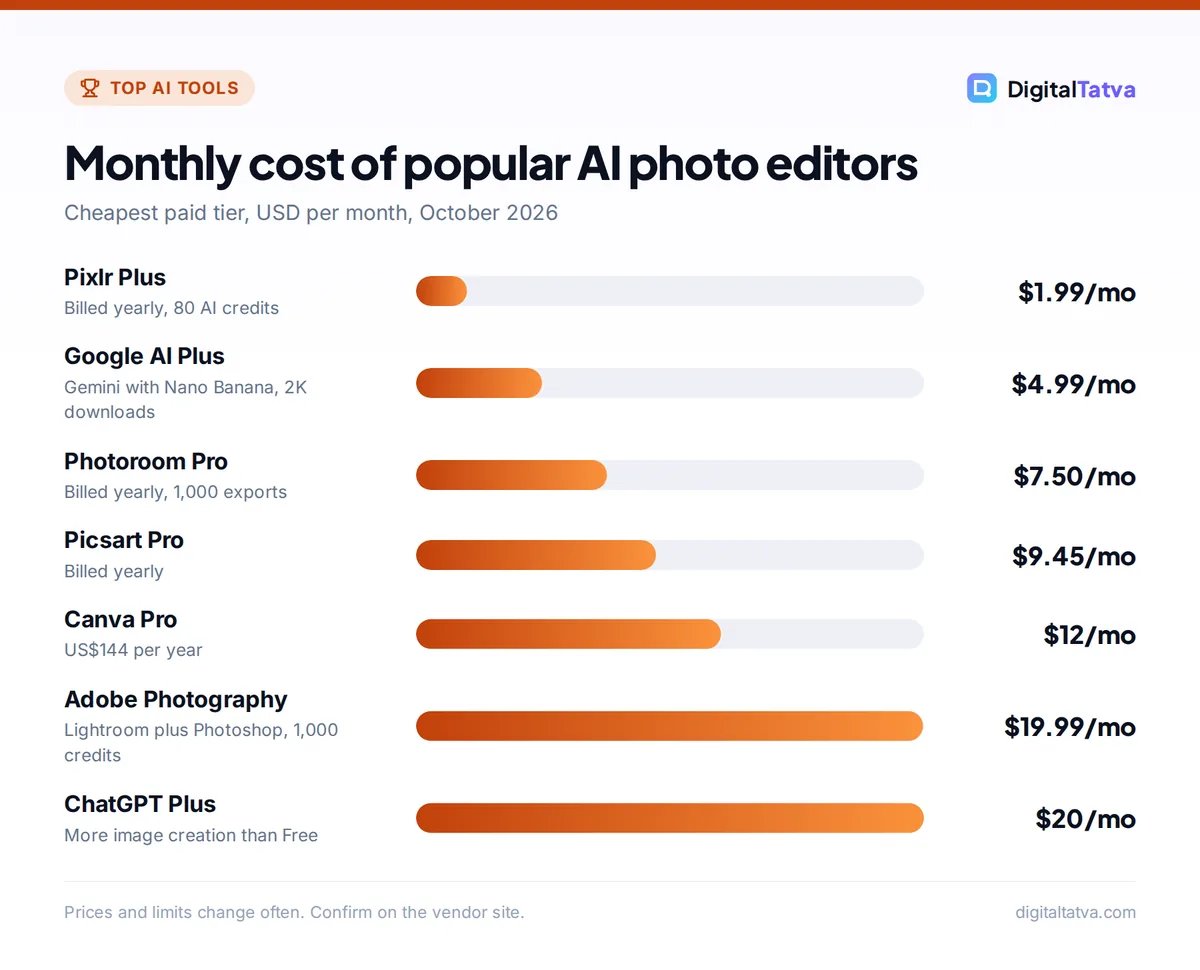
Monthly cost of popular AI photo editors
Cheapest paid tier, USD per month, October 2026
Prices and limits change often. Confirm on the vendor site.
Two kinds of AI photo editor
Classic editors with AI tools (Lightroom, Photoshop, Luminar, Pixlr, Google Photos) keep your original pixels and apply targeted AI: subject masks, noise reduction, object removal and sky replacement. Results are predictable, faces stay the same person, and you can undo any step.
Prompt-based editors (Gemini, ChatGPT and the “Help me edit” box in Google Photos) let you type “make it golden hour and remove the people behind me.” They are magical for creative changes but regenerate parts or all of the image, so small details, text and faces can drift. Use them for fun and concept work, and a classic editor when accuracy matters. Our best AI image generators guide covers tools that create images from scratch instead.
The 10 best AI photo editors
1. Adobe Lightroom: Best AI photo editor for photographers
- Starting price: Photography plan $19.99/month (Lightroom, Lightroom Classic, Photoshop, 1TB); Lightroom plan also available
- Free option: Free trial
- Best for: Hobby and professional photographers editing many photos
Lightroom combines a photo library with AI that saves hours: one-click subject, sky and people masks, Denoise for high-ISO shots, Generative Remove for distractions, and Super Resolution, which doubles width and height (a 12MP photo becomes 48MP). Generative Upscale, powered by Topaz Gigapixel, enlarges up to 4x and costs 10 generative credits for files up to 25MP.
The Lightroom plan includes 250 generative credits a month and the Photography plan includes 1,000. Edits sync across desktop, phone and web, so you can cull on the train and finish at your desk.
Skip it if: you only edit a few phone photos a month; Google Photos is free.
2. Adobe Photoshop: Best for generative edits and retouching
- Starting price: $22.99/month single app; better value inside the $19.99 Photography plan
- Free option: Free trial
- Best for: Designers, retouchers and marketers who need full control
Photoshop’s AI toolbox now includes Generative Fill, Generative Expand, the Remove tool, Harmonize (which blends a pasted object or person into a new background with matching light), Generative Upscale, Prompt to edit and an AI Assistant. You still get layers and masks, so AI output can be refined by hand.
Watch the credits. Adobe’s generative credits FAQ says the Photoshop single app plan includes only 25 monthly credits for people who subscribed on or after 17 June 2025 (500 for earlier subscribers), and Generative Fill uses 1 credit per generation on that plan. The Photography plan’s 1,000 credits go much further.
Skip it if: you want quick results without learning layers.
3. Google Photos: Best free AI photo editor on phones
- Starting price: Free
- Free option: Yes; Magic Editor had a 10 saves per month cap for non-Pixel users without 2TB+ Google One (per Google’s 2024 rollout)
- Best for: Everyday phone photos and family albums
Google Photos gives everyone Magic Eraser, Photo Unblur and Portrait light. Its newer “Help me edit” box lets you describe edits by voice or text, and Google launched it in India in January 2026 in English, Hindi, Tamil, Marathi, Telugu, Bengali and Gujarati on Android phones with 4GB RAM and Android 8.0 or later. It can also fix people shots, such as opening closed eyes, using images from your private face groups.
Edited images get C2PA Content Credentials that record AI changes. Our AI tools for Indian languages guide lists more tools that work in regional languages.
Skip it if: you shoot RAW on a camera and need precise color control.
4. Gemini with Nano Banana: Best prompt-based editor
- Starting price: Free; Google AI Plus $4.99/month (Rs 399/month), AI Pro $19.99/month (Rs 1,950/month)
- Free option: Yes, 1K downloads; 2K with a Google AI plan
- Best for: Restyling, background swaps and multi-step conversational edits
Upload a photo to Gemini, describe the change, and Nano Banana edits it: add or remove objects, change the style or adjust the color grade, then keep refining in the same chat. Google says editing images is not available to users under 18, and paid plans get higher usage limits plus the option to redo images with Nano Banana Pro.
Downloads are 1K on the free tier and 2K with a Google AI plan. All images carry an invisible SynthID watermark, and Google’s last public statement said free and AI Pro images also show a visible sparkle. Our step-by-step Nano Banana editing guide covers prompts that work, and Gemini pricing explains the plans.
Skip it if: you need full-resolution output for print.
5. ChatGPT: Best for creative edits and restyles
- Starting price: Free; Plus $20/month
- Free option: Yes, limited image creation
- Best for: Turning a photo into an illustration, poster or new scene
Upload a photo to ChatGPT and ask for a change, such as “turn this into a watercolor” or “put this product on a marble kitchen counter.” It is excellent at style changes and adding readable text. OpenAI adds C2PA metadata and SynthID to images but no visible watermark unless you ask for one.
Like Gemini, ChatGPT regenerates the image, so it is weaker at subtle retouching where the person must look exactly the same. See how to generate images in ChatGPT for step-by-step prompts and ChatGPT pricing for plan limits.
Skip it if: you want precise, non-destructive edits.
6. Canva: Best for social media photo edits
- Starting price: Pro US$144/year (Rs 4,000/year in India; Pro Lite Rs 1,590/year)
- Free option: Yes, up to 20 Standard or Premium AI uses a month
- Best for: Marketers turning photos into posts, ads and thumbnails
Canva’s photo editor offers filters, adjustments, Magic Eraser-style cleanup, background removal on paid plans, an image upscaler and AI image generation. The real strength is what happens next: drop the edited photo into a template, apply your Brand Kit, and resize it for every platform.
The free allowance resets on the first of each month. Our Canva Magic Studio review goes deeper on the AI tools.
Skip it if: you need photographic precision rather than design output.
7. Luminar: Best one-time purchase AI editor
- Starting price: $129 one-time (Desktop Only); $159 for desktop and mobile; $199 Max with a year of Luminar Prime
- Free option: No, 30-day money-back guarantee
- Best for: Hobby photographers who dislike subscriptions
Skylum’s Luminar (long sold as Luminar Neo) is known for fast AI sky replacement, portrait tools and relighting. Its pricing page lists AI tools including Restoration, GenErase, GenSwap, GenExpand and an AI Assistant. The apps are yours to keep, but the AI tools last 365 days and renew with a Luminar Prime subscription, so the “one-time” price is not the whole story.
Skip it if: you need a cataloging workflow as deep as Lightroom’s.
8. Picsart: Best for creative mobile edits
- Starting price: Pro $9.45/month billed yearly (struck-through $15)
- Free option: Limited
- Best for: Creators making stickers, collages and Instagram edits on a phone
Picsart packs filters, effects, a one-tap enhancer, background and object removal, and a large library of AI image and video models paid for with credits. It is playful and fast, aimed at social content rather than photographic accuracy.
Skip it if: you want a clean, distraction-free editor.
9. Pixlr: Best budget browser editor
- Starting price: Plus $1.99/month billed yearly ($2.49 monthly); Premium $7.99/month yearly
- Free option: Yes, with ads and limits
- Best for: Students and Chromebook users who want layers plus AI
Pixlr is a Photoshop-style editor that runs in the browser, with Background Remover, Image Upscaler and Generative Fill. Plus removes ads, gives unlimited saves and 80 AI credits a month, and Premium adds 1,000 credits and all AI models. It is the cheapest serious editor here.
Skip it if: you edit large RAW files.
10. Photoroom: Best for product photos
- Starting price: Pro $7.50/month billed yearly
- Free option: Yes, 100 exports a month
- Best for: Online sellers, resellers and small brands
Photoroom turns a phone snap into a clean listing photo: it cuts out the product, adds a white or AI-generated background with shadows, and resizes for each marketplace. Pro adds 8,000 AI credits, 1,000 exports a month and AI fashion models. Our background remover roundup compares it with Adobe Express and Canva.
Skip it if: you edit people and landscapes rather than products.
Note: Snapseed, Google’s free manual editor, got a full redesign on iPhone and iPad in 2025. It has few generative features, but it remains a great free choice for precise manual adjustments.
Which AI photo editor should you choose?
| If you are… | Choose | Why |
|---|---|---|
| A casual phone user | Google Photos | Free, built in, works in Indian languages |
| A photographer | Lightroom (Photography plan) | AI masks, Denoise, library, 1,000 credits |
| A designer or retoucher | Photoshop | Generative Fill plus layers and masks |
| A social media manager | Canva | Edit and design in one place |
| An online seller | Photoroom | Clean product shots at scale |
| Anti-subscription | Luminar | One-time license from $129 |
| On a tight budget | Pixlr or Gemini free | Under $2 a month, or free with limits |
How to get better results from AI photo editing
- Fix the basics first. Crop, straighten and set exposure before using AI tools. AI masks and removals work better on a well-exposed image.
- Use masks, not global sliders. Select the subject or sky and adjust it separately. This is where Lightroom and Luminar shine.
- Remove distractions in small passes. Brush over one object at a time with Magic Eraser, the Remove tool or Generative Remove. Large selections produce smeared results.
- Be specific with prompts. In Gemini or ChatGPT, say what to keep: “Keep my face and clothes exactly the same, only change the background to a beach at sunset.”
- Upscale last. If you need a bigger file, enlarge after editing with Super Resolution or a dedicated AI image upscaler.
- Export a copy. Keep your original and export edits as new files, so you can always go back.
Save money: If you were about to buy the Photoshop single app at $22.99, pick the Photography plan at $19.99 instead. It costs less, adds Lightroom and 1TB of storage, and includes 1,000 generative credits a month versus 25 for new single app subscribers.
Ethics and honesty in AI photo editing
AI makes it easy to change reality, so set some rules. Do not edit product photos in ways that misrepresent what buyers will receive, and do not alter people without their consent. Real estate listings are a common trap: if you virtually stage or change a room, label it clearly. Our guide to AI for real estate agents covers disclosure.
Google Photos, Adobe and OpenAI all attach Content Credentials (C2PA) or SynthID to AI-edited images, which helps platforms identify edits. Ownership questions are trickier for heavily generated images; read can you copyright AI content before using AI edits in commercial work.
Frequently asked questions
What is the best free AI photo editor?
Google Photos is the best free AI photo editor for most phone users, with Magic Eraser, Photo Unblur and “Help me edit” for describing changes. For prompt-based edits, Gemini’s free tier with Nano Banana is excellent, though downloads are limited to 1K. Pixlr’s free browser editor and Canva Free, with 20 AI uses a month, are good for desktop work.
Is Lightroom or Photoshop better for AI editing?
Lightroom is better for editing many photos: AI masks, Denoise, Generative Remove and upscaling in a library workflow. Photoshop is better for heavy changes to a single image, such as Generative Fill, compositing and Harmonize. Most photographers get both in the Photography plan at $19.99 a month, which also includes 1,000 generative credits.
Can AI photo editors change faces?
Yes, but with care. Google Photos can open closed eyes or add a smile using your own photos, and Photoshop can retouch skin precisely. Prompt-based tools like Gemini and ChatGPT regenerate the image, so a face can subtly change. Never alter someone’s face without consent, and avoid misleading edits in news, ads or listings.
Which AI photo editor works best on Android?
Google Photos is the strongest free option on Android, and its “Help me edit” feature works in English and six Indian languages on phones with 4GB RAM and Android 8.0 or later. Lightroom mobile is best for serious photographers, Picsart for creative social edits and Photoroom for product photos.
Is there a one-time purchase AI photo editor?
Yes. Skylum’s Luminar sells one-time licenses from $129 for desktop or $159 for desktop and mobile. Note that its AI tools are included for 365 days and then renew with a Luminar Prime subscription, while the core apps keep working. Most other AI editors, including Adobe’s, are subscriptions.
Our verdict
For a free AI photo editor on your phone, start with Google Photos and add Gemini when you want to change a scene by describing it. Photographers should get Adobe’s Photography plan for Lightroom, Photoshop and 1,000 monthly credits, while marketers will move faster in Canva and online sellers in Photoroom. If you hate subscriptions, Luminar’s one-time license is the best compromise, and Pixlr is the bargain pick. For more free tools that create rather than edit images, see our list of free AI image generators with no watermark. Plans, credits and free limits change frequently, so confirm current pricing on each vendor’s site before you buy.
Pricing and features are checked at the time of writing and can change. Some links may be affiliate links, which never affect our verdicts.