AI Tools for Real Estate Agents: Listings, Leads and Follow Ups
The AI tools real estate agents actually need for listing descriptions, property marketing, lead routing and follow ups, with prices, prompts and compliance tips.

On this page
- Key takeaways
- Quick picks: AI tools for real estate agents at a glance
- AI for listings: descriptions, photos and property marketing
- AI for property videos and voiceovers
- AI for leads: capture, qualify and route every enquiry
- AI for follow ups: stay in touch without sounding like a robot
- Research and client education with AI
- Privacy, accuracy and compliance for agents using AI
- Frequently asked questions
- Next steps: build your AI workflow this week
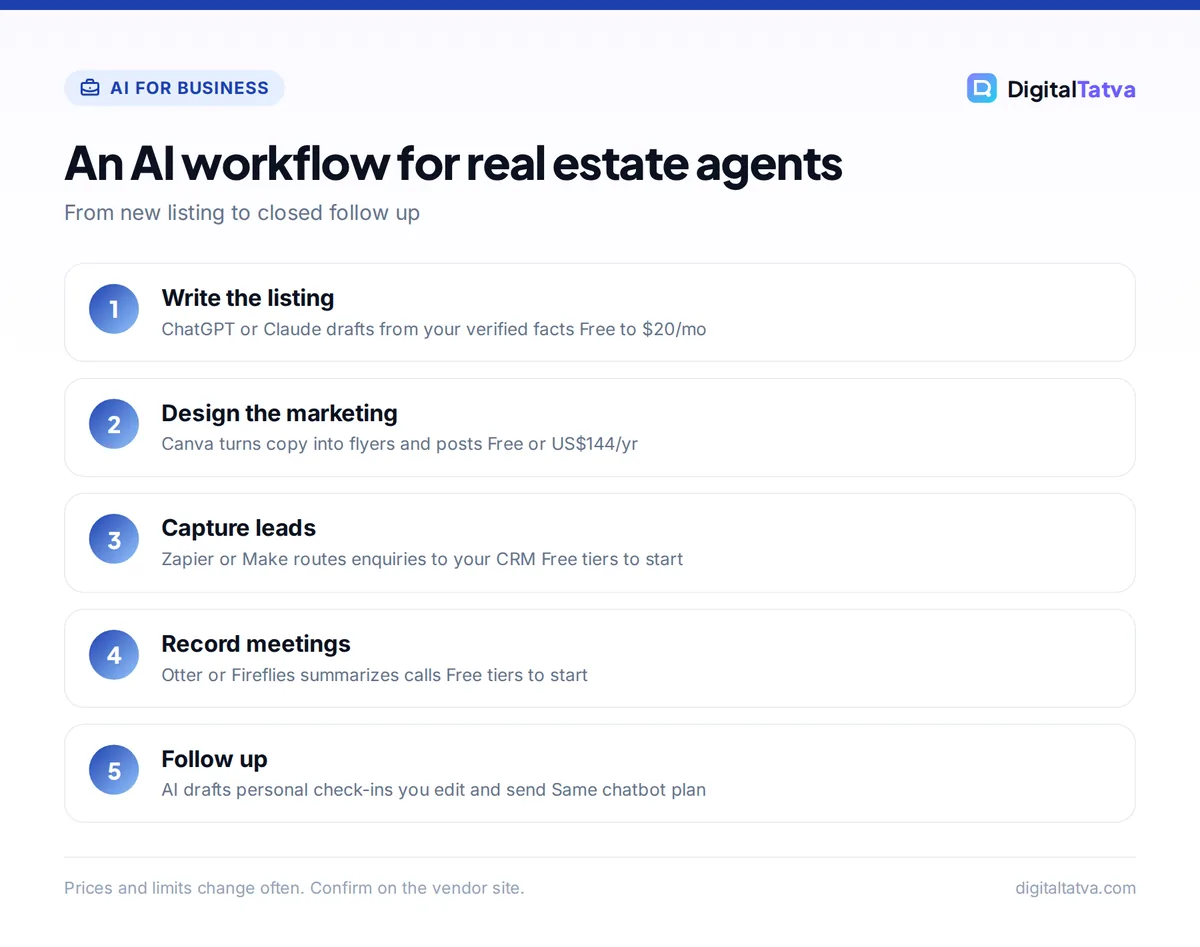
The most useful AI tools for real estate agents are a general assistant such as ChatGPT, Claude or Gemini for listing descriptions and client emails, Canva for flyers and social posts, an automation tool like Zapier for routing new leads, and a meeting notetaker for calls and showings. Together they cover listings, leads and follow ups for roughly $0 to $60 a month. Specialist real estate software can help later, but most agents get the biggest time savings from these general tools first.
This guide walks through each stage of an agent’s week, from writing a listing to nurturing a cold lead, and shows which AI tool fits, what it costs and where you must stay careful. Prices are from vendor pages as of September 2026.
Key takeaways
- Listings: a $0 to $20 a month chatbot writes strong first drafts of listing descriptions, social captions and open house invites in minutes.
- Marketing: Canva (free, or US$144/year for Pro) turns those drafts into on-brand flyers, reels covers and property posts.
- Leads: Zapier Free (100 tasks a month) or Make Free (1,000 credits a month) can send every new enquiry to your CRM and phone instantly.
- Follow ups: AI drafts personalized check-ins and meeting summaries, while you keep the relationship human.
- Compliance: you are responsible for every AI-written claim, image and ad. Check facts, disclose edited or staged photos, and follow fair housing and local advertising rules.
Quick picks: AI tools for real estate agents at a glance
| Job | Tool | Free option | Paid from |
|---|---|---|---|
| Listing descriptions and emails | ChatGPT | Yes, unlimited text chats | $8/mo (Go), $20/mo (Plus) |
| Long documents, guides, market reports | Claude | Yes | $20/mo ($17 annual) |
| Gmail and Google Docs users | Gemini | Yes | $4.99/mo (Google AI Plus) |
| Flyers and social posts | Canva | Yes, up to 20 AI uses | US$144/yr (Pro), Rs 4,000/yr in India |
| Lead routing | Zapier | Yes, 100 tasks/mo | $19.99/mo annual (Professional) |
| Call and meeting notes | Fireflies.ai or Otter.ai | Yes | $10/seat/mo annual (Fireflies Pro) |
| Website chat | Tidio | Yes, 50 conversations | $24.17/mo (Starter) |
| WhatsApp follow ups | WATI | No | $20/mo annual (Growth) |
| Avatar or narrated property videos | HeyGen or Synthesia | Yes, limited | $29/mo (HeyGen Creator) |
If you run your agency like a small business (most agents do), our guide to the best AI tools for small business covers more general options.
AI for listings: descriptions, photos and property marketing
Writing listings is where AI saves agents the most time. A good listing description used to take 30 minutes of staring at a blank page. With AI, you spend that time checking and improving a draft instead.
Write listing descriptions from your notes
Give the chatbot the facts only you can verify: bedrooms, bathrooms, area, floor, parking, recent upgrades, school or transit access, and the kind of buyer the property suits. Then ask for a description in a set length and tone. A prompt like this works well:
Write a 150-word listing description for a 3-bedroom apartment. Facts: 1,450 sq ft, 9th floor, two covered parking spots, renovated kitchen in 2025, 5-minute walk to the metro, east-facing balcony. Audience: young families. Tone: warm and specific, no cliches like “dream home”. End with a one-line call to book a viewing.
Ask for three versions (portal listing, Instagram caption, email to your buyer list) in the same chat so the details stay consistent. Our list of ChatGPT prompts for marketing has more templates you can adapt for property promotion.
Watch out: AI sometimes invents features or rounds numbers. Read every line against your listing sheet before publishing, and never let AI describe a neighborhood in terms of who “should” live there. Fair housing laws in the US and similar rules elsewhere apply to AI-written ads exactly as they apply to yours.
Turn listings into flyers, posts and reels
Canva is the easiest way to turn a listing into a set of matching graphics. The free plan includes templates and up to 20 uses of its AI tools. Canva Pro (US$144/year, Rs 4,000/year in India) gives 10x the AI allowance of Free and five Brand Kits, which keeps your logo, colors and fonts consistent across every property. Our Canva pricing guide explains each plan.
For a wider set of scheduling and caption tools, see our guide to the best AI social media tools.
AI images and virtual staging
AI image tools can help with marketing graphics, but use them carefully on property photos. Adding furniture, changing the sky or removing objects changes how a buyer sees the home. Label any edited or virtually staged photo clearly, keep the original photos available, and follow your portal, brokerage and local regulator rules. In India, include any registration details your state regulator requires, such as RERA numbers, on ads.
For graphics that are not property photos, such as a “Just Sold” banner background, Adobe Firefly offers free daily generations and says outputs from its own Firefly models are safe for commercial use. Our roundup of the best AI image generators compares licensing on other tools.
AI for property videos and voiceovers
Video tours and short walkthrough reels get attention on social platforms, and AI can lower the effort.
- Narrated walkthroughs: shoot the clips yourself, then let AI write the script. ElevenLabs Starter ($6/month) adds a commercial license and instant voice cloning if you want a consistent voiceover. The free plan has no commercial license, so do not use it for client marketing.
- Avatar explainer videos: HeyGen Free allows 3 videos a month of up to 1 minute with a watermark. Creator costs $29/month for 600 credits and no watermark. Synthesia Starter is $29/month, or $18/month billed yearly. These work well for “market update” or “how buying works” videos, not for showing a specific home. Our Synthesia vs HeyGen comparison helps you choose.
Our step-by-step guide on how to make an AI video covers scripting, voice and editing in more detail.
AI for leads: capture, qualify and route every enquiry
Speed matters with property leads. The agent who replies first often gets the viewing. AI and automation help you respond in minutes even when you are at a showing.
- Capture. Connect your website form, portal email alerts or Facebook lead forms to an automation tool. Zapier Free gives 100 tasks a month on two-step Zaps, and Make Free gives 1,000 credits a month.
- Summarize and score. Add an AI step that reads the enquiry and pulls out budget, location, timeline and whether the person is buying or renting. Zapier’s paid plans include AI fields for this.
- Route. Save the lead to your CRM or a Google Sheet and send yourself a phone or Slack alert with the summary.
- Reply. Send an instant, friendly acknowledgment with a link to book a call. Keep it short and honest: say you will call personally.
Our guide on automating tasks with Zapier and AI walks through building a workflow like this from scratch.
Website chat and WhatsApp
A chatbot on your website can answer common questions (viewing times, documents needed, which areas you cover) and collect contact details at night. Tidio’s free plan includes 50 billable conversations, which is enough to test demand. For agents in India and other markets where buyers prefer WhatsApp, WATI’s Growth plan costs $25/month, or $20/month billed annually, with Meta’s WhatsApp message charges on top. Compare more options in our guide to AI customer support tools.
Tip: Tell visitors when they are chatting with a bot, and hand over to a human quickly for anything about price negotiation, legal terms or a specific property’s condition.
AI for follow ups: stay in touch without sounding like a robot
Most deals come from leads that were not ready the first time. AI makes consistent follow up much easier, as long as you keep it personal.
Meeting and call notes
Record buyer consultations and seller meetings (with permission) using a notetaker. Otter Basic is free for 300 minutes a month, capped at 30 minutes per conversation. Fireflies Pro costs $10 per seat per month on annual billing ($18 monthly) with unlimited transcription. Both produce summaries and action items you can paste into your CRM. Our Otter vs Fireflies comparison covers the differences.
Personalized check-ins
Ask your assistant to draft follow ups using your notes: “Write a short WhatsApp message to Priya, who viewed two 2BHK flats last month and wants to move before school starts in June. Mention that a similar flat just listed nearby. Friendly, no pressure.” You still choose who to contact and edit the message, but the blank-page problem disappears.
Build a reusable assistant
Save your brand voice, service areas, standard documents checklist and example messages in a ChatGPT custom GPT or a Claude Project. Every draft then starts from your context. Our tutorial on creating a custom GPT shows how to set one up in under an hour.
Research and client education with AI
AI can help you prepare, but it should not be your source of truth for numbers.
- Neighborhood guides: Perplexity gives answers with numbered citations, so you can check each claim about schools, transport or amenities. Our guide on how to use Perplexity for research explains its search modes.
- Explaining the process: Claude and ChatGPT are good at turning complex steps (loan approval, registration, closing) into plain-language guides for first-time buyers.
- Market reports: paste your own sales data into a chatbot and ask for a summary of trends. Never ask AI to invent prices or comparable sales.
Privacy, accuracy and compliance for agents using AI
Real estate involves personal and financial details, so set rules before you start.
Safe uses
- Drafting listing copy from facts you verified
- Writing general guides, scripts and social posts
- Summarizing your own meeting notes with consent
- Routing leads into tools your brokerage approves
Risky uses
- Pasting ID documents, bank statements or loan details into free chatbots
- Publishing AI descriptions without fact checks
- Undisclosed AI-edited or staged property photos
- Ad targeting or wording that could discriminate
If you work in a team or brokerage, put these rules in writing. Our AI usage policy template gives you a ready-made document to adapt. Team plans such as ChatGPT Business ($25 per user per month, or $20 annually, minimum two seats) also state that workspace data is not used for training, which is safer than personal free accounts.
Frequently asked questions
What is the best AI tool for real estate agents?
For most agents, a general assistant like ChatGPT or Claude is the best first AI tool, because it writes listing descriptions, emails, scripts and follow ups. ChatGPT Free is enough to start. Add Canva for marketing graphics and Zapier for lead routing once you know which tasks save you the most time.
Can ChatGPT write real estate listing descriptions?
Yes. ChatGPT writes good listing descriptions when you give it verified facts, a target buyer, a word count and a tone. Ask for several versions for portals, social media and email. Always check every detail against your listing sheet, because AI can invent features or exaggerate, and you are responsible for what you publish.
Is it legal to use AI-generated photos in property listings?
Rules vary by country, portal and brokerage, so check yours. As a general rule, clearly label any virtually staged or AI-edited photo, keep the original photos available, and never hide defects. Misleading images can break advertising rules and damage trust with buyers. This is not legal advice, so ask your brokerage or regulator if unsure.
How much do AI tools for real estate agents cost?
You can start for $0 with free plans from ChatGPT, Gemini, Canva, Zapier and Otter. A practical paid setup is one $20 chatbot plan plus Canva Pro at US$144 a year, which works out to roughly $32 a month. Video, WhatsApp and team tools add more as your business grows.
Will AI replace real estate agents?
AI is unlikely to replace good agents, because buyers and sellers still want local knowledge, negotiation and someone they trust during a big financial decision. What AI does replace is slow admin: writing, data entry and first replies. Agents who use it well respond faster and spend more time with clients.
Next steps: build your AI workflow this week
Start with your next listing. Write the description with a free chatbot, design the posts in Canva, and set up one automation that sends new leads to your phone. Once that saves you time, add a notetaker and a reusable assistant for follow ups. Small steps like these add up to hours back every week.
Plans and prices change often, so confirm details on the vendor sites, such as the Zapier pricing page and Canva’s pricing page, before you subscribe.
Pricing and features are checked at the time of writing and can change. Some links may be affiliate links, which never affect our verdicts.



