Claude Usage Limits Explained and How to Make Them Last
How Claude usage limits work on Free, Pro, Max and Team in 2026: five-hour sessions, weekly caps, usage credits and ten practical habits that make your allowance last longer.

On this page
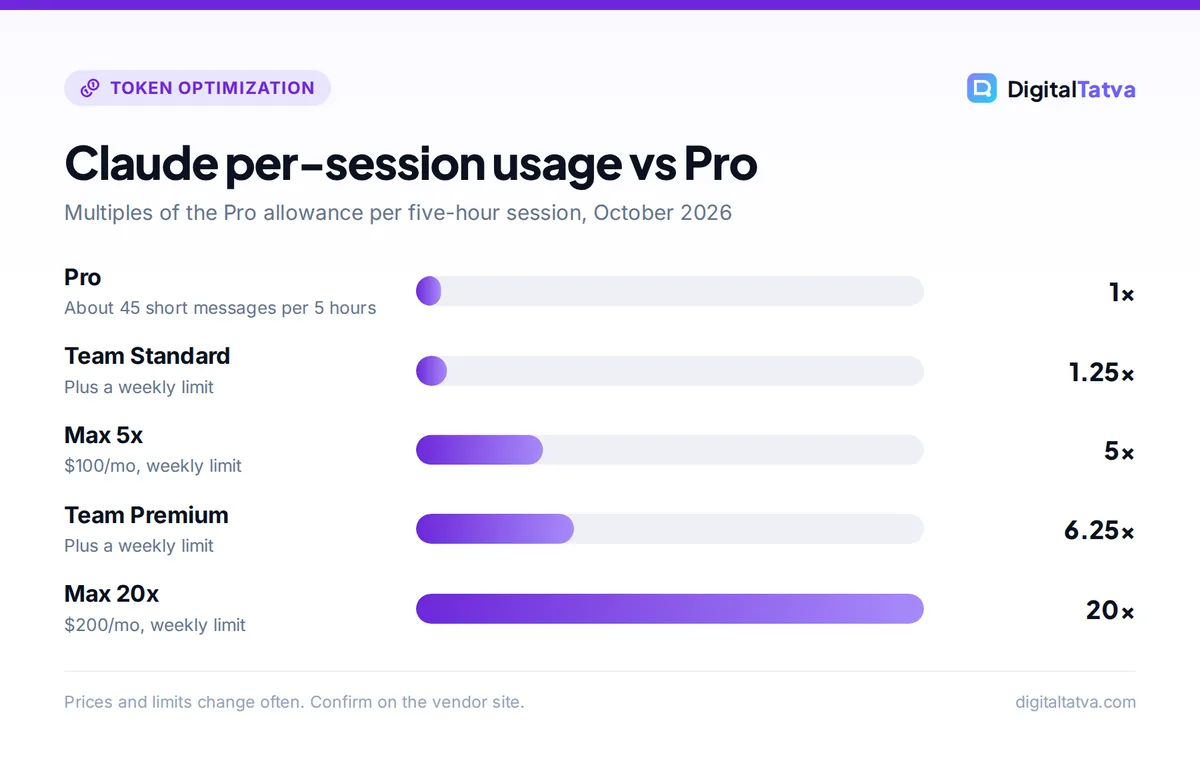
Claude usage limits work in five-hour sessions. On Pro, your session allowance resets every five hours, and Anthropic estimates around 45 messages per session for short conversations; Max 5x and Max 20x give 5x and 20x that per-session allowance, with a weekly cap across all models. Anthropic does not publish exact message caps for the Free plan, and real usage depends on message length, file size, conversation length and model.
This guide explains every Claude limit Anthropic has published as of 1 October 2026, the difference between usage limits and length limits, and ten practical ways to make your allowance last, with worked examples.
Key takeaways
- Pro sessions reset every five hours, with “around 45 messages” per session as Anthropic’s rough estimate for short chats.
- Pro offers “at least five times the usage per session” of the Free plan during peak hours; exact Free caps are not published.
- Max and Team seats add a weekly limit, and Anthropic may apply weekly or monthly caps to Pro as well.
- Claude chat and Claude Code share one allowance, and long chats cost more because Claude rereads the whole conversation each turn.
- Projects caching, fresh chats, batched requests and lighter models stretch any plan further.
Claude usage limits by plan
Anthropic describes usage as multiples of the Pro plan rather than fixed message counts. Here is everything it publishes.
| Plan | Price | Per-session allowance | Reset | Extra caps |
|---|---|---|---|---|
| Free | $0 | Lower than Pro; exact cap not published | Session based | Not published |
| Pro | $20/month ($17 annual) | About 45 short messages (estimate) | Every 5 hours | May apply weekly or monthly caps |
| Max 5x | $100/month | 5x Pro | Every 5 hours | Weekly limit across all models |
| Max 20x | $200/month | 20x Pro | Every 5 hours | Weekly limit across all models |
| Team Standard | $25/seat ($20 annual) | 1.25x Pro | Per session | Weekly limit |
| Team Premium | $125/seat ($100 annual) | 6.25x Pro | Per session | Weekly limit |
| Enterprise | $20/seat annual plus usage | Usage billed at API rates | n/a | Set by your admin |
For Max, Anthropic’s help center gives a rough estimate of at least 225 to 900 messages per five-hour session depending on tier and usage. Treat that as a guide. Sources: Anthropic’s Pro plan usage article and Max plan usage article, checked 1 October 2026. Full plan details are in our Claude pricing guide.
Note: Anthropic’s “45 messages” estimate assumes short conversations, roughly 200 English sentences of 15 to 20 words, on less compute-heavy models. With Opus, long files or Research, expect fewer.
Usage limits vs length limits
Claude has two kinds of limits, and they need different fixes.
- Usage limits cap how much you can use Claude across all conversations over time. When you hit one, Anthropic says you need to “wait for it to reset, upgrade your plan, or purchase extra usage”.
- Length limits cap how much a single conversation can hold, set by the context window. When you hit one, “start a new conversation or use features like projects”.
The context window on paid plans is 200K tokens by default and 1M tokens on Fable 5.1, Opus 5.5, Opus 5, Sonnet 5.5 and Sonnet 5. When a chat nears the limit and code execution is on, Claude summarizes earlier messages to make room. Our context window explainer covers how this works across ChatGPT, Claude and Gemini.
What uses up your Claude allowance
Anthropic lists these factors: message length, file attachment size, current conversation length, tool use (Research and web search), model choice, effort level, Artifact creation and use, and multi-step tasks. Paid users can see progress bars for the five-hour session and the weekly limit under Settings, then Usage.
Why long chats drain limits fastest
Claude processes the full conversation every time it replies. That makes the cost of a long thread grow much faster than the number of messages. Here is the arithmetic for a chat where each exchange adds about 1,000 tokens:
- Message 1: Claude reads about 1,000 tokens.
- Message 30: Claude reads about 30,000 tokens.
- Total over 30 messages: 1,000 + 2,000 + … + 30,000 = 465,000 tokens.
- The same 30 questions split into six fresh chats of five messages each: 6 x (1,000 + 2,000 + 3,000 + 4,000 + 5,000) = 90,000 tokens.
That is about a fifth of the processing for the same number of questions. If you are new to tokens, our guide on what tokens are in AI explains them in plain English.
10 ways to make Claude limits last longer
- Start a new chat for each new task. As the example above shows, splitting long threads can cut processing by around 80 percent. Ask Claude for a short summary before you switch, and paste it into the new chat.
- Put core documents in a Project. Anthropic says project content “is cached and counts less against your limits when reused”. Load your brief, style guide and reference files once. Our guide on how to use Claude Projects shows the setup.
- Work in focused bursts. Project caches expire after a period of inactivity, after which content counts fully again. Doing related work in one sitting gets more value from the cache.
- Batch related questions. Combine “write the intro”, “suggest five titles” and “draft the FAQ” into one message. Anthropic recommends exactly this.
- Use Sonnet 5.5 for routine work. Model choice affects usage. Keep Opus 5.5 for hard reasoning, complex code and final passes.
- Lower the effort level when you can. Effort level is on Anthropic’s list of usage factors. Simple edits rarely need the deepest thinking.
- Trim attachments. Upload the chapter you need, not the whole book. Large files count against usage every turn they stay in the conversation.
- Use memory and chat search instead of repeating context. On paid plans, both let Claude recall earlier work without you pasting it again.
- Be specific and review before sending. A clear prompt avoids follow-up corrections. Our prompt engineering guide and Claude prompts for writing give you efficient templates.
- Separate Claude Code sessions from chat-heavy days. Both draw from the same pool, so a long coding session can leave little for chat in the same window.
Tip: Many of these tricks also work in ChatGPT. Our guide to reducing token usage in ChatGPT and Claude covers both tools side by side.
Usage credits: paying for extra Claude usage
If you keep hitting the wall but do not want a bigger plan, usage credits let you keep going. They are available on Pro, Max 5x and Max 20x, billed at standard API rates, and work in both chat and Claude Code. You turn them on under Settings, then Usage, and can set a monthly spending cap or leave it unlimited, with a daily redemption cap of $2,000.
Here is what extra usage might cost, using Anthropic’s API rates: Opus 5.5 at $4 per 1M input tokens and $20 per 1M output tokens, and Sonnet 5.5 at $2 and $10. Say you send 50 more messages after hitting your limit, each processing 10,000 input tokens and producing 1,000 output tokens:
| Model | Input (500,000 tokens) | Output (50,000 tokens) | Total |
|---|---|---|---|
| Opus 5.5 | 0.5 x $4 = $2.00 | 0.05 x $20 = $1.00 | $3.00 |
| Sonnet 5.5 | 0.5 x $2 = $1.00 | 0.05 x $10 = $0.50 | $1.50 |
Real costs depend on how long your chats are, and the long-chat effect above can multiply input tokens quickly. Still, if you only overflow a few times a month, credits are usually cheaper than the $80 jump from Pro to Max 5x. The per-token rates are covered in our Claude API pricing guide.
Save money: Set a monthly spending cap on usage credits the day you enable them. It stops one long Claude Code session from turning into a surprise bill.
Should you upgrade from Pro to Max?
Upgrade when you hit the five-hour limit most working days, not once or twice a week. Max 5x at $100 per month gives five times Pro’s per-session allowance, priority during peak traffic and higher output limits. Max 20x at $200 suits people running Claude Code for most of the day. Remember that Max still has a weekly limit across all models.
- Stay on Pro if: you hit limits occasionally, mostly write or research, and can wait for a reset or use credits.
- Choose Max 5x if: you use Opus 5.5 or Claude Code for several hours daily.
- Choose Max 20x if: Claude Code is your main development tool and 5x still runs out.
- Choose Team Premium if: you are on a team and only a few members are heavy users; give them Premium seats and everyone else Standard.
Our Claude Pro vs Max comparison walks through the decision in more detail, and our Claude review covers what you get beyond usage.
Frequently asked questions
How many messages can I send on Claude Pro?
Anthropic’s rough estimate is around 45 messages every five hours for short conversations on less compute-heavy models, often more depending on capacity. Long chats, large attachments, Opus 5.5, Research and Artifacts all use more, so you may get fewer. The allowance resets every five hours, and Anthropic may also apply weekly or monthly caps.
How long does the Claude usage limit last?
Session limits reset every five hours on Pro and Max. Max and Team seats also have a weekly limit, which resets on a weekly cycle. Paid users can see progress bars for both the current session and the weekly limit under Settings, then Usage, so you can tell exactly when capacity returns.
What are the Claude free plan limits?
Anthropic does not publish an exact message cap for the Free plan. It says Pro offers at least five times the usage per session of the free service during peak hours. Free includes Sonnet and Haiku, web search, file creation, memory and Artifacts, but not Opus or Claude Code.
Do Claude and Claude Code share usage limits?
Yes. On Pro, Max and Team, Claude chat and Claude Code draw from the same usage allowance. A long coding session reduces what you can do in chat during the same five-hour window and counts toward any weekly limit. Usage credits, if enabled, also apply to both.
Can I pay for more Claude usage without upgrading?
Yes. Pro, Max 5x and Max 20x subscribers can enable usage credits under Settings, then Usage. Credits are billed at standard API rates, apply to chat and Claude Code, and can be capped monthly. There is a daily redemption cap of $2,000. For occasional overflow, this is usually cheaper than moving to a bigger plan.
The bottom line on Claude usage limits
Claude’s limits feel tight mainly when chats run long, files are large or Opus does work Sonnet could handle. Fix those three habits, keep core documents in Projects and batch your requests, and most Pro users stay within their five-hour sessions. If you still overflow, try usage credits with a spending cap before moving to Max. Anthropic adjusts plans and limits regularly, so check the official Claude pricing and help pages for the current rules.
Related reading: ChatGPT limits by plan and how prompt caching cuts API costs.
Pricing and features are checked at the time of writing and can change. Some links may be affiliate links, which never affect our verdicts.