ChatGPT Limits by Plan and How to Avoid Hitting Them
Every ChatGPT limit OpenAI publishes for Free, Go, Plus, Pro and Business in 2026, what happens when you hit one, and nine practical ways to make your plan last longer.

On this page
- Key takeaways
- ChatGPT limits by plan (October 2026)
- Five-hour windows: Business and Codex estimates
- File upload and project limits
- What happens when you hit a ChatGPT limit
- 9 ways to avoid hitting ChatGPT limits
- When the API is cheaper than upgrading
- Frequently asked questions
- The bottom line on ChatGPT limits
ChatGPT limits depend on your plan, the model and the tool you use. Free and Go include unlimited everyday text chats, subject to abuse safeguards, but uploads, images, voice and data analysis have separate caps. Plus has message caps that OpenAI does not publish, and the only hard numbers OpenAI shares are for the premium GPT-6 Pro model, for example 50 messages per week on Pro 100 and 200 per week on Pro 200.
Below is every limit OpenAI has published as of 1 October 2026, what happens when you hit one, and nine practical ways to stay under the cap without upgrading.
Key takeaways
- Free and Go: unlimited everyday text chats with GPT-5.6 Luna, with separate limits on uploads, images, voice and data analysis. Free users can upload 3 files per day.
- Plus: OpenAI publishes no message cap, but says Plus “may include usage limits such as message caps, especially during high demand”.
- Pro 100 shares 50 GPT-6 Pro messages per week; Pro 200 gets 200 per week, then switches to GPT-5.6 Thinking at Medium.
- ChatGPT and Codex share one allowance, and OpenAI Support does not reset limits for you.
- Shorter chats, the right model and fewer regenerations stretch any plan further.
ChatGPT limits by plan (October 2026)
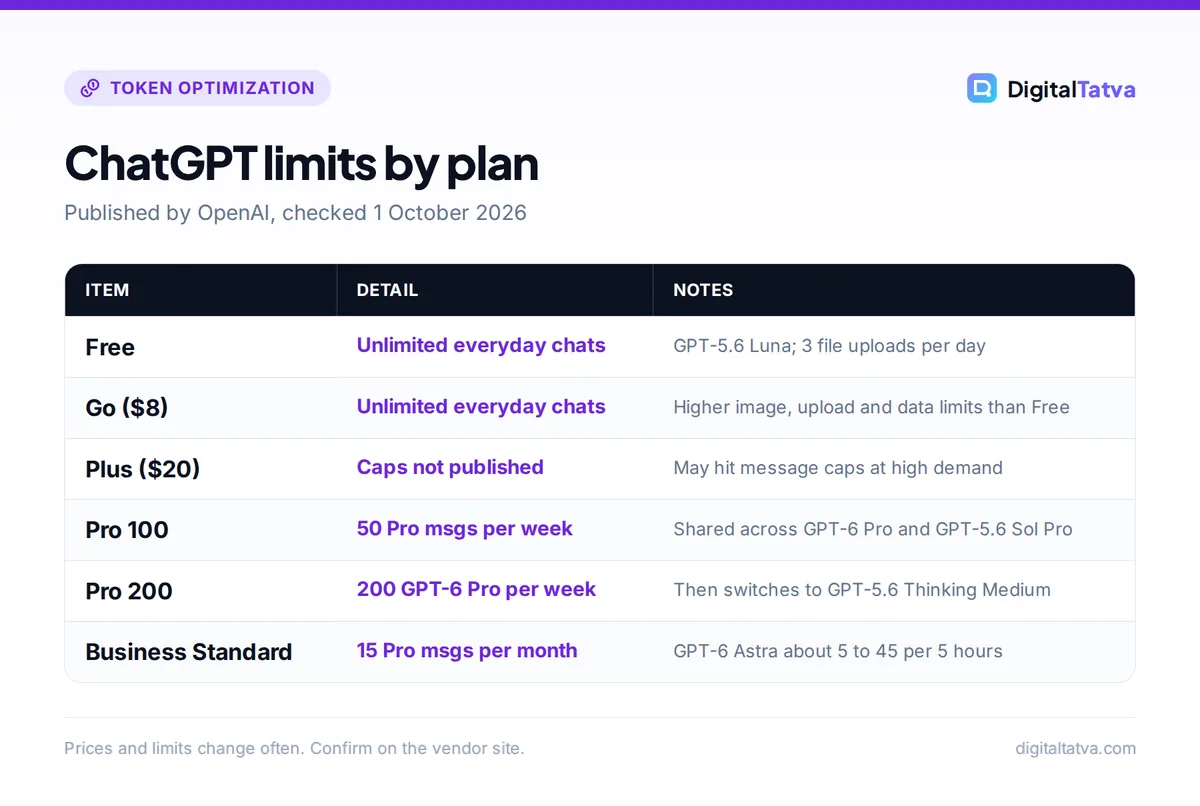
This table combines what OpenAI states across its help center articles. Where OpenAI does not publish a number, we say so instead of guessing.
| Plan | Price | Everyday text chat | Premium model limits | Published caps |
|---|---|---|---|---|
| Free | $0 | Unlimited with GPT-5.6 Luna (abuse safeguards) | No GPT-5.6 Sol | 3 file uploads per day; other tools limited, numbers not published |
| Go | $8/month | Unlimited with GPT-5.6 Luna | No GPT-5.6 Sol | Higher than Free for images, uploads and data analysis; voice same as Free |
| Plus | $20/month | Message caps possible at high demand | GPT-5.6 Sol Medium and High; no Extra High or Pro | Not published |
| Pro 100 | $100/month | “Unlimited messages” within abuse guardrails | 50 per week shared across GPT-6 Pro and GPT-5.6 Sol Pro | Published for Pro models |
| Pro 200 | $200/month | Same as Pro 100 | GPT-6 Pro 200 per week; GPT-5.6 Sol Pro 170 per day; 200 per day combined | Published for Pro models |
| Pro 500 | $500/month | Most usage of any tier | Not stated | Not published |
| Business Standard | $25/seat ($20 annual) | Estimates per 5-hour window (below) | 15 per month shared across GPT-6 Pro and GPT-5.6 Sol Pro | Published |
| Business Premium | $125/seat ($100 annual) | 5x Standard, no 5-hour window | 50 per week shared | Published |
Sources: OpenAI’s GPT-5.6 and GPT-6 Pro help article and the ChatGPT Business models and limits page, both checked on 1 October 2026. For prices and features on each tier, see our full ChatGPT pricing guide.
Watch out: Pro 200 reopened to new subscribers with a lower usage allowance than before. Existing eligible Pro 200 subscribers keep their old allowance until October 29, 2026. Check your own usage screen rather than relying on older numbers.
Five-hour windows: Business and Codex estimates
For Business Standard seats, OpenAI publishes estimated message ranges per 5-hour window. It stresses that “actual usage varies by model and task”, so treat these as ranges, not promises.
| Model | Estimated messages per 5 hours (Business Standard) |
|---|---|
| GPT-6 Astra | 5 to 45 |
| GPT-5.6 Sol | 10 to 100 |
| GPT-5.6 Terra | 25 to 200 |
| GPT-5.6 Luna | 250 to 2,000 |
Codex, OpenAI’s coding agent, works the same way. OpenAI’s Codex pricing page gives Plus and Business estimates of 5 to 45 messages per window on GPT-6 Astra, 15 to 160 on GPT-6.1 Sol and 350 to 3,000 on GPT-6 Luna, and says Pro currently has no 5-hour limit. ChatGPT and Codex share usage, so an afternoon of coding reduces what you can chat.
The pattern matters more than the exact figures: on Business Standard, the low end of the GPT-5.6 Luna range (250) is 50 times the low end for GPT-6 Astra (5), and the high ends differ by about 44 times (2,000 vs 45). The flagship model uses far more of your allowance per message than the smallest one. Choosing the model deliberately is the single biggest lever you have.
File upload and project limits
Uploads have their own caps, separate from messages. According to OpenAI’s file uploads FAQ:
- 512 MB hard limit per file, with text documents capped at 2M tokens per file.
- Spreadsheets around 50 MB and images 20 MB.
- Up to 80 files every 3 hours; Free users are limited to 3 file uploads per day.
- Files per project: Free 5, Go and Plus 25, Pro, Business, Enterprise and Edu 40.
- Storage cap of 25 GB per user and 100 GB per organization.
If you analyze spreadsheets often, our guide on using ChatGPT for Excel and data analysis shows how to prepare files so one upload does the work of several.
What happens when you hit a ChatGPT limit
ChatGPT tells you when you reach a limit and shows the reset time in the app. What happens next depends on the limit:
- Tool limits on Free: the tool pauses until it resets. For GPTs, OpenAI says access “pauses until the limit resets”.
- GPT-6 Pro on Pro 200: ChatGPT switches automatically to GPT-5.6 Thinking at Medium until the weekly limit resets.
- Other caps: you can switch to another model or wait for the reset.
Two details save frustration. First, “OpenAI Support does not reset ChatGPT or Codex usage limits”, so contacting support will not help. Second, upgrading resets your usage rates immediately: the Free tier FAQ says usage resets when you move to Plus, Pro or Business.
9 ways to avoid hitting ChatGPT limits
- Match the model to the task. Use GPT-5.6 Luna for rewrites, summaries and quick questions, and save GPT-6 Astra or GPT-6 Pro for hard reasoning. Based on the Business ranges above, one Astra message can use as much allowance as dozens of Luna messages. Our guide to the cheapest AI model for each task has a cheat sheet.
- Start a new chat for each new task. Every reply processes the whole conversation, so a 60-message thread costs more per turn than a fresh one. Paste a short summary into the new chat instead of dragging the history along.
- Batch your questions. Ask for five headline options, a meta description and an outline in one message rather than three. One well-structured prompt counts as one message.
- Write tighter prompts. Clear context, format and constraints up front mean fewer follow-ups and regenerations. Our prompt engineering guide covers the techniques that cut back-and-forth the most.
- Use projects and custom GPTs for repeat context. Store your brand voice, product facts and instructions once instead of pasting them every time. See how to create a custom GPT.
- Trim uploads before you send them. Remove appendices, duplicate tabs and images you do not need. A 20-page excerpt is faster and lighter than a 300-page PDF.
- Avoid busy hours for heavy work. OpenAI says Plus caps apply “especially during high demand”. Run long research jobs early or late in your day if you keep seeing limit messages.
- Keep coding and chat separate in your head. Because ChatGPT and Codex share one allowance, schedule big Codex sessions when you do not also need heavy chat.
- Keep a backup assistant. A free Claude, Gemini or Perplexity account handles overflow tasks. Our list of free ChatGPT Plus alternatives ranks the best options.
Tip: More techniques that work in both ChatGPT and Claude are in our guide on how to reduce token usage.
When the API is cheaper than upgrading
If you hit Plus limits on a few predictable, repetitive jobs (such as classifying leads or rewriting product descriptions), the API can be far cheaper than jumping to a $100 Pro plan. API usage is billed separately from any ChatGPT subscription and has no weekly message caps, only rate limits and per-token costs.
Here is a worked example with GPT-6 Luna at $0.10 per 1M input tokens and $0.50 per 1M output tokens. Say you process 1,000 product descriptions a month, each with a 2,000-token prompt and a 500-token reply:
- Input: 1,000 x 2,000 = 2,000,000 tokens, so 2 x $0.10 = $0.20
- Output: 1,000 x 500 = 500,000 tokens, so 0.5 x $0.50 = $0.25
- Total: about $0.45 per month
The same job on GPT-6.1 Sol ($2.00 input, $10.00 output per 1M tokens) costs 2 x $2.00 + 0.5 x $10.00 = $9.00. Even the flagship GPT-6 Astra ($10.00 and $50.00) comes to 2 x $10 + 0.5 x $50 = $45, still under half the price of Pro 100. Our OpenAI API pricing guide lists every model, and the Batch API guide shows how to halve those numbers again for jobs that can wait up to 24 hours.
Save money: Before upgrading from Plus to Pro, add up how often you actually hit the cap. If it is once or twice a week, waiting for the reset or using a free backup assistant costs nothing. Our ChatGPT Plus vs Pro comparison shows who really needs the bigger plan.
Frequently asked questions
What is the ChatGPT Plus message limit?
OpenAI does not publish an exact message cap for Plus. Its help center says Plus “may include usage limits such as message caps, especially during high demand” and that limits vary with system conditions. Third-party sites quote figures, but OpenAI has not confirmed them. For Codex and ChatGPT Work, OpenAI estimates 5 to 45 GPT-6 Astra messages per 5-hour window on Plus.
Is ChatGPT Free really unlimited?
For everyday text chats, mostly yes. OpenAI says Free users have “unlimited everyday text chats, subject to abuse-prevention safeguards” with GPT-5.6 Luna. File uploads, image creation, voice, data analysis and other tools have separate limits, and Free users can upload only 3 files per day. ChatGPT shows a notice and the reset time when you reach a tool limit.
How long does it take for ChatGPT limits to reset?
It depends on the limit. Business and Codex estimates run in 5-hour windows, GPT-6 Pro on Pro 100 and Pro 200 resets weekly, Business Standard Pro messages reset monthly, and file uploads are counted in 3-hour windows. ChatGPT shows the exact reset time in the app when you hit a cap. OpenAI Support cannot reset limits early.
Does ChatGPT Pro have unlimited messages?
Not for every model. The Pro plan page lists “unlimited messages and uploads” subject to abuse guardrails, but GPT-6 Pro “does not include unlimited use”. Pro 100 shares 50 GPT-6 Pro and GPT-5.6 Sol Pro messages per week, and Pro 200 gets 200 GPT-6 Pro messages per week. Pro 500 caps are not published.
Do ChatGPT and Codex share the same limit?
Yes. OpenAI says ChatGPT and Codex share usage limits on every plan, so heavy Codex sessions reduce what you can do in chat during the same window. If you code a lot, plan big Codex tasks for times when you do not also need intensive chat, or consider whether a separate coding tool makes more sense.
The bottom line on ChatGPT limits
Most people never hit a hard wall on Free or Go for everyday chat, and the limits that do bite are on uploads, images and the premium models. On Plus, the smartest move is to pick lighter models for routine work, keep chats short and batch requests before you think about Pro. If a predictable workload keeps hitting the cap, the API is often far cheaper than a bigger plan. OpenAI changes plans and limits frequently, so confirm the current numbers on the official ChatGPT pricing and help pages before you decide.
Related reading: what tokens are in AI and how Claude usage limits compare.
Pricing and features are checked at the time of writing and can change. Some links may be affiliate links, which never affect our verdicts.



