Batch API Guide: Save 50% on OpenAI, Claude and Gemini Requests
How the batch API cuts OpenAI, Claude and Gemini token costs by 50%, with real October 2026 batch prices, worked cost examples, limits and setup steps.

On this page
- Key takeaways
- What is a batch API and why is it 50% cheaper?
- Batch API prices for OpenAI, Claude and Gemini (October 2026)
- Worked example: 10,000 product descriptions at standard vs batch prices
- Stack batch with prompt caching for even bigger savings
- How batch processing works on each platform
- How to run your first batch job
- When not to use the batch API
- Common batch API mistakes that cost money
- Frequently asked questions
- Our verdict: batch everything that can wait
A batch API lets you send thousands of AI requests in one file, wait up to 24 hours, and pay half the normal token price. OpenAI, Anthropic and Google all offer a 50% batch discount on input and output tokens in 2026, so any job that does not need an instant answer (product descriptions, tagging, summaries, evaluations, translations) should probably run through batch.
Below: how batch works on each platform, real batch prices, worked cost examples, and the limits and mistakes to avoid.
Key takeaways
- OpenAI, Anthropic and Google all charge 50% of standard prices for batch requests, on both input and output tokens.
- A 10,000-request job that costs $46 on GPT-6.1 Sol or Claude Sonnet 5.5 at standard rates costs $23 in batch mode.
- Batch stacks with prompt caching: on OpenAI, GPT-6.1 Sol cached input drops to $0.05 per 1M tokens in batch, versus $2.00 for normal input.
- Limits differ: OpenAI allows 50,000 requests per batch, Anthropic 100,000, and Gemini accepts JSON Lines files up to 2 GB.
- Batch is wrong for chat, live support or anything a user waits on. Use it for background work you can schedule.
What is a batch API and why is it 50% cheaper?
A normal API call is synchronous: you send a prompt and wait a few seconds for the reply. A batch API is asynchronous. You bundle many requests into a single job, the provider processes them when it has spare capacity, and you collect the results later.
OpenAI’s docs describe a “50% cost discount compared to synchronous APIs”. Anthropic offers “a 50% discount on both input and output tokens”, and Google lists a “50% cost reduction” for Gemini batch mode. Only the timing changes.
If tokens are new to you, read our explainer on what tokens are in AI first. Every price in this article is per 1 million tokens, and as a rough guide one token is about four characters or three quarters of an English word.
Batch API prices for OpenAI, Claude and Gemini (October 2026)
Here are the standard and batch prices for the models most people use, read on the official pricing pages on 1 October 2026. All figures are USD per 1M tokens.
| Model | Standard input | Standard output | Batch input | Batch output |
|---|---|---|---|---|
| GPT-6 Astra (OpenAI) | $10.00 | $50.00 | $5.00 | $25.00 |
| GPT-6.1 Sol (OpenAI) | $2.00 | $10.00 | $1.00 | $5.00 |
| GPT-6 Luna (OpenAI) | $0.10 | $0.50 | $0.05 | $0.25 |
| Claude Fable 5.1 | $10 | $50 | $5 | $25 |
| Claude Opus 5.5 | $4 | $20 | $2 | $10 |
| Claude Sonnet 5.5 | $2 | $10 | $1 | $5 |
| Claude Haiku 4.5 | $1 | $5 | $0.50 | $2.50 |
| Gemini 3.1 Pro Preview (up to 200K prompt) | $2.00 | $12.00 | $1.00 | $6.00 |
| Gemini 3.8 Flash (until 31 Dec 2026) | $0.75 | $3.75 | $0.375 | $1.875 |
| Gemini 3.5 Flash-Lite | $0.30 | $2.50 | $0.15 | $1.25 |
Sources: the OpenAI API pricing page, Anthropic’s pricing docs and the Gemini API pricing page. For the full standard price lists, see our breakdowns of OpenAI API pricing, Claude API pricing and Gemini API pricing.
Watch out: Gemini 3.8 Flash doubles in price on 1 January 2027, to $1.50 input and $7.50 output at standard rates ($0.75 and $3.75 in batch). If you are budgeting a long project on Flash, use the 2027 numbers for anything after New Year.
Worked example: 10,000 product descriptions at standard vs batch prices
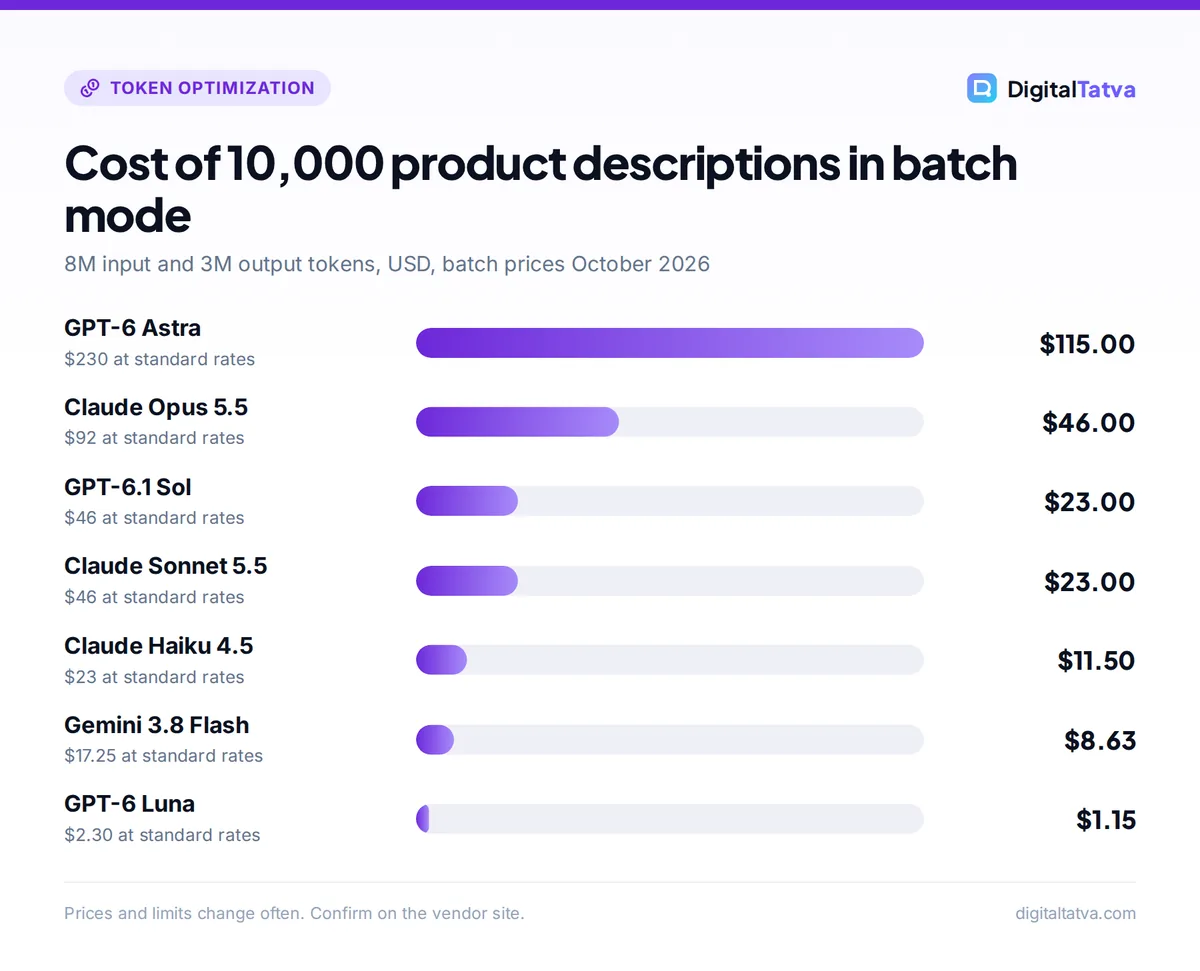
Imagine an online store that needs fresh descriptions for 10,000 products. Each request sends about 800 input tokens (instructions plus product attributes) and gets back about 300 output tokens (roughly 225 words).
Total tokens for the job:
- Input: 10,000 x 800 = 8,000,000 tokens, or 8M.
- Output: 10,000 x 300 = 3,000,000 tokens, or 3M.
Now multiply by the price per 1M tokens. On GPT-6.1 Sol at standard rates: 8 x $2.00 = $16.00 for input, plus 3 x $10.00 = $30.00 for output, so $46.00 in total. In batch: 8 x $1.00 = $8.00, plus 3 x $5.00 = $15.00, so $23.00.
| Model | Standard cost | Batch cost | You save |
|---|---|---|---|
| GPT-6 Astra | $80 + $150 = $230.00 | $40 + $75 = $115.00 | $115.00 |
| Claude Opus 5.5 | $32 + $60 = $92.00 | $16 + $30 = $46.00 | $46.00 |
| GPT-6.1 Sol | $16 + $30 = $46.00 | $8 + $15 = $23.00 | $23.00 |
| Claude Sonnet 5.5 | $16 + $30 = $46.00 | $8 + $15 = $23.00 | $23.00 |
| Claude Haiku 4.5 | $8 + $15 = $23.00 | $4 + $7.50 = $11.50 | $11.50 |
| Gemini 3.8 Flash | $6 + $11.25 = $17.25 | $3 + $5.625 = $8.63 | $8.62 |
| GPT-6 Luna | $0.80 + $1.50 = $2.30 | $0.40 + $0.75 = $1.15 | $1.15 |
Two lessons jump out. First, batch halves every row, so the absolute saving is biggest on premium models: $115 on GPT-6 Astra versus about $1 on GPT-6 Luna. Second, model choice matters even more than batch. Moving from Opus 5.5 to Haiku 4.5 saves more than batching Opus does. For product copy, a budget model in batch mode is often good enough, which is the kind of trade-off we map out in our guide to the cheapest AI model for each task.
Indian sellers pay these API bills in USD. To see the rupee figure, multiply the dollar total by the exchange rate on your card statement, and remember that banks often add a foreign currency markup.
Stack batch with prompt caching for even bigger savings
Most batch jobs repeat the same long instructions in every request. That repeated block is perfect for prompt caching, which charges a fraction of the normal input price when the start of a prompt matches something the provider has already processed. Our guide to prompt caching covers the mechanics in depth.
OpenAI: cached input in batch is listed directly
OpenAI prints batch cached-input prices on its pricing page. For GPT-6.1 Sol, normal input is $2.00, batch input is $1.00, and batch cached input is $0.05 per 1M tokens.
Say each of your 10,000 requests starts with the same 3,000-token style guide. That is 30M tokens of repeated prefix.
- Standard, no cache: 30 x $2.00 = $60.00.
- Batch, no cache: 30 x $1.00 = $30.00.
- Batch, if nearly every request hits the cache: 30 x $0.05 = $1.50.
Hit rates are never perfect, and on GPT-5.6 and later the first cache write costs 1.25x normal input, but the gap is still huge. The minimum cacheable prefix on GPT-5.6 and later is 1,024 tokens, so very short instructions will not cache.
Anthropic: discounts stack, hit rates vary
Anthropic’s batch docs say “the pricing discounts from prompt caching and Message Batches can stack”. They also note typical batch cache hit rates of 30% to 98%, depending on traffic patterns. Because batch requests run in parallel and in no fixed order, some will miss the cache. Use the 1-hour cache option (written at 2x base input) for long batches, since the default 5-minute cache can expire while the batch is still running.
Gemini: caching works in batch too
Google confirms that context caching is supported for batch requests. Gemini’s implicit caching is on by default for 2.5 and newer models, but the minimum is 4,096 tokens on Gemini 3.5 to 3.8 Flash and 3.1 Pro Preview, so only long shared prompts benefit.
How batch processing works on each platform
The three providers follow the same pattern but with different limits. This table compares what matters when you plan a job.
| Feature | OpenAI Batch API | Anthropic Message Batches | Gemini Batch Mode |
|---|---|---|---|
| Discount | 50% | 50% | 50% |
| Max size per batch | 50,000 requests or 200 MB | 100,000 requests or 256 MB | Inline under 20 MB, JSONL file up to 2 GB |
| Turnaround | Within 24 hours | Most finish within 1 hour | Target 24 hours, usually quicker |
| Expiry | 24-hour window | Expires after 24 hours | Expires after 48 hours pending or running |
| Results kept | 30 days | 29 days | 6 weeks |
| Rate limits | Separate from normal limits | Separate batch limits | See AI Studio |
OpenAI
You upload a JSON Lines file (one request per line, each with a custom ID) and create a batch against an endpoint. Supported endpoints include /v1/responses, /v1/chat/completions, /v1/embeddings, /v1/completions, /v1/moderations, and the image generation and edit endpoints. A big bonus: batch usage does not consume your standard per-model rate limits, and you can create up to 2,000 batches per hour.
Anthropic
You POST to /v1/messages/batches with a list of requests, each holding a custom_id and normal Messages API params. Batches support vision, tool use, system prompts, multi-turn conversations, extended thinking and caching. Streaming and Fast mode are not supported. You only pay for requests that succeed: errored, canceled and expired requests are not billed.
Google Gemini
Small jobs can be sent inline. Larger jobs go in a JSON Lines file of up to 2 GB. Jobs that stay pending or running for more than 48 hours expire, and results stay downloadable for six weeks.
How to run your first batch job
The UI and SDK calls differ by provider, but the workflow is the same everywhere.
- Pick a job that can wait. Good fits: rewriting a product catalog, tagging support tickets, summarizing call transcripts, translating help articles, scoring leads, or running test prompts against a new model.
- Test the prompt synchronously first. Run 20 to 50 requests through the normal API and check the output. A batch with a bad prompt just wastes money faster.
- Build the request file. Write one request per line in JSON Lines format. Give each one a unique custom ID, such as your product SKU, so you can match results back later.
- Put shared instructions first. Keep the long, identical part of every prompt (instructions, examples, style guide) at the very start and the variable part at the end. This is what makes caching work.
- Submit and record the batch ID. Upload the file or send the request list, then save the batch ID the API returns.
- Poll for status. Check every few minutes. Anthropic reports in_progress, canceling and ended. OpenAI and Gemini have similar states.
- Download and reconcile results. Results may not come back in the order you sent them. Join them to your data by custom ID, then retry any that errored or expired in a new, smaller batch.
Tip: Split very large jobs into several batches of a few thousand requests so you get partial results sooner and can tweak the prompt between rounds.
When not to use the batch API
Batch is not a free lunch. The discount comes from giving up speed, so it is the wrong choice whenever a person is waiting.
Use batch for
- Bulk content: product copy, meta descriptions, alt text, ad variations
- Data work: classification, extraction, tagging, deduplication
- Nightly reports and summaries of yesterday’s tickets or calls
- Model evaluations and prompt testing across hundreds of cases
- Embedding large document sets for search
Skip batch for
- Chatbots, live chat and customer support replies
- Coding agents and anything interactive
- Multi-step workflows where step two needs step one’s answer right away
- Streaming output (not supported on Anthropic batches)
If you need cheaper real-time calls, look at the other levers instead: shorter prompts, smaller models and caching. Our guide on how to reduce token usage in ChatGPT and Claude lists the techniques that work for interactive apps.
Flex processing: the middle option
OpenAI and Google also sell Flex processing, priced the same as batch (half of standard). Flex keeps the normal request style but may be slower at busy times. At the other end, OpenAI’s Fast mode (renamed from Priority processing on 30 July 2026) costs more than standard for quicker responses, so check that nobody on your team has it switched on for background jobs.
Common batch API mistakes that cost money
- Forgetting output tokens. Output is 5x the input price on most of these models. Set a sensible max output length so a runaway response cannot inflate the bill.
- Ignoring reasoning tokens. Reasoning models think before answering, and those hidden tokens are billed as output. For simple tasks, use a lower reasoning effort or a non-reasoning budget model.
- Sending huge contexts. On GPT-6 and GPT-5.6 models, any request over 272K input tokens is billed at 2x input and 1.5x output for the whole request. Gemini 3.1 Pro also costs more above 200K tokens. Our guide to the context window explains how to stay under these thresholds.
- Changing the prompt prefix. Putting a date or customer name at the top of every prompt breaks caching. Move variable details to the end.
Before you commit to a big job, run the numbers with our step-by-step method to estimate AI API costs before you build. If the batch feeds marketing content, our guide to AI for ecommerce shows where bulk generation pays off, and how to measure AI ROI helps you prove the saving to a client or boss.
Frequently asked questions
How much does the batch API save?
OpenAI, Anthropic and Google all charge 50% of standard prices for batch requests, on both input and output tokens. For example, Claude Sonnet 5.5 drops from $2 input and $10 output per 1M tokens to $1 and $5, and GPT-6 Astra drops from $10 and $50 to $5 and $25. Stacking prompt caching on top can cut repeated input costs much further.
How long does a batch job take?
OpenAI processes batches within a 24-hour window. Anthropic says most batches finish within 1 hour, with expiry after 24 hours. Google targets 24 hours for Gemini batch jobs but says they are usually much quicker, and jobs expire if they are still pending or running after 48 hours. Plan for the worst case and treat faster results as a bonus.
Is batch output lower quality than normal API output?
No. Batch uses the same models with the same parameters, so the output quality is identical. The only difference is timing: requests run when the provider has spare capacity instead of immediately. If you see different results, it is usually because of normal model randomness, a different temperature setting or a changed prompt, not because of batch mode.
Can I use the batch API with ChatGPT Plus or Claude Pro?
No. Batch processing is an API feature billed per token through the OpenAI platform, the Claude Developer Platform or Google AI Studio. Consumer subscriptions such as ChatGPT Plus, Claude Pro or Google AI Pro do not include API credits, and API usage is billed separately from any chat subscription.
What is the cheapest model for batch jobs in 2026?
Among the models in this guide, GPT-6 Luna is the cheapest at $0.05 input and $0.25 output per 1M tokens in batch. Gemini 3.1 Flash-Lite ($0.125 and $0.75 in batch) and Gemini 3.5 Flash-Lite ($0.15 and $1.25) are close. Test a sample first, because the cheapest model is only cheap if its output is usable.
Our verdict: batch everything that can wait
If a task does not need an answer within seconds, there is little reason to pay full price for it. Batch mode halves your bill on every major provider, keeps the same model quality, and on OpenAI even sits outside your normal rate limits. Combine it with caching and a right-sized model, and a job that looks expensive on paper often costs a few dollars.
Start small: move one recurring background job (nightly summaries, weekly content refreshes or tagging) to batch this month and compare the invoice. If you run an agency, our guide to AI for marketing agencies has more ideas for bulk work worth batching. Prices and limits change often, so confirm current batch rates on each vendor’s pricing page before you run a large job.
Pricing and features are checked at the time of writing and can change. Some links may be affiliate links, which never affect our verdicts.



