How to Train AI to Write in Your Brand Voice
How to train AI to write in your brand voice: build an AI-ready voice guide, set it up in ChatGPT, Claude and Jasper, test drafts and keep content human.

On this page
- Key takeaways
- What is a brand voice?
- How do you write a brand voice guide that AI can follow?
- How do you set up your brand voice in ChatGPT?
- How do you set up your brand voice in Claude?
- Which tools have built-in brand voice features?
- How do you test whether AI matches your brand voice?
- How do you keep AI content sounding human?
- Frequently asked questions
- Next steps
- Sources
Last updated: 22 October 2026
Quick answer: To train AI to write in your brand voice, write a one-page voice guide (personality, tone, vocabulary, do and do not examples), collect 5 to 10 of your best pieces, and load both into a persistent setup such as a ChatGPT project or custom GPT, a Claude Project or custom style, or Jasper IQ. Then test, mark what sounds wrong, and update the instructions until drafts need only light edits.
AI tools do not know your brand by default: without guidance, ChatGPT, Claude and Gemini write in a polite, generic style that sounds like every other company. The fix is not a longer prompt each time but a reusable brand voice setup that the AI reads before every task.
This guide explains what a brand voice is, how to document it so AI can follow it, how to set it up in each major tool, and how to keep AI-assisted content sounding human.
Key takeaways
- AI follows examples better than adjectives: show it real writing you like and dislike.
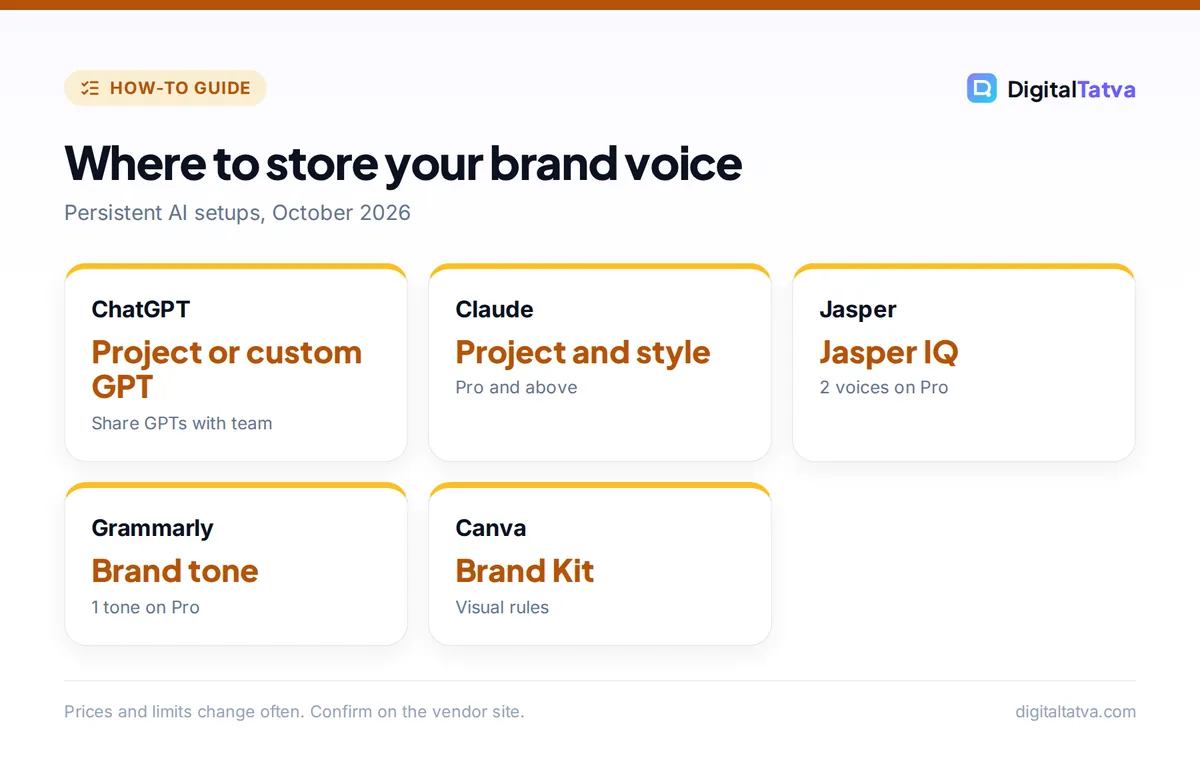
- Store your voice once in a ChatGPT project, custom GPT, Claude Project or Jasper IQ so every chat starts with it.
- Include banned words and phrases; AI tends to overuse the same clichés.
- Jasper Pro includes 2 Brand Voices; Grammarly Pro includes 1 brand tone; Canva AI applies visual brand rules.
- Review a sample of AI drafts every month and update the guide with what you corrected.
What is a brand voice?
A brand voice is the consistent personality a business uses in all its writing: the words it chooses, how formal it is, how it explains things and how it makes readers feel. Tone can shift by situation (a support reply versus a launch post), but the voice stays the same.
| Key fact | Detail (October 2026) |
|---|---|
| What AI needs | A written voice guide plus 5 to 10 real examples |
| ChatGPT | Projects, custom instructions and custom GPTs |
| Claude | Projects (Pro and above) and styles |
| Jasper | Jasper IQ brand voice; Pro includes 2 Brand Voices |
| Grammarly | Pro includes 1 brand tone and 1 style guide |
| HubSpot | Content Agent researches brand voice before drafting (public beta, 2026) |
Brand voice matters more as AI content grows: in HubSpot’s 2024 State of Marketing report, 60% of marketers using generative AI for content worried it could harm their brand’s reputation. A clear voice guide is the cheapest protection.
How do you write a brand voice guide that AI can follow?
You write an AI-ready brand voice guide by turning vague adjectives into specific, testable rules with examples. “Friendly” means nothing to an AI; “use contractions, address the reader as you, and explain jargon in one sentence” does.
- Describe the personality. Pick three traits and explain each, for example “Practical: we always give the next step; we never end with vague inspiration.”
- Set tone by channel. Note how you sound on the website, in support replies, on LinkedIn and in ads.
- List vocabulary. Words you use (product names, customer terms) and words you never use.
- Add do and do not pairs. Five short examples of the same message written right and wrong.
- Specify format rules. Sentence length, paragraph length, emoji use, spelling (US or UK English), how you write numbers and currency.
- Collect examples. Choose 5 to 10 pieces that best represent the brand.
Prompt to draft the guide: “Here are 8 pieces of our best writing. Analyze them and write a one-page brand voice guide with: 3 personality traits with explanations, tone by channel, preferred and banned words, sentence and paragraph length, 5 do and do not examples, and a 3-sentence summary I can paste into any AI tool.”
If you are starting from scratch, build the strategy first with our guide to creating a brand identity with AI.
How do you set up your brand voice in ChatGPT?
You set up your brand voice in OpenAI’s ChatGPT by creating a project with your voice guide as instructions and your examples as files, or by building a custom GPT that your whole team can use. Both make ChatGPT apply the voice automatically in every new chat.
- Project: create a project, paste the voice summary and rules into its instructions, and upload the guide and examples. Good for one person or a small team.
- Custom GPT: build a GPT with the same instructions and files, then share it with colleagues so everyone writes from the same setup. See how to create a custom GPT.
- Custom instructions: account-wide preferences, useful for personal style but too broad for several brands.
Projects and custom GPTs are available on paid plans such as ChatGPT Plus; check current plan features in ChatGPT Free vs Plus.
How do you set up your brand voice in Claude?
You set up your brand voice in Anthropic’s Claude with a Project that holds your voice guide and examples as knowledge, and optionally a custom style created from your writing samples. Claude Projects are included on Claude Pro and higher plans.
- Create a Project named after the brand and add the voice guide to its instructions.
- Upload examples and reference documents (product sheets, FAQs) as project knowledge.
- Create a style. In Claude’s style settings, create a custom style from your writing samples so Claude matches sentence rhythm and word choice.
- Test across tasks: a blog intro, a support reply and a LinkedIn post.
Our guides to Claude Projects and Claude prompts for writing cover the details.
Which tools have built-in brand voice features?
Several marketing tools store brand voice centrally so every user and agent follows it, which is more reliable than personal chat setups for teams.
| Tool | Brand voice feature | Price note |
|---|---|---|
| Jasper | Jasper IQ: brand voice, style guide, audiences, knowledge; Auto IQ applies context automatically | Pro $69/seat/month, 2 Brand Voices |
| Grammarly | Brand tones and style guides flag off-brand writing anywhere you type | Pro 1 brand tone; Enterprise unlimited |
| HubSpot | Content Agent researches brand voice, audience and competitors before drafting | Public beta, 2026 |
| Canva | Brand Intelligence applies fonts, colors and style; Brand Kit | Pro US$144/year |
| Copy.ai | Brand Voice and Infobase for GTM workflows | Chat plan $29/month |
Read our Jasper AI review and Grammarly review to compare these in depth, or browse the best AI writing tools.
How do you test whether AI matches your brand voice?
You test brand voice by giving the AI the same three tasks every time your guide changes, then scoring each draft against your rules. A simple scorecard makes the improvement visible.
| Check | Pass if |
|---|---|
| Vocabulary | No banned words; product names spelled correctly |
| Structure | Sentence and paragraph length within your rules |
| Personality | A colleague can tell it is your brand without the logo |
| Accuracy | No invented claims, prices or statistics |
| Edits needed | Light edits only, not rewrites |
When drafts fail, ask the AI: “Rewrite this to match our voice guide and list every change you made and why.” Then add the lessons to the guide. Our prompt engineering guide explains why examples and clear structure work.
How do you keep AI content sounding human?
AI content sounds human when it includes things only your business knows: real stories, specific numbers, opinions and customer language. A voice guide controls style; your input supplies substance.
- Feed it raw material: call notes, customer quotes, internal data, founder opinions.
- Ban filler: list phrases AI overuses and remove them in review.
- Vary rhythm: ask for a mix of short and long sentences.
- Edit the first and last lines yourself: they carry most of the voice.
- Set team rules: decide what AI may write unreviewed; see our AI usage policy template.
Apply the setup to your channels with ChatGPT for social media and AI email marketing. Tools that only disguise AI text, such as humanizers, do not fix a missing voice; see why in best AI humanizers.
Frequently asked questions
Can ChatGPT learn my brand voice?
Yes. ChatGPT does not permanently learn your voice from one chat, but a ChatGPT project or custom GPT with your voice guide and examples makes it apply the voice in every conversation. Results improve when you add do and do not examples and update the instructions after reviewing drafts.
How many examples does AI need to copy my style?
Five to ten strong examples usually work well, ideally covering different formats such as a blog post, an email and a social post. More examples help only if they are consistent. Pair them with a written guide, because AI follows explicit rules more reliably than it infers them.
What is the best AI tool for brand voice?
For teams, Jasper is the strongest dedicated option because Jasper IQ applies brand voice and rules to every user and agent. For individuals and small teams, a Claude Project or ChatGPT custom GPT with a good voice guide delivers similar results at about $20 a month.
Can I use one AI setup for several brands?
Yes, but keep each brand separate. Create one ChatGPT project, custom GPT or Claude Project per brand, or use a tool with multiple brand voices, such as Jasper. Mixing brands in one setup leads to blended, inconsistent writing.
Should I tell customers we use AI for writing?
It is your choice in most cases, as long as content is accurate and testimonials are real. Many brands share that they use AI with human review, which can build trust. Never present AI-written reviews or AI personas as real customers.
Next steps
Write your one-page voice guide this week, pick your best examples, and set up one persistent AI workspace for the brand. Test three tasks, score them, and update the guide monthly. AI tool features and plan limits change often, so check each vendor’s current documentation when you set things up.
Sources
- What’s new in Jasper, June 2026, Jasper Blog, checked 22 October 2026
- Grammarly plans, Grammarly, checked 22 October 2026
- What’s new from HubSpot UNBOUND 2026, Integrate IQ, September 2026, checked 22 October 2026
- Introducing Canva AI 2.0, Canva Newsroom, April 2026, checked 22 October 2026
Pricing and features are checked at the time of writing and can change. Some links may be affiliate links, which never affect our verdicts.