How to Use AI for Lead Generation: Tools and Workflow
How to use AI for lead generation: a seven-step outbound workflow, inbound AI tactics, the best tools from Apollo to Clay and Sales Navigator, prompts and mistakes.

On this page
- Key takeaways
- What is AI lead generation?
- How do you generate leads with AI, step by step?
- How do you use AI for inbound lead generation?
- Which AI lead generation tools should you choose?
- Example: AI lead generation for a small agency
- Common AI lead generation mistakes
- Frequently asked questions
- Next steps
- Sources
Last updated: 22 October 2026
Quick answer: To use AI for lead generation, define your ideal customer profile with ChatGPT or Claude, find and enrich prospects with tools like Apollo, LinkedIn Sales Navigator or Clay, personalize outreach with AI and send through lemlist, Instantly or HubSpot, and capture inbound leads with an AI website chatbot and Meta lead ads. Score leads in your CRM and keep a human reviewing messages.
AI lead generation is the use of AI tools to find, research, contact, qualify and nurture potential customers faster than manual prospecting. The biggest gains come from research and personalization: AI can read a prospect’s website, news and job posts and write a relevant first line in seconds.
This guide gives a complete AI lead generation workflow for B2B and service businesses, the best tools at each stage with October 2026 prices, prompts to copy and the mistakes that get domains blacklisted.
Key takeaways
- Good AI lead generation starts with a precise ideal customer profile (ICP), not with sending more emails.
- Apollo has a free plan; Clay’s free plan includes 100 data credits and 500 actions a month.
- LinkedIn Sales Navigator Core costs US$119.99 a month and includes AI-powered lead and account research.
- For inbound, an AI chatbot and Meta’s Advantage+ leads campaigns capture and qualify leads around the clock.
- Measure meetings and pipeline, not emails sent, and protect sending domains.
What is AI lead generation?
AI lead generation is a sales and marketing process that uses artificial intelligence to identify potential customers, enrich their data, prioritize them by fit and intent, and engage them with personalized messages, both outbound (prospecting) and inbound (capturing website and ad leads).
| Stage | AI tools | Starting price (October 2026) |
|---|---|---|
| Define ICP | ChatGPT, Claude | Free |
| Find prospects | Apollo, LinkedIn Sales Navigator | Apollo free; Sales Navigator Core US$119.99/month |
| Enrich and research | Clay (Claygent), Apollo AI assistant | Clay free plan; Launch from $185/month |
| Outreach | lemlist, Instantly, HubSpot | Instantly from $47/month; lemlist from $69 |
| Inbound capture | Website AI chatbot, Meta lead ads, HubSpot Customer Agent | Varies; Meta has no tool fee |
| Score and nurture | HubSpot, Zoho CRM (Zia), Freshsales (Freddy AI) | Free CRM tiers available |
How do you generate leads with AI, step by step?
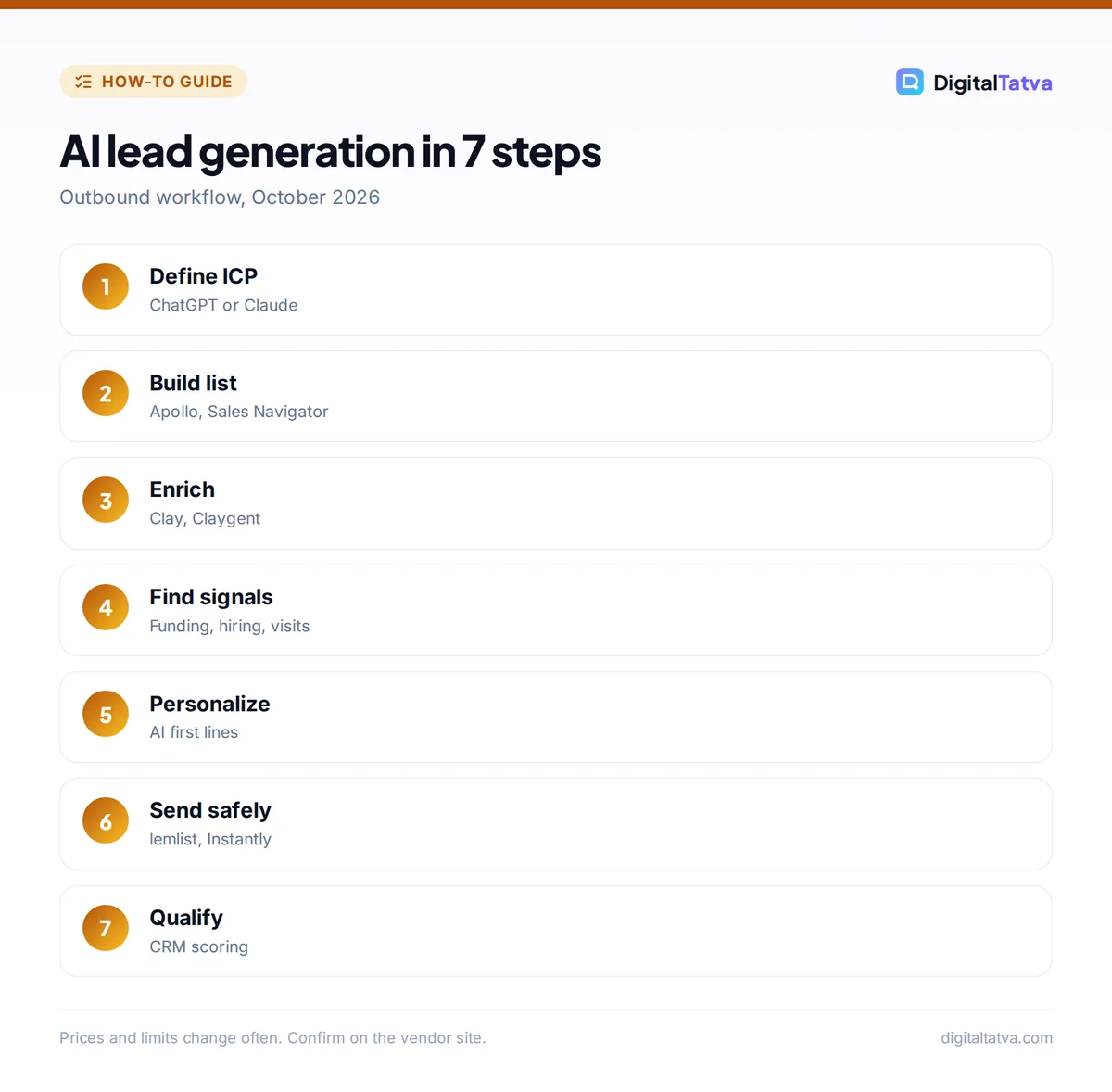
You generate leads with AI in seven steps: define the ICP, build a target list, enrich it, find buying signals, personalize outreach, send safely and follow up, then qualify and hand off. Each step uses AI for research and writing and a person for judgment.
Step 1: Define your ideal customer profile
An ideal customer profile is a description of the companies and people most likely to buy and succeed with your product. Ask AI to analyze your best customers.
Prompt: “Here is a list of our 20 best customers with industry, size, location and deal value. Identify the common patterns and write an ICP with firmographics, buyer roles, pain points, buying triggers and disqualifiers. Then suggest 3 lookalike segments we are not targeting yet.”
Step 2: Build a target list
Use a B2B database to turn the ICP into accounts and contacts. Apollo’s AI assistant converts plain-language requests (“Series A SaaS companies in India with 50 to 200 employees hiring sales leaders”) into filtered searches. LinkedIn Sales Navigator adds Account IQ and Lead IQ for AI-powered research on LinkedIn data; Core costs US$119.99 a month or US$1,079.88 a year.
Step 3: Enrich and research
Enrichment fills in emails, phone numbers, tech stack and company details; research finds talking points. Clay combines many data providers in one table and its Claygent AI agent browses the web to answer custom questions, such as “Does this company mention SOC 2 on its website?”. Learn the workflow in how to use Clay.
Step 4: Find buying signals
Buying signals are events that make a prospect more likely to buy now: new funding, a new executive, hiring for a relevant role, a website visit or a job change by a past champion. Prioritize contacts with recent signals; several AI SDR tools track these automatically, as covered in best AI SDR tools.
Step 5: Personalize outreach
Use AI to write a relevant opening line and short message per prospect, based on the research and signal. Keep messages under 100 words, focused on one problem and one call to action.
Prompt: “Using the research below, write a 70-word cold email to [name, role] at [company]. Open with the specific signal ([signal]), connect it to [problem we solve], include one proof point, and end with a low-pressure question. No buzzwords, no flattery.”
More templates are in our ChatGPT prompts for sales and ChatGPT prompts for LinkedIn.
Step 6: Send safely and follow up
Send through an outreach tool with deliverability safeguards: lemlist (from $69 a month, with lemAgent AI) and Instantly (from $47 a month, with AI reply and sales agents) both support multi-step sequences. Use separate sending domains, authenticate them and ramp volume slowly.
Step 7: Qualify and hand off
When prospects reply, AI can classify responses (interested, not now, wrong person, unsubscribe) and draft follow-ups, while your CRM scores leads by fit and engagement. Compare CRMs with AI scoring in best AI CRM.
How do you use AI for inbound lead generation?
AI improves inbound lead generation by creating lead magnets faster, running ads that find buyers automatically, and qualifying website visitors through conversational chatbots, so more of your existing traffic turns into leads.
- Lead magnets: use AI to draft checklists, calculators and guides; Canva Code can build interactive quizzes that save answers to a sheet.
- Lead ads: Meta’s Advantage+ automation supports the Leads objective; see Meta Advantage+ explained.
- Website chatbot: answer questions and capture details 24/7; follow how to add an AI chatbot to your website. HubSpot’s Customer Agent can also qualify leads, billed at $0.50 per resolved conversation.
- WhatsApp: in India especially, many leads prefer chat; read WhatsApp AI for business.
- Nurture: AI-personalized email sequences keep early leads warm; see AI email marketing.
Which AI lead generation tools should you choose?
Choose AI lead generation tools by your budget and sales model. Most small teams need only a database, one enrichment tool, one outreach tool and a CRM.
| Team type | Recommended stack | Approximate monthly cost |
|---|---|---|
| Solo founder or freelancer | ChatGPT + Apollo free + HubSpot free CRM | $0 to $20 |
| Small sales team | Apollo Basic + Instantly or lemlist + HubSpot Starter | About $100 to $300 |
| Growth team | Clay Launch + Sales Navigator + lemlist + HubSpot Professional | Several hundred to $1,000+ |
| Hands-off outbound | Managed AI SDR such as Artisan or AiSDR | About $250 to $2,500+ |
Prices are from vendor pages and dated reports; see our best AI sales tools for details, and our HubSpot Breeze AI review for HubSpot’s agents.
Example: AI lead generation for a small agency
Here is how a five-person digital marketing agency in India could run this workflow in one week, using mostly free and low-cost tools. The numbers are illustrative, not results from a real campaign.
- Monday: ICP. The founder pastes data on the 15 best clients into ChatGPT and learns they are mostly D2C brands with 10 to 50 staff that recently raised funding or launched on a marketplace.
- Tuesday: list. In Apollo, the team filters for D2C brands of that size in Mumbai, Bengaluru and Ahmedabad and exports 300 decision makers in marketing and growth roles.
- Wednesday: research. In Clay, Claygent checks each brand’s website for whether it runs a blog, has an email signup and advertises on Meta, and flags the 150 best fits.
- Thursday: messaging. ChatGPT drafts a first line per prospect from the research, such as noticing that a brand has an email signup but no welcome offer. A team member reviews every message.
- Friday: send. The agency sends 30 emails a day from a warmed-up secondary domain through lemlist, with two follow-ups and a LinkedIn connection step.
Over the next weeks, replies are tagged in the CRM, interested leads get a call, and the team feeds what worked back into the ICP and prompts. The same approach works for consultants, software companies and B2B service firms.
Common AI lead generation mistakes
The most common mistakes are sending at volume before targeting is right, trusting enrichment data blindly and letting AI send unreviewed messages. These damage your domain and brand quickly.
- Volume over relevance: 200 well-researched emails beat 5,000 generic ones.
- Unverified emails: bounces hurt deliverability; verify before sending.
- Fake personalization: “I loved your recent post” without a real reference is obvious.
- Ignoring privacy rules: follow local email and data protection laws; read AI data privacy for business before uploading customer lists to AI tools.
- No follow-up: most replies come after the second or third touch.
Frequently asked questions
What is the best AI tool for lead generation?
There is no single best tool. Apollo is the best all-round starting point because it combines a B2B database, an AI assistant and sequences with a free plan. Clay is best for custom research and enrichment, and LinkedIn Sales Navigator is best for LinkedIn-based prospecting.
Can ChatGPT generate leads?
Not directly. ChatGPT cannot reliably provide verified contact data, but it is excellent for defining your ideal customer profile, researching companies from web pages, writing personalized outreach and analyzing replies. Pair it with a B2B database such as Apollo or Sales Navigator for actual contacts.
Is AI lead generation free?
You can start free with ChatGPT, Apollo’s free plan, Clay’s free plan (100 data credits and 500 actions a month) and HubSpot’s free CRM. Scaling usually needs paid plans, typically from about $50 to a few hundred dollars a month for a small team.
Does AI lead generation work in India?
Yes. Apollo, LinkedIn Sales Navigator, Clay and HubSpot all cover Indian companies, though data coverage can be thinner for small businesses. WhatsApp-based lead capture and follow-up work especially well in India, alongside email and LinkedIn.
How many leads can AI generate per month?
It depends on your market size, data quality and sending limits rather than on AI itself. A small team can research and contact a few hundred well-matched prospects a month safely. Focus on positive replies and meetings booked, not raw lead counts.
Next steps
Write your ICP with AI today, build a list of 200 matching prospects in Apollo or Clay, personalize the first touch with AI and send through a warmed-up domain. Review results after two weeks and refine targeting before scaling. Lead generation tools change pricing and credits often, so confirm current plans on each vendor’s website before you subscribe.
Sources
- Sales Navigator plans, LinkedIn, checked 22 October 2026
- About Apollo credits, Apollo.io, checked 22 October 2026
- Clay pricing and credits explained, Valley, August 2026, checked 22 October 2026
- lemlist pricing, lemlist, checked 22 October 2026
- Instantly pricing, Instantly, checked 22 October 2026
Pricing and features are checked at the time of writing and can change. Some links may be affiliate links, which never affect our verdicts.