How to Use Clay for AI Sales Prospecting
How to use Clay for AI sales prospecting: build and enrich tables, research prospects with Claygent, write AI first lines, push leads to your CRM, and control credits.

On this page
Last updated: 22 October 2026
Quick answer: To use Clay for AI sales prospecting, build a table of target companies or people, enrich it with data from Clay’s many providers, use Claygent (Clay’s AI web research agent) to answer custom questions about each prospect, write personalized lines with an AI column, then push qualified leads to your CRM or outreach tool. Clay’s free plan includes 100 data credits and 500 actions a month.
Clay is a data enrichment and go-to-market automation platform that works like a spreadsheet where every column can pull data, run AI research or trigger an action. Growth and sales teams use it to build highly targeted lead lists and personalize outreach at a level that generic databases cannot match.
This step-by-step guide shows how to use Clay for prospecting, with an example workflow, Claygent prompts, current pricing after Clay’s March 2026 repricing, and tips to keep credit costs under control.
Key takeaways
- Clay is a table where each column enriches data, runs AI research or sends records to other tools.
- Claygent is Clay’s AI web research agent, included on all plans, and it can use your own AI API key.
- Free: 100 data credits, 500 actions a month and tables up to 200 rows, with unlimited seats.
- After March 2026 repricing, Launch starts at about $185 a month ($167 yearly) and Growth at about $495 ($446 yearly), according to a third-party breakdown.
- Test every workflow on 20 to 50 rows before running it on thousands, to avoid burning credits.
What is Clay?
Clay is a go-to-market data platform that combines dozens of data providers, an AI research agent and automation in a spreadsheet-style interface, so teams can find, enrich, qualify and personalize leads in one place.
| Key fact | Detail (October 2026) |
|---|---|
| Company | Clay (United States) |
| Core idea | Tables where columns enrich, research or act on each row |
| AI agent | Claygent, AI web research on all plans |
| Free plan | 100 data credits, 500 actions per month, 200 rows per table, unlimited seats |
| Paid plans | Launch from about $185/month; Growth from about $495/month; Enterprise custom |
| Pricing change | Repriced March 2026; legacy plans kept until a plan change |
| Best for | Growth, RevOps and outbound sales teams |
Clay is part of a wider move to AI-assisted prospecting; see our AI lead generation workflow and the best AI sales tools.
How does Clay pricing work?
Clay pricing is based on two allowances: data credits, used when you pull data from providers such as email or phone lookups, and actions, used when Clay runs steps in your tables. Each plan includes a monthly amount of both, and annual billing saves about 10%.
| Plan | Monthly | Yearly (per month) | Data credits | Actions |
|---|---|---|---|---|
| Free | $0 | $0 | 100 | 500 |
| Launch | From $185 | From $167 | 2,500 | 15,000 |
| Growth | From $495 | From $446 | 6,000 | 40,000 |
| Enterprise | Custom | Annual | 100,000+ | 200,000+ |
These figures come from a breakdown by Valley (a competing outreach vendor) with prices as of 6 October 2026; Clay’s own pricing page shows the same $167 and $446 headline yearly prices. Customers on legacy plans (Starter, Explorer, Pro) keep them until they change plans. If you connect your own OpenAI or Anthropic key to Claygent, model usage is billed by that provider; see how to estimate AI API costs.
How do you use Clay, step by step?
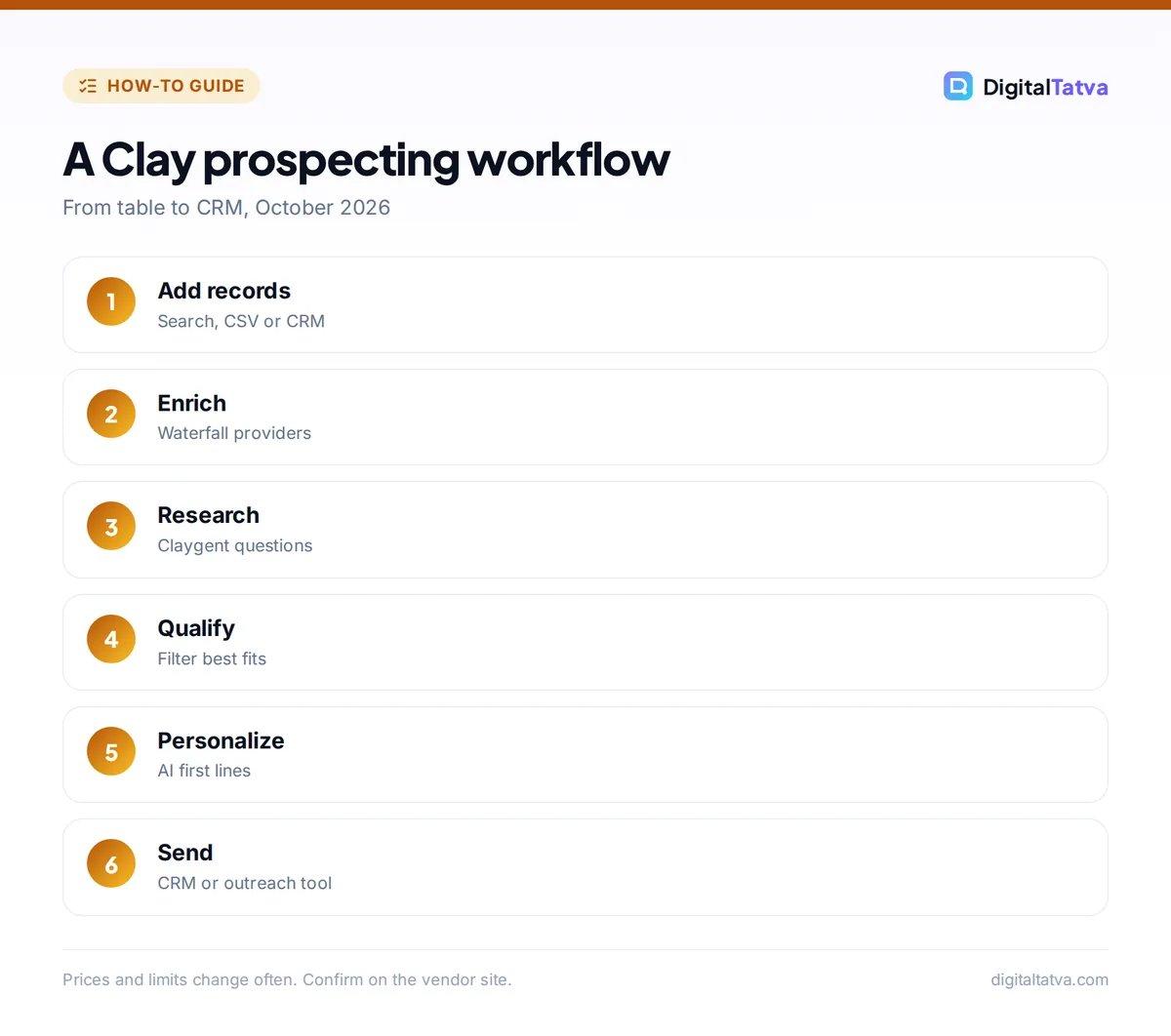
You use Clay by creating a table, importing or finding records, adding enrichment and AI columns, filtering to qualified rows and sending them to your CRM or outreach tool. Here is the full workflow.
- Create a workbook and table. Start from a template or a blank table for companies or people.
- Add records. Import a CSV, connect your CRM, or use Clay’s search to find companies by industry, size and location.
- Enrich companies. Add columns for company size, industry, funding, tech stack and website. Clay can try several providers in sequence until one returns a result (waterfall enrichment), which improves coverage.
- Find people. Add a column that finds decision makers by job title at each company.
- Run Claygent research. Ask custom questions about each company’s website or the web (examples below).
- Qualify with formulas or AI. Add a column that scores fit (for example “Yes if 20 to 200 employees and uses Shopify”) and filter to the best rows.
- Find contact details. Only for qualified rows, add email and phone enrichment to save data credits.
- Write personalized lines. Add an AI column that writes a first line using the research.
- Send to tools. Push rows to HubSpot, Salesforce or your outreach tool, or export a CSV.
Save credits: Run cheap filters (size, industry, location) before expensive enrichment like emails and phone numbers, and set columns to run only when earlier conditions are met.
What can Claygent do?
Claygent is Clay’s AI research agent that reads websites and searches the web to answer a question you write for every row, returning a short answer you can use for qualification or personalization. It turns hours of manual research into a column.
Useful Claygent prompts:
- “Visit [Website]. Does this company sell to businesses, consumers or both? Answer B2B, B2C or Both.”
- “Find this company’s pricing page. What is the lowest paid plan price? Return only the number or Not found.”
- “Does [Company] have open job listings for sales or marketing roles? List up to 3 titles.”
- “From [Website], summarize in one sentence what the company sells and to whom.”
- “Is there evidence that [Company] sells on Amazon or Flipkart? Answer Yes or No with the URL.”
Write prompts that return short, structured answers (Yes or No, a number, one sentence), because they are easier to filter and cheaper to process. For how research agents work in general, see what are AI agents and best AI research tools.
Watch out: AI research can be wrong or out of date. Spot-check 10% of Claygent answers before using them in outreach, especially anything you will mention to the prospect.
Example: a Clay workflow for an agency
This example shows how a marketing agency could find D2C brands that need email marketing help. It uses only the steps above.
| Column | What it does |
|---|---|
| Company search | D2C brands, 10 to 100 employees, India |
| Website | Company domain |
| Claygent: platform | “Is this store built on Shopify? Yes or No” |
| Claygent: email signup | “Does the homepage have an email signup form? Yes or No” |
| Qualify | Keep Shopify = Yes and email signup = No |
| Find people | Founder, Head of Marketing, Growth Manager |
| Email enrichment | Only for qualified rows |
| AI first line | “Noticed [Company] doesn’t have an email signup on the homepage yet…” |
| Send to CRM | Push to HubSpot with a lead source tag |
Then write the sequence with our ChatGPT prompts for sales, and send it with one of the tools in best AI SDR tools.
Clay vs Apollo vs automation tools
Clay is best for custom research and enrichment from many sources, Apollo is best for a single affordable database with built-in sequences, and automation tools such as n8n or Zapier are best for connecting apps when you do not need prospect data.
| Tool | Strength | Starting price |
|---|---|---|
| Clay | Many data providers, Claygent research, flexible tables | Free; Launch from about $185/month |
| Apollo.io | Large database, AI assistant, sequences | Free; Basic $49/user/month annual |
| n8n or Zapier | General app automation with AI steps | Free tiers available |
Compare automation tools in n8n vs Zapier or build your own pipeline with an n8n AI workflow. Pick a CRM to receive the leads in best AI CRM; HubSpot users can compare Clay with HubSpot’s built-in Prospecting Agent in our HubSpot Breeze AI review.
Frequently asked questions
Is Clay free?
Yes, Clay has a free plan with 100 data credits and 500 actions a month, tables up to 200 rows and unlimited seats, and Claygent is included. It is enough to learn Clay and run small tests. Real prospecting campaigns usually need the Launch plan or higher.
What is Claygent?
Claygent is Clay’s AI web research agent. You write a question, and it visits websites or searches the web for every row in your table, returning an answer such as Yes or No, a number or a short summary. It is available on all Clay plans.
How much does Clay cost?
After Clay’s March 2026 repricing, Launch starts at about $185 a month or $167 billed yearly, and Growth at about $495 a month or $446 yearly, according to a third-party breakdown with prices as of October 2026. Enterprise is custom. Confirm on Clay’s pricing page.
Is Clay worth it for small teams?
Clay is worth it if you need precise targeting and research-based personalization that standard databases cannot provide. For simple list building and sequences, Apollo’s free or Basic plan is cheaper. Many small teams start with Apollo and add Clay when they need deeper research.
Is it legal to use Clay data for outreach?
Using business contact data for B2B outreach is legal in many countries if you follow local rules on consent, identification and opt-outs, but rules vary by region. Check the laws in each market, honor unsubscribes, and read AI data privacy for business. This is not legal advice.
Next steps
Sign up for Clay’s free plan, build a 50-row table of your best-fit accounts, add two Claygent questions and one AI first-line column, and review the results by hand. Once the workflow produces good leads, move to a paid plan and scale carefully. Clay’s plans and credit rules have changed recently, so check Clay’s pricing page for current details before upgrading.
Sources
- Clay pricing, Clay, checked 22 October 2026
- Clay pricing and credits explained (2026), Valley, August 2026, checked 22 October 2026
- About Apollo credits, Apollo.io, checked 22 October 2026
Pricing and features are checked at the time of writing and can change. Some links may be affiliate links, which never affect our verdicts.