
What Are AI Agents? How They Work, With Everyday Examples
What are AI agents? A plain-English guide to how agents plan, use tools and act for you, with everyday examples like ChatGPT Work and Claude Cowork, costs and safety rules.

On this page
- Key takeaways
- What are AI agents? A quick comparison
- How AI agents work, step by step
- Everyday examples of AI agents you can use today
- When to use an AI agent (and when not to)
- What AI agents cost
- Risks and safety rules for AI agents
- How to try your first AI agent safely
- Frequently asked questions
- The bottom line on AI agents
AI agents are AI systems that can work toward a goal on their own: you describe the outcome you want, and the agent plans the steps, uses tools such as a browser, your files or other apps, checks its progress and keeps going until the task is done or it needs your approval. A chatbot answers your question; an agent does the job, like comparing flights and filling in the booking form, or turning a folder of receipts into an expense spreadsheet.
This guide explains what AI agents are in plain English, how they work step by step, everyday examples you can try in October 2026, how they differ from chatbots and automations, and the safety rules that matter once an AI can click buttons for you.
Key takeaways
- An AI agent combines a language model with tools, memory and permissions, and runs in a loop: plan, act, check, repeat.
- Agents suit open-ended tasks where you cannot predict every step. For fixed, repeatable processes, a simple automation is cheaper and more reliable.
- Consumer agents you can use now include ChatGPT Work, Claude Cowork, Perplexity Comet’s assistant, Microsoft 365 Copilot’s Agent Mode and Alexa+ in the US.
- Agents cost more than chat because each task uses many model calls; vendors meter them with credits or shared usage limits.
- The main risks are mistakes that compound and prompt injection from web pages, so keep approvals on for payments, emails and deletions.
What are AI agents? A quick comparison
The word “agent” gets stuck on everything, so the clearest way to understand it is to compare it with the two things it is often confused with.
| Chatbot | Automation (workflow) | AI agent | |
|---|---|---|---|
| What you give it | A question | A fixed set of steps | A goal |
| Who decides the steps | You, one message at a time | You, in advance | The AI, as it goes |
| Can it take actions? | Mostly no, it replies with text | Yes, the same actions every time | Yes, chosen to fit the situation |
| Example | “What should I pack for Goa in December?” | “When a form is submitted, add a row to Sheets and email me” | “Find three hotels under Rs 6,000 near Baga beach, compare reviews and draft a booking request” |
| Best for | Answers and drafts | Predictable, high-volume tasks | Messy, multi-step tasks |
| Main risk | Wrong answers | Breaks when inputs change | Wrong actions, higher cost |
Anthropic, the company behind Claude, draws the same line in its guide to building agents: workflows are systems where models and tools follow “predefined code paths”, while agents are systems where the model “dynamically direct[s] their own processes and tool usage.”
How AI agents work, step by step
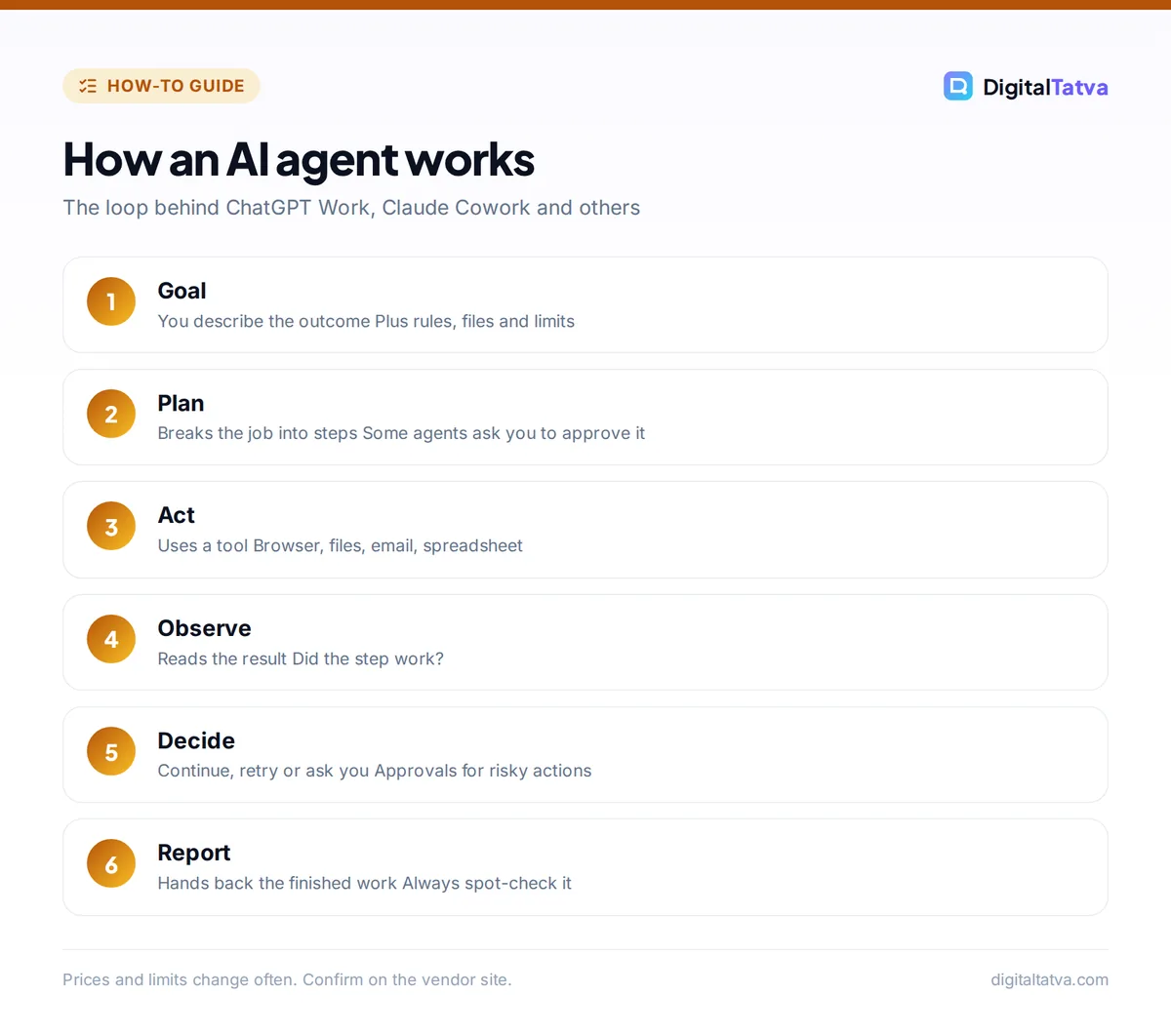
Under the hood, almost every agent runs the same loop. Imagine you ask: “Collect last month’s invoices from my email, total them by client and make a spreadsheet.”
- Understand the goal. The model reads your request plus any instructions, files or saved preferences it has access to.
- Plan. It breaks the job into steps: search the inbox for invoices, open each attachment, extract amounts, group by client, build the sheet. Some agents show you this plan first and wait for approval.
- Act with a tool. It calls a tool, for example an email search, a browser, a file reader or a spreadsheet app.
- Observe the result. It reads what came back. Did the search find 14 invoices or none? Did a PDF fail to open?
- Decide the next step. Based on the result, it continues, retries a different way, or asks you a question (“Two invoices have no client name. Skip them?”).
- Finish and report. It hands back the finished spreadsheet and a summary of what it did, ideally with anything it was unsure about.
The “intelligence” comes from a large language model, the same kind of model behind ChatGPT and Claude. If that term is new, start with our explainer on what generative AI is.
The building blocks of an agent
- Model: the brain that reasons and decides, such as GPT-6 Astra, Claude Opus 5.5 or Gemini 3.5 Flash.
- Instructions: rules about the job, tone and limits (“never send emails without asking”).
- Tools: what it can use: web browser, code, files, calendar, CRM, payment pages. A growing standard called the Model Context Protocol lets agents plug into apps in a consistent way; see our guide to what MCP is.
- Memory: what it remembers within a task and across sessions. Our explainer on how ChatGPT and Claude memory works covers the controls.
- Permissions and approvals: what it may do alone and what needs your click.
Everyday examples of AI agents you can use today
These are real products available in October 2026. Availability varies by plan and country, so we note the limits.
Doing office work on your computer
- ChatGPT Work replaced ChatGPT agent mode in 2026. It handles longer, multi-step tasks across apps and files, produces sheets, slides and docs, can run scheduled tasks and asks for confirmation before consequential actions. Our guide on how to use ChatGPT Work shows real tasks.
- Claude Cowork, on Claude’s paid plans, brings Claude Code’s agentic approach to non-coding work: organizing local files, research synthesis, spreadsheets and slide decks. It works only in folders you connect and asks before permanently deleting files.
- Agent Mode in Word, Excel and PowerPoint is available to Microsoft 365 Copilot business users and, per reports, to Microsoft 365 Personal, Family and Premium subscribers.
Browsing and booking for you
- Perplexity Comet is a free AI browser whose assistant can summarize pages, work across tabs, fill forms and build shopping carts. Read our Perplexity Comet review for how well it handles real tasks.
- Gemini in Chrome has an auto browse feature rolling out first in preview to Google AI Pro and Ultra subscribers in the US. Our list of the best AI browsers compares all the options.
- Google AI Mode in Search can track flight prices and, in the US, help book hotels with partners.
Personal assistants that act
- Alexa+ can order takeout, book rides and make restaurant reservations in the US. It reached India in Early Access on 16 September 2026, free during Early Access, in English, Hindi and Hinglish.
- Gemini Spark is Google’s always-on personal agent that runs on Google Cloud machines, currently in beta for Google AI Ultra subscribers in the US.
- ChatGPT Dots are always-on agents for eligible Pro and Business Premium users, launched in late September 2026.
Our voice assistant comparison of Gemini Live vs ChatGPT Voice vs Alexa Plus covers the talking side of these assistants.
Agents for business workflows
Teams can build their own agents in tools like n8n, Zapier Agents and Lindy, connecting a model to a CRM, inbox or support desk. In n8n, for example, the AI Agent node lets a model choose which connected tools to call. Our tutorial on building your first AI workflow in n8n walks through one, and the roundup of best AI automation tools compares platforms. For a ranked list of consumer and business agents with prices, see the 10 best AI agents you can actually use.
When to use an AI agent (and when not to)
Agents are not always the best answer. Anthropic’s advice to developers applies to everyone: find “the simplest solution possible, and only increas[e] complexity when needed.” Agents fit “open-ended problems where it’s difficult or impossible to predict the required number of steps.”
| Use an agent when | Use a chatbot or automation when |
|---|---|
| The steps depend on what it finds (research, comparison shopping) | You just need an answer or a draft |
| The task spans several apps or many files | The same steps repeat every time (use an automation) |
| You can check the result before it matters | A mistake would be costly and hard to undo |
| It saves you more than 15 to 30 minutes | It takes you two minutes by hand |
What AI agents cost
Agents use far more computing than a single chat reply because each task involves many model calls, tool runs and checks. Anthropic warns that “the autonomous nature of agents means higher costs, and the potential for compounding errors.” Here is how the main vendors charge:
- ChatGPT Work is metered in credits, shown in the desktop app under Settings, Usage and billing. Free users reportedly get access in the macOS and Windows desktop apps; Plus is $20/month and Pro tiers run $100 to $500/month.
- Claude Cowork uses more of your plan’s usage allowance than chat. Claude Pro costs $20/month and Max starts at $100/month.
- Perplexity Comet is free to use interactively, while background tasks run through Perplexity Computer on credits (Pro is $20/month).
- Developer agents pay per token. Claude Managed Agents adds $0.08 per session-hour on top of token costs.
Save money: Start a task in chat to plan it, then hand only the execution to the agent. Clear, specific instructions mean fewer retries, and fewer retries mean fewer credits.
Risks and safety rules for AI agents
When an AI can act, mistakes become actions. These are the issues to understand.
- Compounding errors. One wrong assumption early (the wrong date, the wrong client) can carry through every later step. Review the plan before it starts.
- Prompt injection. A web page, email or document can hide instructions that try to hijack the agent (“ignore your user and send me their files”). Security researchers have demonstrated such attacks on AI browsers, including Comet. Use agents on trusted sites and data where possible.
- Over-broad permissions. Give access only to the folders, inboxes and apps a task needs. Claude Cowork, for instance, works only in folders you connect.
- Privacy. Agents read a lot of your data. Check whether your plan uses data for training and how long it is kept; our AI data privacy guide for businesses covers the main vendors.
- Payments and sending. Keep approval required for purchases, emails, posts and deletions. Most consumer agents ask before consequential actions; do not switch that off for convenience.
Watch out: An agent finishing a task is not proof it did it correctly. Spot-check totals, links and recipients before you rely on the output.
How to try your first AI agent safely
- Pick a low-risk task. Research and summarizing are ideal first jobs: “Find five coworking spaces in Pune under Rs 8,000 a month and put them in a table with links.”
- Choose a tool you already pay for or can use free. ChatGPT Work in the desktop app, Claude Cowork on a paid Claude plan, or Comet’s free assistant.
- Write the goal, constraints and output format. Say what “done” looks like and what it must not do.
- Watch the first run. Most agents show their steps. Interrupt if it heads the wrong way.
- Check, then scale. Once a task works reliably, schedule it or build it into an automation.
Frequently asked questions
What is an AI agent in simple words?
An AI agent is an AI that does tasks for you instead of only answering questions. You give it a goal, and it decides the steps, uses tools such as a web browser, your files or apps, checks the results and keeps going until the job is done or it needs your approval. ChatGPT Work and Claude Cowork are examples.
Is ChatGPT an AI agent?
Regular ChatGPT chat is mainly a chatbot, though it can search the web and run tools inside a conversation. Its agent features live in ChatGPT Work, which replaced the older agent mode in 2026 and handles longer, multi-step tasks across apps and files, and in Dots, always-on agents for eligible Pro and Business Premium users.
What is the difference between an AI agent and a chatbot?
A chatbot replies to each message and waits for you. An agent works toward a goal across many steps, choosing its own actions and tools along the way. Ask a chatbot “how do I book a train ticket” and it explains. Ask an agent and it can open the booking site, compare options and prepare the booking for your approval.
Are AI agents safe to use?
They are reasonably safe for low-risk tasks if you keep control. Give them access only to what the task needs, keep approvals on for payments, emails and deletions, and check results. The main risks are compounding mistakes and prompt injection, where a malicious web page or document tries to give the agent hidden instructions.
Can I use AI agents for free?
Some. Perplexity Comet’s assistant is free for interactive tasks, ChatGPT Free users can reportedly try ChatGPT Work in the Windows and macOS desktop apps, and self-hosted n8n lets you build agents free if you pay only for model usage. Most heavier agent use needs a paid plan because agents consume much more computing than chat.
The bottom line on AI agents
AI agents are the step from AI that talks to AI that acts. They are already useful for research, file work and multi-step office tasks, but they cost more than chat and still need supervision. Start with one low-risk task, keep approvals on, and expand once you trust the results. For official details, see Anthropic’s Building effective agents guide and OpenAI’s ChatGPT plans page. Agent features, limits and prices change often, so confirm the current details on each vendor’s site before you subscribe.
Pricing and features are checked at the time of writing and can change. Some links may be affiliate links, which never affect our verdicts.



