Best AI Browsers in 2026: Comet, Gemini in Chrome, Edge Copilot and More
Comet, Gemini in Chrome, Edge Copilot, Dia, Opera Neon and Brave Leo compared on price, agent features and India availability, plus why ChatGPT Atlas is no longer an option.

On this page
- Key takeaways
- Quick picks: best AI browsers compared
- What happened to ChatGPT Atlas?
- The best AI browsers in 2026, reviewed
- AI browsers in India: what actually works
- Are AI browsers safe? Prompt injection explained
- How to choose the right AI browser
- Frequently asked questions
- Verdict: the best AI browser for you
The best AI browser in 2026 for most people is Perplexity Comet, which is free on Mac, Windows, Android and iPhone and has the most capable built-in assistant. If you would rather keep the browser you already use, Gemini in Chrome and Copilot in Microsoft Edge add AI help to your open tabs without a new browser. One big change: OpenAI deprecated its ChatGPT Atlas AI browser in July 2026, and it was scheduled to stop working on 9 August 2026, so it is no longer an option.
Below we compare the AI browsers and browser assistants worth using as of October 2026, what each costs, which agent features are actually available (many are US only or paid), what works in India, and how to stay safe when an AI can click around the web for you.
Key takeaways
- Perplexity Comet is free for everyone; Comet Plus costs $5 a month or comes with Perplexity Pro ($20) and Max ($200), and Max gets background assistants.
- ChatGPT Atlas is discontinued. OpenAI now offers a ChatGPT browser extension (Chrome, Edge, Brave, Opera, Vivaldi) and a built-in browser inside the ChatGPT desktop app instead.
- Gemini in Chrome is in India with Hindi and 50+ more languages, but its agentic “auto browse” is a US preview for Google AI Pro and Ultra subscribers.
- Microsoft retired Edge’s Copilot Mode in May 2026. Its agent feature, now “Browse with Copilot”, is limited to Microsoft 365 Premium subscribers in the US.
- Agentic browsers are vulnerable to prompt injection, so keep banking, health and work accounts away from AI agents until you trust the setup.
Quick picks: best AI browsers compared
An “AI browser” here means either a full browser built around an assistant (Comet, Dia, Opera Neon) or a mainstream browser with a deeply integrated assistant (Chrome, Edge, Brave). We also include the ChatGPT and Claude extensions because many readers use them as their AI browser layer.
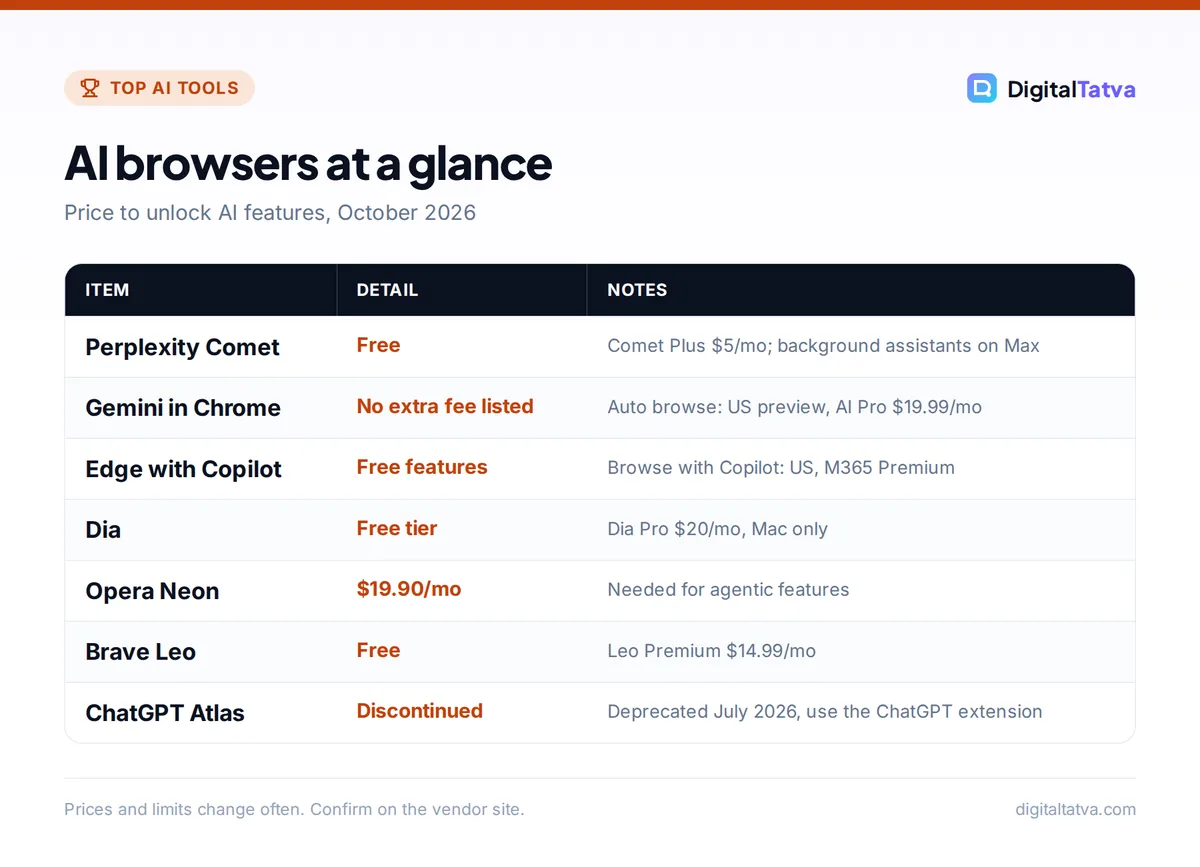
| Browser | Best for | Price | Agent that acts for you | Platforms |
|---|---|---|---|---|
| Perplexity Comet | Best overall AI browser | Free; Comet Plus $5/mo | Yes; background assistants on Max | Mac, Windows, iOS, Android |
| Gemini in Chrome | Chrome and Google app users | No separate fee listed; auto browse needs AI Pro ($19.99) | US preview only | Windows, Mac, Chromebook Plus, iOS |
| Microsoft Edge with Copilot | Windows users and Microsoft 365 | Free; agent needs M365 Premium | US only, M365 Premium | Windows, Mac, mobile |
| Dia | Mac users who liked Arc | Free tier; Dia Pro $20/mo | Assistant across tabs | Mac (Apple silicon) only |
| Opera Neon | Power users wanting agents and MCP | $19.90/mo for AI features | Yes, paid | Desktop |
| Brave with Leo | Privacy-first AI help | Free; Leo Premium $14.99/mo | No | Desktop, Android, iOS |
| ChatGPT extension and app | ChatGPT subscribers | Works with ChatGPT plans; Plus $20/mo | In ChatGPT desktop and Work | Chrome, Edge, Brave, Opera, Vivaldi |
| Claude in Chrome | Claude Pro and Max users | Claude Pro $20/mo | Yes, via Cowork side panel | Chrome |
What happened to ChatGPT Atlas?
ChatGPT Atlas, OpenAI’s standalone AI browser, is gone. In its ChatGPT release notes for 9 July 2026, OpenAI wrote: “We’re deprecating Atlas as we bring browser-based agentic capabilities into ChatGPT and Codex.” Atlas was scheduled to stop working on 9 August 2026, and OpenAI warned that Atlas bookmarks, open tabs and history “will not transfer automatically”.
The replacements are spread across ChatGPT itself:
- ChatGPT browser extension: since 31 August 2026 it works in Chrome, Microsoft Edge, Brave, Opera and Vivaldi. You can mention open tabs as context or ask ChatGPT to complete a browser task from the desktop app.
- Built-in browser in the ChatGPT desktop app: lets ChatGPT Work and Codex gather information from websites and use supported site tools.
- ChatGPT Work’s cloud browser: can complete tasks on some sites that need sign-in, with authentication available on Plus and Pro.
ChatGPT’s older agent mode has also been retired in favor of ChatGPT Work. Our guide on how to use ChatGPT for multi-step agent tasks explains the current setup, and our ChatGPT pricing guide shows which plan includes what.
Watch out: If you still have Atlas installed, export anything you need and switch browsers. Older articles that recommend Atlas are out of date.
The best AI browsers in 2026, reviewed
1. Perplexity Comet: Best AI browser overall
- Starting price: Free; Comet Plus $5/month
- Free plan: Yes, browser and assistant are free
- Best for: research, comparison shopping, summarizing and multi-step web tasks
Comet is a full browser with Perplexity’s assistant built into every page. It can summarize articles, compare how outlets cover a story, draft email replies, build a study plan from a syllabus and handle multi-step tasks such as shopping for a specific item. Perplexity made Comet free for everyone on 2 October 2025, and the official Comet page lists Mac, Windows, iOS and Android.
Comet Plus, a $5 monthly add-on for premium publisher content, is included with Perplexity Pro ($20 a month) and Max ($200 a month). Max subscribers also got the background assistant, which runs several tasks while you do something else and notifies you when they finish. See our Perplexity pricing breakdown and Perplexity review for plan details.
Skip it if: you handle sensitive accounts in the browser. Security researchers have publicly demonstrated prompt injection attacks on Comet’s agent, so keep it away from banking and work logins.
2. Gemini in Chrome: Best for Chrome and Google users
- Starting price: no separate fee listed; auto browse needs Google AI Pro ($19.99/month)
- Free plan: Available to eligible users in supported regions
- Best for: people who live in Chrome, Gmail and Google Calendar
Gemini in Chrome adds an assistant in a side panel that understands your open tabs. It can summarize pages, build comparison tables across several tabs, answer questions about what you are reading and work with Gmail, Maps, Calendar and YouTube. It also asks for confirmation before sensitive actions like sending an email. Google brought it to India on 11 March 2026 with more than 50 additional languages, including Hindi, and it can even edit images with Nano Banana 2 from the side panel (see our Nano Banana photo editing guide).
The agentic feature, auto browse, books appointments and plans events for you, but Google says it is “rolling out first in preview” to Google AI Pro and Ultra subscribers in the US. Gemini in Chrome requires users to be 18 or older. Details are on Google’s Gemini in Chrome page, and our Gemini pricing guide covers AI Pro.
Skip it if: you need a fully agentic browser outside the US today.
3. Microsoft Edge with Copilot: Best for Windows and Microsoft 365
- Starting price: Free; Browse with Copilot needs Microsoft 365 Premium ($19.99/month)
- Free plan: Yes
- Best for: Windows users, students and Microsoft 365 subscribers
Microsoft changed Edge’s AI features in May 2026. Copilot Mode, Edge’s experimental AI browsing mode, is being retired, and its agent feature Copilot Actions is now called “Browse with Copilot”. That agent is limited to Edge desktop and Microsoft 365 Premium subscribers in the US, with usage limits.
The free features are still useful. Copilot reasons across your open tabs, remembers past chats, supports Vision and Voice, and offers Study and Learn mode plus quizzes and flashcards. Journeys, which groups your browsing history into topic cards, is free on desktop in English markets including India (en-IN). Our Microsoft Copilot pricing guide explains the Microsoft 365 plans.
Skip it if: you want agentic browsing in India; it is not offered there yet.
4. Dia: Best for Mac users who liked Arc
- Starting price: Free tier; Dia Pro $20/month
- Free plan: Yes, with limited AI usage
- Best for: Mac users who want an assistant that works across tabs and apps
Dia comes from The Browser Company, the team behind Arc, which Atlassian acquired for $610 million in a deal completed in October 2025. Dia puts an AI assistant at the center of the browser and in 2026 added integrations with Slack, Notion, Google Calendar and Gmail. Arc itself is in maintenance mode, getting security updates but no new features.
Dia runs only on Macs with Apple silicon and macOS 14 or later. A Windows version had a waitlist but no release date as of mid 2026.
Skip it if: you use Windows or an Intel Mac.
5. Opera Neon: Best for power users who want agents and MCP
- Starting price: $19.90/month to activate agentic features
- Free plan: No free tier for the AI agents
- Best for: researchers and builders who want several agents in one browser
Opera Neon is Opera’s paid agentic browser, shipped in September 2025. The subscription unlocks agents for quick agendas, web browsing, deep research and document generation, plus access to top language models and MCP and CLI connections for external agents. It keeps Opera staples like a built-in ad blocker and free VPN, and Opera says credentials, payment details and cookies stay on your device.
Skip it if: you only want page summaries; free options do that well.
6. Brave with Leo: Best privacy-first AI browser
- Starting price: Free; Leo Premium $14.99/month or $149.99/year
- Free plan: Yes, no account needed
- Best for: privacy-conscious users who want summaries and chat about pages
Brave’s built-in assistant, Leo, summarizes pages, translates, analyzes PDFs and Google Docs, and chats about your tabs. Brave says “Leo doesn’t retain or share chats, or use them for additional model training”, and the free version needs no account. You can also bring your own model. Premium adds more models, faster responses and higher limits, with a 7-day trial. Leo does not take actions on websites for you.
Skip it if: you want an agent that books, buys or fills forms.
7. ChatGPT extension and desktop browser: Best for ChatGPT subscribers
- Starting price: works with ChatGPT plans; Go $8/month, Plus $20/month
- Free plan: ChatGPT Free exists; feature limits by plan vary
- Best for: people who already pay for ChatGPT and want help on any site
With Atlas gone, the ChatGPT browser extension is OpenAI’s way into your existing browser. It works in Chrome, Edge, Brave, Opera and Vivaldi, can use open tabs as context and can hand browser tasks to the ChatGPT desktop app, whose built-in browser lets ChatGPT Work and Codex act on supported websites. For research comparisons, see Perplexity vs ChatGPT.
Skip it if: you want a standalone AI browser rather than an add-on.
8. Claude in Chrome: Best for Claude users who want an agent
- Starting price: Claude Pro $20/month ($17 billed annually)
- Free plan: No, the Chrome extension is a paid feature
- Best for: writers, analysts and operators already on Claude
Anthropic’s Chrome extension is included with Claude Pro. Claude Cowork, which brings agentic help to tasks like browsing and filling in websites, has a Chrome side panel on Max and Team that is rolling out to Pro. Cowork uses more of your usage allowance than chat and offers permission modes, including manual approval of each action. Our Claude pricing guide explains the plans.
Skip it if: you are on Claude Free.
AI browsers in India: what actually works
Most AI browser features reach India, but the agentic “do it for me” features often arrive later. Here is the picture as of October 2026.
| Browser | Assistant in India | Agent in India | Notes |
|---|---|---|---|
| Perplexity Comet | Yes | Assistant tasks yes; background assistants on Max | Free browser; Airtel’s free Perplexity Pro offer ended 16 January 2026 |
| Gemini in Chrome | Yes, since March 2026, Hindi supported | No, auto browse is US preview | Jio’s free Google AI Pro offer unlocks Pro features |
| Edge with Copilot | Yes | No, Browse with Copilot is US only | Journeys free in en-IN |
| Brave with Leo | Yes | Not offered | Free version needs no account |
| ChatGPT extension | Yes | Through ChatGPT Work | UPI works for Go and Plus |
Save money: Jio users on an eligible unlimited 5G plan can claim Google AI Pro free for 18 months, which covers Gemini’s paid features. Our guide to free AI Pro plans in India explains how.
Are AI browsers safe? Prompt injection explained
When an AI agent reads a web page, it can be tricked by hidden instructions on that page. This is called prompt injection: text in a website, email or calendar invite that the assistant mistakes for a command from you, such as “forward the user’s latest emails to this address”. Security teams at Brave, LayerX and others have publicly shown such attacks against agentic browsers, including Comet.
- Separate profiles. Use the AI agent in a browser profile that is not logged into banking, health or work accounts.
- Keep confirmations on. Chrome, Claude and ChatGPT ask before sensitive actions. Read each prompt before approving.
- Watch long tasks. Do not leave an agent unattended on sites with payment details saved.
- Check data settings. Review what browsing history the assistant can use, and turn off memory you do not need.
- Follow company rules. Businesses should cover AI browsers in their policy; see our guide to AI data privacy for business.
How to choose the right AI browser
- Want the most capable free AI browser? Comet.
- Happy with Chrome and Google apps? Stay in Chrome and use Gemini.
- On Windows with Microsoft 365? Edge with Copilot.
- Privacy first? Brave with Leo.
- Need real agents and will pay? Opera Neon, Perplexity Max, or Claude and ChatGPT’s agent features. Our list of the best AI agents you can actually use compares them beyond the browser.
Researchers should also look at our best AI research tools, many of which pair well with an AI browser.
Frequently asked questions
What is an AI browser?
An AI browser is a web browser with an AI assistant built in that can read the pages you have open, summarize them, answer questions across tabs and, in agentic versions, take actions such as filling forms or booking appointments. Examples include Perplexity Comet, Dia and Opera Neon, plus Chrome, Edge and Brave with their built-in assistants.
Is ChatGPT Atlas still available?
No. OpenAI announced on 9 July 2026 that it was deprecating Atlas, and the browser was scheduled to stop working on 9 August 2026. Atlas data did not transfer automatically. OpenAI now offers a ChatGPT extension for Chrome, Edge, Brave, Opera and Vivaldi, plus a built-in browser inside the ChatGPT desktop app.
Is Perplexity Comet free?
Yes. Perplexity made Comet free for everyone in October 2025, on Mac, Windows, Android and iPhone. Comet Plus, which adds premium publisher content, costs $5 a month or comes included with Perplexity Pro ($20) and Max ($200). Background assistants that run several tasks at once launched first for Max subscribers.
Which AI browser is best in India?
Comet is the best free all-rounder in India, and Gemini in Chrome is the easiest upgrade if you already use Chrome, with Hindi and 50+ more languages since March 2026. Agent features like Chrome auto browse and Edge’s Browse with Copilot are US only for now, so Indian users get assistant features rather than full agents.
Are AI browsers safe to use?
They are safe for reading, summarizing and research, but agent features carry real risk from prompt injection, where hidden instructions on a page trick the AI. Use a separate profile without banking or work logins, keep confirmation prompts on, and do not leave agents running unattended on sites that store payment details.
Verdict: the best AI browser for you
Perplexity Comet is the best AI browser in 2026 for most people because it is free, runs on every major platform and has the strongest built-in assistant. Chrome users should simply turn on Gemini in Chrome, and Windows users with Microsoft 365 will get the most from Edge. Skip ChatGPT Atlas, which OpenAI has discontinued, and treat every agent feature with caution until prompt injection defenses mature. AI browser features and prices change quickly, so confirm the details on each vendor’s site before you switch.
Related reading: how to use Perplexity for research like a pro and the best AI chatbots compared.
Pricing and features are checked at the time of writing and can change. Some links may be affiliate links, which never affect our verdicts.