10 Best AI Agents You Can Actually Use in 2026
The 10 best AI agents in 2026, from ChatGPT agent mode and Claude Cowork to Perplexity Computer, Zapier Agents and n8n, with verified prices and safety tips.

On this page
The best AI agent for most people in October 2026 is ChatGPT agent mode, included with ChatGPT Plus at $20 a month, because it can browse, fill in forms, work with files and hand back a finished result with very little setup. Claude Cowork is the strongest choice for work that lives in files on your own computer, and Perplexity Computer is the pick for research-heavy tasks. If you want agents that run your business workflows on autopilot, Zapier Agents, Lindy and n8n are better fits than a chat app.
Below you will find a quick picks table, ten tool cards with prices from official pages where we could confirm them, a guide to choosing, and the safety rules that matter once an AI can click buttons for you.
Key takeaways
- ChatGPT agent mode (Plus at $20 a month and up) is the easiest general-purpose agent; ChatGPT Dots, launched on 29 September 2026, add always-on agents for Pro and Business Premium users.
- Claude Cowork is included on every paid Claude plan (Pro at $20, or $17 a month billed annually) and works directly with local folders on Mac and Windows.
- Perplexity Computer is listed on Perplexity Pro ($20 a month) and suits multi-step research; Max ($200) adds 10,000 monthly credits.
- For business automation, Zapier Agents has a free tier with 400 activities a month, Lindy starts at $29.99 per user, and self-hosted n8n is free.
- Agents use far more of your plan allowance than normal chat, so start with low-risk tasks and keep approval steps switched on.
Quick picks: the best AI agents compared
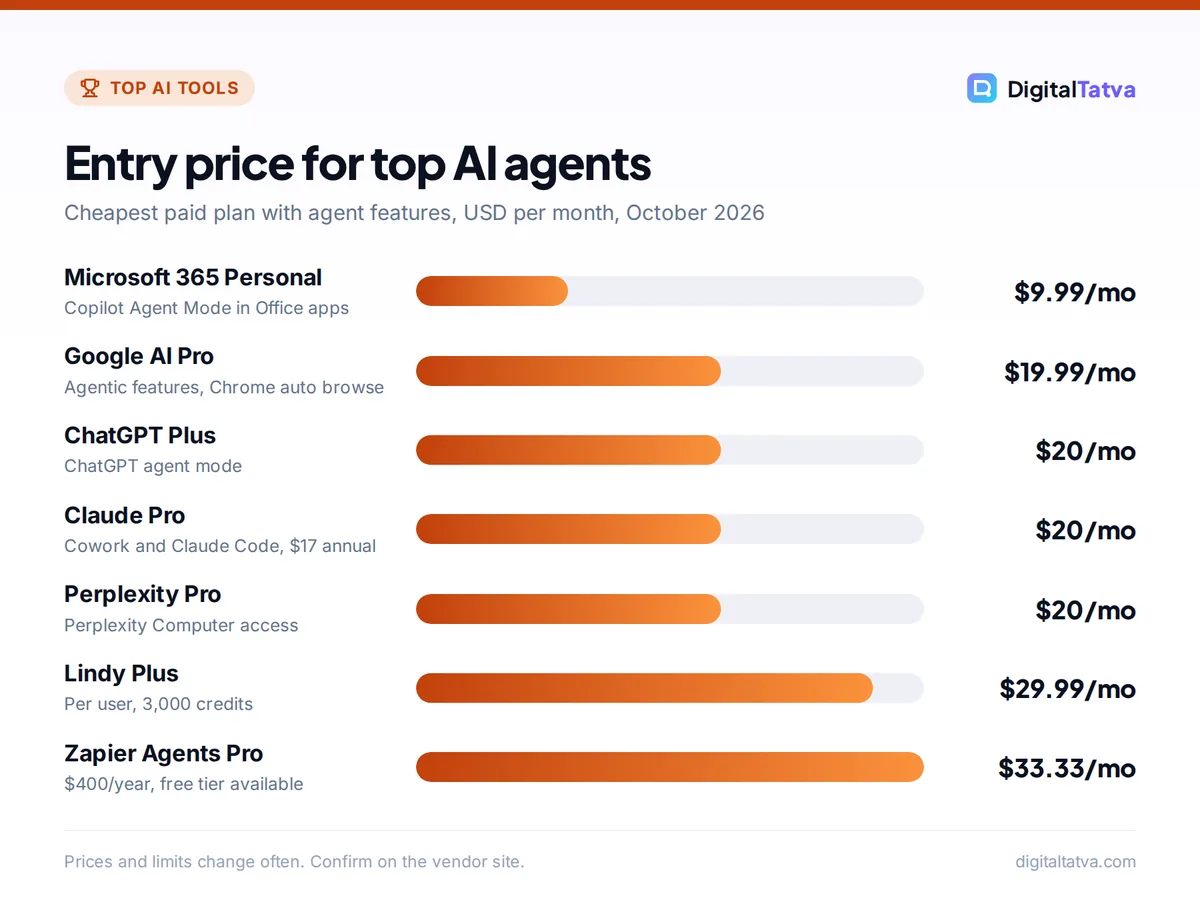
Starting prices are the cheapest paid plan that includes the agent feature, in USD per month. “Free plan” means you can try the agent itself without paying, not just the wider product.
| Agent | Best for | Starting price | Free plan |
|---|---|---|---|
| ChatGPT agent mode | Best overall, everyday web tasks | $20 (Plus) | No |
| Claude Cowork | Files, spreadsheets and decks on your computer | $20 (Pro), $17 annual | No |
| Perplexity Computer | Research and reports | $20 (Pro) | No |
| Manus | Trying an autonomous agent for free | About $20 (third-party) | Yes, daily credits |
| Google Gemini agents | Gmail, Chrome and Google users | $19.99 (Google AI Pro) | Limited |
| Microsoft 365 Copilot Agent Mode | Word, Excel and PowerPoint | $9.99 (Microsoft 365 Personal) | No |
| Zapier Agents | No-code business agents | $33.33 ($400/year) | Yes, 400 activities/month |
| Lindy | Inbox, calendar and admin agents | $29.99 per user | Trial only |
| Claude Code | Coding agents | $20 (Claude Pro) | No (Codex has a free tier) |
| n8n | Building your own agents | EUR 20 (annual, cloud) | Yes, self-hosted |
What counts as an AI agent in 2026
A chatbot answers a prompt and stops. An agent loops: it plans, takes an action (opens a website, reads a spreadsheet, sends a draft), checks the result and decides the next step. Agents fall into three groups.
- Assistant agents live in a chat app such as ChatGPT, Claude, Perplexity or Gemini and work in a cloud browser or on your desktop.
- Workflow agents run in tools such as Zapier, Lindy and n8n, triggering on events and acting across your business apps.
- Coding agents such as Claude Code and OpenAI Codex read a codebase, run commands and edit files.
If you are new to the idea, our step-by-step guide on how to use ChatGPT agent mode for real tasks is the easiest place to start.
The 10 best AI agents you can use right now
We ranked these on reliability, setup effort, control and price. All of them still make mistakes, so review their work like a junior assistant’s.
1. ChatGPT agent mode: Best overall AI agent
- Starting price: $20/month (ChatGPT Plus); Pro from $100/month for maximum agent use
- Free plan: No agent mode on Free
- Best for: Booking, comparing, form filling, research that ends in a document
ChatGPT agent works inside a virtual browser, so it can open websites, click, scroll, fill in forms and combine what it finds with your files and connected apps. OpenAI folded its earlier Operator product into agent mode in 2025, and it is available on Plus, Pro, Business, Enterprise and Edu. The Pro plan page lists “maximum deep research and agent mode”, so heavy users get much more room than Plus.
The newest addition is Dots, always-on agents that keep working on a goal between conversations with their own cloud computer and browser. They launched on 29 September 2026 for Pro users outside the EEA, Switzerland and the UK, and for Business Premium seats, with the first Dot included. On 7 October 2026 OpenAI also began rolling out GPT-6 with Intelligent UI, which lets answers include buttons, forms and charts; our explainers on GPT-6 models and which plan gets what and ChatGPT Intelligent UI cover those changes.
Skip it if: you only need occasional help; agent runs eat into Plus limits quickly. Our ChatGPT Plus vs Pro comparison explains when the bigger plan pays off.
2. Claude Cowork: Best for work on your own computer
- Starting price: $20/month (Claude Pro), or $17/month billed annually
- Free plan: No, paid plans only
- Best for: Organizing files, building spreadsheets and slide decks, research synthesis
Cowork brings the approach of Claude Code to non-coding work without a terminal. In the Claude desktop app for macOS and Windows it can work inside folders you connect, organize files, build spreadsheets and decks, browse and fill in websites, and run scheduled tasks. It is also available on the web and mobile for Pro, Max and Team, and in a Chrome side panel for Max and Team, with Pro rolling out.
Anthropic’s permission modes are a real strength. Manual asks before every action, Auto runs a safety review on each step, and Skip approves everything (Anthropic warns to use it only when you completely trust the task). Claude also needs explicit permission before permanently deleting files. The trade-off is usage: Cowork consumes more of your allowance than chat, and Auto mode the most. Our Claude Pro vs Max guide helps you size the plan.
Skip it if: you are on the free Claude plan, or your work happens mostly on websites rather than in files.
3. Perplexity Computer: Best for research-heavy tasks
- Starting price: $20/month (Perplexity Pro); Max $200/month
- Free plan: No
- Best for: Market research, competitor scans, sourced reports
Perplexity Computer launched in February 2026 as a cloud agent that coordinates many AI models to complete multi-step jobs. It started on the Max plan, and Perplexity’s official pricing page now lists “Perplexity Computer access” on Pro, alongside 4,000 bonus credits a month, deep research and premium data sources such as PitchBook and Statista.
Max adds 10,000 monthly credits plus 35,000 bonus credits and the highest research limits. Because Perplexity is built around citations, Computer’s output is easier to fact-check than most agents. See our Perplexity pricing guide for the full plan breakdown.
Skip it if: your tasks are about acting on websites (bookings, form filling) rather than finding and summarizing information.
4. Manus: Best autonomous agent to try for free
- Starting price: Pro reportedly from $20/month (third-party figure)
- Free plan: Yes, daily refreshing credits and one task at a time
- Best for: Curious users who want to test a fully autonomous agent
Manus made its name by taking a big goal (“research 20 suppliers and build a comparison sheet”) and running with it. Meta announced it was acquiring Manus in December 2025, and Manus said it would keep its own subscription service.
A third-party pricing tracker updated in September 2026 lists a free plan with 300 daily credits plus 1,000 starter credits, and paid tiers at about $20, $40 and $200 a month with more credits. We could not confirm these on Manus’s own page, so check before you pay. Credit-based agents can burn through an allowance fast on long tasks.
Skip it if: you handle sensitive client data and need clear enterprise controls.
5. Google Gemini agents: Best for Gmail and Chrome users
- Starting price: $19.99/month (Google AI Pro, Rs 1,950 in India)
- Free plan: Limited agent features
- Best for: People whose work runs through Gmail, Docs and Chrome
Google AI Pro lists “agentic capabilities” and Chrome auto browse, plus Gemini in Gmail, Docs and Vids and the Jules coding agent, at about the price of ChatGPT Plus.
The headline feature is Gemini Spark, an always-on agent unveiled at Google I/O in May 2026. You can email it tasks at a dedicated Gmail address and it works in the background on Google Cloud machines. It is a US beta for Google AI Ultra (from $99.99 a month), so most readers cannot use it yet. Gemini 4 Argon, announced on 30 September 2026, is also a limited rollout rather than a general launch. Our Gemini pricing guide compares the plans.
Skip it if: you need Spark today outside the US.
6. Microsoft 365 Copilot Agent Mode: Best for Office documents
- Starting price: $9.99/month (Microsoft 365 Personal); Copilot Business add-on $21/user/month
- Free plan: No
- Best for: Building and editing Word, Excel and PowerPoint files
Agent Mode lets Copilot edit your document or workbook step by step. It became generally available in April 2026 and is the default Copilot experience on Microsoft 365 Copilot, Premium, Personal and Family, according to a 2026 rollout summary.
For companies, Copilot Cowork reached general availability in June 2026 for Microsoft 365 Copilot users and can produce Word, Excel and PowerPoint files in a single task, billed in Copilot Credits. Our Microsoft Copilot pricing guide lists every plan.
Skip it if: your team works in Google Workspace.
7. Zapier Agents: Best no-code agents for business workflows
- Starting price: $33.33/month billed as $400/year (Agents Pro, 1,500 activities)
- Free plan: Yes, 400 activities a month
- Best for: Small businesses connecting CRMs, email, sheets and Slack
Zapier Agents run on triggers and act across the thousands of apps Zapier already connects. You describe the job (“when a lead fills the form, research the company, score it and post to Slack”) and the agent handles each run. The free tier is enough to prove one or two workflows.
Zapier MCP is included on all plans and lets assistants such as ChatGPT or Claude trigger Zapier actions, with each MCP tool call using two tasks. For how Zapier compares with cheaper builders, read Zapier vs Make vs n8n.
Skip it if: you run long, high-volume workflows; task-based pricing climbs fast.
8. Lindy: Best for inbox, calendar and admin agents
- Starting price: $29.99/user/month (Plus, 3,000 credits)
- Free plan: No permanent free plan shown; a trial is mentioned
- Best for: Founders, sales reps and assistants drowning in email and scheduling
Lindy builds agents for personal operations: triaging email, drafting replies, booking meetings, chasing leads and updating your CRM. Non-technical users can set up useful agents in an afternoon.
Pro costs $99.99 per user for 15,000 credits and Max $199.99 for 35,000, with Enterprise adding HIPAA, SSO and audit logs. Annual pricing was not shown on Lindy’s page when we checked.
Skip it if: you need agents that touch dozens of apps; Zapier or n8n have wider reach.
9. Claude Code: Best coding agent
- Starting price: $20/month (Claude Pro); Max from $100/month
- Free plan: No (OpenAI Codex is included on ChatGPT Free with limits)
- Best for: Developers, and non-developers building small apps and scripts
Claude Code runs in your terminal or IDE, reads your project, plans changes, edits files and runs commands. It shares one usage pool with Claude chat, so a Pro subscription covers both. Many readers with no coding background now use it to build internal tools; our beginner guide to Claude Code walks through a first project.
OpenAI Codex is the main alternative and is included on every ChatGPT plan, from Free to Enterprise, with limits per five-hour window. For the full field, see our list of the best AI coding assistants.
Skip it if: you never touch code or files; Cowork or ChatGPT agent will feel friendlier.
10. n8n: Best for building your own AI agents
- Starting price: EUR 20/month billed annually (Starter cloud, 2,500 executions)
- Free plan: Yes, the self-hosted Community Edition
- Best for: Technical founders, agencies and developers who want full control
n8n gives you AI agent nodes, code nodes and hundreds of integrations on a visual canvas. Because it bills per workflow execution rather than per step, long agent workflows with many tool calls stay cheap, and the self-hosted Community Edition costs nothing but server fees.
You choose the model, so you can pair it with a budget model such as GPT-6 Luna or Claude Haiku 4.5 for routine steps. Our tutorial on building your first AI workflow in n8n gets you to a working agent quickly.
Skip it if: nobody on your team is comfortable with APIs and credentials.
How to choose the right AI agent
Start from the kind of task, not the brand. This table maps common jobs to a first choice and a runner-up.
| Your task | First choice | Runner-up |
|---|---|---|
| Web tasks: compare, book, fill in forms | ChatGPT agent mode | Manus |
| Organize files, build decks and spreadsheets | Claude Cowork | Microsoft 365 Copilot Agent Mode |
| Sourced research reports | Perplexity Computer | ChatGPT deep research |
| Email triage and scheduling | Lindy | Gemini in Gmail |
| Lead routing and CRM updates | Zapier Agents | n8n |
| Build an internal tool or website | Claude Code | OpenAI Codex |
Check where the agent runs
Cloud agents (ChatGPT agent, Perplexity Computer, Manus, Gemini Spark) keep working when your laptop is closed. Desktop agents such as Claude Cowork can touch local files but need your computer on.
Look at the approval controls
The best agents let you decide what needs your sign-off, such as Claude Cowork’s Manual and Auto modes or ChatGPT Dots’ Custom Rules. Never let an agent send emails, pay or delete data with no review.
Price by usage, not by sticker
One long agent run can use as much capacity as dozens of chat messages, and credit-based tools can run dry mid-task. Start on the cheapest plan, log a week of real tasks, then upgrade only if you hit limits. Our list of the best AI automation tools covers more workflow options, including Gumloop and Relay.app.
Save money: If you already pay $20 for ChatGPT Plus or Claude Pro, you already have a capable agent. Use it for a month before adding a second agent subscription, and see our guide to saving money on AI subscriptions for more ways to trim the stack.
Safety, privacy and control when agents act for you
Once an AI can click and type, mistakes have real consequences.
- Give the least access possible. Connect only the folders, inboxes and apps a task needs. Claude Cowork, for example, can only reach folders you connect.
- Keep humans on irreversible actions. Require approval before sending messages, spending money or deleting anything.
- Watch for prompt injection. Hidden instructions in a web page or email can hijack an agent. Stop any run that drifts.
- Use business plans for client data. Business and Enterprise tiers add admin controls and data commitments; our guide on AI data privacy for business explains what to check.
- Write the rules down. Add agent use to your company AI usage policy so staff know which tasks are allowed.
Watch out: Agents can report a task as complete when it is not. Spot-check outputs, especially numbers pulled from websites, before you act on them or send them to a client.
Frequently asked questions
What is the best AI agent in 2026?
For most people, ChatGPT agent mode is the best all-round AI agent because it is included with ChatGPT Plus at $20 a month and handles web tasks, files and connected apps with little setup. Claude Cowork is better for work on local files, and Perplexity Computer is better for research. Businesses automating workflows should look at Zapier Agents, Lindy or n8n.
Is there a free AI agent?
Yes. Zapier Agents has a free tier with 400 activities a month, n8n’s self-hosted Community Edition is free, and Manus reportedly offers daily free credits. OpenAI Codex is also included on ChatGPT Free with limits. The main assistant agents, ChatGPT agent mode and Claude Cowork, need a paid plan starting at about $20 a month.
What is the difference between an AI agent and a chatbot?
A chatbot answers one message at a time. An AI agent takes a goal, plans the steps, uses tools such as a browser, your files or business apps, checks its own progress and keeps going until the task is done. Many chat apps now include both: you can chat normally or switch on agent mode for longer tasks.
Are AI agents safe to use with my email and files?
They can be, if you limit access and keep approval steps on. Connect only what a task needs, require sign-off before sending, paying or deleting, and use business plans with admin controls for client data. Be alert to prompt injection, where hidden text on a web page tries to redirect the agent, and stop any run that drifts.
How much do AI agents cost in India?
Most agents are billed in USD, so you pay the list price plus your card’s foreign exchange fee. Google AI Pro is listed at Rs 1,950 a month, and Claude Pro has been reported at about Rs 2,000 a month including GST. Free options such as self-hosted n8n and the Zapier Agents free tier are good ways to start without a subscription.
Our verdict: which AI agent should you use?
Start with ChatGPT agent mode if you want one agent that handles everyday web tasks, and with Claude Cowork if your work lives in documents, spreadsheets and folders. Choose Perplexity Computer for sourced research, Microsoft 365 Copilot or Gemini if your company already runs on their apps, and Zapier Agents, Lindy or n8n when you want agents that work on triggers in the background. Whatever you pick, keep approvals on and review results before they reach a customer. Agent features and plan limits change quickly, so confirm current pricing on each vendor’s site before you subscribe.
Pricing and features are checked at the time of writing and can change. Some links may be affiliate links, which never affect our verdicts.