10 Best AI Automation Tools for Business Workflows
The 10 best AI automation tools for 2026, from Zapier, Make and n8n to Power Automate, Lindy and Activepieces, with verified prices, free plans and who each tool suits.

On this page
- Key takeaways
- Best AI automation tools at a glance
- The 10 best AI automation tools, reviewed
- How to choose the right AI automation tool
- Pricing notes: what AI automation really costs
- Popular AI automation use cases for small businesses
- Frequently asked questions
- Our verdict: the best AI automation tools for most businesses
The best AI automation tools in 2026 are Zapier for non-technical teams, Make for visual multi-step workflows on a budget, and n8n for developers who want AI agents and self-hosting. Microsoft Power Automate is the natural pick if your company runs on Microsoft 365, while newer AI-first tools like Lindy, Gumloop and Relay.app are built around agents rather than classic “if this, then that” triggers.
Below we rank the 10 tools worth your time, with verified starting prices, free plan details and who should skip each one. The single most important thing to understand before you choose is how each tool counts usage (tasks, credits, steps or executions), because that decides your real monthly bill far more than the headline price.
Key takeaways
- Zapier is the easiest all-rounder: Free gives 100 tasks a month, paid plans start from $19.99/month, and it adds Agents, Chatbots and MCP on top.
- Make offers the most automation per dollar in the cloud: Core is $12/month for 10,000 credits.
- n8n and Activepieces are open source, so you can self-host them for free and pay only for your server.
- Power Automate Premium costs $15/user/month (paid yearly) and is the best fit for Microsoft 365 companies that need desktop RPA.
- AI model token costs are usually extra, so budget for OpenAI, Anthropic or Google usage on top of your automation plan.
Best AI automation tools at a glance
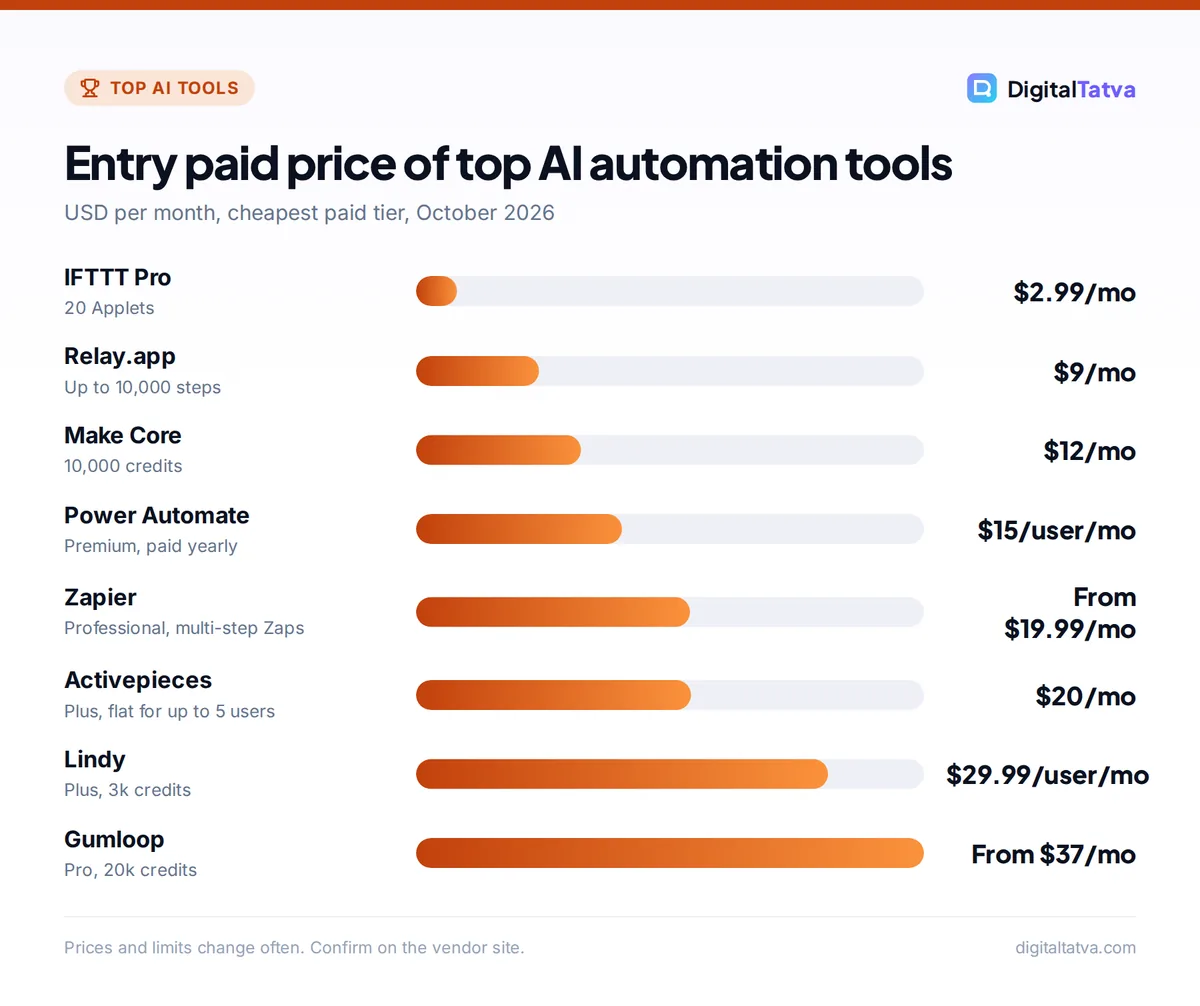
This table uses official list prices in USD (n8n in EUR) checked on 1 October 2026. “From” prices are the cheapest paid tier; most tools sell bigger usage tiers above that.
| Tool | Best for | Starting paid price | Free plan |
|---|---|---|---|
| Zapier | Non-technical teams, widest app library | From $19.99/mo | Yes, 100 tasks/mo |
| Make | Visual multi-step workflows on a budget | Core $12/mo (10,000 credits) | Yes, 1,000 credits/mo |
| n8n | Developers, AI agents, self-hosting | Starter EUR 20/mo (annual) | Community Edition (self-hosted) |
| Microsoft Power Automate | Microsoft 365 companies and RPA | Premium $15/user/mo (yearly) | 30-day trial |
| Activepieces | Open source Zapier alternative | Plus $20/mo flat | Yes, 1,000 credits/mo |
| Relay.app | Human-in-the-loop AI workflows | Professional $9/mo | Yes, 100 steps/mo |
| Lindy | AI assistants that act on email and meetings | Plus $29.99/user/mo | Trial only |
| Gumloop | AI agent workflows for ops and marketing | Pro from $37/mo | 14-day trial |
| Pipedream | Developers embedding integrations in products | Startup $99/mo ($90 annual) | Yes, development only |
| IFTTT | Personal and smart home automations | Pro $2.99/mo | Yes, 2 Applets |
The 10 best AI automation tools, reviewed
1. Zapier: Best for non-technical teams
- Starting price: Free; Professional from $19.99/mo; Team from $69/mo
- Free plan: Yes, 100 tasks/month on two-step Zaps
- Best for: Small businesses, marketers and ops teams with no developer
Zapier is still the easiest way to connect apps, and its AI layer has grown into a full suite. Zapier Copilot helps you build Zaps by describing them in plain English, AI fields and the AI by Zapier step let you summarize, classify or draft text inside any workflow, and Zapier Agents can act across apps on your behalf. Agents have a free tier with 400 activities a month, and Agents Pro costs $33.33/month ($400/year) for 1,500 activities.
Zapier also sells Chatbots (Free for 2 bots, Pro $13.33/month for 5) and includes Zapier MCP on all plans, which lets assistants like ChatGPT or Claude trigger Zapier actions. Each MCP tool call uses two tasks, so watch your quota. If you are new to it, follow our guide on how to automate repetitive tasks with Zapier and AI.
Pros
- Largest library of ready-made app connectors
- Most polished no-code AI features
- Fastest setup for beginners
Cons
- Task-based pricing gets expensive for long workflows
- Free plan is limited to two-step Zaps
2. Make: Best value for visual multi-step workflows
- Starting price: Free; Core $12/mo; Pro $21/mo; Teams $38/mo
- Free plan: Yes, 1,000 credits/month and 2 active scenarios
- Best for: Marketers and ops teams comfortable with a little logic
Make uses a visual canvas where every module is a bubble and you can watch data flow between them. Routers, iterators and error handlers let you build branching workflows that would need several separate Zaps in Zapier. Each module action uses 1 credit, and the paid tiers each start with 10,000 credits a month, so Core at $12 covers a lot of moderate-volume automation.
AI comes in as modules that call OpenAI, Anthropic, Google and other providers. That works well when AI is one step in a bigger process, such as “read the email, classify it with AI, route it to the right sheet”. For a head-to-head breakdown, read our Zapier vs Make vs n8n comparison.
Skip Make if nobody on your team will spend an afternoon learning the canvas, or you need self-hosting.
3. n8n: Best for AI agents and developers
- Starting price: Starter EUR 20/mo (annual); Pro EUR 50/mo; Business EUR 667/mo
- Free plan: Community Edition, free if you self-host
- Best for: Technical teams, agencies and anyone building AI agents
n8n bills per workflow execution regardless of how many steps it has, which makes it far cheaper than step-based tools for long, AI-heavy workflows. Starter includes 2,500 executions and Pro 10,000. All plans include unlimited users, workflows and integrations, and monthly billing costs about 17% more than the annual price.
The AI agent nodes support tool calling, memory and model switching, and code nodes let you run JavaScript or Python when a prebuilt node is not enough. Because you can self-host, you can keep data on your own servers or connect to a local model. Our guide to running an LLM locally with Ollama pairs well with a self-hosted n8n setup.
Watch out: Self-hosting is free in license terms, not in effort. Someone has to handle the server, updates, backups and security.
4. Microsoft Power Automate: Best for Microsoft 365 companies
- Starting price: Premium $15/user/mo, paid yearly
- Free plan: 30-day free trial
- Best for: Businesses on Outlook, Teams, SharePoint and Excel that need desktop RPA
Power Automate connects tightly with Microsoft 365, and it is the only tool on this list with mature desktop RPA (robotic process automation, meaning a bot that clicks through desktop apps like a person). Premium at $15/user/month (paid yearly) includes cloud flows, attended desktop flows and basic process mining. Unattended bots cost more: Process is $150/bot/month and Hosted Process, which includes a Microsoft-hosted virtual machine, is $215/bot/month, both paid yearly.
Copilot Studio, Microsoft’s tool for building AI agents, is sold separately with its own credits. If you are weighing Microsoft’s AI subscriptions overall, see our Microsoft Copilot pricing guide.
Skip Power Automate if your stack is mostly Google Workspace and SaaS apps; Zapier or Make will be quicker.
5. Activepieces: Best open source Zapier alternative
- Starting price: Plus $20/mo flat; Team $200/mo flat
- Free plan: Yes, 1,000 credits/month, cloud or self-hosted
- Best for: Small teams that want Zapier-style simplicity with open source control
Activepieces feels closer to Zapier than n8n does, but it is open source and can run on your own server. Every plan includes unlimited flows plus AI agents and chat. Plus costs a flat $20/month for 10,000 credits and up to 5 users, and lets you bring your own AI keys. Team is $200/month for 50,000 credits and 25 users. Extra usage is $0.007 per credit.
Flat pricing (not per seat) makes it attractive for agencies and small teams. See our guide to AI for marketing agencies for how automation fits into client pricing.
6. Relay.app: Best for human-in-the-loop AI workflows
- Starting price: Professional $9/mo; Team $59/mo
- Free plan: Yes, 100 steps/month, 1 user
- Best for: Teams that want a person to approve AI output before it goes out
Relay.app is built around workflows where AI drafts something and a human reviews it, which is the safest way to automate client emails, proposals or social posts. Every plan includes the same features and integrations, including AI steps; plans differ only in steps and users. Professional at $9/month allows up to 10,000 steps for 1 to 2 users, and Team at $59/month allows up to 25,000 steps with unlimited users.
That makes it one of the cheapest ways to get multi-step AI automation in the cloud.
7. Lindy: Best AI assistant for email, meetings and follow ups
- Starting price: Plus $29.99/user/mo; Pro $99.99; Max $199.99
- Free plan: No permanent free plan shown; trial available
- Best for: Founders and salespeople who want an AI assistant that acts for them
Lindy is less a workflow builder and more a team of AI assistants. You describe a job, such as triaging your inbox, preparing meeting notes or following up with leads, and Lindy runs it across your connected apps. Plus includes 3k credits per user per month, Pro 15k and Max 35k. Enterprise adds HIPAA, SSO and audit logs.
Skip Lindy if you need predictable per-task costs; credit-based agents are harder to forecast than a fixed workflow.
8. Gumloop: Best for AI agent workflows in ops and marketing
- Starting price: Pro from $37/mo
- Free plan: 14-day free trial on Pro
- Best for: Growth, ops and marketing teams building AI pipelines without code
Gumloop combines a drag-and-drop workflow canvas with AI agents. Pro starts at $37/month with 20k credits, unlimited seats and unlimited agents, plus access to 35+ models. You can bring your own API keys, though Gumloop lists an 8% orchestration fee. Common uses include scraping and enriching lead lists, turning research into content briefs and monitoring competitors.
If content is your main use case, our list of AI SEO tools covers the specialist options.
9. Pipedream: Best for developers and SaaS products
- Starting price: Startup $99/mo or $90/mo billed annually
- Free plan: Yes, development only
- Best for: Developers who want code-first workflows and embedded integrations
Pipedream offers 3,000+ connectors and 10,000+ prebuilt tools, with full code steps when you need them. Its newer focus is letting software companies embed integrations and AI tools for their own users. Startup includes 10,000 usage credits a month (then $0.012 per credit) and 100 external users (then $2 each). The free plan covers every feature, but only in development.
Skip Pipedream if you are not a developer; Zapier or Relay.app will be easier.
10. IFTTT: Best for personal and smart home automation
- Starting price: Pro $2.99/mo; Pro+ $8.99/mo
- Free plan: Yes, 2 Applets
- Best for: Individuals, creators and smart home users
IFTTT (“if this, then that”) is the cheapest and simplest tool here. Pro at $2.99/month ($35.88/year) gives 20 Applets, and Pro+ at $8.99/month ($107.88/year) gives unlimited Applets plus AI services. It is great for saving social posts, smart home routines and personal reminders, but too limited for business workflows.
How to choose the right AI automation tool
Start with three questions: who will build the workflows, how many steps they have, and where your data must live.
- Match the tool to the builder. No technical skills on the team: Zapier, Relay.app or Lindy. Comfortable with logic: Make or Activepieces. Developers: n8n or Pipedream.
- Count the steps, then the runs. Multiply actions per run by runs per month. Step-based tools (Zapier, Make, Relay.app) scale with both numbers; n8n scales only with runs.
- Check where data goes. If client or customer data cannot leave your servers, shortlist the self-hostable tools: n8n and Activepieces.
- Look at your core apps. Microsoft-heavy companies get the most from Power Automate. Everyone else should confirm their CRM, helpdesk and email tool have native connectors.
- Prototype on free plans. Build your most important workflow on two tools, run it for a week and compare real usage before paying.
Tip: Write a short internal rule about what AI is allowed to send without human review. Our AI usage policy template gives you a starting point.
Pricing notes: what AI automation really costs
Your bill has two parts: the automation platform and the AI model. Many tools include some AI usage, but if you connect your own API key you pay the model provider separately.
Worked example: one AI step, 1,000 runs a month
Say each run sends about 2,000 input tokens and gets back about 500 output tokens. That is 2M input and 0.5M output tokens a month:
- GPT-6 Luna ($0.10 input, $0.50 output per 1M tokens): $0.20 + $0.25 = $0.45 a month.
- Claude Haiku 4.5 ($1 input, $5 output per 1M tokens): $2.00 + $2.50 = $4.50 a month.
- GPT-6 Astra ($10 input, $50 output per 1M tokens): $20 + $25 = $45 a month.
For classification and summaries, a budget model is usually enough. Our guide to picking the cheapest AI model for each task explains when to upgrade, and our breakdowns of OpenAI API pricing and Claude API pricing list every rate.
Save money: Put filters before AI steps. If half your incoming form entries are spam, filtering first halves your tasks, credits and tokens on every platform.
Paying from India
None of these tools listed official INR prices on the pages we checked. Expect to pay in USD (or EUR for n8n) by card, with forex fees and GST on top. Self-hosting n8n or Activepieces on a low-cost server is the cheapest route for Indian teams with some technical skill.
Popular AI automation use cases for small businesses
- Lead handling: score new form entries with AI, add them to your CRM and alert sales in Slack.
- Customer support triage: classify incoming emails and draft replies for review. For dedicated tools, see our guide to AI customer support tools.
- Website chat: connect a chatbot to your knowledge base and hand hot leads to a human. Our walkthrough on adding an AI chatbot to your website covers setup.
- Content repurposing: turn a blog post into social captions and a newsletter draft.
- Reporting: pull weekly numbers into a sheet and have AI write the summary.
Owners starting from zero should read our guide on how small businesses can use AI without a big budget.
Frequently asked questions
What is the best AI automation tool for beginners?
Zapier is the best starting point for beginners. You can describe a workflow in plain English and Zapier Copilot helps build it, the free plan gives 100 tasks a month, and it connects to more apps than any rival. Relay.app is a cheaper alternative at $9 a month if you want simple AI steps with human approval built in.
Is there a free AI automation tool?
Yes. Zapier, Make, Activepieces, Relay.app and IFTTT all have free plans, with limits such as 100 tasks or 1,000 credits a month. n8n Community Edition and Activepieces are open source and free to self-host, so you pay only for the server. Most free plans are fine for testing but too small for daily business use.
Is n8n better than Zapier for AI automation?
For technical users building long AI workflows or agents, usually yes. n8n bills per execution rather than per step and can be self-hosted, which keeps costs low and data private. Zapier is better for non-technical teams who want quick setup, the largest app library and polished AI features like Agents and Chatbots without touching code.
Do AI automation tools include the cost of AI models?
Partly. Many tools include some built-in AI usage or credits, but if you connect your own OpenAI, Anthropic or Google API key, you pay those token costs separately. For a typical AI step running 1,000 times a month, a budget model costs under a dollar, while a flagship model can cost around $45.
How much do AI automation tools cost in India?
We could not find official INR prices for these tools. Most charge in USD, from $2.99 a month for IFTTT Pro to $15 per user for Power Automate Premium, and n8n charges in euros. Add card forex fees and GST. Self-hosting n8n or Activepieces is the lowest-cost option if you can manage a server.
Our verdict: the best AI automation tools for most businesses
For most small businesses, start with Zapier, because nothing else gets a non-technical team from idea to working automation as quickly. Move to Make when your workflows grow and costs climb, or to n8n when you have a developer and want AI agents, self-hosting or execution-based pricing. Choose Power Automate if you live in Microsoft 365, and try Relay.app or Lindy if you want AI to draft and act while a person stays in control. Once your workflows are running, track the hours saved with our guide to measuring ROI from AI tools, and check the official Zapier pricing page and the official Make pricing page for current usage tiers. Pricing and allowances change often, so confirm current plans on each vendor’s site before you subscribe.
Pricing and features are checked at the time of writing and can change. Some links may be affiliate links, which never affect our verdicts.