Zapier vs Make vs n8n: Best Tool for AI Automation
Zapier vs Make vs n8n compared on pricing models, AI agents, integrations and self-hosting, with worked cost examples showing which automation tool is cheapest for you.

On this page
- Key takeaways
- Quick verdict: which automation tool fits you
- How pricing works: tasks vs credits vs executions
- Zapier: easiest AI automation for non-technical teams
- Make: the best value for visual, multi-step scenarios
- n8n: the most powerful option for AI agents and developers
- AI features, integrations and privacy compared
- Choose Zapier if, Make if, n8n if
- Frequently asked questions
- Our verdict
For AI automation in 2026, Zapier is the easiest tool for non-technical teams, Make gives the most automation per dollar for visual builders, and n8n is the best choice for technical users who want AI agents, self-hosting and pricing that does not grow with every step. If you want to connect apps in ten minutes, pick Zapier. If you run complex multi-step workflows on a tight budget, pick Make. If you have a developer (or are one) and want full control, pick n8n.
The biggest difference is how each tool bills you: Zapier counts tasks, Make counts credits per module action, and n8n counts whole workflow executions. That single detail can make the same workflow cost ten times more on one platform than another, so we work through real examples below.
Key takeaways
- Zapier Free gives 100 tasks a month on two-step Zaps. Professional starts at $19.99/mo billed annually, and the Zapier Agents, Chatbots and MCP features make it the most complete no-code AI suite.
- Make Free includes 1,000 credits a month. Paid plans start at $12/mo for 10,000 credits, and each module action uses 1 credit.
- n8n bills per workflow execution regardless of steps. Starter is EUR 20/mo (annual) for 2,500 executions, and the self-hosted Community Edition is free.
- For long AI workflows with many steps, n8n is usually cheapest; for short two-app connections, Zapier’s simplicity is worth the premium.
- AI model costs are separate: you pay OpenAI, Anthropic or Google for tokens on top of your automation plan.
Quick verdict: which automation tool fits you
Think of the three tools as a ladder. Zapier is the most beginner-friendly, with the largest app directory and AI features that work out of the box. Make sits in the middle, with a visual canvas that shows data flowing between modules and much cheaper usage. n8n is the most powerful and flexible, with code nodes, AI agent nodes and the option to run everything on your own server.
If you are new to automation, our step-by-step guide on how to automate repetitive tasks with Zapier and AI is a good first project. For a wider shortlist, see our list of the best AI automation tools for business workflows.
| Criteria | Zapier | Make | n8n |
|---|---|---|---|
| Best for | Non-technical teams, fast setup | Visual builders on a budget | Developers, AI agents, self-hosting |
| Billing unit | Tasks | Credits (1 per module action) | Executions (whole workflow run) |
| Free plan | 100 tasks/mo, two-step Zaps | 1,000 credits/mo, 2 active scenarios | Community Edition free if self-hosted |
| Entry paid plan | Professional from $19.99/mo (annual) | Core $12/mo, 10,000 credits | Starter EUR 20/mo (annual), 2,500 executions |
| Team plan | Team from $69/mo (annual), 25 users | Teams $38/mo, 10,000 credits | Unlimited users on all plans |
| AI extras | Agents, Chatbots, Copilot, MCP, AI fields | AI modules and app connections | AI agent nodes, code nodes, local models |
| Self-hosting | No | No | Yes |
| Learning curve | Lowest | Medium | Highest |
How pricing works: tasks vs credits vs executions
This is the section that matters most for your bill, so here are the three models in plain words.
- Zapier tasks: each successful action step in a Zap counts as a task. The trigger that starts the Zap generally does not count. A Zap with one trigger and four actions uses about four tasks per run.
- Make credits: each module action in a scenario uses 1 credit. A scenario with five modules uses about five credits per run.
- n8n executions: one full run of a workflow counts as one execution, whether it has 3 steps or 30.
Worked example: an AI lead-handling workflow
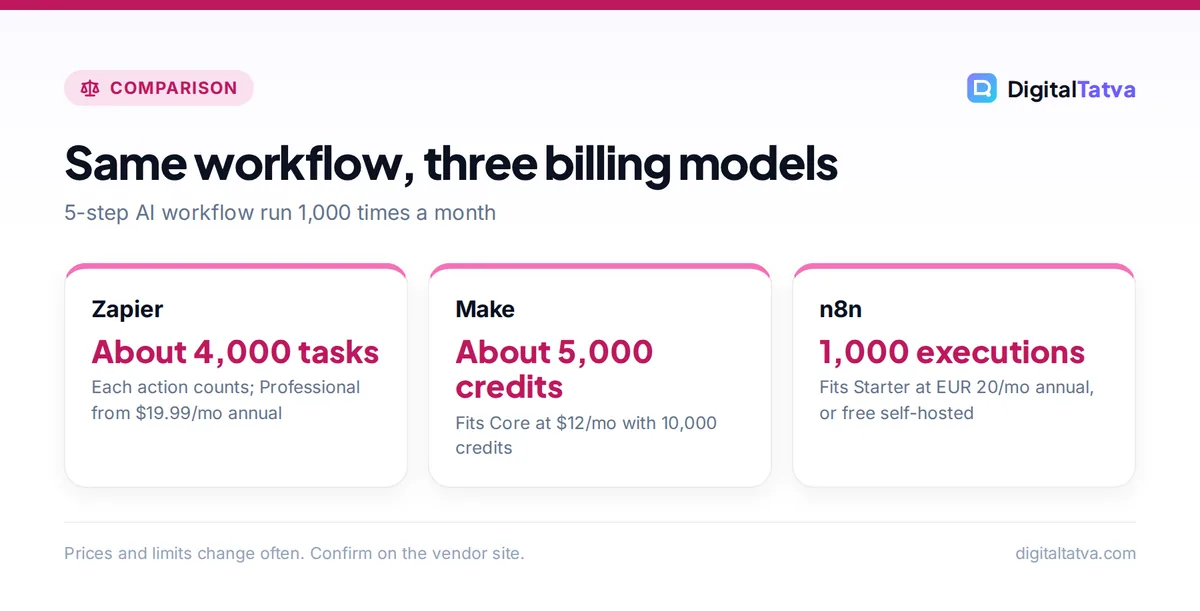
Say every new website form submission should be (1) received, (2) summarized and scored by an AI model, (3) added to your CRM, (4) posted to Slack, and (5) answered with a personalized email. That is one trigger plus four actions, and it runs 1,000 times a month.
- Zapier: 4 actions x 1,000 runs = about 4,000 tasks a month. The Professional plan’s base allowance is reported at 750 tasks, so you would need a higher task tier. Check the task slider on the official Zapier pricing page.
- Make: 5 modules x 1,000 runs = about 5,000 credits. That fits inside the 10,000 credits on Core at $12 a month.
- n8n: 1,000 executions. That fits inside Starter’s 2,500 executions at EUR 20 a month (annual), or costs nothing but server fees on the self-hosted Community Edition.
Now scale it: if the workflow grows to 15 steps, Zapier and Make usage roughly triples, while n8n still counts 1,000 executions. That is why n8n wins for long, AI-heavy workflows.
Save money: Add a filter step as early as possible. If half your form submissions are spam, filtering before the AI step halves the tasks, credits and tokens you pay for on every platform.
Do not forget AI model costs
Automation plans do not include the AI model’s token costs when you connect your own API key. Using the example above, assume each run sends about 2,000 input tokens and receives about 500 output tokens. Over 1,000 runs that is 2M input and 0.5M output tokens:
- GPT-6 Luna ($0.10 input, $0.50 output per 1M tokens): $0.20 + $0.25 = $0.45 a month.
- Claude Haiku 4.5 ($1 input, $5 output per 1M tokens): $2.00 + $2.50 = $4.50 a month.
- GPT-6 Astra ($10 input, $50 output per 1M tokens): $20 + $25 = $45 a month.
Model choice can matter as much as platform choice. Our guides to OpenAI API pricing, Claude API pricing and Gemini API pricing list every rate, and our walkthrough on picking the cheapest AI model for each task shows when a budget model is good enough.
Zapier: easiest AI automation for non-technical teams
Zapier’s strength is that almost anyone can use it. You describe what you want, Zapier Copilot (included on Free) helps build the Zap, and thousands of app integrations cover nearly any SaaS tool your team uses. AI fields let you drop a model step into any Zap without writing prompts from scratch.
Zapier plans
| Plan | Price | Tasks | Key features |
|---|---|---|---|
| Free | $0 | 100/mo | Two-step Zaps, Zapier Copilot |
| Professional | From $19.99/mo annual (about $29.99 monthly) | About 750 base | Multi-step Zaps, premium apps, webhooks, AI fields |
| Team | From $69/mo annual (about $103.50 monthly) | About 2,000 base | 25 users, SAML SSO |
| Enterprise | Custom | Annual task limits | Unlimited users |
Monthly prices and base task counts come from third-party 2026 sources; the annual starting prices are from Zapier’s own page.
Zapier’s AI add-ons
- Zapier Agents: Free with 400 activities a month, or Pro at $33.33/mo ($400/yr) for 1,500 activities.
- Zapier Chatbots: Free for 2 bots, Pro at $13.33/mo ($160/yr) for 5 bots, Advanced at $66.67/mo ($800/yr) for 20 bots. Useful if you want to add an AI chatbot to your website without code.
- Zapier MCP: included on all plans, letting AI assistants trigger Zapier actions. Each MCP tool call uses two tasks, so heavy use adds up.
Skip Zapier if you run high-volume, many-step workflows: task-based pricing gets expensive fastest.
Make: the best value for visual, multi-step scenarios
Make (formerly Integromat) uses a visual canvas where each module is a bubble and you can see data pass between them. Routers, iterators and error handlers make it easy to build branching logic that would need several Zaps in Zapier. For marketers and ops teams comfortable with a bit of logic, it delivers far more automation per dollar.
| Plan | Price (monthly figure shown) | Credits | Notes |
|---|---|---|---|
| Free | $0 | 1,000/mo | 2 active scenarios |
| Core | $12/mo | 10,000 | Entry paid plan |
| Pro | $21/mo | 10,000 | More advanced features |
| Teams | $38/mo | 10,000 | Team collaboration |
| Enterprise | Custom | Custom | Security and support |
Annual billing saves “15% or more” according to the official Make pricing page; exact 2026 annual figures were not captured, and older quotes of Core at $9 are 2025-era prices.
Skip Make if you need self-hosting or your team will not invest an afternoon in learning the canvas.
n8n: the most powerful option for AI agents and developers
n8n is a workflow tool built with developers in mind. Beyond app integrations, it offers code nodes (JavaScript or Python), HTTP requests to any API, and AI agent nodes that can use tools, memory and different models. Because it can be self-hosted, you can keep sensitive data on your own servers and even connect to local models. Our guide to running an LLM locally with Ollama pairs well with a self-hosted n8n setup.
| Plan | Price (annual billing) | Executions | Concurrency |
|---|---|---|---|
| Community Edition | Free (self-hosted) | Depends on your server | Depends on your server |
| Starter | EUR 20/mo | 2,500 | 5 |
| Pro | EUR 50/mo | 10,000 | 20 |
| Business | EUR 667/mo | 40,000 | Higher; self-hosted, cloud on waitlist |
| Enterprise | Custom | Custom | 200+ |
n8n shows prices in euros, billed annually; monthly billing costs about 17% more. Every plan includes unlimited users, workflows and integrations. Check the official n8n pricing page for the rate in your currency.
Watch out: Self-hosting is free in license terms, not in effort. You are responsible for the server, updates, backups and security. If nobody on your team can maintain a server, use n8n Cloud or pick Make.
AI features, integrations and privacy compared
AI capabilities
Zapier offers the most polished no-code AI layer: Copilot to build Zaps, Agents that act across apps, Chatbots, and MCP so assistants like ChatGPT or Claude can trigger actions. Make offers AI modules and connections to the major model providers, which works well when AI is one step in a larger scenario. n8n offers the deepest AI tooling, with agent nodes, memory, tool calling and model switching, ideal for teams building support bots or research agents. For support use cases, see our guide to AI customer support tools.
Integrations
Zapier has the largest library of ready-made app connectors. Make covers the popular apps and lets you call any API with HTTP modules. n8n has fewer prebuilt nodes than Zapier, but its HTTP and code nodes mean it can connect to almost anything if you are comfortable reading API docs.
Privacy and data control
Zapier and Make are cloud only, so your data passes through their servers. n8n’s self-hosted option is the only one of the three that keeps workflow data entirely on infrastructure you control, which matters for agencies handling client data or businesses with strict compliance needs. Zapier Team adds SAML SSO for companies that need centralized logins.
Choose Zapier if, Make if, n8n if
Choose Zapier if you
- Want the fastest setup with no technical skills.
- Run simple, low-volume workflows between popular apps.
- Want built-in AI agents and chatbots without code.
Choose Make if you
- Build multi-step scenarios with branching logic.
- Want the lowest cloud price for moderate volume ($12 for 10,000 credits).
- Prefer a visual canvas to see exactly how data flows.
Choose n8n if you
- Build long AI workflows or agents with many steps.
- Need self-hosting for privacy or cost reasons.
- Have developer skills or a developer on the team.
Small business owners starting from zero should read our guide on using AI without a big budget, and agencies can see how automation fits client pricing in AI for marketing agencies. Once workflows are live, track the hours saved with our guide to measuring ROI from AI tools.
Frequently asked questions
Is n8n cheaper than Zapier?
Usually yes, especially for long workflows. n8n bills per execution regardless of steps, starting at EUR 20 a month (annual) for 2,500 executions, and the self-hosted Community Edition is free. Zapier counts each action as a task, so a 5-step workflow running 1,000 times uses about 4,000 tasks, which needs a higher paid tier.
Is there a free version of Zapier, Make or n8n?
Yes, all three. Zapier Free gives 100 tasks a month on two-step Zaps with Copilot. Make Free gives 1,000 credits a month and 2 active scenarios. n8n’s Community Edition is free and unlimited if you self-host it, though you pay for and maintain the server yourself.
Which is best for AI agents: Zapier, Make or n8n?
n8n is the most flexible for custom AI agents, with agent nodes, memory, tool calling and code. Zapier is the easiest, with Zapier Agents (400 free activities a month) and MCP support for assistants. Make works well when AI is one step inside a larger visual scenario rather than an autonomous agent.
Is Make easier than n8n?
For most non-developers, yes. Make’s visual canvas and prebuilt modules are friendlier than n8n’s developer-oriented nodes, and there is no server to manage. n8n becomes easier than Make once workflows need custom code, complex API calls or self-hosting, which is where Make starts to feel limiting.
How much do Zapier, Make and n8n cost in India?
We could not confirm official INR prices. Zapier and Make charge in USD, starting at $19.99 a month (Zapier Professional, annual) and $12 a month (Make Core). n8n shows EUR prices, starting at EUR 20 a month billed annually. Expect card forex fees and GST on top, or self-host n8n to avoid subscription costs.
Our verdict
There is no single winner, but there is a clear winner for each type of user. Zapier is the best starting point for non-technical teams and simple AI automations. Make is the best value for visual, multi-step workflows in the cloud. n8n is the best tool for serious AI automation, especially long agent workflows or anything that must be self-hosted. Our practical advice: prototype on the free plans, run your real workflow for a week, then calculate tasks, credits or executions before you pay. Pricing and allowances change often, so confirm the current plans on each vendor’s site before you subscribe. For a quick model cost sanity check, use our guide on estimating AI API costs before you build.
Pricing and features are checked at the time of writing and can change. Some links may be affiliate links, which never affect our verdicts.