How to Create an AI Usage Policy for Your Team (With Template)
How to create an AI usage policy for your team in 7 steps, with a free copyable template covering approved tools, data rules, human review and incident reporting.

On this page
- Key takeaways
- Why every team needs an AI usage policy
- What to include in an AI usage policy
- How to create an AI usage policy in 7 steps
- Choosing approved AI tools for your policy
- Free AI usage policy template
- How to roll out the policy so people follow it
- Frequently asked questions
- Next steps: adopt your AI policy this month
An AI usage policy is a short internal document that tells your team which AI tools they may use, what data they must never put into them, which tasks need human review, and who to contact when something goes wrong. To create one, list the AI tools people already use, sort your data into safe and restricted categories, write clear rules for each, and have every staff member read and sign it. A good policy fits on two or three pages, and you can adapt the free template below in an afternoon.
This guide explains what to include, walks through the process step by step, and gives you a practical, copyable AI usage policy template for a small or midsize team. It is written for founders, agency owners and managers as of October 2026.
Not legal advice: This article and template are general guidance, not legal advice. Laws on data protection, employment and AI differ by country and industry. Ask a qualified lawyer to review your final policy, especially if you handle health, financial or children’s data.
Key takeaways
- Your team is already using AI. A policy turns hidden, personal-account use into approved, safer use.
- The core of any policy is data rules: what can go into AI tools, what needs an approved business plan, and what must never be shared.
- Approve specific tools and plans. Business plans such as ChatGPT Business add admin controls, and OpenAI says it does not train on ChatGPT Business workspace data.
- Require human review for anything customer-facing, legal, financial or published under your name.
- Review the policy every six months, because AI tools, plans and laws change quickly.
Why every team needs an AI usage policy
Without a policy, staff make their own choices. Someone pastes a client contract into a free chatbot, someone else publishes an AI-written blog post with a made-up statistic, and nobody knows which tools the company pays for. A policy prevents these problems without banning useful tools.
There is also a growing legal reason. The EU AI Act’s Article 4 requires providers and deployers of AI systems to take measures to support the AI literacy of their staff, and it has applied since 2 February 2025. In India, the Digital Personal Data Protection Rules 2025 were notified on 13 November 2025, with most substantive obligations, such as security safeguards and breach intimation, phasing in by 13 May 2027 according to law firm summaries. If you process personal data with AI tools, your policy should support these obligations.
For a structured approach to risk, the US National Institute of Standards and Technology publishes the voluntary NIST AI Risk Management Framework, organized around four functions: Govern, Map, Measure and Manage. It also has a Generative AI Profile (NIST AI 600-1). You do not need to follow it in full, but it is a useful checklist for larger teams.
What to include in an AI usage policy
Most good policies cover the same ten areas. The table shows what each section answers.
| Section | Question it answers |
|---|---|
| Purpose and scope | Who does this apply to, and which tools count as AI? |
| Approved tools | Which AI tools and plans may staff use for work? |
| Data rules | What information can and cannot go into AI tools? |
| Acceptable uses | What are people encouraged to use AI for? |
| Prohibited uses | What is never allowed, even with approved tools? |
| Human review | Which outputs must a person check before use? |
| Disclosure | When must we tell clients or readers that AI was used? |
| Intellectual property | Who owns outputs, and how do we avoid copying others’ work? |
| Security and accounts | Work accounts, passwords, connectors and new tool requests |
| Incidents and review | What to do when something goes wrong, and when the policy is updated |
How to create an AI usage policy in 7 steps
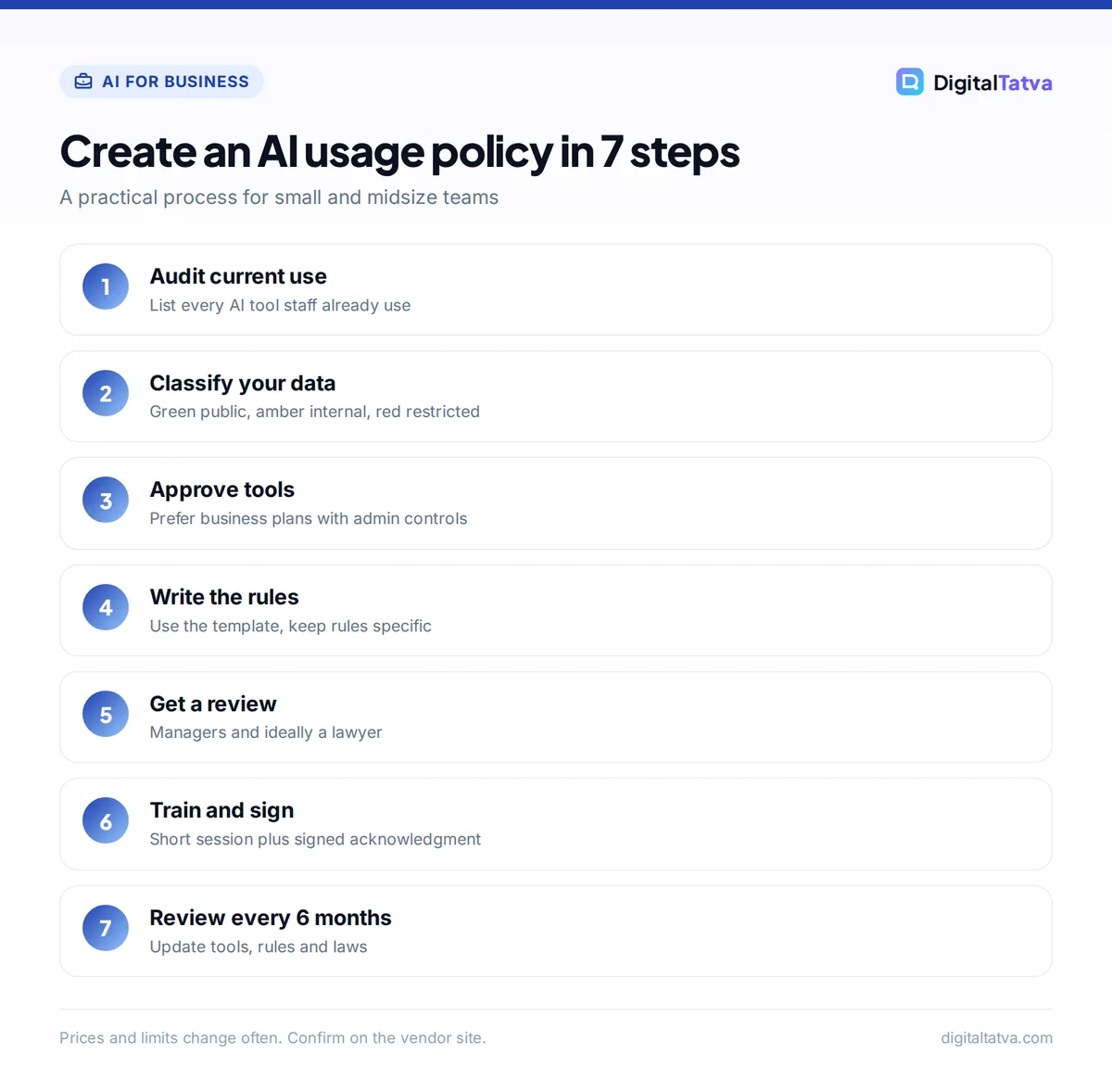
- Audit current use. Ask staff, anonymously if needed, which AI tools they use and for what. Include browser extensions, meeting notetakers and AI features inside tools you already pay for, such as Gemini in Google Workspace or Copilot in Microsoft 365.
- Classify your data. Create three simple levels: public (safe for any tool), internal (approved business tools only) and restricted (never in AI tools without written approval). The traffic light table below gives examples.
- Choose approved tools and plans. Prefer business plans with admin controls and clear data terms. Our guide to AI team plans explained compares the main options.
- Write the rules. Use the template below. Keep sentences short and specific, such as “Do not paste customer phone numbers into any AI tool” rather than “Use AI responsibly”.
- Get a review. Have a manager from each team, and ideally a lawyer, check that the rules are practical and legally sound for your country.
- Train and sign. Run a 30-minute session with real examples, then ask everyone to sign the acknowledgment. This also supports AI literacy duties.
- Review on a schedule. Set a reminder every six months to update the approved tools list and rules.
A traffic light system for data
| Level | Examples | Rule |
|---|---|---|
| Green: public | Published blog posts, public product info, general questions | Any approved tool, including free plans |
| Amber: internal | Internal docs, draft strategies, anonymized reports, non-sensitive client briefs | Approved business plans only, using work accounts |
| Red: restricted | Customer personal data, ID documents, passwords, card or bank details, health data, unreleased financials, confidential client data under NDA | Never in AI tools unless written approval and a vetted setup |
Tip: For teams that must process sensitive data with AI, one option is running open models on your own hardware, so data never leaves your machines. Our guide on how to run an LLM locally explains the basics.
Choosing approved AI tools for your policy
The plan you choose matters as much as the tool. Free consumer accounts are fine for public information, but internal work belongs on business plans with admin controls.
| Tool and plan | Price | Why it suits a policy |
|---|---|---|
| ChatGPT Business | $25/user/mo monthly, $20 annual, 2 seat minimum | Admin and spend controls; OpenAI does not train on workspace data |
| Claude Team | $25/member/mo Standard, $20 annual, 2 to 150 seats | Shared team workspace with Projects and knowledge bases on work accounts |
| Gemini in Google Workspace | Bundled in Business plans | AI inside Gmail, Docs and Drive that your admin already manages |
| Microsoft 365 Copilot Business | $21/user/mo annual list | Works inside Word, Excel, Outlook and Teams under your Microsoft 365 admin |
Before approving any tool, read its data and training terms yourself. Our ChatGPT pricing guide, Claude pricing guide and Microsoft Copilot pricing guide list what each business plan includes. If you are still deciding between assistants, see our ChatGPT vs Claude comparison or our roundup of the best AI chatbots.
Free AI usage policy template
Copy the sections below into your own document. Replace everything in [square brackets], delete what does not apply, and add rules specific to your industry. Remember that this template is not legal advice.
1. Purpose and scope
This policy explains how [Company Name] employees, contractors and interns (“staff”) may use artificial intelligence (AI) tools for work. It covers chatbots, writing and image generators, meeting notetakers, coding assistants, browser extensions and AI features built into other software. It applies on company and personal devices whenever staff do company work.
2. Approved tools
- Staff may use only the AI tools listed in the Approved AI Tools list maintained by [Policy Owner, e.g. Operations Manager].
- Current approved tools: [e.g. ChatGPT Business, Claude Team, Gemini in Google Workspace, Canva, Grammarly].
- Internal and client work must use company-provided work accounts, not personal accounts.
- To request a new tool, email [contact] with the tool name, plan, purpose and a link to its data policy. Do not use it for work until it is approved.
3. Data rules
- Green (public): may be used in any approved tool.
- Amber (internal): may be used only in approved business plans through work accounts. Remove names and identifying details where possible.
- Red (restricted): must never be entered into an AI tool without written approval from [Policy Owner]. This includes customer and employee personal data, government ID numbers, passwords and access keys, payment card or bank details, health information, confidential client material under NDA, and unreleased financial results.
- When in doubt, treat information as Red and ask.
4. Acceptable uses
Staff are encouraged to use approved AI tools to:
- Draft and edit emails, posts, reports and proposals
- Summarize documents, meetings and research
- Brainstorm ideas, outlines and headlines
- Explain formulas, write code and analyze non-restricted data
- Translate or simplify text for internal use
5. Prohibited uses
Staff must not use AI tools to:
- Make final decisions about hiring, firing, pay, credit or other matters that significantly affect a person, without human review
- Create content that is discriminatory, harassing, deceptive or illegal
- Impersonate a real person or generate fake reviews, testimonials or endorsements
- Copy or closely imitate copyrighted work, trademarks or a living artist’s style for commercial use
- Bypass security controls or upload company files to unapproved services
6. Human review and accuracy
- AI output is a draft. The person who uses it is responsible for it.
- Check all facts, numbers, quotes, links and legal or medical statements against a reliable source before use.
- Anything sent to clients, published publicly or used in contracts must be reviewed by [a second person / the team lead].
- Never present AI-generated statistics, citations or research as verified unless you have checked the original source.
7. Disclosure and transparency
- Tell clients when AI is used substantially in their deliverables if their contract requires it or they ask.
- Label AI-generated or AI-edited images when they could mislead, such as edited product or property photos.
- Customer-facing chatbots must say they are automated and offer a way to reach a person.
8. Intellectual property
- Work created with AI tools for [Company Name] belongs to [Company Name], subject to the tool’s terms and client contracts.
- Use only tools whose terms allow commercial use of outputs for client and marketing work.
- Do not upload client materials to AI tools unless the client contract allows it.
9. Security and accounts
- Protect AI accounts with strong passwords and two-factor authentication.
- Do not connect AI tools to company email, drives or systems (connectors, plugins or agents) without approval.
- Remove access to AI tools when staff leave the company.
10. Training
All staff must complete [Company Name]’s AI training within [30] days of joining and when this policy changes significantly. Training covers approved tools, data rules, common AI errors and how to report issues.
11. Reporting incidents
If restricted data is entered into an AI tool by mistake, or AI output causes harm or a complaint, report it to [contact] within [24 hours]. Do not try to hide or fix it alone. Early reporting will not be punished.
12. Ownership, review and acknowledgment
- Policy owner: [Name, Role]. Effective date: [Date]. Next review: [Date, six months later].
- Breaking this policy may lead to disciplinary action in line with [Company Name]’s existing procedures.
- Acknowledgment: “I have read and understood the [Company Name] AI Usage Policy and agree to follow it.” Name, signature, date.
How to roll out the policy so people follow it
A policy that sits in a shared drive changes nothing. Make it part of everyday work.
- Pay for the approved tools. If the safe option is free for staff, they stop using personal accounts. A $20 to $25 per person team plan costs less than one data leak.
- Share good examples. Build a shared prompt library so people learn what good use looks like. Our prompt engineering guide is a good training resource.
- Make asking easy. Name one person who answers “can I use AI for this?” questions within a day.
- Measure the benefit. Track time saved, so the policy is seen as enabling work, not blocking it. Our guide on how to measure AI ROI shows how.
Agencies handling client data should read our guide on AI for marketing agencies, and smaller teams can start with our guide to using AI in a small business on a budget.
Frequently asked questions
What should an AI usage policy include?
An AI usage policy should include its scope, a list of approved tools, data rules that say what can and cannot be shared, acceptable and prohibited uses, human review requirements, disclosure rules, intellectual property terms, security basics, training, incident reporting and a review date. The data rules are the most important section for most teams.
Do small businesses need an AI policy?
Yes, even a five-person team benefits from one. Staff are likely already using AI tools, often on personal accounts. A short policy protects customer data, sets quality standards and shows clients you take privacy seriously. It can be as short as two pages, and the template in this guide is a quick way to start.
Can employees use free ChatGPT for work?
That depends on your policy. Many companies allow free plans for public information only and require a business plan, such as ChatGPT Business, for internal or client work. Business plans add admin controls, and OpenAI says it does not train on Business workspace data. Personal or customer data should never go into free consumer accounts.
Is this AI usage policy template legally binding?
The template becomes part of your workplace rules only when you adopt it, usually alongside employment contracts or a staff handbook. It is general guidance, not legal advice. Laws differ by country and industry, so have a qualified lawyer review your final version, especially if you handle sensitive personal or financial data.
How often should we update our AI usage policy?
Review it at least every six months, and sooner when you add a new AI tool, change plans or when relevant laws change. AI products update their features, data terms and pricing often, so the approved tools list in particular can go out of date within months.
Next steps: adopt your AI policy this month
Run a quick audit of the AI tools your team uses, copy the template above, fill in your approved tools and data rules, and get it reviewed. Then train your team and set a six-month review date. A clear, practical policy lets people use AI confidently while keeping customer and company data safe.
AI plans and data terms change often, so confirm current details on each vendor’s site, such as OpenAI’s ChatGPT Business overview and the Claude pricing page, before you finalize your approved tools list.
Pricing and features are checked at the time of writing and can change. Some links may be affiliate links, which never affect our verdicts.



