Cursor Pricing Explained: Hobby vs Pro vs Ultra vs Teams
Cursor costs $0 on Hobby, $20 on Pro, $60 on Pro Plus and $200 on Ultra, with Teams from $40 per user. Here is how usage pools affect what you really pay.

On this page
- Key takeaways
- Cursor plans and prices compared
- How Cursor usage works: the two pools
- Every Cursor plan explained
- What Cursor really costs: realistic monthly scenarios
- How to save money on Cursor
- Cursor vs GitHub Copilot and other alternatives on price
- Frequently asked questions
- Our verdict: which Cursor plan should you choose?
Cursor pricing in 2026 has a free Hobby plan, then Pro at $20/month, Pro Plus at $60/month and Ultra at $200/month for individuals. Teams pay $40 per user per month on Standard or $120 per user on Premium, and Enterprise is custom. Developers in India also get a Start plan at Rs 649/month, tax inclusive.
The price you see is not always the price you pay. Cursor now splits usage into two pools: its own models get generous included usage, while Claude, GPT and Gemini are charged at API rates once your allowance runs out. This guide explains every plan, how the usage pools work, what heavy users really spend, and which tier fits your workflow.
Key takeaways
- Hobby is free with limited Agent requests and no card required. Pro costs $20/month with unlimited Tab completions and cloud agents.
- Pro Plus ($60) and Ultra ($200) mainly buy you more included usage, not new features.
- The “Cursor Models” pool (Composer 2.5, Grok 4.x) stretches much further than the “Other Models” pool (Claude, GPT, Gemini), which is billed at API prices.
- Cursor says daily agent users typically spend $60 to $100/month in total usage, and power users $200 or more.
- Teams Standard is $40/user and Premium $120/user with 5x the Standard agent limits, plus SSO, analytics and Bugbot.
Cursor plans and prices compared
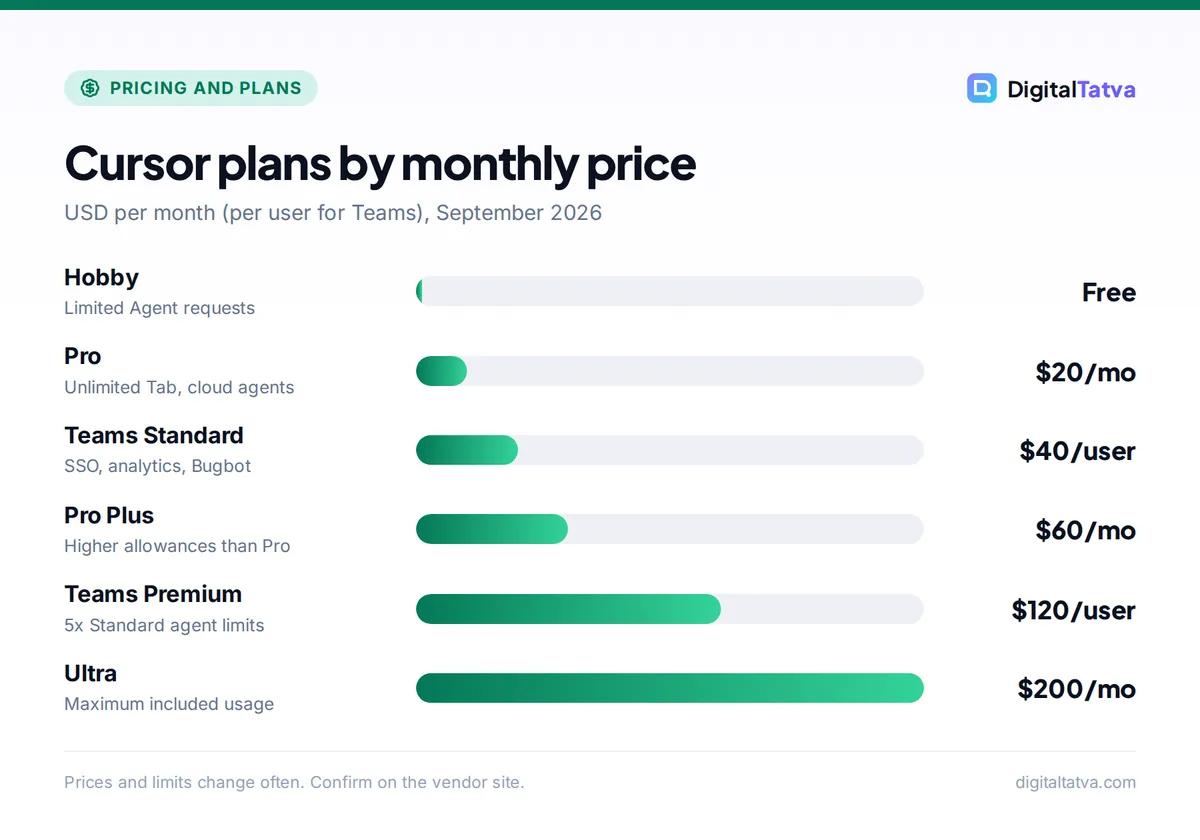
This table reflects Cursor’s official pricing page and docs as of September 2026.
| Plan | Price | What you get | Best for |
|---|---|---|---|
| Hobby | Free | Limited Agent requests, no card needed | Trying Cursor |
| Start (India only) | Rs 649/month incl. tax | Cursor Models pool only | Budget users in India |
| Pro | $20/month | Unlimited Tab, extended agent limits, cloud agents | Most professional developers |
| Pro Plus | $60/month | Higher allowances than Pro | Daily agent users |
| Ultra | $200/month | Maximum included usage | Power users running agents all day |
| Teams Standard | $40/user/month | SSO, analytics, Bugbot | Small engineering teams |
| Teams Premium | $120/user/month | 5x Standard agent limits | Teams of heavy agent users |
| Enterprise | Custom | Pooled usage, SCIM, audit logs | Large companies |
Check the official Cursor pricing page for the latest figures and any regional plans.
How Cursor usage works: the two pools
Understanding the two usage pools is the key to understanding your Cursor bill. Cursor explains this in its models and pricing docs.
The Cursor Models pool
This pool covers Cursor’s in-house and partner models, currently Composer 2.5 and Grok 4.x. Cursor gives this pool significantly more included usage than the other pool. If you are happy using Composer for most agent work, your plan allowance goes much further.
The Other Models pool
This pool covers third-party frontier models such as Claude, GPT and Gemini. Usage here is charged at the model’s API price. So a long agent session with a flagship model consumes your included allowance at roughly the same rate as calling that model’s API directly.
What happens when included usage runs out
Once your included usage is gone, on-demand usage continues at API rates and is billed in arrears (at the end of the billing period). That is convenient, because your work never stops, but it also means a heavy month can produce a bill well above the plan price. Check your account settings for spending controls if you want a hard ceiling.
Watch out: Cursor does not publish the exact dollar amount of included usage on each plan. Treat “Pro at $20” as the floor of your monthly cost, not the ceiling, if you use frontier models heavily.
A worked example with real API prices
To see why the pool matters, take an agent task that sends 300,000 input tokens and returns 30,000 output tokens. Tokens are small pieces of text; our guide to tokens covers the basics.
- With Claude Opus 5.5 ($4 input, $20 output per million tokens on Anthropic’s API): 300,000 x $4 / 1,000,000 = $1.20 input, plus 30,000 x $20 / 1,000,000 = $0.60 output. About $1.80 per task.
- With Claude Sonnet 5.5 ($2 input, $10 output): $0.60 plus $0.30 = about $0.90 per task.
- With GPT-6.1 Sol ($2 input, $10 output on OpenAI’s API): also about $0.90 per task.
Run ten Opus tasks a day for 20 working days and you are looking at around $360 of model usage. That lines up with Cursor’s own guidance that power users spend $200 or more a month. Cursor’s actual billing can differ from these list rates (for example, through caching), so use this as a rough planning figure. For the underlying rates, see our breakdowns of Claude API pricing and OpenAI API pricing.
Every Cursor plan explained
Hobby: free
Hobby gives you the Cursor editor with limited Agent requests. No credit card is required, so it is a risk-free way to see whether an AI-first editor suits you. You will hit the agent limit quickly if you code daily.
Who it is for: students, hobbyists and anyone comparing editors. If you are new to the tool, start with our walkthrough on how to use Cursor AI to code faster.
Start (India only): Rs 649/month
Start is a lower-priced plan shown only to users in India. It costs Rs 649/month including tax and uses the Cursor Models pool only, which means Composer 2.5 and Grok 4.x, not Claude, GPT or Gemini.
Who it is for: Indian students, freelancers and junior developers who want more than Hobby but find $20 steep. Who should skip it: anyone who specifically wants Claude or GPT inside Cursor.
Save money: If you are in India and Composer handles your daily work well, Start gives you paid-tier Cursor at a fraction of the Pro price. Try Hobby first to test Composer on your own codebase.
Pro: $20/month
Pro is the standard plan. It includes unlimited Tab (Cursor’s autocomplete), extended agent limits, access to cloud agents that run tasks in the background, and both usage pools.
Who it is for: professional developers who use Tab constantly and agents a few times a day. Who should skip it: people who use frontier models for hours each day. They will pay on-demand charges and should compare against Pro Plus.
Pro Plus: $60/month
Pro Plus has the same features as Pro with higher included allowances. Cursor’s guidance that daily agent users spend $60 to $100/month in total usage suggests this is the natural home for that group.
Who it is for: developers whose Pro bills regularly land above $60 once on-demand usage is added.
Ultra: $200/month
Ultra includes the maximum usage Cursor offers on an individual plan. It is designed for power users who run several agents in parallel and default to frontier models.
Who it is for: consultants, founders coding solo and senior engineers whose monthly usage consistently exceeds $200. Everyone else should stay on Pro or Pro Plus.
Teams: $40 or $120 per user
Teams Standard costs $40 per user per month and adds SSO, usage analytics and Bugbot, Cursor’s AI code reviewer. Teams Premium costs $120 per user per month and gives 5x the Standard agent limits. You can think of Premium as the team equivalent of the Pro Plus or Ultra step up. Our guide on when AI team plans save money helps you decide if the admin features justify the higher per-seat price over individual Pro accounts.
Enterprise: custom
Enterprise adds pooled usage across the company, SCIM provisioning and audit logs. Pricing is negotiated with sales.
What Cursor really costs: realistic monthly scenarios
Because usage beyond your plan is billed at API rates, your real monthly cost depends on how you work. These scenarios use Cursor’s own spending guidance.
| Developer profile | Suggested plan | Likely monthly spend |
|---|---|---|
| Uses Tab all day, agents occasionally | Pro | $20, sometimes a little more |
| Uses agents daily | Pro Plus | $60 to $100 total, per Cursor’s guidance |
| Runs agents constantly with frontier models | Ultra | $200 or more |
| Indian developer happy with Composer | Start | Rs 649 |
| Team of 10, moderate use | Teams Standard | $400 plus any extra usage |
How to save money on Cursor
- Default to Composer for routine work. The Cursor Models pool gets far more included usage, so let Composer handle boilerplate, tests and simple refactors.
- Save frontier models for hard problems. Switch to Claude or GPT for architecture changes or bugs Composer cannot crack. Our guide on the cheapest AI model for each task gives a practical framework.
- Keep context focused. Reference only the files the agent needs. Fewer input tokens mean lower API-rate charges. See our tips to reduce token usage.
- Use spending controls. On-demand usage is billed in arrears, so check your account settings for a spend cap to protect you from surprise bills.
- Review usage monthly and right-size. If your total regularly lands between plan prices, move to the plan that covers it. Also check whether annual billing is offered, since Cursor does not show an annual discount on the pages we reviewed. Our guide to annual vs monthly AI plans explains when to commit.
Tip: Avoid paying twice. If you already have Claude Pro (which includes Claude Code) or a ChatGPT plan (which includes Codex), you may get enough agent capacity there and only need Cursor Pro for Tab and editing.
Pros
- Unlimited Tab on Pro is excellent for everyday coding
- Access to Claude, GPT, Gemini and Cursor’s own models in one editor
- India-only Start plan makes paid Cursor affordable locally
- Work never stops when allowances run out
Cons
- Included usage per plan is not published in dollars
- Frontier model use can push bills well past the sticker price
- Annual discount is not shown on the pricing pages
Cursor vs GitHub Copilot and other alternatives on price
GitHub Copilot Pro costs $10/month with 1,500 AI Credits, and its code completions never consume credits. That makes Copilot cheaper for autocomplete-first developers. Cursor is the stronger choice if you want an editor built around agents and multi-file edits. Devin Desktop (formerly Windsurf) also sits at $20/month for Pro and $200 for Max. Compare them in our Cursor vs GitHub Copilot comparison, the GitHub Copilot pricing guide and our ranking of the best AI coding assistants. For a hands-on opinion of the editor itself, read our Cursor AI review.
Frequently asked questions
Is Cursor free to use?
Yes. The Hobby plan is free, needs no credit card and includes limited Agent requests. It is a good way to test the editor and Cursor’s models on your own projects. If you code every day, you will likely hit the agent limit and need Pro at $20/month, or the Rs 649/month Start plan if you are in India.
How much does Cursor cost in India?
Cursor offers an India-only Start plan at Rs 649/month, tax inclusive, which uses the Cursor Models pool (Composer 2.5 and Grok 4.x). Other plans are priced in USD: Pro is $20/month, Pro Plus $60, Ultra $200, and Teams $40 or $120 per user. Your card issuer may add foreign transaction fees on USD plans.
Is Cursor Pro worth $20 a month?
For most professional developers, yes. Unlimited Tab alone saves meaningful time, and Pro includes extended agent limits and cloud agents. It becomes less of a bargain if you use Claude or GPT heavily, because usage beyond your allowance is billed at API rates. In that case, compare the total against Pro Plus at $60.
What is the difference between Cursor Pro, Pro Plus and Ultra?
The main difference is included usage. Pro ($20) covers typical daily coding, Pro Plus ($60) offers higher allowances for daily agent users, and Ultra ($200) gives the maximum included usage for power users. Cursor says daily agent users typically spend $60 to $100 a month and power users $200 or more.
Why is my Cursor bill higher than my plan price?
After your included usage runs out, Cursor keeps working and bills on-demand usage at each model’s API rate, charged in arrears. Frontier models like Claude and GPT draw from the Other Models pool at API prices, so heavy use adds up fast. Switching routine tasks to Composer and watching your usage dashboard keeps costs in check.
Our verdict: which Cursor plan should you choose?
Start on Hobby to test the editor, then move to Pro at $20 once it becomes part of your daily workflow. Indian developers who are comfortable with Composer should look closely at the Rs 649 Start plan. Upgrade to Pro Plus or Ultra only after a month or two of usage data shows your total consistently lands above those prices, and keep an eye on on-demand charges either way. Teams should weigh whether SSO, analytics and Bugbot justify $40 per seat. Cursor adjusts its plans and usage rules often, so confirm the current details on the official Cursor pricing page before you subscribe.
Related reading:
Pricing and features are checked at the time of writing and can change. Some links may be affiliate links, which never affect our verdicts.