How to Reduce Token Usage in ChatGPT and Claude
Practical ways to reduce token usage in ChatGPT and Claude, from smarter chat habits to API caching and batching, with worked examples using real token prices.

On this page
- Key takeaways
- Why ChatGPT and Claude use more tokens than you expect
- 8 ways to reduce token usage in the ChatGPT and Claude apps
- Reduce token usage in Claude specifically
- Reduce token usage in ChatGPT specifically
- How to reduce token usage on the OpenAI and Claude APIs
- Token saving techniques at a glance
- Common mistakes that waste tokens
- Frequently asked questions
- Next steps: build better token habits
The fastest way to reduce token usage in ChatGPT and Claude is to stop resending what the model does not need: start a new chat for each new topic, upload only the relevant part of a file, ask for short structured answers, and pick a lighter model for simple jobs. On the API, add prompt caching, cap output length and batch anything that can wait. Together these habits can cut tokens by half or more without hurting answer quality.
Why does it matter? On subscription plans like ChatGPT Plus or Claude Pro, tokens decide how quickly you hit your usage limit. On the API, tokens are your bill. This guide gives you practical techniques for both, with worked examples using real per-million-token prices.
Key takeaways
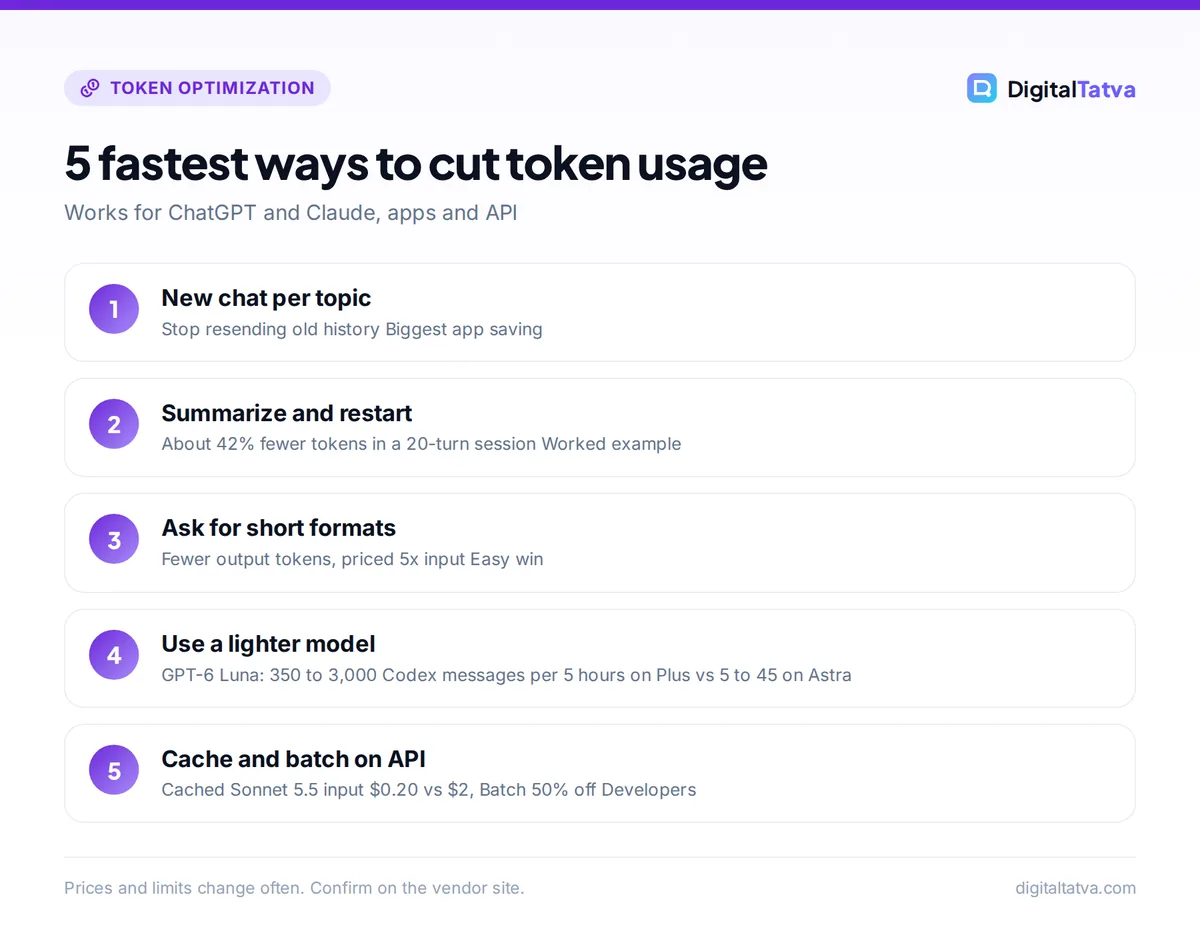
- Every chat message resends the conversation history, so long threads burn tokens fast. Restarting with a short summary can cut input tokens by around 40% in a typical 20-turn session.
- Anthropic says documents uploaded to a Claude Project are cached and “count less against your limits than new content”.
- Model choice is a huge lever: in Codex on ChatGPT Plus, GPT-6 Luna allows 350 to 3,000 messages per 5 hours versus 5 to 45 for GPT-6 Astra.
- On the API, cached reads on Claude Sonnet 5.5 cost $0.20 per million tokens instead of $2, and the Batch API halves prices.
- Output costs about five times more than input, so capping reply length is one of the easiest savings.
Why ChatGPT and Claude use more tokens than you expect
A token is a chunk of text, roughly three-quarters of an English word (our plain English guide to AI tokens explains the basics). What surprises most people is not the size of a token but how many get sent.
Chat models do not remember earlier turns by themselves. Each time you press send, the app sends your new message plus the conversation so far, plus any system instructions, memory and attached files. So your 20th message carries the weight of the previous 19.
The arithmetic of a long chat
Imagine each turn (your message plus the reply) adds about 400 tokens. Turn 1 sends 400 tokens. Turn 2 sends 800. Turn 20 sends 8,000. Over 20 turns, the total input is 400 x (1 + 2 + … + 20) = 400 x 210 = 84,000 tokens.
Now suppose that at turn 10 you ask for a 500-token summary and start a fresh chat with it. Turns 1 to 10 send 400 x 55 = 22,000 tokens. Turns 11 to 20 each carry the 500-token summary plus the new turns: (10 x 500) + (400 x 55) = 27,000 tokens. The total is 49,000 tokens, about 42% fewer.
On the Claude Opus 5.5 API at $4 per million input tokens, that is $0.336 versus $0.196 for one session. Inside a subscription, it means the same work uses far less of your five-hour allowance.
8 ways to reduce token usage in the ChatGPT and Claude apps
These techniques work on Free, Plus, Pro, Max and Team plans. They are most useful if you regularly run into the caps described in our guides to Claude usage limits and ChatGPT limits by plan.
- Start a new chat for every new topic. Do not use one endless thread for an email, then a spreadsheet formula, then a blog outline. Each unrelated message drags the old context along. New topic, new chat.
- Summarize and restart long threads. When a working session gets long, ask: “Summarize the decisions, facts and open questions so far in under 200 words.” Paste that into a new chat and carry on. The example above shows why this saves so much.
- Edit your message instead of adding a correction. If a reply misses the point, edit the original prompt and regenerate rather than sending “No, I meant…”. Editing replaces the failed turn instead of stacking another one on top.
- Put several questions in one message. Anthropic’s own advice is to “group them in a single message” rather than sending separate ones. Five small questions in one message resend the history once, not five times.
- Upload only what is relevant. Anthropic lists file attachment size as a factor in usage. If you need feedback on chapter 3, paste chapter 3, not the full 200-page manuscript.
- Use Claude Projects for files you reuse. Anthropic says “When you upload documents to a project, they’re cached for future use”, and cached content counts less against your limits. Caches expire after a period of inactivity, so this works best when you use the project regularly. Our guide on how to use Claude Projects shows the setup.
- Ask for the length and format you need. “Give me 5 bullets, under 80 words” produces far fewer output tokens than “Tell me about…”. You can also add a standing instruction, such as “Be concise unless I ask for detail”, to your custom instructions or project instructions.
- Pick the lightest model that does the job. Use the flagship only for hard reasoning. For rewriting, summarizing and quick questions, a smaller model is fine and stretches your allowance much further.
Tip: Turn off extra features you do not need for a given task. Web search, deep research and extended thinking all generate extra tokens behind the scenes. Switch them on when a question needs them, not by default.
How much difference does model choice make?
OpenAI publishes rough Codex limits per 5-hour window for ChatGPT Plus and Business, and they show the effect clearly. ChatGPT and Codex share the same usage limits.
| Model (ChatGPT Plus or Business, Codex) | Estimated messages per 5 hours | API output price per 1M tokens |
|---|---|---|
| GPT-6 Astra | 5 to 45 | $50.00 |
| GPT-6.1 Sol | 15 to 160 | $10.00 |
| GPT-6 Luna | 350 to 3,000 | $0.50 |
The ranges are wide because heavy tasks use more tokens per message. The pattern is the point: the cheaper the model per token, the more work fits in your window. On Claude, the same logic applies to choosing Sonnet or Haiku over Opus for routine work.
Reduce token usage in Claude specifically
Claude’s usage resets in five-hour sessions, and Anthropic estimates “around 45 messages every five hours” on Pro for short conversations on less compute-heavy models. Longer conversations, bigger attachments and heavier models lower that number. Claude and Claude Code share the same allowance, so a long coding session also eats into your chat budget.
- Use chat search and memory instead of pasting old context. Paid users can search previous conversations and reference them in new chats, which avoids copying huge blocks of history.
- Plan the conversation. Anthropic suggests deciding up front what specific help you need. A clear first prompt avoids several rounds of back and forth.
- Keep Claude Code sessions focused. Clear or compact the context between unrelated coding tasks so the agent is not rereading old files and logs.
- Know when to upgrade. If you still hit limits daily after these changes, compare plans in our Claude Pro vs Max guide. Max 5x costs $100 a month and Max 20x costs $200.
Reduce token usage in ChatGPT specifically
OpenAI does not publish exact ChatGPT message caps, and its help center notes that Plus may still hit caps at peak times. Token habits matter just as much here.
- Use projects and custom GPTs for repeat work. Put standing instructions in one place instead of retyping a long brief in every chat.
- Review what memory and custom instructions add. Long custom instructions are included with your messages. Keep them short and specific.
- Save Astra for the hard problems. Plus includes GPT-5.6 Sol with Medium and High thinking. Use the lighter thinking level for everyday tasks.
- Consider the right plan. If you are a daily heavy user, our ChatGPT Plus vs Pro comparison explains when the Pro tiers at $100, $200 or $500 a month make sense.
How to reduce token usage on the OpenAI and Claude APIs
On the API, every token is billed, so savings show up directly on your invoice. Here are the techniques with the biggest effect, each with the arithmetic shown.
1. Cache your fixed prompt prefix
If every request starts with the same system prompt, product catalog or style guide, caching lets you pay a fraction of the input price for that part. OpenAI caches automatically when the start of the prompt is identical and at least 1,024 tokens long. Anthropic lets you mark what to cache, with a 5-minute cache write at 1.25x the input price.
Worked example (Claude Sonnet 5.5): a 10,000-token system prompt sent with 2,000 requests a day is 20M input tokens. Uncached: 20 x $2 = $40 a day. Cached reads at $0.20: 20 x $0.20 = $4. Add, say, 50 cache writes a day (0.5M tokens at $2.50 = $1.25) and the total is about $5.25 a day, roughly 87% less. Our prompt caching guide covers prompt layout and expiry rules.
Here is a minimal Claude request that marks a long system prompt for caching. Check Anthropic’s pricing docs for current cache rates.
import anthropic

client = anthropic.Anthropic()

response = client.messages.create(
    model="claude-sonnet-5-5",
    max_tokens=300,  # cap output length
    system=[
        {
            "type": "text",
            "text": LONG_STYLE_GUIDE,  # same text on every request
            "cache_control": {"type": "ephemeral"},
        }
    ],
    messages=[{"role": "user", "content": "Rewrite this product title: ..."}],
)
2. Cap output length
Output costs five times more than input on GPT-6.1 Sol ($2 versus $10) and Claude Opus 5.5 ($4 versus $20). Set a maximum output token limit and ask for tight formats. Example: 1,000 requests a day on GPT-6.1 Sol with 800-token replies is 0.8M output tokens, or $8 a day. Cutting replies to 300 tokens makes it 0.3M, or $3 a day, saving $150 a month.
3. Trim conversation history in your app
If you run a chatbot, do not send the full transcript every turn. Keep the last few turns verbatim and replace older ones with a short summary.
def build_messages(history, summary, keep_last=6):
    """Send a running summary plus only the most recent turns."""
    recent = history[-keep_last:]
    messages = []
    if summary:
        messages.append({"role": "user", "content": f"Conversation summary so far: {summary}"})
        messages.append({"role": "assistant", "content": "Understood."})
    return messages + recent
4. Route easy work to cheaper models
Send classification, tagging and short replies to a budget model, and escalate only hard cases. GPT-6 Luna costs $0.10 input and $0.50 output per million tokens, 20 times cheaper than GPT-6.1 Sol. Our guide on choosing the cheapest AI model for each task has a full routing table.
5. Lower reasoning effort
Reasoning models generate hidden thinking tokens that are billed as output. GPT-6 Astra supports low, medium, high, xhigh and max effort. Start low and only raise effort when a task fails, because each step up can multiply the hidden output.
6. Batch anything that can wait
OpenAI, Anthropic and Google all offer Batch processing at 50% off. A nightly job of 20M input and 2M output tokens on GPT-6.1 Sol costs (20 x $2) + (2 x $10) = $60 on Standard and $30 through Batch. See our Batch API guide.
7. Stay under long-context thresholds
On OpenAI’s GPT-6 and GPT-5.6 models, requests over 272K input tokens are billed at 2x input and 1.5x output for the whole request. Send only the relevant chunks of a document instead of the full file. Our context window explainer covers chunking.
Token saving techniques at a glance
| Technique | Works in apps | Works on API | Effort |
|---|---|---|---|
| New chat per topic | Yes | Yes (reset history) | Low |
| Summarize and restart | Yes | Yes (rolling summary) | Low |
| Combine questions in one message | Yes | Yes | Low |
| Short, structured answers | Yes | Yes (max output tokens) | Low |
| Lighter model for simple tasks | Yes | Yes (routing) | Medium |
| Projects or cached prefix | Claude Projects | Prompt caching | Medium |
| Lower reasoning effort | Thinking level picker | Effort parameter | Low |
| Batch processing | No | Yes (50% off) | Medium |
Common mistakes that waste tokens
- Pasting the same brief into every chat. Put it in a project, custom GPT or system prompt once.
- Asking the model to “explain your reasoning” by default. That multiplies output tokens. Ask only when you need to check the logic.
- Uploading screenshots of text. Paste the text itself when you can. Images are converted to tokens too.
- Vague first prompts. Three rounds of corrections cost far more than one precise request. Our prompt engineering guide shows how to get it right first time.
- Never checking usage. On the API, read the token counts in each response and your dashboard. Anthropic’s token counting endpoint is free to use, so you can measure prompts before you send them.
Save money: If you pay for several AI subscriptions and still hit limits, fixing token habits often beats upgrading. For more ways to cut your monthly bill, see our list of ways to save money on AI subscriptions.
Frequently asked questions
Why does Claude run out of messages so fast?
Claude’s limit is based on usage, not a fixed message count. Anthropic says message length, attachments, conversation length and model all affect it. Long threads resend history every turn and big files add many tokens, so you reach the five-hour cap sooner. Starting new chats, using Projects for repeat files and choosing Sonnet over Opus for routine work all help.
Does starting a new chat really save tokens?
Yes. Each message in a chat includes the earlier conversation, so a long thread makes every new message more expensive. In our worked example, restarting a 20-turn session halfway with a 500-token summary cut total input from 84,000 to 49,000 tokens, about 42% fewer. The model loses old detail, so carry over a short summary of anything important.
Do Claude Projects use fewer tokens?
Anthropic says documents uploaded to a project are cached for future use and that cached content counts less against your limits than new content. The caches expire after a period of inactivity, so the benefit is biggest when you work in the same project regularly. Projects also keep your instructions in one place, which avoids pasting them repeatedly.
How do I check how many tokens my prompt uses?
For OpenAI models, paste text into the OpenAI Tokenizer web tool or use the open-source tiktoken library. For Claude, the API has a free token counting endpoint that returns an estimate before you send a request. Every API response also reports the input and output tokens actually used, which is the most reliable number for budgeting.
Is it cheaper to use the API than ChatGPT Plus or Claude Pro?
It depends on volume. For example, 200 requests a month of 3,000 input and 700 output tokens on GPT-6.1 Sol costs (0.6 x $2) + (0.14 x $10), about $2.60. Heavy daily use with long files can cost far more, and the API lacks app features, so many people keep a subscription. Use our guide to estimating AI API costs to compare.
Next steps: build better token habits
You do not need to become a developer to save tokens. Start with the three habits that give the biggest return: a new chat per topic, short structured answers, and a lighter model for everyday tasks. If you build on the API, add caching, output caps and batching, and check your usage data weekly. For full rate cards, see our Claude API pricing breakdown and OpenAI API pricing guide.
Usage limits and token prices change often, so confirm the current numbers on OpenAI’s and Anthropic’s official pages before you plan around them.
Pricing and features are checked at the time of writing and can change. Some links may be affiliate links, which never affect our verdicts.



