Annual vs Monthly AI Plans: When Should You Commit?
Annual AI plans save 15% to 51%, but only if you stay past the break-even month. See the real discounts on Claude, Midjourney, Otter and more, with the math shown.

On this page
- Key takeaways
- How much annual billing saves on popular AI tools
- The break-even rule: when annual billing actually saves money
- AI plans with no confirmed annual option
- The hidden risks of paying for AI a year in advance
- When annual billing is clearly the right call
- Annual vs monthly for teams and business seats
- Which plans to commit to annually: a quick decision guide
- Frequently asked questions
- Our verdict on annual vs monthly AI plans
Annual AI plans usually cost 15% to 25% less than paying monthly, and a few tools (Otter.ai and Fireflies.ai) cut the price by 40% to 50%. Commit to annual billing only when you have used a tool for at least two or three months and expect to keep it for about 10 more. For fast-changing tools such as ChatGPT, Claude, Cursor and GitHub Copilot, monthly billing is often the safer choice in 2026, even if it costs a little more.
This guide shows the real annual discount on popular AI tools, a simple break-even rule you can apply to any plan, the risks of paying a year up front, and which subscriptions are worth committing to. Every saving is worked out from the published prices, so you can check the math yourself.
Key takeaways
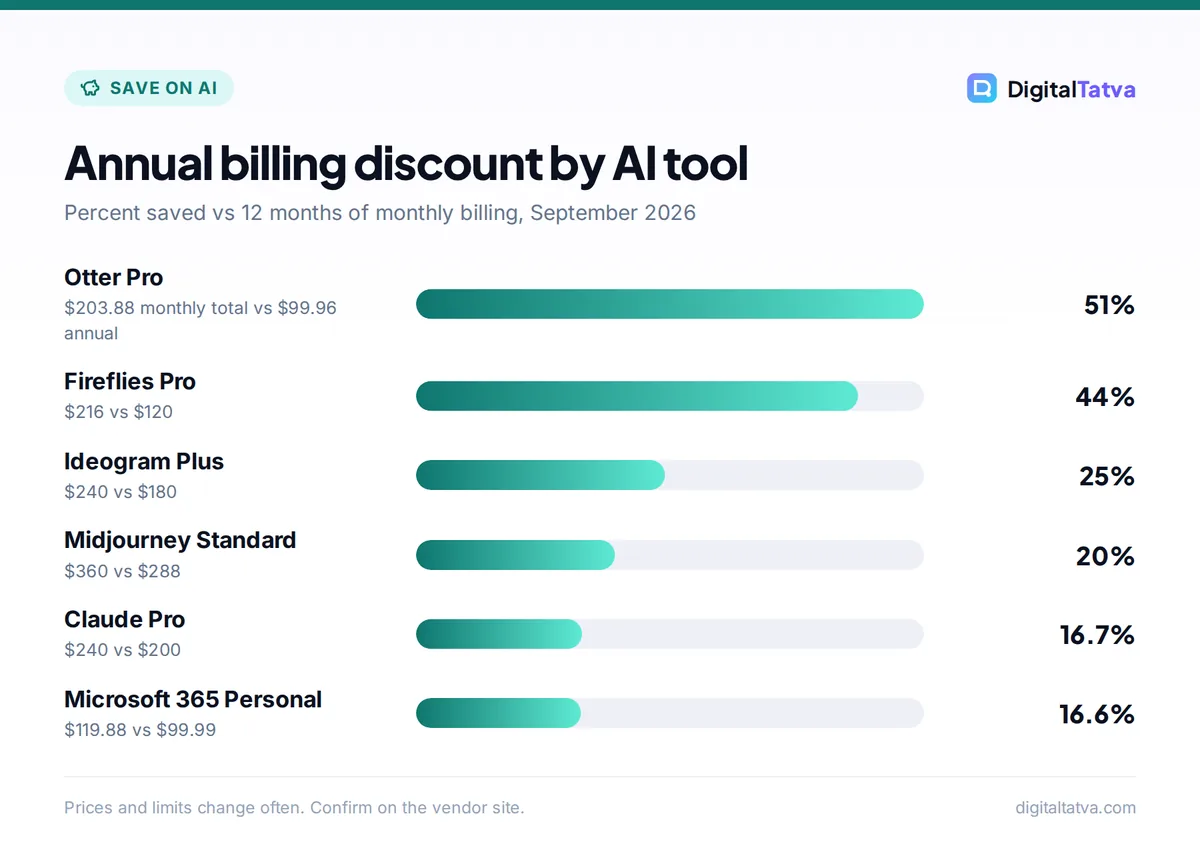
- Typical annual discounts: Claude Pro 16.7%, Midjourney 20%, Ideogram Plus 25%, Fireflies Pro 44% and Otter Pro 51%.
- Break-even rule: divide the annual price by the monthly price. Claude Pro is $200 / $20 = 10 months, so annual only pays off if you would otherwise stay 10 months or more.
- Several big assistants (ChatGPT Plus, Claude Max, Cursor) have no confirmed annual price, so monthly is the default there.
- AI plans change mid-year. GitHub Copilot’s June 2026 move to AI credits shows how an annual plan can end differently from how it started.
- Team seats save the most in dollars: two ChatGPT Business seats cost $120 less per year on annual billing.
How much annual billing saves on popular AI tools
The table compares 12 months of monthly billing with the annual price for tools whose annual rates appear on the vendor’s pricing page. The last column is the break-even point: how many months of monthly payments equal one annual payment.
| Tool and plan | 12 x monthly | Annual price | You save | Discount | Break-even |
|---|---|---|---|---|---|
| Claude Pro | $240 | $200 | $40 | 16.7% | 10 months |
| Midjourney Standard | $360 | $288 | $72 | 20% | 9.6 months |
| Ideogram Plus | $240 | $180 | $60 | 25% | 9 months |
| Runway Standard | $180 | $144 | $36 | 20% | 9.6 months |
| Leonardo.ai Essential | $144 | $115.20 | $28.80 | 20% | 9.6 months |
| Microsoft 365 Personal | $119.88 | $99.99 | $19.89 | 16.6% | 10 months |
| Lovable Pro | $300 | $250 | $50 | 16.7% | 10 months |
| Fireflies.ai Pro | $216 | $120 | $96 | 44.4% | 6.7 months |
| Otter.ai Pro | $203.88 | $99.96 | $103.92 | 51% | 5.9 months |
Here is how one row works. Otter Pro is $16.99 a month, so 12 x $16.99 = $203.88. The annual plan is $99.96. The saving is $203.88 minus $99.96 = $103.92, which is 51% of the monthly total. Break-even is $99.96 / $16.99 = 5.9 months. You can confirm the figures on Otter’s official pricing page.
The break-even rule: when annual billing actually saves money
An annual discount only saves money if you would have kept paying for most of the year anyway. If you would cancel after four months, annual billing costs you more, not less.
Use this rule for any AI plan:
- Find the break-even month. Divide the annual price by the monthly price. For Midjourney Standard: $288 / $30 = 9.6 months.
- Estimate how long you will really use it. Look at your own history. If you have paid for this tool for three months straight and use it weekly, 12 months is realistic. If you signed up for one project, it is not.
- Commit only if your estimate clearly beats break-even. If you expect 12 months and break-even is 9.6, annual wins. If you expect 8 months, stay monthly.
- Add a safety margin for fast-moving tools. For AI assistants and coding tools, where pricing and models change every few months, require at least two months of margin above break-even.
Tip: A quick worked case. You use Claude Pro daily for writing. Monthly for 12 months is 12 x $20 = $240. Annual is $200. If you stay all year, you save $40. If you quit after 8 months, monthly would have cost 8 x $20 = $160, so annual cost you $200 minus $160 = $40 more. Our Claude pricing guide covers what Pro includes.
AI plans with no confirmed annual option
Some of the most popular AI subscriptions do not show an annual price on their official pages in 2026. For these, monthly billing is the only verified choice, and that is not a bad thing given how quickly they change.
- ChatGPT Plus and Pro: OpenAI’s help center confirms Plus at $20 a month billed monthly. We could not confirm an annual Plus or Pro option. See our ChatGPT pricing breakdown.
- Claude Max: Max 5x is $100 a month and Max 20x is $200. No annual Max price is listed, unlike Pro. Our Claude Pro vs Max comparison helps you choose a tier.
- Cursor: Pro at $20, Pro Plus at $60 and Ultra at $200 a month show no annual discount on the pages we read. Details are in our Cursor pricing guide.
- GitHub Copilot: annual prices for Pro, Pro+ and Max are not shown on the current plans page.
- Google AI Pro: $19.99 a month. We could not confirm an annual Google AI price on Google’s pages, so check the checkout screen.
If you only use one of these assistants occasionally, consider whether you need a paid plan at all. Our list of free ChatGPT Plus alternatives covers what the free tiers can handle.
The hidden risks of paying for AI a year in advance
Plans can change during your term
AI pricing changes more often than most software. GitHub Copilot moved from premium requests to usage-based AI credits on June 1, 2026. Annual Pro and Pro+ subscribers kept their old premium requests only until their term ends. After that they drop to the Free plan, with an option to upgrade. That is fair to existing customers, but it means an annual plan can end on very different terms. Our GitHub Copilot pricing guide explains the new credit system.
OpenAI did something similar with ChatGPT Pro 200: new subscribers now get a lower usage allowance, and existing eligible subscribers keep the old allowance only until October 29, 2026.
A better or cheaper tool may appear
New models arrive every few months. OpenAI’s GPT-6 family rolled out to paid ChatGPT plans in 2026, and Anthropic’s lineup now centers on Claude Opus 5.5 and Sonnet 5.5. If a rival tool becomes clearly better for your work in month four, an annual plan keeps you paying for the old one.
“Annual” sometimes means a 12-month contract billed monthly
Some vendors quote a low monthly price that is really an annual commitment. Adobe Creative Cloud plans are listed as “annual, billed monthly”, and Microsoft 365 Copilot costs $31.50 per user a month on monthly billing with an annual commitment, versus $30 paid yearly. Read the checkout terms to see whether you can cancel early and what it costs.
Watch out: Refund rules for annual AI plans vary by vendor and region, and most pricing pages do not state them. Before you prepay, check the vendor’s billing help page for its refund and cancellation policy.
When annual billing is clearly the right call
Annual billing makes sense when three things are true: you rely on the tool every week, its plans have been stable, and the discount is large. These categories usually pass the test.
Meeting notetakers
Otter and Fireflies give the biggest annual discounts in this guide. Fireflies Pro is $18 a month or $10 a month billed annually, so 12 x $18 = $216 versus 12 x $10 = $120, a $96 saving. If you run client calls every week, the break-even of 6.7 months is easy to beat. Compare both tools in our Otter vs Fireflies review.
Image and video tools you use for steady client work
Midjourney, Ideogram, Leonardo and Runway all take 20% to 30% off for annual billing. Ideogram Pro is the largest: $60 a month or $504 a year, so 12 x $60 = $720 minus $504 = $216 saved (30%). Midjourney’s annual plans are on its official plan comparison page, and our Midjourney pricing guide explains each tier. For video credits, see Runway pricing.
SEO platforms that agencies keep for years
SEO suites rarely get cancelled mid-year, and the dollar savings are large. Semrush’s SEO plan is $139 a month or $117.33 a month billed annually. That is 12 x $139 = $1,668 versus 12 x $117.33 = $1,407.96, a $260.04 saving. Ahrefs Lite drops from $129 to about $107 a month on annual billing. See our list of the best AI SEO tools for the full lineup.
Bundles you would buy anyway
Microsoft 365 Personal includes Copilot in the Office apps. At $9.99 a month or $99.99 a year, you save 12 x $9.99 = $119.88 minus $99.99 = $19.89. If you already use Word and Excel all year, annual is the easy choice. Our Microsoft Copilot pricing guide compares Personal, Family and Premium.
Annual vs monthly for teams and business seats
For teams, the annual discount multiplies by the number of seats, so it adds up quickly. ChatGPT Business and Claude Team both price a Standard seat at $25 a month billed monthly or $20 billed annually. Premium seats are $125 or $100.
A worked example for a small agency with 2 ChatGPT Business Standard seats:
- Monthly: 2 seats x $25 x 12 months = $600
- Annual: 2 seats x $20 x 12 months = $480
- Saving: $600 minus $480 = $120 a year
With 10 seats, the same math gives 10 x $5 x 12 = $600 saved a year. The catch is seat count. If your team shrinks mid-year, you may still pay for seats you no longer need, so commit to the number of seats you are confident about and add more later. Notion Business shows the same pattern, at $20 a seat monthly or about $16 annually; see our Notion AI pricing guide. Our guide to AI team plans explains when business seats beat individual subscriptions.
Save money: Run a team on monthly billing for the first quarter, track who actually uses each seat, then switch only the active seats to annual. To judge whether a tool earns its seat cost at all, use our method to measure ROI from AI tools.
Which plans to commit to annually: a quick decision guide
| Your situation | Choose | Why |
|---|---|---|
| Trying a tool for the first time | Monthly | You have no usage history yet |
| Daily user for 3+ months, stable plan | Annual | You will clear the break-even point |
| Fast-changing assistant or coding tool | Monthly | Plans and models change mid-year |
| Meeting notes for weekly client calls | Annual | 40% to 50% discounts on Otter and Fireflies |
| Agency SEO platform | Annual | Large dollar savings, low churn |
| Team with changing headcount | Monthly first, then annual for core seats | Avoid paying for empty seats |
| Student with a free offer | Neither yet | Use the free period first |
Students should check our list of AI student discounts and free plans before paying anything, since several tools are free for a year.
Frequently asked questions
Is an annual AI subscription worth it?
It is worth it when you will use the tool for longer than the break-even point. Divide the annual price by the monthly price to find it. For Claude Pro that is $200 / $20 = 10 months, and for Otter Pro it is $99.96 / $16.99 = 5.9 months. If you are unsure you will stay that long, pay monthly.
Does ChatGPT Plus have an annual plan?
We could not confirm one. OpenAI’s help center lists ChatGPT Plus at $20 a month, billed monthly, and no official annual price appeared on the pages we checked. Some third-party sites simply multiply $20 by 12. Check the ChatGPT checkout screen to see whether an annual option is offered in your country.
How much does Claude Pro cost per year?
Claude Pro costs $200 a year on annual billing, which works out to about $17 a month. Paying monthly costs $20 a month, or 12 x $20 = $240 a year. So annual billing saves $40, or 16.7%, if you keep the plan for the full year.
Can I switch from monthly to annual later?
Starting monthly and switching once you know you will keep the tool is the lowest-risk approach. Whether you can switch mid-cycle, and how unused days are credited, depends on the vendor and is rarely stated on pricing pages. Check the vendor’s billing help page or account settings before you change plans.
Which AI tools give the biggest annual discount?
Among the tools we checked, Otter.ai Pro gives the largest discount at 51%, followed by Fireflies.ai Pro at 44%. Ideogram Pro saves 30%, Ideogram Plus 25%, and Midjourney, Runway and Leonardo.ai save 20%. Claude Pro and Microsoft 365 Personal save about 16.7%.
Our verdict on annual vs monthly AI plans
Pay monthly while you test a tool, and switch to annual only once your own usage clearly beats the break-even month. Annual billing is a strong deal for meeting notetakers, SEO suites, Microsoft 365 and image tools you use for steady work. For AI assistants and coding tools, monthly billing keeps you free to move when plans or models change, which happens often. Vendors adjust annual discounts and terms regularly, so confirm the current prices and refund policy on each vendor’s site before you prepay.
Related reading: 12 ways to save money on AI subscriptions and which AI subscriptions are worth paying for.
Pricing and features are checked at the time of writing and can change. Some links may be affiliate links, which never affect our verdicts.



