Cursor AI Review: The AI Code Editor Developers Actually Use
Our Cursor AI review: Tab, Agent, cloud agents and Bugbot, Hobby to Ultra pricing, the two usage pools, pros and cons, and how it compares with GitHub Copilot. Rated 8.5/10.


On this page
Cursor is the AI code editor most professional developers should try first in 2026. It combines fast autocomplete (Tab), an Agent that can plan and edit across many files, cloud agents that work in the background, and access to models from several labs in one editor that feels like VS Code. Pro costs $20 per month, but heavy agent users should expect real usage costs above that, because frontier models are billed at API rates once your included usage runs out.
This review explains what Cursor is, which features matter, how the new usage-based pricing works, the pros and cons, and who should pay for it.
Key takeaways
- Our rating: 8.5/10. Cursor is the most complete AI-first code editor for working developers.
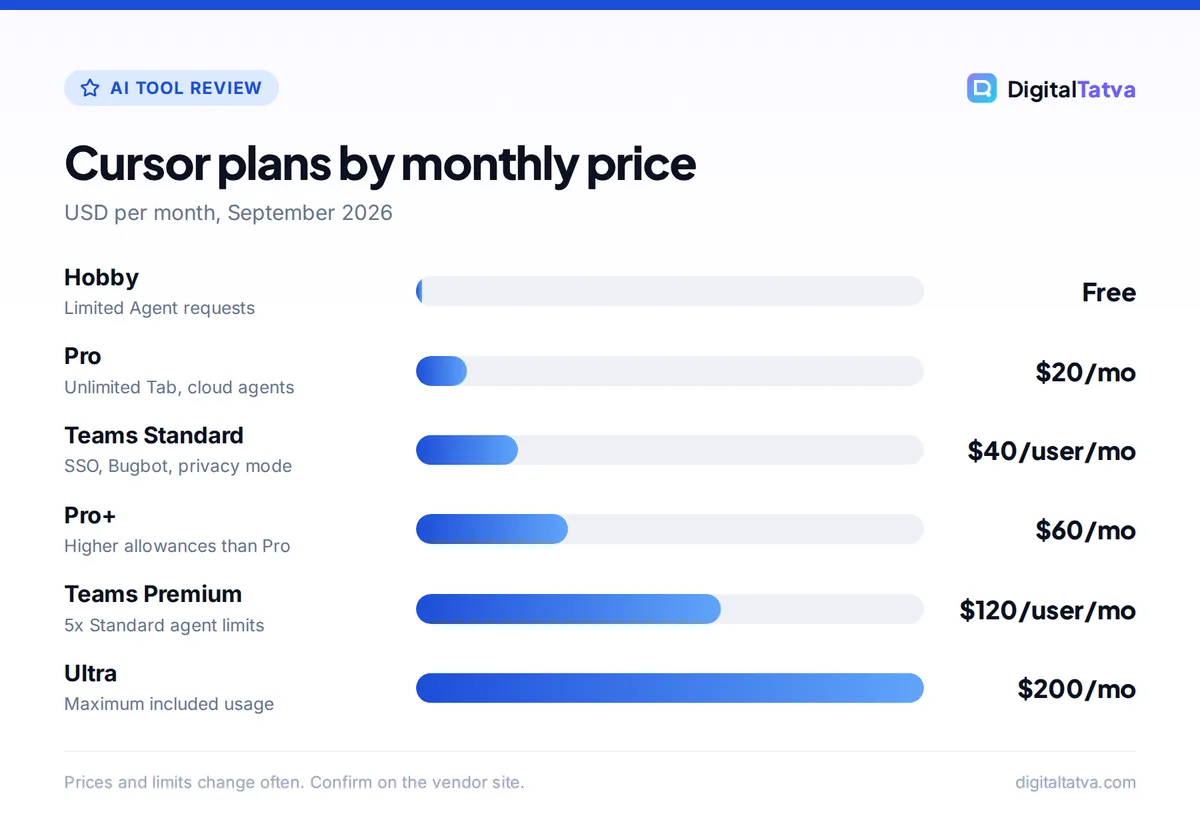
- Hobby is free, Pro is $20 per month, Pro+ is $60, Ultra is $200, and Teams starts at $40 per user per month.
- Usage is split into two pools: Cursor’s own models (such as Composer 2.5) get more included usage, while Claude, GPT and Gemini models are charged at API prices.
- Cursor says daily agent users typically spend $60 to $100 per month in total usage, and power users $200 or more.
- India has a Start plan at Rs 649 per month (tax inclusive) limited to Cursor’s own models.
Our verdict
8.5/10
Cursor is the AI code editor to beat for developers who want agents inside their editor. It is excellent to work in, but its usage-based billing makes monthly costs harder to predict than the $20 headline price suggests.
What is Cursor AI?
Cursor is a code editor built around AI. It looks and feels like VS Code, so your extensions, themes and keyboard shortcuts carry over, but AI is part of every layer: completions as you type, a chat and Agent panel that understands your whole codebase, and agents that can run in the cloud while you work on something else.
The key difference from a plugin such as GitHub Copilot is depth. Because Cursor controls the whole editor, its Agent can read many files, propose multi-file changes, run terminal commands and show you a diff to accept or reject. If you are new to it, our guide on how to use Cursor AI to code faster walks through setup and first projects.
Key features of Cursor in 2026
Tab: predictive autocomplete
Tab predicts your next edit, not just the next word. It can suggest multi-line changes and jump to the next place you are likely to edit. Pro and higher plans include unlimited Tab, which is the feature many developers use most. In everyday use, Tab is where Cursor feels noticeably smoother than a basic autocomplete plugin.
Agent: multi-file changes from a prompt
The Agent takes a task such as “add pagination to the orders API and update the tests”, searches the codebase, edits the relevant files and can run commands. You review the changes as diffs. Hobby gets limited Agent requests, Pro gets extended limits, and the higher tiers raise them further.
Cloud agents
Cloud agents run tasks remotely, so you can hand off a refactor or a bug fix and keep working locally. They are included on the individual paid plans, and Teams adds cloud agents and automations with shared team context. This is useful for chores that do not need you watching every step.
Bugbot code reviews
Bugbot is Cursor’s agentic code reviewer for pull requests. On individual plans it runs on usage-based billing, while Teams includes agentic code reviews with Bugbot as a listed feature. Teams that already use pull request review tools should test Bugbot on a few real PRs before relying on it.
Model choice: Cursor Models and Other Models
Cursor gives you two kinds of models. The “Cursor Models” pool includes Cursor’s own Composer 2.5 and Grok 4.x models, which get significantly more included usage. The “Other Models” pool covers Claude, GPT and Gemini, which are charged at each model’s API price. Practically, that means you can use Composer for most day-to-day work and switch to a frontier model for hard problems, but frontier usage drains your allowance faster.
MCPs, skills and hooks
Paid plans support MCP (Model Context Protocol, a standard way to connect AI tools to outside systems such as databases, issue trackers or docs), plus skills and hooks. This lets the Agent pull context from tools your team already uses instead of you pasting it in.
Team controls and privacy
Teams adds centralized billing, a team marketplace for internal rules, skills and plugins, usage analytics, team-wide privacy mode and SAML or OIDC single sign-on. Enterprise adds pooled usage, SCIM seat management, repository, model and MCP access controls, and audit logs. If your company is adopting AI coding tools, pair these controls with a written AI usage policy for your team.
Cursor pricing in 2026
These are the current plans from the official Cursor pricing page. Exact included usage amounts in dollars are not published.
| Plan | Price | What you get | Best for |
|---|---|---|---|
| Hobby | Free | Limited Agent requests, access to Composer, no card needed | Trying Cursor, students |
| Start (India only) | Rs 649/month incl. tax | Cursor Models pool only | Indian developers on a budget |
| Pro | $20/month | Unlimited Tab, extended Agent limits, cloud agents, frontier models | Most individual developers |
| Pro+ | $60/month | Higher allowances than Pro | Daily agent users |
| Ultra | $200/month | Maximum included usage | Power users running agents all day |
| Teams Standard | $40/user/month | SSO, analytics, Bugbot, privacy mode | Small engineering teams |
| Teams Premium | $120/user/month | 5x Standard agent limits | Heavy-usage teams |
| Enterprise | Custom | Pooled usage, SCIM, audit logs | Large organizations |
How the usage-based model affects your bill
After you use up your plan’s included usage, Cursor keeps working with on-demand usage at API rates, billed in arrears. Cursor’s own guidance is that daily agent users typically spend $60 to $100 per month in total, and power users $200 or more. So a developer on Pro who leans heavily on Claude or GPT models may pay well above $20 in a busy month.
The fix is simple: use Composer 2.5 for routine edits and save frontier models for complex reasoning. Our Cursor pricing guide goes deeper into each tier, and understanding what tokens are helps you see why long agent sessions cost more. For the per-token rates behind the “Other Models” pool, see our Claude API pricing and OpenAI API pricing breakdowns.
Save money: Check your on-demand usage settings in your Cursor account and set a cap where available, keep agent prompts focused on the files that matter, and start new chats for new tasks so you are not resending a long history. Our guide to reducing token usage covers more techniques that apply to Cursor too.
Cursor pros and cons
Pros
- Familiar VS Code feel, so switching takes minutes
- Tab autocomplete is fast and predicts multi-line edits
- Agent handles multi-file changes with clear diffs to review
- Models from several labs plus Cursor’s own Composer in one editor
- Cloud agents, MCP support and strong team controls
- India-only Start plan at Rs 649 lowers the entry price
Cons
- Monthly cost is hard to predict once you use frontier models heavily
- Included usage per plan is not published in dollars
- Bugbot on individual plans is billed separately on usage
- You have to switch editors, unlike a plugin that works in your existing IDE
- Agent changes still need careful review; it can edit more than you intended
Cursor vs GitHub Copilot and other alternatives
Cursor’s closest rival is GitHub Copilot, which also moved to usage-based AI credits in June 2026. Here is how the main options compare on price and approach.
| Tool | Entry paid plan | How it works | Best for |
|---|---|---|---|
| Cursor | $20/month Pro | Standalone AI editor, two usage pools | Developers who want agents in the editor |
| GitHub Copilot | $10/month Pro | Plugin for many IDEs, 1,500 AI credits on Pro | Teams on GitHub, budget-conscious users |
| Claude Code | Included in Claude Pro ($20/month) | Terminal and IDE agent, shares Claude usage | Developers who already pay for Claude |
| Devin Desktop (formerly Windsurf) | $20/month Pro | AI editor, daily and weekly quotas | Developers comparing AI editors |
Our detailed Cursor vs GitHub Copilot comparison covers quality, IDE support and team features, and our GitHub Copilot pricing guide explains its AI credits. For the full field, see our ranking of the best AI coding assistants. If you use Claude Code heavily, our Claude Pro vs Max guide explains when the higher tier pays off.
Non-developers who want to build apps without writing code should look elsewhere: our list of the best AI app builders for non-coders and our Lovable review are better starting points.
Who should use Cursor?
Cursor is a strong fit for
- Professional developers who work in large codebases and want an Agent that understands the whole project.
- Freelancers and agency developers who juggle many client projects and want to hand routine tasks to cloud agents.
- Startup teams that want SSO, privacy mode and Bugbot reviews in one tool.
- Indian developers who can start on the Rs 649 Start plan and upgrade when they need frontier models.
Consider skipping Cursor if
- You are tied to an IDE that Cursor does not replace, such as a JetBrains workflow your team depends on. A plugin-based tool fits better.
- You need a fixed, predictable monthly bill and plan to use frontier models all day.
- You write code only occasionally. Hobby or GitHub Copilot Free may be enough.
Tips to get the most from Cursor
- Start on Hobby. Import your VS Code settings and use it on a real project for a week before paying.
- Write project rules. Add rules that describe your stack, conventions and testing approach so the Agent follows them.
- Default to Composer. Use Cursor’s own models for routine work and switch to Claude, GPT or Gemini only for hard problems.
- Keep tasks small. Ask the Agent for one change at a time, review the diff, then move on.
- Watch on-demand usage. Review your usage dashboard weekly and cap on-demand spend where your plan allows, so a busy week does not surprise you on the invoice.
Frequently asked questions
Is Cursor AI worth it?
For most professional developers, yes. Pro at $20 per month gives unlimited Tab, extended Agent limits, cloud agents and access to frontier models in an editor that feels like VS Code. Budget for extra usage if you rely on Claude or GPT models all day, since Cursor says daily agent users typically spend $60 to $100 per month.
Is Cursor free?
Yes, Cursor has a free Hobby plan that needs no credit card. It includes limited Agent requests and access to Composer, Cursor’s own model. It is good for learning the editor and small projects. Regular users will hit the limits quickly and should consider Pro, or the Start plan in India.
How much does Cursor cost in India?
Cursor offers an India-only Start plan at Rs 649 per month, tax inclusive, which uses only the Cursor Models pool. Other plans are priced in USD: Pro at $20 per month, Pro+ at $60 and Ultra at $200. Indian cards may show a converted amount plus any applicable taxes.
Is Cursor better than GitHub Copilot?
Cursor is usually the better choice if you want a deeply integrated Agent and are happy to switch editors. GitHub Copilot is cheaper to start at $10 per month and works as a plugin in many IDEs. Both now use usage-based billing, so compare how much frontier model usage you need before choosing.
Which models can I use in Cursor?
Cursor offers its own models, such as Composer 2.5 and Grok 4.x, in the Cursor Models pool with more included usage. It also offers Claude, GPT and Gemini models in the Other Models pool, charged at each model’s API price. Available models change often, so check the model list in your Cursor settings.
Final verdict: is Cursor the AI code editor to use?
For most working developers, yes. Cursor earns an 8.5 out of 10 from us because its Tab autocomplete, multi-file Agent, cloud agents and model choice make it the most complete AI-first editor available, and the familiar VS Code base makes switching painless. It loses points for usage-based billing that makes the real monthly cost hard to predict, and for not publishing included usage in dollars. Start on Hobby, move to Pro once it becomes your daily editor, and keep an eye on on-demand usage before you lean on frontier models. Pricing and usage rules change often, so confirm the current details on Cursor’s official pricing page before you upgrade.
Pricing and features are checked at the time of writing and can change. Some links may be affiliate links, which never affect our verdicts.