10 Best AI App Builders for Non Coders
The 10 best AI app builders for non-coders in 2026, from Lovable and Bolt.new to Bubble and FlutterFlow, with prices, free plans and who each tool suits.

On this page
The best AI app builder for most non-coders in 2026 is Lovable: you describe a web app in plain English and it builds the frontend, backend, database and login for you, with Pro from $25 per month. Bolt.new is the fastest for quick prototypes, Replit is best if you want building and hosting in one place, and Bubble or FlutterFlow suit people who want visual control over a serious product, including mobile apps.
This guide ranks 10 AI app builders by who they suit, what they cost as of October 2026, and how their credit limits work, because almost every tool here meters AI use with credits, tokens or workload units.
Key takeaways
- Lovable is our top pick for non-coders building real web apps, with a free plan of 5 credits a day (up to 30 a month) and Pro from $25 per month.
- Prompt-to-app tools (Lovable, Bolt.new, v0, Base44, Replit) are fastest; visual builders (Bubble, Glide, FlutterFlow) give more control as apps grow.
- Most free plans are good for testing, but publishing on a custom domain or adding team members almost always needs a paid plan.
- Credits are the hidden cost: big changes and long fix loops use more of them, so plan your app before you start prompting.
- For native iOS and Android apps, look at FlutterFlow, Bubble or Google AI Studio’s Android output rather than web-only builders.
Quick picks: the 10 best AI app builders compared
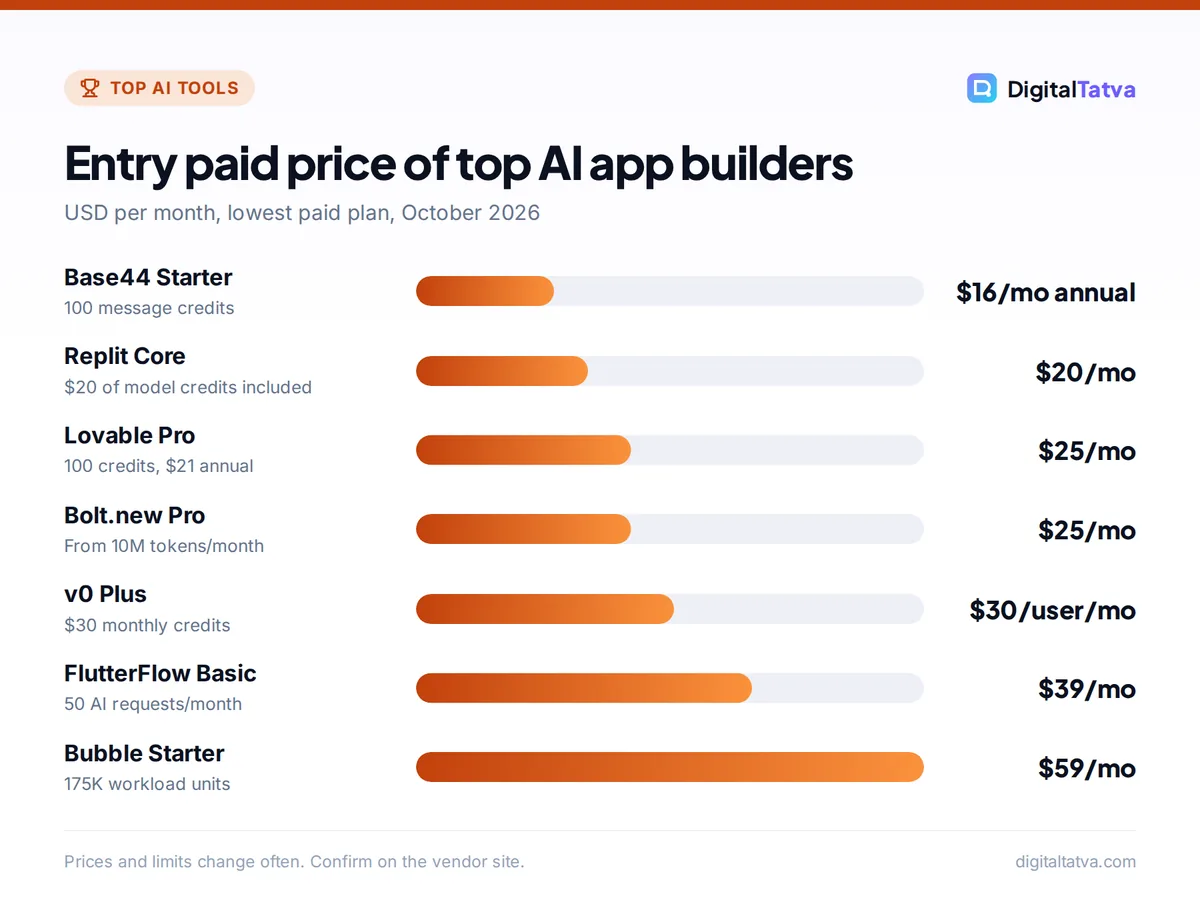
Here is the short version. Prices are the lowest paid plan billed monthly unless stated.
| Tool | Best for | Starting paid price | Free plan |
|---|---|---|---|
| Lovable | Full web apps by chatting | $25/month (Pro) | Yes, 5 credits/day |
| Bolt.new | Fast full-stack prototypes | $25/month (Pro) | Yes, 1M tokens/month |
| Replit | Build and host in one place | $20/month (Core) | Yes, Starter |
| v0 by Vercel | Polished interfaces and front ends | $30/user/month (Plus) | Yes, $5 credits/month |
| Base44 | Cheap all-in-one internal tools | $16/month billed annually | Yes, 25 message credits |
| Google AI Studio Build | Gemini-powered apps and Android | Usage-based (Cloud Run hosting) | Yes |
| Bubble | Scalable no-code products | $59/month (Starter) | Yes, development only |
| Glide | Business apps on your data | $25/month (Basic) | Yes, no published apps |
| FlutterFlow | Native mobile apps | $39/month (Basic) | Yes, 2 projects |
| Claude Artifacts | Quick single-page tools | $20/month (Claude Pro) | Yes, included in Claude Free |
The 10 best AI app builders in detail
1. Lovable: Best for non-coders building full web apps
- Starting price: $25/month (Pro, 100 credits), $21/month billed annually
- Free plan: Yes, 5 credits per day, up to 30 per month
- Best for: Founders, marketers and freelancers launching web apps and MVPs
Lovable turns a chat into a working web app with a frontend, backend, database, authentication and integrations such as Stripe, Slack and Supabase. Its built-in backend, Lovable Cloud, handles the database, user sign-in, file storage and serverless functions without separate setup, and you can sync your code to GitHub, GitLab or Bitbucket so you keep full ownership. A Chat mode lets you discuss ideas for a fraction of a credit before you spend credits on building.
It is the most complete “describe it and get an app” experience for non-technical users. The trade-off is credit use: large changes and repeated bug-fix loops add up. Read our full Lovable review for pricing tiers, pros and cons.
2. Bolt.new: Best for fast full-stack prototypes
- Starting price: $25/month (Pro, from 10M tokens/month, no daily cap)
- Free plan: Yes, 300K tokens per day, 1M per month
- Best for: Quick demos, landing pages with logic, validating ideas
Bolt.new builds full-stack apps in the browser from a prompt and shows a live preview as it works. It meters usage in tokens rather than credits, and the free plan is generous enough to build a small prototype. Teams pay $30 per member per month. Bolt says annual billing saves up to 28 percent, though exact annual prices are not listed.
It is great when speed matters more than polish. For complex apps with many users and roles, non-coders may find Lovable’s guided backend easier to manage.
3. Replit: Best for building and hosting in one place
- Starting price: $20/month (Core) or $18/month billed annually
- Free plan: Yes, Starter with 1 published app and daily Agent credits
- Best for: Learners and builders who want code, database and hosting together
Replit’s Agent builds apps from a description, and the platform handles hosting, storage and databases. Core includes $20 of credits for top models plus Free Mode work within an allowance. Pro at $100 per month ($90 annual) adds $100 of credits, 10 parallel agents, up to 15 collaborators and 28-day database rollback. Agent pricing is effort based: simple requests cost less and complex builds cost more, and Replit does not publish a per-checkpoint dollar figure.
Replit sits between no-code and real coding, which makes it ideal if you want to learn as you build. It also appears in our ranking of the best AI coding assistants.
4. v0 by Vercel: Best for polished interfaces
- Starting price: $30/user/month (Plus, $30 monthly credits plus $2 daily login credits)
- Free plan: Yes, $5 of monthly credits
- Best for: Designers and founders who care about clean, modern UI
v0 generates good-looking interfaces and full apps, with especially strong front-end output. Business costs $100 per user per month with the same credit allowance plus business controls. Its dollar-based credits make it easy to see what each session costs.
Non-coders can absolutely use it, but v0 rewards people who are comfortable reading a little code and deploying to the web. If you mostly want a working backend, Lovable or Base44 is simpler.
5. Base44: Best budget all-in-one builder
- Starting price: $16/month billed annually (Starter, 100 message credits)
- Free plan: Yes, 25 message credits and up to 5 apps
- Best for: Internal tools, small business apps and side projects
Base44 builds apps with authentication, a database and analytics included, so you are not wiring services together. Paid plans add unlimited apps, in-app code editing, custom domains and a free domain for the first year. Builder costs $40 per month annually, Pro $80 and Elite $160, and only Pro and Elite add AI model selection and GitHub integration. Monthly billing costs about 20 percent more than the annual rates.
It is a strong low-cost option for small business owners who need a booking tool, a customer portal or an internal tracker. Our guide to AI for small business has more ideas for where an app like this pays off.
6. Google AI Studio Build: Best for Gemini-powered apps
- Starting price: Usage based (Cloud Run hosting and paid models billed on usage)
- Free plan: Yes, build in AI Studio; costs apply for paid models and hosting
- Best for: Apps that use Gemini AI features, and Android apps
Build mode in Google AI Studio is Google’s vibe coding tool. It generates web apps with a React frontend and Node.js server, and can also produce Android apps in Kotlin with Jetpack Compose. It connects to Firebase and Google Workspace APIs and deploys to Cloud Run. Google warns that API calls from shared apps count toward your usage, and paid models can cost money.
It is a natural fit if your app’s main feature is AI, such as a document summarizer or an image tool. Our Gemini API pricing guide explains what those model calls cost.
7. Bubble: Best for scalable no-code products
- Starting price: $59/month (Starter), $708/year billed annually
- Free plan: Yes, development version only (no live site)
- Best for: Startups building a real product without hiring developers
Bubble is the veteran of visual no-code. You design pages, workflows and a database visually, and every plan supports web, iOS and Android apps that share one backend. Usage is measured in workload units: 50K per month on Free, 175K on Starter, 250K on Growth ($209 per month) and 500K on Team ($549 per month). Annual billing saves 20 percent.
The learning curve is steeper than chat-based tools, but you get precise control and a platform built for apps that grow. Bubble also markets AI features, but its real strength is the visual editor itself.
8. Glide: Best for business apps on your existing data
- Starting price: $25/month (Basic, 100 credits, 2 published apps)
- Free plan: Yes, but no published apps
- Best for: Operations teams turning spreadsheets into apps
Glide turns business data into clean, mobile-friendly apps for field teams, inventory, CRM-style tracking and approvals. Plus costs $50 per month with 5 published apps, and Pro costs $125 per month with unlimited published apps and the option to build with your own agent through MCP. Glide lets you build AI features into your apps, and paid plans offer an agent mode in light, medium or heavy settings.
Glide is less suited to consumer apps but excellent for internal tools. Pair it with an automation platform from our list of the best AI automation tools to connect it to the rest of your stack.
9. FlutterFlow: Best for native mobile apps
- Starting price: $39/month (Basic, 50 AI requests/month), about $29/month annual
- Free plan: Yes, 2 projects and 5 lifetime AI requests
- Best for: Founders who need real iOS and Android apps
FlutterFlow is a visual builder for Flutter apps, which compile to native mobile apps as well as web. AI generation helps you create pages and components from prompts, while the visual editor gives fine control. Growth costs $80 per month for the first seat with 200 AI requests, and Business costs $150 for the first seat with 500 AI requests and automated tests. Annual billing saves about 25 percent.
It is more technical than Lovable or Glide, but it is the best choice here if app store publishing is your goal.
10. Claude Artifacts: Best for quick single-page tools
- Starting price: $20/month (Claude Pro), $17/month billed annually
- Free plan: Yes, Artifacts are included in Claude Free
- Best for: Calculators, quizzes, simple dashboards and one-off tools
Claude can build small interactive apps, called Artifacts, right inside a chat. Ask for “a loan EMI calculator with a chart” or “a quiz for my course” and you get a working tool you can use and share. It has no full database or user accounts like Lovable, but for single-page tools it is the fastest and cheapest option, and the free plan includes it.
See our Claude pricing guide for what each plan adds, and our list of the best free AI tools for other no-cost options.
How to choose the right AI app builder
Prompt-to-app or visual builder?
Prompt-to-app tools (Lovable, Bolt.new, v0, Base44, Replit, Google AI Studio) are the fastest way from idea to working app, and they are where most non-coders should start. Visual builders (Bubble, Glide, FlutterFlow) take longer to learn but make it easier to make precise changes later without burning AI credits on every tweak.
Web app or mobile app?
Most prompt-to-app tools build web apps that work in a phone browser. If you need an app in the Apple App Store or Google Play, choose FlutterFlow or Bubble, or Google AI Studio’s Android output.
Who owns the code?
Lovable syncs to GitHub, GitLab or Bitbucket, and Base44 offers GitHub integration on Pro and Elite. Code export matters if you might hand the app to a developer later. If you expect that, read our guide on how to use Cursor AI, the editor many developers use to continue AI-built projects.
Plan before you prompt
- Write a one-page brief. List the users, the main screens, the data you store and the one thing the app must do well.
- Build the core flow first. Get sign-up and the main action working before adding extras.
- Change one thing per prompt. Smaller requests use fewer credits and are easier to undo.
- Test with real users early. Share a preview link with five people before polishing the design.
Clear prompts save credits on every tool here. Our prompt engineering guide covers the basics.
Pricing notes: credits, tokens and hidden costs
Almost every AI app builder now charges by usage, but they count it differently.
| Tool | How usage is counted | What to watch |
|---|---|---|
| Lovable | Credits (build and run) | Hosting and AI calls use run credits |
| Bolt.new | Tokens | Free plan has a daily token cap |
| Replit | Effort-based Agent credits | Complex builds cost more per request |
| v0 | Dollar credits | Per-user pricing for teams |
| Base44 | Message and integration credits | Integrations have their own allowance |
| Bubble | Workload units | Heavy traffic needs a higher tier |
| FlutterFlow | AI requests per month | Seats priced separately |
Save money: Build your prototype on free plans first, then pay for one month only when you are ready to publish. Lovable rolls unused monthly credits over while you stay subscribed, and Replit, Bubble, Base44 and FlutterFlow all discount annual billing. Our guide to annual vs monthly AI plans explains when to commit.
Watch out: Your app may call AI models or third-party services after launch. Those costs are separate from the builder subscription, so check what each feature costs before you go live. If you plan to add an assistant to a site, our guide on adding an AI chatbot to your website covers the options.
AI app builder picks by persona
- Solo founder testing an idea: Lovable or Bolt.new on the free plan, then Pro when you have users.
- Small business owner needing an internal tool: Base44 or Glide.
- Student learning to build: Replit, because you see and learn the code.
- Designer or marketer building a polished front end: v0.
- Startup planning app store launch: FlutterFlow or Bubble.
- Freelancer or agency building client tools: Lovable with Git sync, so a developer can take over later. Our guide to AI for marketing agencies shows how agencies package this work.
Frequently asked questions
What is the best AI app builder for beginners?
Lovable is the best AI app builder for most beginners because you describe the app in plain English and it sets up the frontend, backend, database and login for you. Bolt.new is a close second for quick prototypes. If you want a single-page tool like a calculator or quiz, Claude Artifacts on the free Claude plan is even simpler.
Can I build an app with AI without coding?
Yes. Tools like Lovable, Bolt.new, Base44 and Glide let you build working apps without writing code. You will still need to think clearly about users, screens and data, and test carefully. For complex products with payments and many user roles, expect to learn some basics or bring in a developer for review.
Is there a free AI app builder?
Most tools on this list have a free plan. Lovable gives 5 credits a day up to 30 a month, Bolt.new gives 1M tokens a month, v0 gives $5 of credits, Base44 gives 25 message credits, and Bubble’s free plan covers development. Free plans are good for testing, but publishing a live app usually needs a paid plan.
Which AI app builder can make mobile apps?
FlutterFlow is the strongest choice for native iOS and Android apps, and Bubble supports web, iOS and Android apps on every plan with a shared backend. Google AI Studio Build can generate Android apps in Kotlin. Most other prompt-to-app tools build web apps, which work in a phone browser but are not app store apps.
Are AI-built apps secure enough for real users?
They can be, but you should not assume it. Some builders, such as Lovable, include security checks and scanning for sensitive data, which helps. Still review who can read and edit each table, keep API keys out of the frontend, and get a developer to review anything that handles payments or personal data before launch.
Final verdict: which AI app builder should you pick?
Start with Lovable if you are a non-coder who wants a complete web app from a conversation; it is the best balance of ease, features and code ownership. Pick Bolt.new for speed, Replit for an all-in-one place to build and host, v0 for beautiful interfaces, and Base44 for low-cost internal tools. Choose Bubble or FlutterFlow when you need a scalable product or native mobile apps, and use Claude Artifacts for quick single-page tools. Whatever you choose, build the smallest useful version first and watch your credit use. Pricing and credit allowances change often, so confirm the current details on each vendor’s site, such as the Lovable plans and credits page and Bubble’s pricing page, before you subscribe.
Pricing and features are checked at the time of writing and can change. Some links may be affiliate links, which never affect our verdicts.