Canva AI vs Adobe Firefly: Best AI Design Tool for Marketers
Canva AI vs Adobe Firefly compared for marketers: design speed, image quality, AI credits, commercial safety and 2026 prices in USD and INR, with picks by role.

On this page
- Key takeaways
- Quick verdict: Canva AI vs Adobe Firefly
- Our verdict
- Canva AI vs Firefly comparison table
- Design quality and AI image generation
- Features for marketing workflows
- Pricing: what you actually pay
- AI limits and credits explained
- Commercial use, licensing and brand safety
- Choose Canva or Firefly: who each tool is for
- Frequently asked questions
- Final verdict: the best AI design tool for marketers
For most marketers, Canva AI is the better pick: it turns a prompt into a finished, on-brand social post, deck or flyer, and Canva Pro costs US$144 a year. Adobe Firefly is the better pick when image quality, editing control and commercial safety matter more than speed, with plans from $9.99 a month. Many teams end up using both: Firefly to make and fix the hero image, Canva to lay it out.
This comparison covers what each tool does well, what you actually pay as of September 2026, how their AI allowances work, and which one fits your role. Prices come from the official Canva and Adobe pricing pages unless we say otherwise.
Key takeaways
- Canva wins on layout and speed: templates, Brand Kits and team sharing make it the faster tool for everyday marketing design.
- Firefly wins on image generation and editing: Generative Fill, video generation and Adobe’s commercial-use position suit brand and campaign work.
- Entry prices: Canva Pro is US$144/year (Rs 4,000/year in India). Firefly Standard is $9.99/month with 2,000 generative credits.
- Both have free tiers: Canva Free includes up to 20 AI uses, and Firefly gives free daily generations with no plan needed.
- Best combo for small teams: Canva Pro or Business for design, plus Firefly Standard only if you need heavier image editing.
Quick verdict: Canva AI vs Adobe Firefly
The two tools solve different problems. Canva is a design platform with AI built in. Its job is to get a finished asset out the door: a carousel, an ad set, a presentation or a printed flyer. Firefly is Adobe’s generative AI engine. Its job is to create and edit images, video and audio at high quality, then hand them to Adobe Express, Photoshop or any other tool.
If you are a solo marketer or small business owner who needs ten social posts by Friday, start with Canva. If you are a designer or brand team that cares about every pixel of a product shot, start with Firefly. For a deeper look at Canva’s AI on its own, read our Canva Magic Studio review.
Our verdict
8.5/10
Our rating for marketers: Canva AI 8.5/10 for its speed, templates and team features. Adobe Firefly scores 8/10 for marketers, but rises to the top pick for designers who need precise image editing and commercially safe outputs.
Canva AI vs Firefly comparison table
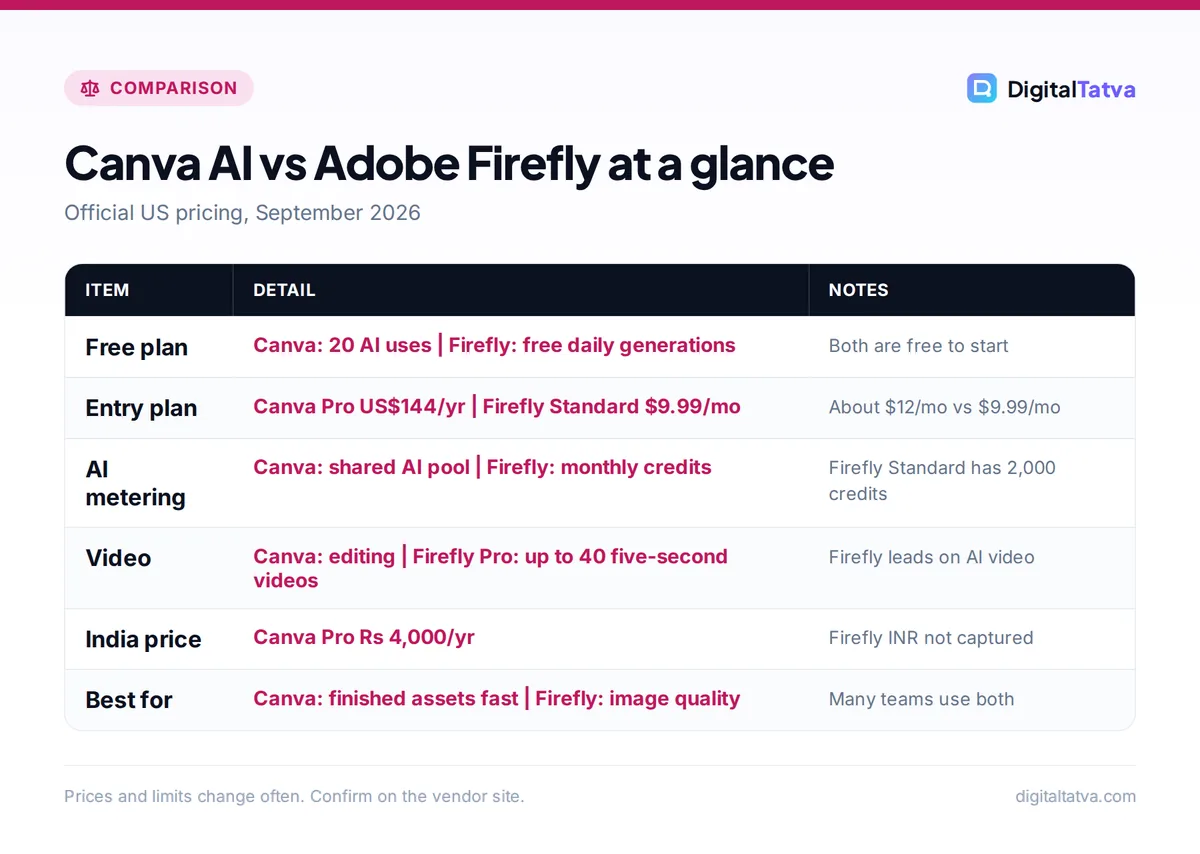
This table puts the plans and core features side by side. Canva lists its paid plans as yearly prices on the US page, while Firefly lists monthly prices.
| Feature | Canva AI | Adobe Firefly |
|---|---|---|
| Free plan | Yes, up to 20 uses of Standard or Premium AI, 5GB storage, 1 Brand Kit | Yes, free daily generations (image, video, audio) that refresh each day |
| Entry paid plan | Pro: US$144/year | Firefly Standard: $9.99/month, 2,000 credits |
| Mid tier | Business: US$250/year per person | Firefly Pro: $19.99/month, 4,000 credits |
| Top self-serve tier | Enterprise (custom pricing) | Firefly Premium: $199.99/month, 50,000 credits |
| How AI is metered | Shared AI pool: Pro gets 10x Free, Business 20x Free | Monthly generative credits, plus unlimited standard image features on paid plans |
| India pricing | Pro Rs 4,000/year, Business Rs 6,800/year per person, Pro Lite Rs 1,590/year | Not captured in our research (check Adobe’s India page) |
| Brand controls | 1 Brand Kit (Free), 5 (Pro), 100 (Business) | Via Adobe Express Premium, included in Firefly Standard and up |
| Commercial position | Standard Canva licensing terms apply | Adobe says Firefly model outputs are safe for commercial use |
| Best for | Finished marketing assets, fast | High-quality images, edits and short video |
Design quality and AI image generation
Adobe Firefly: stronger for image creation and editing
Firefly is the specialist here. You can generate images from text, then use Generative Fill to add, remove or replace parts of an image with a brush and a prompt. Paid plans include unlimited use of standard image features such as Generative Fill, so you only spend credits on heavier tasks like premium generations and video.
Firefly also gives you access to partner models inside the same app. Adobe’s free daily generations include partner models such as Nano Banana and Luma Ray3.14, which is useful when you want a different look without opening another tool. Note that partner model outputs may carry different terms from Adobe’s own models, so check before you use them in paid ads.
Canva AI: good enough images, inside a finished layout
Canva’s AI image tools are designed to fill a design, not to win a photography award. In everyday use, the results work well for social posts, blog headers and slide backgrounds, especially once you place them in a template with your brand fonts and colors.
Canva now groups its AI features into Standard, Premium and Ultra AI tiers. Each tier draws on your shared AI allowance at a different rate. The older “Magic Studio” branding no longer appears on the pricing page, although many people still use the name.
If raw image quality is your main concern, also compare dedicated generators in our list of the best AI image generators and our Midjourney vs ChatGPT image comparison.
Features for marketing workflows
This is where Canva pulls ahead for most marketers. The question is not “which AI makes the nicest picture” but “which tool gets a campaign live faster with fewer people involved”.
Templates, resizing and brand kits
Canva’s template library and Brand Kits are the main reason teams pick it. A Brand Kit stores your logos, colors and fonts, so anyone on the team can produce on-brand work. Free includes 1 Brand Kit, Pro includes 5, and Business includes 100, which matters for agencies managing several clients. Our guide to AI for marketing agencies covers how agencies structure these workspaces.
Firefly Standard and higher plans include Adobe Express Premium, which is Adobe’s own template-based design app. Express covers similar ground to Canva, but Canva’s template range and collaboration features are more mature for non-designers.
Video and audio
Firefly is the stronger choice for AI video. Firefly Pro at $19.99/month covers up to 40 five-second videos a month, Pro Plus covers up to 100, and Premium includes unlimited use of the Firefly Video Model in Generate Video. Free daily generations also include video and audio, so you can test before paying.
Canva handles video editing well (cutting clips, adding captions, laying out reels), but treat it as an editor first. For more dedicated options, see our roundup of the best AI video generators.
Extra apps in the bundle
Firefly Standard also includes Photoshop on web and mobile, and Adobe Fonts. That is real value if you already open Photoshop now and then. Canva Pro and Business focus on the Canva workspace itself, with larger storage: 100GB on Pro and 500GB on Business.
Tip: Use Firefly to create or clean up one strong hero image, export it, then drop it into a Canva template and let Canva resize it for every channel. You get Adobe-level image quality with Canva-level speed. Our list of AI tools for social media shows where scheduling tools fit into this workflow.
Pricing: what you actually pay
Canva plans
Canva’s US pricing page lists yearly prices. Monthly billing exists, but the monthly USD price was not shown when we checked, so look at the toggle on the live page before you pay.
- Free ($0): up to 20 uses of Standard or Premium AI, 5GB storage, 1 Brand Kit.
- Pro (US$144/year, one person): 10x more AI than Free, 5 Brand Kits, 100GB storage.
- Business (US$250/year per person): 20x more AI than Free, 100 Brand Kits, 500GB. You pay only for members who accept the invite. Business replaces the old Teams plan, which is closed to new sign-ups.
- Enterprise (custom): 20x AI, SSO and SCIM, 1TB storage.
In India, Canva lists Pro Lite at Rs 1,590/year, Pro at Rs 4,000/year and Business at Rs 6,800/year per person. Pro Lite gets 20 AI uses, the same as Free, so it is a templates and storage upgrade rather than an AI upgrade. Full details are in our Canva pricing guide.
Adobe Firefly plans
| Firefly plan | Monthly price | Generative credits | Video allowance |
|---|---|---|---|
| Free | $0 | Free daily generations | Included in daily generations |
| Firefly Standard | $9.99 | 2,000/month | Not stated as a video count |
| Firefly Pro | $19.99 | 4,000/month | Up to 40 five-second videos |
| Firefly Pro Plus | $49.99 | 10,000/month | Up to 100 five-second videos |
| Firefly Premium | $199.99 | 50,000/month | Unlimited Firefly Video Model in Generate Video |
Team versions offer the same credits plus admin tools and 24×7 support. Adobe was running first-year promotions on Pro Plus and Premium when we checked, ending October 21, so budget using the regular prices above. If you already pay for Creative Cloud Pro ($69.99/month on an annual plan, billed monthly), you get a monthly credit allowance and unlimited standard image generation without a separate Firefly plan.
Cost comparison for a typical marketer
Canva Pro works out to US$12 a month when you divide the annual price by 12. Firefly Standard costs $9.99 a month on monthly billing, which is $119.88 over a year. The prices are close, so choose on fit, not price. Stacking both costs roughly $264 a year for one person, which is still less than a single year of Creative Cloud Pro.
Save money: Canva only shows yearly prices on its US page, and annual plans are usually cheaper than monthly ones. If you are unsure, test on Free for a few weeks first. Our guide to annual vs monthly AI plans explains when committing for a year makes sense.
AI limits and credits explained
Both tools meter AI use, but in different ways, and this is the part most buyers misread.
Canva uses one shared AI pool per plan. Pro gets “10x more AI than Canva Free” and Business gets “20x”. Standard, Premium and Ultra AI tools draw from that pool at different rates, and fair use applies. Canva does not publish exact credit numbers, so you cannot calculate a precise cost per image. An AI Pass add-on is available on Pro and Business, and Business can buy AI top-ups, but prices for these were not shown.
Firefly is more transparent. You get a fixed number of generative credits each month, and standard image features such as Generative Fill are unlimited on paid plans. Credits mainly go on premium image generations and video. If you plan to make a lot of short video clips, the video counts in the table above are the numbers to plan around.
Watch out: Canva’s AI allowance is shared across all AI tools in your plan. A week of heavy image generation can leave little for copywriting or other AI features. Track usage in your first month before you commit a whole team.
Commercial use, licensing and brand safety
Adobe’s strongest selling point for brands is its commercial position. Adobe states that outputs from Adobe Firefly AI models are safe for commercial use, and that the models are trained on licensed and public domain content. Content Credentials (metadata that shows AI was used) are attached to outputs. For agencies and in-house teams with legal review, this is often the deciding factor.
Two caveats apply. First, partner models offered inside Firefly may have different terms from Adobe’s own models. Second, Canva’s licensing terms apply to Canva content, and you should read them for paid campaigns, especially for stock elements inside templates.
If your company is rolling out AI design tools to many staff, write down which tools and models are approved for client work. Our AI usage policy template gives you a starting point.
Choose Canva or Firefly: who each tool is for
Choose Canva AI if
- You need finished social posts, ads, decks and print designs fast
- Non-designers on your team create content
- You manage several brands and need many Brand Kits
- You want one tool for design, light video editing and presentations
Choose Adobe Firefly if
- Image quality and precise edits matter most
- You need AI video clips with a predictable monthly allowance
- Your legal team wants a clear commercial-use position
- You already use Photoshop or Creative Cloud
Picks by persona
| You are | Best choice | Why |
|---|---|---|
| Solo founder or freelancer | Canva Pro | Templates and AI in one place for about $12/month |
| Social media manager | Canva Pro, plus Firefly Free for hero images | Speed for daily posts, quality when it counts |
| Ecommerce brand | Firefly Standard plus Canva Pro | Clean product image edits, then fast listing graphics |
| Marketing agency | Canva Business | 100 Brand Kits and per-member billing |
| Brand or creative team | Firefly Pro or Creative Cloud Pro | Video allowance, Photoshop and commercial safety |
Ecommerce sellers can find more product-image ideas in our guide to AI for ecommerce. If you need slides more than social graphics, compare Canva with dedicated tools in our list of the best AI presentation makers.
Frequently asked questions
Is Canva AI better than Adobe Firefly?
Canva AI is better for producing finished marketing designs quickly, thanks to its templates, Brand Kits and team features. Adobe Firefly is better for generating and editing high-quality images and short videos, and Adobe positions its model outputs as safe for commercial use. Most marketers get more daily value from Canva, while designers and brand teams often prefer Firefly.
Is Adobe Firefly free to use?
Yes. Adobe Firefly offers free daily generations for images, video and audio with no paid plan required, and they refresh every day. Adobe does not state the exact daily number. The free tier includes some partner models such as Nano Banana and Luma Ray3.14. Paid plans start at $9.99 a month for 2,000 generative credits and unlimited standard image features.
How much does Canva Pro cost in India?
Canva’s India pricing page lists Canva Pro at Rs 4,000 per year, Pro Lite at Rs 1,590 per year and Business at Rs 6,800 per year per person. Pro Lite includes 20 AI uses, the same as the free plan, so choose full Pro if AI features are the reason you are upgrading. Check the live page for monthly INR prices.
Can I use Canva and Firefly images commercially?
Adobe states that outputs from its own Firefly models are safe for commercial use, but partner model outputs may carry different terms. Canva content is covered by Canva’s own licensing terms, which you should review for paid ads and client work. In both cases, avoid generating real people, logos or trademarked characters without permission.
Do I need Creative Cloud to use Firefly?
No. Firefly has its own plans starting at $9.99 a month, plus free daily generations. Creative Cloud plans also include a monthly credit allowance and unlimited standard image generation, so if you already pay for Creative Cloud Pro or a single app plan, you may not need a separate Firefly subscription.
Final verdict: the best AI design tool for marketers
Pick Canva AI if your goal is shipping marketing content quickly with a small team. Canva Pro at US$144 a year (Rs 4,000 in India) covers most solo marketers, and Business at US$250 per person suits agencies with many brands. Pick Adobe Firefly if image quality, video generation and a clear commercial-use position are your priorities, starting with Firefly Standard at $9.99 a month.
If budget allows, the strongest setup is both: Firefly for the hero image, Canva for everything around it. Start on both free tiers, run one real campaign through each, and upgrade only the tool you used most. For more zero-cost options, see our list of the best free AI tools. Pricing changes often, so confirm current prices on the official Canva pricing page and the Adobe Firefly plans page before you subscribe.
Pricing and features are checked at the time of writing and can change. Some links may be affiliate links, which never affect our verdicts.