AI for Ecommerce: 12 Practical Uses That Grow Sales
12 practical ways to use AI for ecommerce, from product descriptions and photos to support bots, WhatsApp, email and automation, with real 2026 tool prices and a starter stack.

On this page
- Key takeaways
- AI for ecommerce at a glance: 12 uses and the tools to try
- Uses 1 to 4: create product content faster
- Uses 5 to 8: sell and support customers
- Uses 9 to 12: run the business smarter
- A starter AI stack for a small online store
- Risks to manage when using AI in ecommerce
- How to measure whether AI is growing your sales
- Frequently asked questions
- Where to start with AI in your store
AI for ecommerce works best on the repetitive jobs that eat a store owner’s week: writing product descriptions, editing product photos, answering “where is my order?” messages, drafting emails and ads, and turning sales data into decisions. You can start for free, because Shopify Magic is included on every Shopify plan, and a full starter stack of a chat assistant, a design tool and a support bot costs less than one part-time hire. The trick is to use AI where it saves hours and keep a human check on anything a customer will read.
Below are 12 practical uses of AI in ecommerce, the tools that fit each one, what they cost in 2026, and the mistakes that cost stores money or trust.
Key takeaways
- Shopify Magic and Sidekick are included with every Shopify plan and cover product descriptions, email subject lines, background removal and store analysis.
- A general assistant such as ChatGPT Plus ($20/month) or Claude Pro ($20/month, $17 billed annually) handles copy, reviews analysis and spreadsheets for any platform.
- For support, Intercom Fin charges $0.99 per resolution and Tidio has a free plan, so you pay roughly in line with the tickets AI actually solves.
- Canva Pro (US$144/year, Rs 4,000/year in India) covers product images, social posts and resizing ads for every platform.
- Always review AI product claims, prices and policies before publishing, and measure each use case against the hours or sales it is meant to improve.
AI for ecommerce at a glance: 12 uses and the tools to try
This table maps each use to a starting tool and its entry price. You do not need all twelve. Most stores get the biggest return from the first five.
| Use case | Tools to try | Entry cost |
|---|---|---|
| 1. Product descriptions | Shopify Magic, ChatGPT, Claude | Free on Shopify; $20/month for an assistant |
| 2. Product photos | Shopify Magic, Canva, Adobe Firefly | Free; Canva Pro US$144/year; Firefly Standard $9.99/month |
| 3. Product and ad videos | HeyGen, Synthesia, Runway | Free tiers; paid from about $15 to $29/month |
| 4. SEO for product and category pages | Semrush, Surfer, Claude | Surfer from $49/month annual; Semrush SEO $139/month |
| 5. AI customer support | Intercom Fin, Tidio Lyro | Fin $0.99 per resolution; Tidio Free |
| 6. WhatsApp selling and updates | WATI, Interakt | WATI Growth $25/month ($20 annual) plus Meta fees |
| 7. Email marketing copy | Shopify Magic, ChatGPT, your email platform’s AI | Free to $20/month |
| 8. Ad copy and creative testing | ChatGPT, Claude, Canva | Free to $20/month |
| 9. Review and feedback analysis | Claude, ChatGPT | Free to $20/month |
| 10. Sales, pricing and inventory analysis | Shopify Sidekick, ChatGPT for Excel | Included on Shopify; ChatGPT Free and up |
| 11. Translation and localization | Canva Translate, Claude, Gemini | Canva Pro; Google AI Pro $19.99/month |
| 12. Workflow automation | Zapier, Make, n8n | Free tiers; Zapier Professional from $19.99/month annual |
Uses 1 to 4: create product content faster
1. Write product descriptions and listings
This is the fastest win. Shopify’s help center describes Shopify Magic as “a suite of free AI-powered features” that are “available for free, regardless of your subscription plan”, and it writes product descriptions, headings and email subject lines inside the admin. On WooCommerce, Amazon or your own site, a general assistant does the same job.
Give the AI real inputs: materials, dimensions, care instructions, who the product is for and two or three phrases your customers use in reviews. Ask for a short benefit-led opening, scannable bullets and a size or fit note. Then check every factual claim. AI will happily invent “100% organic” or “waterproof” if your input is vague. Our collection of ChatGPT prompts for marketing includes product copy templates you can reuse.
Tip: Create one master prompt with your brand voice, banned words and formatting rules, then reuse it for every product. In Claude, keep it in a Project; in ChatGPT, save it as a custom GPT. Consistency across hundreds of listings matters more than any single clever description.
2. Edit and create product photos
Shopify Magic includes media editing such as background removal and banner creation. Outside Shopify, Canva Pro’s Background Remover, Magic Background and AI photo editor turn phone shots into clean catalog images, and Magic Resize turns one design into every ad and social format. Adobe Firefly Standard ($9.99/month, 2,000 generative credits) adds Photoshop on web and mobile for more precise edits, and Adobe says Firefly model outputs are safe for commercial use.
Use AI to change backgrounds, lighting and scenes, not the product itself. Shoppers return items that look different from the photos, so never let AI alter colors, textures or shapes. For lifestyle scenes and campaign art, compare tools in our list of the best AI image generators, and see our Canva Magic Studio review for what Canva’s AI does well.
3. Make product videos and video ads
Short videos sell, but filming every product is expensive. AI video tools can turn product photos and a script into a clip, or put a presenter on screen. HeyGen has a free plan (3 videos a month, up to 1 minute, watermarked) and Creator at $29/month; Synthesia Starter is $29/month or $18/month billed yearly; Runway Standard is $15/month for 625 credits. ElevenLabs adds voiceovers from $6/month with a commercial license.
Be careful with fake “customer” testimonials. Presenting an AI avatar as a real buyer misleads shoppers and can break advertising rules. Use avatars clearly as presenters, and use real customer clips for testimonials. Our guide to the best AI video generators compares quality and pricing in detail.
4. Improve SEO on product and category pages
Category pages and buying guides bring in shoppers who have not chosen a brand yet. AI SEO tools find the questions and terms shoppers search, and suggest what to add to a page. Surfer starts at $49/month on annual billing and Semrush’s SEO plan is $139/month ($117.33 on annual billing). Both now track visibility in AI search as well as Google.
Avoid mass-generating thin pages. Google warns that using generative AI “to generate many pages without adding value for users may violate Google’s spam policy on scaled content abuse.” Write fewer, genuinely useful guides with your own product knowledge. See our ranked list of AI SEO tools for Google and AI search.
Uses 5 to 8: sell and support customers
5. Answer customer questions with an AI support agent
Most ecommerce tickets are repetitive: order status, returns, sizing, shipping times and payment issues. An AI agent trained on your help pages and policies can answer these around the clock. Intercom’s Fin AI agent is billed per outcome, at $0.99 per resolution, and can work with other helpdesks without seats. Tidio’s free plan includes 50 billable conversations, and its Lyro AI agent add-on starts at $32.50/month.
Per-resolution pricing makes the maths simple. If Fin resolves 300 conversations in a month, that is 300 x $0.99 = $297. Compare that with the hours your team spends on those 300 tickets today. Set clear handoff rules for refunds, damaged goods and angry customers, since those need a person. Our guide to AI customer support tools compares the options, and our walkthrough on adding an AI chatbot to your website covers setup.
6. Sell and send updates on WhatsApp
For stores in India, WhatsApp is often a bigger channel than email. Platforms such as WATI put your WhatsApp Business account in a multi-user dashboard with automation and AI. WATI Growth costs $25/month ($20/month billed annually) for 3 users, and Pro ($99/month, or $79 annually) adds 500 AI credits a month plus an optional Astra AI Agents add-on for automated replies. Remember that Meta charges per message on top, depending on country and template type. Interakt is a popular India-focused option; its prices are listed in INR and we could not confirm them on the official page, so check before you sign up.
7. Write emails and flows that convert
Abandoned cart, welcome, post-purchase and win-back emails do most of the selling in email marketing. AI speeds up drafting subject lines, body copy and variations to test. Shopify Magic generates email subject lines for free, and most email platforms now include their own AI writing features. A general assistant is still useful for planning the full sequence: ask it for a five-email welcome flow with a goal for each email, then edit.
Keep personal data out of prompts unless your tool and contract allow it. Write copy with placeholders like {first_name} and let your email platform fill them in.
8. Generate ad copy and creative variations
Paid ads reward volume testing, and AI makes variations cheap. Ask ChatGPT or Claude for ten headlines across different angles (price, quality, gifting, urgency), then build the visuals in Canva and resize them for every placement with Magic Resize. ChatGPT Go costs $8/month and Plus $20/month; see our ChatGPT pricing guide for what each plan includes. Ad platforms also include their own AI tools for generating variations and targeting, which are worth testing inside your existing campaigns.
Keep a human approval step for any claim about results, discounts or health benefits, since ad platforms and consumer law hold you responsible for what the AI wrote. Our list of the best AI tools for social media marketing covers scheduling and organic content too.
Uses 9 to 12: run the business smarter
9. Analyze reviews, returns and customer feedback
Hundreds of reviews hide clear patterns: a size that runs small, packaging that breaks, a feature people love. Export reviews or return reasons to a spreadsheet, paste them into Claude or ChatGPT, and ask for the top complaints and praises with example quotes and rough counts. Claude Pro handles very long documents well, with a 1M token context on Opus 5.5 and Sonnet 5.5.
Turn the findings into action: fix product pages, update size guides, brief suppliers and reuse the exact phrases customers love in your copy. Shopify Magic also generates automatic customer segment descriptions and spending projections inside the admin.
10. Understand sales, pricing and inventory
Shopify’s Sidekick assistant, opened from the purple glasses icon in the admin, can analyze pricing, write product copy and produce weekly performance summaries. Shopify says it “is included with your Shopify plan” and that “features and usage limits vary by plan.” Ask plain questions such as “which products sold less this month than last month and why might that be?”
On other platforms, export orders to Excel or Google Sheets and use the ChatGPT add-in, which is available on Free, Go, Plus and higher plans, to build pivot tables, flag slow-moving stock and forecast reorder dates. Our guide to using ChatGPT for Excel and data analysis walks through the steps. Always check formulas before you base a stock order on them.
11. Translate and localize your store
Selling across states or countries often means product pages, ads and emails in more than one language. Claude and Gemini produce natural translations quickly; Canva’s Translate and Magic Resize convert whole designs into other languages and formats. Google AI Pro costs $19.99/month (Rs 1,950/month in India) and adds Gemini in Gmail and Docs.
Ask a native speaker to review your top pages and anything legal, such as return policies. Machine translation is good enough for drafts, not for promises you are bound by.
12. Automate the busywork between tools
Many small stores waste hours copying data between their store, spreadsheet, email tool and helpdesk. Automation tools connect them and can add an AI step in the middle: tag new orders by risk, summarize daily support tickets, alert you when stock runs low, or draft a reply to every new review. Zapier’s free plan includes 100 tasks a month and Professional starts at $19.99/month on annual billing; Make’s free plan gives 1,000 credits; n8n’s self-hosted Community Edition is free.
Start with one workflow that runs daily and saves you real time. Our step-by-step guide on automating repetitive tasks with Zapier and AI shows how, and our Zapier vs Make vs n8n comparison helps you pick the cheapest tool for your volume.
A starter AI stack for a small online store
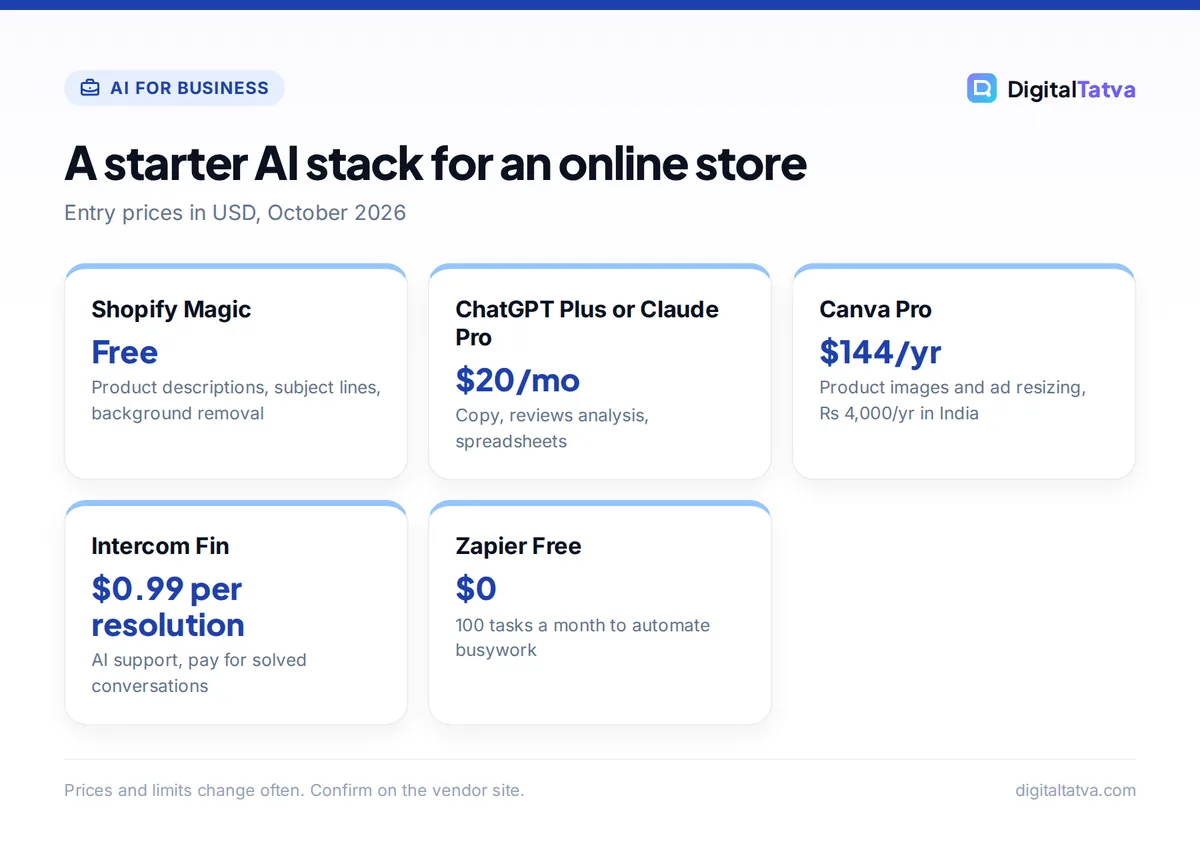
Here is a practical setup by budget. Prices are monthly unless stated.
Free stack
$0
- Shopify Magic and Sidekick (if on Shopify)
- ChatGPT Free or Claude Free
- Canva Free (up to 20 AI uses)
- Tidio Free, Zapier Free
Growth stack
About $32/mo
- ChatGPT Plus or Claude Pro ($20)
- Canva Pro (US$144/year, about $12/month)
- Intercom Fin at $0.99 per resolution, paid as used
Scale stack
$100+/mo
- Growth stack plus an SEO tool (Surfer from $49 annual)
- Zapier Professional or Make for automation
- AI video tool for ads (from about $15 to $29)
Save money: Do not pay for overlapping assistants. One of ChatGPT Plus, Claude Pro or Google AI Pro is enough for most store owners. Claude Pro’s annual billing ($17/month) and Canva Pro’s yearly price are cheaper than paying monthly. Our guide on how small businesses can use AI without a big budget has more ways to cut costs.
Risks to manage when using AI in ecommerce
- Wrong product facts. AI invents specifications, certifications and compatibility. A human must approve every description, especially for electronics, cosmetics, food and children’s products.
- Misleading images and reviews. Never generate fake reviews or alter how a product looks. It drives returns and can break consumer protection and platform rules.
- Customer data. Check whether a tool trains on your data before you paste orders or customer messages. Business plans such as ChatGPT Business say they do not train on workspace data. In India, the DPDP Rules 2025 phase in obligations on consent, security and breach reporting through 2027, so get advice on what applies to your store.
- Bot dead ends. An AI agent that cannot hand over to a person frustrates customers. Always offer a clear “talk to a human” route.
- Brand sameness. If you and your competitors use the same prompts and templates, everything starts to look alike. Feed AI your own voice, photos and customer language.
A short written policy keeps your team consistent. Use our AI usage policy template as a starting point.
How to measure whether AI is growing your sales
Pick one metric per use case before you start, and compare a few weeks before and after:
- Content. Hours spent per new product listing, and conversion rate on rewritten product pages.
- Images and video. Ad click-through rate and cost per purchase for AI-assisted creative versus your old creative.
- Support. Share of conversations resolved by AI, first response time and customer satisfaction scores.
- Email. Open and click rates on AI-drafted subject lines in A/B tests.
- Operations. Hours saved per week from automations, multiplied by what that time costs you.
Our guide on how to measure ROI from AI tools includes a simple framework for turning these numbers into a keep-or-cancel decision for each subscription.
Frequently asked questions
How is AI used in ecommerce?
Online stores use AI to write product descriptions, edit product photos, create video ads, answer customer questions, draft marketing emails, test ad copy, analyze reviews and sales data, translate store content and automate tasks between tools. The most common starting points are product copy, image editing and AI customer support, because they save the most hours quickly.
Is Shopify Magic free?
Yes. Shopify’s help center says Shopify Magic tools “are available for free, regardless of your subscription plan.” It covers product descriptions, email subject lines, headings, background removal, banners, theme generation and customer analytics. Shopify’s Sidekick assistant is also included with your Shopify plan, although features and usage limits vary by plan.
What is the best AI tool for ecommerce product descriptions?
If you sell on Shopify, start with the free Shopify Magic writer inside your admin. For more control over brand voice, or if you sell on Amazon, WooCommerce or your own site, use ChatGPT Plus or Claude Pro at $20 a month with a saved master prompt. Always check AI-written specifications and claims against the real product before publishing.
How much does AI for an online store cost?
You can start at $0 with Shopify Magic, free chat assistants, Canva Free and Tidio Free. A solid growth setup of ChatGPT Plus or Claude Pro plus Canva Pro costs about $32 a month, plus AI support at around $0.99 per resolved conversation with Intercom Fin. Indian sellers pay Rs 4,000 a year for Canva Pro.
Can AI replace customer service staff in ecommerce?
AI can handle a large share of repetitive questions such as order status, returns, shipping and sizing, around the clock. It should not handle refunds disputes, damaged goods or upset customers alone. The best setup lets an AI agent answer common questions from your policies and hands complex conversations to a person with the full context attached.
Where to start with AI in your store
Do not try all twelve uses at once. This week, rewrite your ten best-selling product pages with AI and a strong master prompt, and clean up their photos. Next month, add an AI support agent for order and returns questions and one automation that saves you daily busywork. Measure each change, keep what works and cancel what does not. For ready-made prompts across marketing, sales and operations, see our 60 AI prompts for small business owners. AI tool pricing changes often, so confirm current plans and fees on each vendor’s site before you subscribe.
Pricing and features are checked at the time of writing and can change. Some links may be affiliate links, which never affect our verdicts.



