10 Best AI Video Generators for Creators and Marketers
Runway, Google Veo, HeyGen, Synthesia, Descript and five more AI video generators ranked for 2026, with real credit costs, free plans and who each tool suits.

On this page
The best AI video generators in 2026 are Runway for cinematic text-to-video and image-to-video, Google Veo (through Gemini and Flow) for the best value, and HeyGen or Synthesia for talking-avatar videos. Descript is the pick for editing real footage with AI, and Adobe Firefly is the safest choice for commercial campaigns. OpenAI’s Sora is no longer an option: its app shut down in April 2026 and its API ended on September 24, 2026.
We rank 10 tools below by what kind of video they make best, what they cost as of September 2026, and what you actually get per dollar. Video pricing is credit-heavy and confusing, so we translate credits into seconds wherever the vendor publishes the numbers.
Key takeaways
- Best overall: Runway, with Gen-4.5 plus third-party models like Kling 3.0 and Seedance 2.5, from $15/month ($12/month annual).
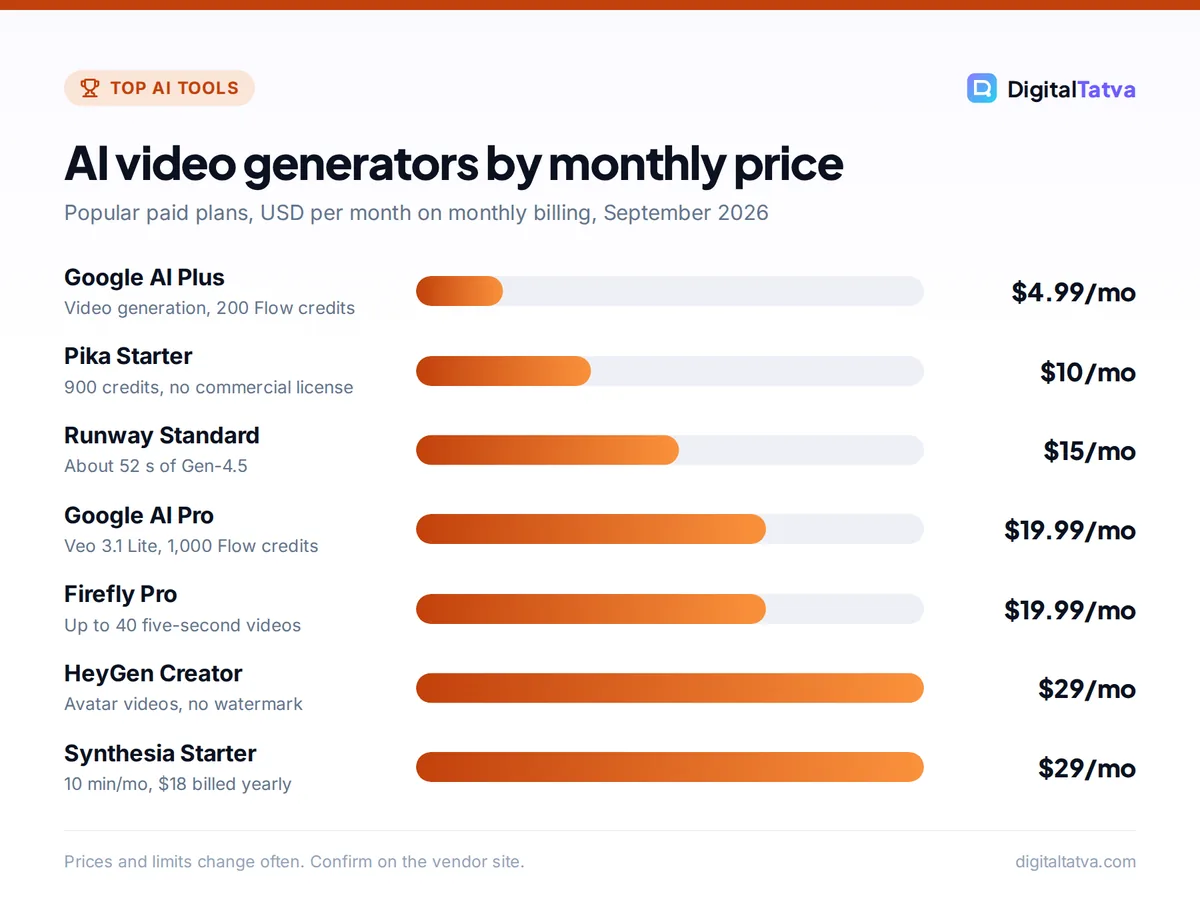
- Best value: Google AI Pro at $19.99/month (Rs 1,950 in India) bundles Veo 3.1 Lite video, 1,000 Flow credits, Gemini and 5 TB storage.
- Best for avatar videos: HeyGen for marketing and social, Synthesia for training and corporate content.
- Best for editing: Descript lets you edit video by editing the transcript.
- Sora is discontinued: ignore older guides that recommend it.
Quick picks: best AI video generators at a glance
| Tool | Best for | Starting paid price | Free plan |
|---|---|---|---|
| Runway | Cinematic generative video | $15/mo ($12/mo annual) | 125 one-time credits |
| Google Veo (Gemini, Flow) | Best value bundle | $4.99/mo (AI Plus) | Limited Flow access |
| Kling AI | Realistic motion on a budget | Around $10/mo (unverified) | Daily credits, watermark |
| HeyGen | Avatar videos for marketing | $29/mo (Creator) | 3 videos/mo, watermark |
| Synthesia | Training and corporate video | $29/mo ($18/mo yearly) | Up to 10 min/mo |
| Descript | Editing real footage with AI | About $24/mo ($16 annual) | 60 media min/mo |
| Adobe Firefly | Commercially safe clips | $19.99/mo (Pro, video) | Free daily generations |
| Midjourney | Animating Midjourney images | $10/mo ($8/mo annual) | No |
| Pika | Fun social clips and effects | $10/mo ($8/mo annual) | Credit packs only |
| CapCut | Short-form editing for Reels and Shorts | Around $9.99/mo (unverified) | Yes |
Watch out: OpenAI announced the end of Sora in March 2026. The web and app experiences closed on April 26, 2026, and the Sora API ended on September 24, 2026, according to OpenAI’s Sora discontinuation notice. Video generation does not appear on current ChatGPT plan listings.
The 10 best AI video generators reviewed
1. Runway: Best overall AI video generator
- Starting price: $15/mo Standard, or $12/mo annual ($144/year)
- Free plan: Yes, 125 one-time credits
- Best for: filmmakers, agencies, creative directors
Runway remains the most complete creative video platform. Its flagship Gen-4.5 model handles text-to-video and image-to-video with strong camera control, and the app also offers third-party models including Kling 3.0, Nano Banana Pro and Seedance 2.5. Having several leading models in one subscription is a real advantage when one model struggles with a shot.
Runway publishes clear conversions. Standard’s 625 monthly credits equal about 52 seconds of Gen-4.5 or 104 seconds of the cheaper Gen-4 Turbo. Pro ($35, or $28 annual) gives 2,250 credits, about 187 seconds of Gen-4.5, plus unlimited Topaz upscaling. Max ($95, or $76 annual) gives 9,500 credits, about 791 seconds. That works out to roughly $0.29 per second of Gen-4.5 on Standard monthly. The old Unlimited plan is gone. Our Runway pricing guide goes deeper into the real cost per video.
Skip it if: you need talking avatars or simple editing. It is built for generative footage.
2. Google Veo: Best value AI video generator
- Starting price: $4.99/mo AI Plus; $19.99/mo AI Pro (Rs 1,950 in India)
- Free plan: Limited Flow access, no Veo listed
- Best for: creators and small businesses already using Google
Google bundles video generation into its Google AI subscriptions, used through the Gemini app and Flow, Google’s AI filmmaking tool. AI Plus includes video generation and 200 Flow credits a month. AI Pro includes Veo 3.1 Lite, 1,000 Flow credits, Gemini with 4x Free usage limits and 5 TB of storage. AI Ultra (from $99.99/month, Rs 6,500 in India) unlocks the full Veo 3.1 model with 10,000 to 25,000 Flow credits.
Google does not publish how many credits each clip uses, so we cannot give a cost per second. Still, for anyone who would pay for Gemini or Google storage anyway, AI Pro is excellent value. Older articles that quote Ultra at $249.99 are out of date. See our Gemini plans explained.
Skip it if: you need predictable credit costs for client budgeting.
3. Kling AI: Best for realistic motion on a budget
- Starting price: around $10/mo Standard per third-party sources (unverified)
- Free plan: About 66 daily credits that expire in 24 hours, watermarked
- Best for: social creators who want realistic human motion
Kling’s current model, Kling 3.0, is known for natural human movement and physics, and it is popular for short social clips. It is also available inside Runway. Third-party sources agree on credit allowances (Standard 660, Pro 3,000, Premier 8,000 and Ultra 26,000 credits a month), but they disagree on prices, and the official page would not load for us. Treat any dollar figure you see as approximate.
The free tier adds a watermark and does not include commercial rights, according to those same sources. Paid tiers remove the watermark.
Skip it if: you need verified pricing and clear commercial terms for client work.
4. HeyGen: Best for avatar videos in marketing
- Starting price: $29/mo Creator
- Free plan: Yes, 3 videos/month up to 1 minute, watermarked
- Best for: marketers, course creators, sales teams
HeyGen turns a script into a video of a realistic presenter, using stock avatars or a custom avatar of yourself. Its current avatar model is Avatar IV. It is great for product explainers, personalized sales videos and social content in multiple languages.
The free plan includes 500+ stock avatars, 1 custom avatar and 1080p export, limited to 3 one-minute videos a month with a watermark. Creator removes the watermark and allows videos up to 30 minutes. Pro ($49) adds 4K export, and Business ($149 plus $20 per seat) allows 60-minute videos and 5 custom avatars. Compare it with its main rival in Synthesia vs HeyGen.
Skip it if: you want cinematic scenes rather than a presenter on screen.
5. Synthesia: Best for training and corporate videos
- Starting price: $29/mo Starter, or $18/mo billed yearly
- Free plan: Yes, up to 10 minutes/month with 9 avatars
- Best for: HR, L&D teams, internal communications
Synthesia focuses on business video: onboarding, compliance training, product walkthroughs and internal updates. Its editor feels like building slides, which makes it easy for non-video people. Enterprise adds SCORM export for learning systems and SSO.
The free Basic plan needs no card and gives up to 10 minutes a month. Starter gives 10 minutes with 125+ avatars and logo removal. Creator ($89/month) raises that to 30 minutes, 180+ avatars, 5 personal avatars and API access.
Skip it if: you make short, punchy social content. HeyGen is usually a better fit.
6. Descript: Best for editing real footage with AI
- Starting price: about $24/mo Hobbyist, or about $16/mo annual (check live page)
- Free plan: Yes, 60 media minutes/month, 720p with watermark
- Best for: podcasters, YouTubers, course creators
Descript is not a text-to-video generator. It transcribes your recording and lets you edit video by deleting words in the transcript. AI tools remove filler words, fix eye contact, clean audio and cut clips for social. For anyone who films themselves, that saves hours.
Hobbyist includes 10 media hours and 400 AI credits a month at 1080p. Creator gives 30 hours, 800 AI credits and 4K. Descript says annual billing saves up to 35%.
Skip it if: you do not have your own footage to start from.
7. Adobe Firefly: Best for commercially safe video clips
- Starting price: $19.99/mo Firefly Pro (up to 40 five-second videos)
- Free plan: Yes, free daily generations
- Best for: brands, agencies and Premiere Pro users
Adobe positions Firefly outputs as safe for commercial use because its models are trained on licensed and public domain content. That matters for ad campaigns where legal teams ask how footage was made. Firefly also includes partner models such as Luma Ray3.14.
Firefly Pro gives 4,000 credits, enough for up to 40 five-second videos. Pro Plus ($49.99) allows up to 100, and Premium ($199.99) includes unlimited use of the Firefly Video Model in Generate Video. Read Canva vs Adobe Firefly if you are choosing a design suite.
Skip it if: you need long clips. Firefly works in short segments.
8. Midjourney: Best for animating your Midjourney images
- Starting price: $10/mo Basic, $8/mo annual
- Free plan: No
- Best for: artists who already use Midjourney for stills
Every Midjourney plan can turn images into short videos in Fast mode, up to 21 seconds with extensions. The look matches Midjourney’s image style, which is great for mood pieces and social loops. Relax mode video (SD only) is limited to Pro and Mega, and an HD batch of 4 uses about 26 GPU minutes. See Midjourney pricing for GPU hours by plan.
Skip it if: you need dialogue, avatars or longer narrative video.
9. Pika: Best for playful social clips and effects
- Starting price: $10/mo Starter, or $8/mo annual
- Free plan: No monthly credits, credit packs only
- Best for: social media creators and meme makers
Pika is built for quick, fun clips with creative effects, and it also gives access to third-party models such as Seedance 2.5, MiniMax H3 and Wan 3.0 alongside its own Pika 2.5. Starter gives 900 credits, but note that it does not include a commercial license. You need Creator ($35, or $28 annual) with 3,150 credits for commercial use.
Skip it if: you make brand or client videos on a Starter budget.
10. CapCut: Best for short-form editing
- Starting price: around $9.99/mo Standard per third-party sources
- Free plan: Yes
- Best for: Reels, Shorts and TikTok creators
CapCut is a video editor with AI features such as auto captions, background removal and templates, rather than a pure generator. It is the fastest way to polish vertical video. We could not verify CapCut’s prices on an official page, and they vary by platform and region, so check inside the app before paying.
Skip it if: you need generative scenes from text prompts.
How to choose the right AI video generator
Start with the type of video you make, because the tools above solve very different problems.
| You want to make | Best tool | Runner-up |
|---|---|---|
| Cinematic ads, music videos, b-roll | Runway | Google Veo (AI Pro or Ultra) |
| Presenter or spokesperson videos | HeyGen | Synthesia |
| Training and onboarding modules | Synthesia | HeyGen |
| Edited podcasts and YouTube videos | Descript | CapCut |
| Commercially safe brand clips | Adobe Firefly | Runway |
| Quick social loops | Pika or Midjourney | Kling |
- Write the script and shot list first. Credits burn fast when you experiment without a plan. Describe subject, action, camera move, lighting and duration for each shot.
- Generate stills before video. Create key frames with an image tool, then animate them with image-to-video. It gives you more control. Our ranking of the best AI image generators helps here.
- Use cheaper models for drafts. On Runway, Gen-4 Turbo costs about half as many credits per second as Gen-4.5, so test there first.
- Add voice and music separately. Tools like ElevenLabs produce better voiceovers than most built-in options. See our best AI voice generators list and ElevenLabs pricing guide.
- Edit and caption last. Assemble clips in Descript or CapCut, add captions and export in the right aspect ratio.
For a full walkthrough, read our guide on how to make an AI video from scratch.
Pricing notes: the real cost of AI video
AI video is far more expensive than AI images, and most plans run out faster than people expect. A few rules help you budget.
- Convert credits to seconds. Runway Standard gives about 52 seconds of Gen-4.5 per month. That is enough for testing, but not for a weekly ad campaign.
- Check commercial rights. Pika Starter and free tiers of Kling do not include commercial use. Upgrade before using clips for clients.
- Annual billing helps. Runway drops from $15 to $12, Synthesia Starter from $29 to $18, and Pika from $10 to $8 a month. Our guide on annual vs monthly AI plans explains when to commit.
- Ignore promo prices when comparing. Adobe’s first-year discounts on Firefly Pro Plus and Premium end on October 21, so compare regular prices.
Save money: If you already pay for Google storage or Gemini, Google AI Pro may give you enough video generation without a separate Runway plan. Agencies juggling several tools should read our guide to AI for marketing agencies and our tips to save money on AI subscriptions.
Frequently asked questions
What is the best AI video generator in 2026?
Runway is the best overall AI video generator in 2026 because it combines its own Gen-4.5 model with third-party models like Kling 3.0 and Seedance 2.5 in one app, and publishes clear credit costs. Google Veo through Google AI Pro is the best value, while HeyGen and Synthesia lead for avatar-based videos.
Is Sora still available?
No. OpenAI discontinued Sora in 2026. The Sora web and app experiences closed on April 26, 2026, and the Sora API ended on September 24, 2026. You cannot buy or use Sora as a standalone product. Runway, Google Veo and Kling are the main alternatives for text-to-video generation.
Is there a free AI video generator?
Yes, with limits. HeyGen Free gives 3 one-minute videos a month with a watermark, Synthesia Basic gives up to 10 minutes a month, Descript Free includes 60 media minutes, and Runway gives 125 one-time credits. Adobe Firefly offers free daily generations. Free output is usually watermarked or lacks commercial rights.
How much does AI video cost per second?
It depends on the tool and model. On Runway Standard at $15 a month, Gen-4.5 works out to roughly $0.29 per second, and Gen-4 Turbo costs about half that. Firefly Pro at $19.99 covers up to 40 five-second clips. Google does not publish per-clip credit costs for Veo, so test before committing.
Which AI video tool is best for YouTube and Instagram?
For talking-head content, record yourself and edit with Descript or CapCut. For faceless channels and explainers, HeyGen avatars work well. For eye-catching b-roll and ads, use Runway or Google Veo. Our guide to AI tools for social media covers scheduling and captions too.
Our verdict: the best AI video generator for you
Choose Runway if you want the most capable generative video platform with transparent credits. Choose Google AI Pro if you want strong video generation bundled with Gemini and storage at $19.99 a month. Pick HeyGen for marketing avatars, Synthesia for training content, Descript for editing your own footage, and Adobe Firefly when commercial safety matters most.
Start with free tiers, script your shots before spending credits, and upgrade only once you know your monthly output. Video pricing changes often, so confirm current plans on the official Runway pricing page and HeyGen pricing page before you subscribe.
Pricing and features are checked at the time of writing and can change. Some links may be affiliate links, which never affect our verdicts.