Synthesia vs HeyGen: Best AI Avatar Video Tool
Synthesia vs HeyGen compared on avatar realism, editing, video minutes, credits, pricing and enterprise features, with a clear pick for marketers and training teams.

On this page
- Key takeaways
- Quick verdict: Synthesia vs HeyGen
- Avatar quality and realism
- Editing, templates and workflow
- Pricing compared plan by plan
- Voices, languages and translation
- Integrations, API and use cases
- Privacy, consent and commercial use
- Choose Synthesia if, choose HeyGen if
- Frequently asked questions
- Our verdict
HeyGen is the better AI avatar video tool for most marketers, creators and small teams in 2026: it has a usable free plan, watermark-free videos from $29 a month, 4K export from $49, and its Avatar IV model makes talking-head videos look lifelike. Synthesia is the better choice for companies producing training and internal communications at scale, thanks to its structured editor, collaboration, SCORM export and enterprise controls. Pick HeyGen for social and sales video; pick Synthesia for L&D and corporate content.
This comparison covers avatar quality, editing, limits per plan, pricing, languages, integrations and privacy, so you can choose the right plan the first time.
Key takeaways
- HeyGen Creator ($29/mo) removes the watermark and allows videos up to 30 minutes long; Pro ($49/mo) adds 4K export.
- Synthesia Starter costs $29/mo monthly or $18/mo billed yearly, but includes only 10 minutes of video per month.
- Synthesia Creator ($89/mo) adds 5 personal avatars and API access; HeyGen Business ($149/mo plus $20 per seat) includes 5 custom avatars.
- Synthesia is stronger for training teams (SCORM, SSO and unlimited minutes on Enterprise). HeyGen is stronger for fast marketing content.
- Neither pricing page states commercial use terms, so check each vendor’s terms before running ads.
Quick verdict: Synthesia vs HeyGen
Both tools let you type a script, pick a digital presenter (an “avatar”), and get a video of that presenter speaking your words. The difference is focus. HeyGen chases realism and speed for marketing: product demos, UGC-style ads, personalized sales videos and social clips. Synthesia chases consistency and governance for enterprises: onboarding courses, policy updates, how-to libraries and multilingual training.
If you want to see how both fit into the wider market, our list of the best AI video generators for creators and marketers compares them with text to video tools like Runway.
| Criteria | Synthesia | HeyGen |
|---|---|---|
| Best for | Training, L&D, internal comms | Marketing, sales, social video |
| Free plan | Basic: up to 10 min/mo, 9 avatars, no card | 3 videos/mo, up to 1 min each, watermark |
| Entry paid plan | Starter $29/mo or $18/mo yearly | Creator $29/mo |
| Video minutes or length | 10 min/mo (Starter), 30 min/mo (Creator) | Credit based; videos up to 30 min (Creator, Pro), 60 min (Business) |
| Stock avatars | 125+ (Starter), 180+ (Creator), 240+ (Enterprise) | 500+ |
| Custom avatars | 5 personal avatars on Creator, unlimited on Enterprise | 1 on Free, 5 on Business |
| Max export | Check vendor page | 1080p (Free, Creator), 4K (Pro, Business) |
| API | Creator and above | Check vendor page for current plans |
| Enterprise extras | SSO, SCORM, unlimited minutes | No duration limit, contact sales |
Avatar quality and realism
HeyGen’s current avatar model, Avatar IV, is the headline feature. In everyday use it produces natural head movement, expressive faces and convincing lip sync, even from a single photo. That makes it popular for talking-head marketing videos where viewers should not feel they are watching a robot. HeyGen also offers more than 500 stock avatars, so it is easy to find a presenter that matches your audience.
Synthesia’s avatars are polished and consistent, which is what corporate video needs: the same presenter, the same framing, the same tone across 200 training modules. They can feel a little more formal than HeyGen’s best output, but that reads as professional in a course or HR update. Synthesia offers 125+ avatars on Starter, 180+ on Creator and 240+ on Enterprise.
Tip: Judge avatars on a 60-second script with a product name, a number and a question. Short clips hide lip sync drift that becomes obvious over a full minute.
Editing, templates and workflow
Synthesia: slide-based production
Synthesia’s editor works like a presentation tool. Each scene is a slide with an avatar, script, text, images and screen recordings, which makes it easy for instructional designers to build structured lessons. Collaboration is built in: Starter includes 1 editor and 3 guests, and higher plans add more. Enterprise adds SCORM export so videos drop straight into a learning management system, plus SSO for IT teams.
If your videos start life as slide decks, pair Synthesia with one of the best AI presentation makers to draft the structure before converting it into video.
HeyGen: fast, flexible marketing video
HeyGen is designed for speed. You can generate a talking-head video from a script in minutes, create a custom avatar of yourself, translate videos into other languages with lip sync, and produce multiple versions for different audiences. Videos can run up to 30 minutes on Creator and Pro, and up to 60 minutes on Business, which covers webinars and long demos too.
For step-by-step production advice with any of these tools, our guide on how to make an AI video from text in 30 minutes walks through scripting, voice and editing.
Pricing compared plan by plan
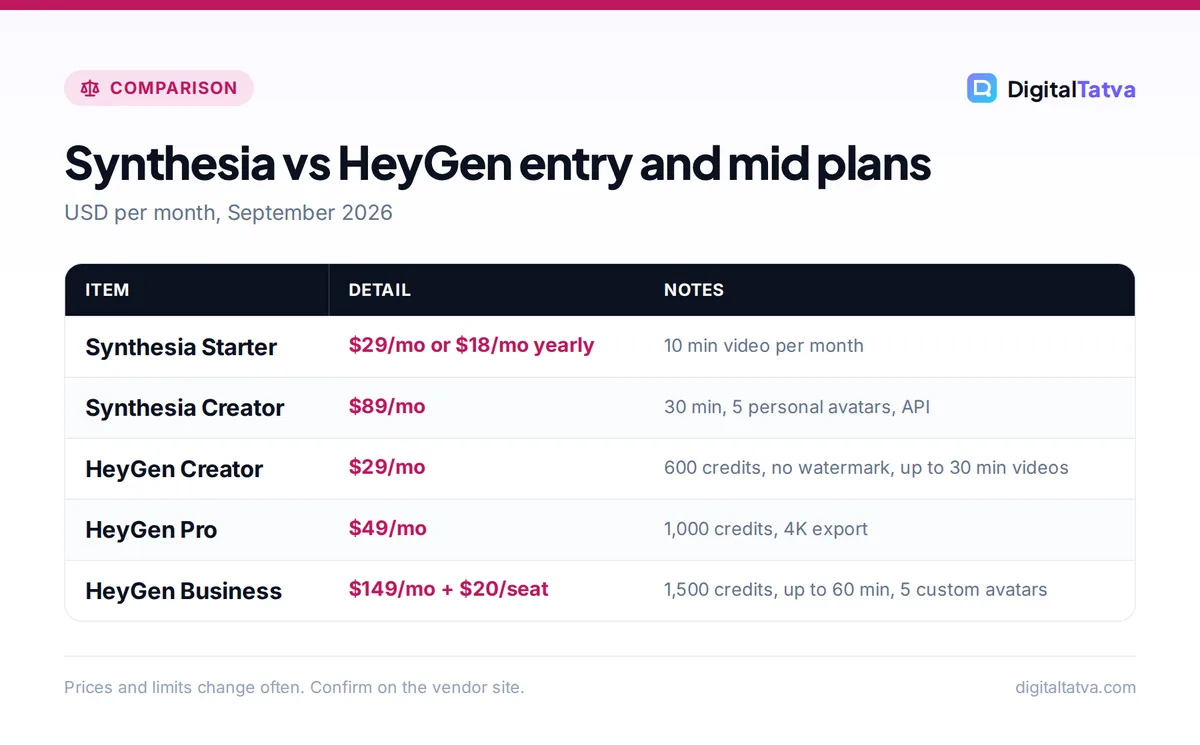
The two tools measure usage differently. Synthesia gives you a fixed number of video minutes per month (and also shows monthly credits: 1,200 on Starter and 3,600 on Creator). HeyGen gives you credits (600 on Creator, 1,000 on Pro, 1,500 on Business) and a maximum length per video. HeyGen does not state a fixed credits-to-minutes conversion on its pricing page, so check how many credits your chosen avatar and features use.
Synthesia plans
| Plan | Price | Video per month | Highlights |
|---|---|---|---|
| Basic (free) | $0, no card | Up to 10 min | 9 avatars, 1 editor |
| Starter | $29/mo monthly or $18/mo yearly | 10 min | 125+ avatars, 1 editor and 3 guests, logo removal, 1,200 credits |
| Creator | $89/mo monthly | 30 min | 180+ avatars, 5 personal avatars, API, 3,600 credits |
| Enterprise | Custom | Unlimited | 240+ avatars, unlimited personal avatars, SSO, SCORM |
Synthesia’s Creator annual price was not captured in our research, so check the official Synthesia pricing page for the current yearly rate.
HeyGen plans
| Plan | Price | Credits | Highlights |
|---|---|---|---|
| Free | $0 | n/a | 3 videos/mo up to 1 min, watermark, 1080p, 1 custom avatar |
| Creator | $29/mo monthly (around $24/mo on annual, unconfirmed) | 600 | No watermark, videos up to 30 min, 1080p |
| Pro | $49/mo | 1,000 | 4K export, videos up to 30 min |
| Business | $149/mo plus $20/seat/mo | 1,500 | Videos up to 60 min, 4K, 5 custom avatars |
| Enterprise | Contact sales | Custom | No duration limit |
See the official HeyGen pricing page for current credit costs per feature.
What this means in practice
At the entry level, Synthesia Starter billed yearly is $18 a month, or $216 a year, for 10 minutes of video per month. That is enough for about five 2-minute explainers. At $29 monthly, it works out to $2.90 per video minute. Synthesia Creator at $89 for 30 minutes is about $2.97 per minute, but you are also paying for personal avatars and API access.
HeyGen Creator at $29 is the cheapest way to get watermark-free, long-form avatar video, and Pro at $49 is the cheapest route to 4K. A three-person marketing team on HeyGen Business pays $149 plus 3 x $20, which is $209 a month. For agencies deciding between team plans and individual seats, our guide to when AI team plans actually save money helps with that math.
Save money: Finalize the script and on-screen text before generating. Regenerating a video to fix one sentence costs the same minutes or credits as the original. Also compare yearly billing: Synthesia Starter drops from $29 to $18 a month. Read our guide on annual vs monthly AI plans before you commit.
Pricing in India
We could not confirm official INR pricing for either tool, so Indian buyers should expect to pay the USD price by international card, plus any bank forex charges and applicable GST. For more ways to cut costs, see our list of 12 ways to save money on AI subscriptions.
Voices, languages and translation
Both platforms include built-in AI voices and support many languages, which is a big reason teams use them for global training and localized marketing. HeyGen’s video translation, which re-voices your video and adjusts lip movement, is especially useful for creators repurposing one video for several markets. Synthesia makes it simple to produce the same course in many languages while keeping the presenter and layout identical.
If you want a more distinctive voice than the built-in options, you can generate narration separately and import it. Our comparison of ElevenLabs vs Murf AI covers the leading voice tools, and our guide to cloning your voice with ElevenLabs explains the safe way to do it.
Integrations, API and use cases
Synthesia includes API access from the Creator plan, so developers can generate videos programmatically, for example producing a personalized onboarding video for each new customer. Enterprise adds SCORM for LMS platforms. HeyGen is popular for sales outreach and ecommerce, where teams produce many short, tailored videos. Check HeyGen’s pricing page for which plans currently include API access.
Typical fits we see:
- Ecommerce brands: HeyGen for product explainers and ad variants. Our guide to AI for ecommerce has more ideas.
- Real estate agents: HeyGen for quick listing walkthrough intros; see AI tools for real estate agents.
- Agencies: HeyGen for client social content, Synthesia for enterprise clients that need training libraries.
- HR and L&D teams: Synthesia, for SCORM, SSO and consistent presenters.
Privacy, consent and commercial use
Custom avatars are built from a real person’s face and voice, so consent matters. Both platforms build consent steps into custom avatar creation, and you should keep written consent on file for any employee or actor. Neither vendor’s pricing page states its commercial use terms, so read the terms of service before running paid ads with avatar videos. For teams, add avatar and voice cloning rules to your AI usage policy.
Enterprises with strict IT requirements will find Synthesia’s Enterprise plan (SSO, unlimited personal avatars, SCORM) the more familiar procurement package. HeyGen Enterprise also exists, with custom terms through sales.
HeyGen pros
- Very lifelike avatars with Avatar IV
- 500+ stock avatars even on Free
- 4K export from $49/mo
- Long videos (30 to 60 minutes) on paid plans
HeyGen cons
- Credit system makes minutes harder to predict
- Free videos carry a watermark and cap at 1 minute
- Seat fees add up on Business
Synthesia pros
- Clear minutes-per-month allowances
- Slide-style editor built for training
- SCORM, SSO and unlimited minutes on Enterprise
- Cheap yearly Starter at $18/mo
Synthesia cons
- Only 10 minutes per month on Starter
- Creator jumps to $89/mo
- Avatars feel more formal for social content
Choose Synthesia if, choose HeyGen if
Choose Synthesia if you
- Build training courses, onboarding or compliance videos.
- Need SCORM export, SSO or unlimited minutes (Enterprise).
- Want predictable monthly minutes rather than credits.
- Have instructional designers who think in slides.
Choose HeyGen if you
- Make marketing, sales or social videos where realism sells.
- Want watermark-free video on a $29 budget or 4K at $49.
- Need long videos up to 30 or 60 minutes.
- Want to test for free with 3 short videos a month.
Not sure you need an avatar at all? For cinematic B-roll without a presenter, our breakdown of Runway pricing and the real cost per video is a useful comparison point. And for scripts, try our ChatGPT prompts for marketing.
Frequently asked questions
Is HeyGen better than Synthesia?
For marketing and social video, usually yes. HeyGen’s Avatar IV looks very lifelike, it offers 500+ stock avatars, and watermark-free video starts at $29 a month with 4K from $49. Synthesia is better for training and corporate teams that need SCORM, SSO, consistent presenters and predictable monthly video minutes.
Is there a free version of Synthesia or HeyGen?
Yes. Synthesia Basic is free with no card, up to 10 minutes a month and 9 avatars. HeyGen Free allows 3 videos a month, up to 1 minute each, with a watermark, 1080p export and 1 custom avatar. Both are fine for testing, but HeyGen’s watermark rules out most published work.
How much does Synthesia cost per month?
Synthesia Starter costs $29 a month on monthly billing or $18 a month billed yearly, for 10 minutes of video per month. Creator costs $89 a month for 30 minutes, 5 personal avatars and API access. Enterprise is custom priced with unlimited minutes. Confirm the current yearly Creator price on Synthesia’s site.
Can I use HeyGen or Synthesia videos commercially?
Paid plans are designed for business use, but neither pricing page spells out commercial terms, so read each vendor’s terms of service before running ads. Always get written consent from anyone whose face or voice you turn into a custom avatar, and avoid publishing HeyGen Free videos because of the watermark.
How much do Synthesia and HeyGen cost in India?
We could not confirm official INR prices for either tool at the time of writing. Most Indian users pay the USD price by international card, for example $29 a month for HeyGen Creator or $18 a month for Synthesia Starter billed yearly, plus any forex fees and GST that apply.
Our verdict
For most marketers, founders and creators, HeyGen is the better buy: more realistic avatars, a generous stock library, long videos and 4K at a lower price. For companies building training libraries, Synthesia is the safer, more structured choice, and its Enterprise plan answers the questions IT and L&D teams will ask. Start with each tool’s free plan using the same script, then upgrade the one whose output you would actually publish. Plans and prices change often, so confirm the latest details on each vendor’s website before you subscribe.
Pricing and features are checked at the time of writing and can change. Some links may be affiliate links, which never affect our verdicts.