10 Best AI Presentation Makers in 2026
The 10 best AI presentation makers in 2026, from Gamma and Canva to Copilot in PowerPoint, Gemini in Slides and Claude, with real prices, free plans and a simple deck workflow.

On this page
The best AI presentation maker for most people in 2026 is Gamma, which turns a prompt or document into a designed deck in about a minute and exports to PowerPoint, PDF and Google Slides. Canva is the better pick if you care about brand templates and visuals, and Microsoft Copilot in PowerPoint or Gemini in Google Slides make sense if your company already pays for Microsoft 365 or Google Workspace. Claude and ChatGPT are strongest at the thinking part: structure, storyline and speaker notes.
Below we rank 10 AI presentation tools on output quality, editing control, export options and value. Prices come from vendor pages as of September 2026. Where a vendor’s page did not show a price clearly, we say so rather than guess.
Key takeaways
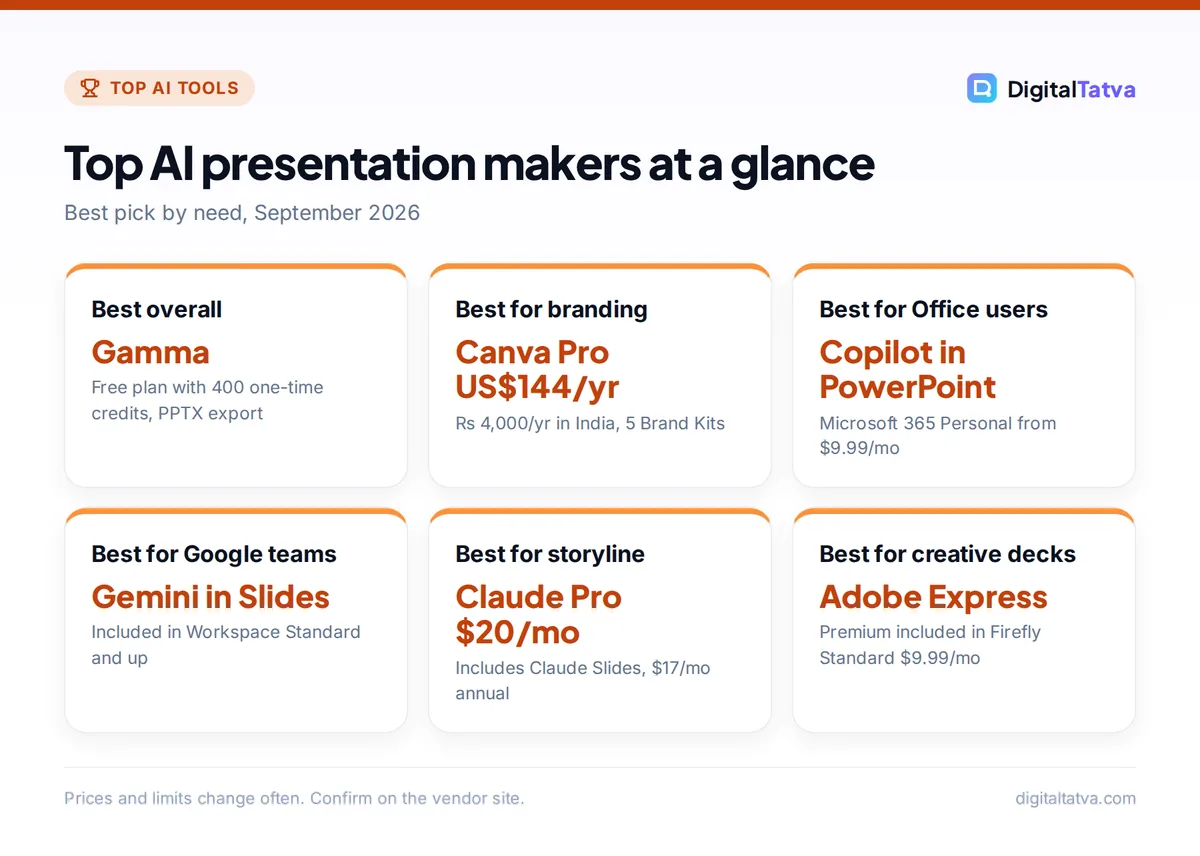
- Best overall: Gamma. The free plan gives 400 one-time credits and exports to PPTX, PDF and Google Slides.
- Best for design and brand kits: Canva, with Pro at US$144/year (Rs 4,000/year in India).
- Best inside existing office suites: Copilot in PowerPoint (Microsoft 365 Personal from $9.99/month) and Gemini in Google Slides (Workspace Standard and up).
- Best for storyline and content: Claude Pro ($20/month) now includes Claude Slides, and ChatGPT is great for outlines and speaker notes.
- Always edit the output. AI decks look finished before they are accurate, so check every number and claim.
Quick picks: best AI presentation makers compared
| Tool | Best for | Starting price | Free plan |
|---|---|---|---|
| Gamma | Fast, polished decks from a prompt | About $9/mo (Plus, third-party figure) | Yes, 400 one-time credits |
| Canva | Branded, visual presentations | US$144/yr, Rs 4,000/yr (Pro) | Yes, up to 20 AI uses |
| Microsoft Copilot in PowerPoint | Office and corporate users | $9.99/mo (Microsoft 365 Personal) | No Copilot in desktop apps |
| Gemini in Google Slides | Google Workspace teams | Included in Workspace Standard and up | No |
| Claude | Storyline, research-heavy decks | $20/mo ($17 annual) | Yes (Slides on paid plans) |
| ChatGPT | Outlines, speaker notes, quick PPTX drafts | $8/mo (Go), $20/mo (Plus) | Yes |
| Beautiful.ai | Auto-formatting business slides | Paid plans (check vendor) | Trial |
| Prezi | Non-linear, zooming talks | Paid plans (check vendor) | Limited free option |
| Plus AI | AI inside Google Slides and PowerPoint | Paid plans (check vendor) | Trial |
| Adobe Express | Creative, image-rich decks | Included in Firefly Standard ($9.99/mo) | Yes |
The 10 best AI presentation makers in 2026
1. Gamma: Best AI presentation maker overall
- Starting price: about $9/mo for Plus (third-party figure; confirm on Gamma’s site)
- Free plan: Yes, 400 one-time credits
- Best for: founders, consultants, students and marketers who need decks fast
Gamma builds a complete, well-designed deck from a one-line prompt, pasted notes or an uploaded document. It works in “cards” rather than fixed slides, which makes layouts flexible, and you can refine any card with a follow-up prompt. The free plan includes 400 credits that do not refresh (you earn 200 more per referral), up to 10 cards per prompt, and export to PDF, PPTX and Google Slides.
Gamma’s official page lists Free, Plus, Pro and Ultra, but prices did not display when we checked. Third-party reports list Plus at about $9/month with 1,000 credits and branding removal, Pro at about $18/month with 4,000 credits, custom branding, analytics and API access, and Ultra at about $90/month. Unused credits roll over up to 2x your monthly allocation. Read our full Gamma AI review for strengths and limits.
2. Canva: Best for branded, visual presentations
- Starting price: Pro US$144/yr; Rs 4,000/yr in India
- Free plan: Yes, up to 20 AI uses
- Best for: marketers, small businesses, educators
Canva’s AI can generate a first-draft deck from a prompt, then you finish it with the biggest template and asset library of any tool here. Brand Kits keep fonts, colors and logos consistent, which is why marketing teams prefer it. Free includes up to 20 uses of Canva’s AI. Pro gives 10x more AI, 5 Brand Kits and 100 GB of storage. Business costs US$250/year per person (Rs 6,800/year in India) with 20x the Free AI allowance.
Indian users will also see Pro Lite at Rs 1,590/year, but it has the same 20 AI uses as Free. See our Canva pricing guide and Canva AI review, or the official Canva pricing page.
3. Microsoft Copilot in PowerPoint: Best for Office users
- Starting price: $9.99/mo or $99.99/yr (Microsoft 365 Personal)
- Free plan: Free Copilot does not work inside desktop Office apps
- Best for: corporate teams and anyone who must deliver .pptx files
Copilot in PowerPoint can create a deck from a Word document, summarize a long presentation, and rewrite slides in place, all inside the file format your clients and managers expect. For individuals, Microsoft 365 Personal ($9.99/month) includes Copilot in the apps, and Microsoft 365 Premium ($19.99/month, up to 6 people) offers more extensive AI use.
Businesses can add Microsoft 365 Copilot Business at $21/user/month annual list, or buy Business Standard with Copilot at $23.50/user/month annual. Design quality is decent but less striking than Gamma. Our Microsoft Copilot pricing guide compares every bundle.
4. Gemini in Google Slides: Best for Google Workspace teams
- Starting price: included in Google Workspace Business Standard and up
- Free plan: No
- Best for: teams that already share decks in Google Drive
In Google Workspace, Gemini is bundled into Business plans, and Gemini in Slides is available from the Standard plan upward. It can draft slides, generate images, and pull context from your Docs and Drive files. Third-party sources list Workspace Standard at about $14/user/month on annual billing, but official prices load dynamically, so confirm on Google’s site.
The advantage is zero extra tools: your deck stays in Drive with normal sharing and comments. The limitation is design, which is plainer than Gamma or Canva. Learn the workflow in how to use Gemini in Gmail, Docs and Sheets.
5. Claude: Best for storyline and research-heavy decks
- Starting price: $20/mo, or $17/mo billed annually (Pro)
- Free plan: Yes, but Claude Slides is listed on paid plans
- Best for: consultants, analysts, founders pitching investors
The hard part of a presentation is the argument, not the layout. Claude is our favorite tool for turning a messy brief, a research report or a long transcript into a tight storyline with one clear message per slide. Claude Pro now includes Claude Design, Slides and Docs, and paid plans handle up to 1M tokens on Opus 5.5 and Sonnet 5.5, so you can feed it a full report.
A good workflow is to build the storyline in Claude, then paste it into Gamma or Canva for design. Keep your brand guidelines in a project using our guide to Claude Projects, and see the Claude pricing guide for plan limits.
6. ChatGPT: Best for outlines, speaker notes and quick PPTX drafts
- Starting price: $8/mo (Go), $20/mo (Plus)
- Free plan: Yes
- Best for: students and busy professionals who need a fast first draft
ChatGPT is not a design tool, but it is excellent at slide outlines, speaker notes, rehearsal questions and turning data into chart-ready tables. It can also generate a basic downloadable PowerPoint file, which is fine as a starting point for internal meetings. It can create images for title slides too.
Plus at $20/month gives access to stronger models and higher limits than Go or Free. For a deeper look at prompting, read our prompt engineering guide. If you want visuals beyond ChatGPT, see our roundup of the best AI image generators.
7. Beautiful.ai: Best for auto-formatting business slides
- Starting price: paid plans, check the vendor pricing page
- Free plan: Trial
- Best for: sales teams and managers who hate fiddling with alignment
Beautiful.ai uses “smart slides” that rearrange themselves as you add content, so text boxes, charts and images always stay aligned. Its AI can generate a deck from a prompt, but the real value is that the deck stays tidy as you edit it. That makes it strong for teams producing lots of similar sales or reporting decks.
The tradeoff is less creative freedom than Canva. We could not verify current prices, so check the vendor site before you commit.
8. Prezi: Best for non-linear, zooming presentations
- Starting price: paid plans, check the vendor pricing page
- Free plan: Limited free option
- Best for: teachers, speakers and anyone who wants to stand out
Prezi’s open canvas lets you zoom between topics instead of flipping slides, which works well for storytelling talks and lessons. Its AI features can turn an outline into a Prezi layout and suggest structure. It is less suited to corporate decks that must be shared as PowerPoint files.
Use it when the presentation is live and visual. Skip it for board decks and investor reports, where a conventional slide flow is expected.
9. Plus AI: Best AI add-on for Google Slides and PowerPoint
- Starting price: paid plans, check the vendor pricing page
- Free plan: Trial
- Best for: people who must stay inside Slides or PowerPoint
Plus AI works as an add-on inside Google Slides and PowerPoint, generating slides and rewriting content without moving you into a new app. That matters if your company has a mandatory template or a strict file workflow. It is a good alternative to Gemini or Copilot if your workplace plan does not include AI.
Pricing was not in our verified sources, so check the vendor page. Test it on your own template before buying, since template handling varies.
10. Adobe Express: Best for creative, image-rich decks
- Starting price: Adobe Express Premium is included in Firefly Standard ($9.99/mo)
- Free plan: Yes
- Best for: creators and designers already in the Adobe ecosystem
Adobe Express offers presentation templates plus Firefly-powered image generation and editing. Firefly Standard at $9.99/month includes Adobe Express Premium, 2,000 generative credits a month, Photoshop on web and mobile, and Adobe Fonts. Adobe states that outputs from its own Firefly models are safe for commercial use, which is useful for client work.
It is weaker than Gamma at generating a full deck from a prompt, so treat it as a design tool with AI help. Our Canva AI vs Adobe Firefly comparison covers which suits marketers better.
How to choose an AI presentation maker
Choose based on where the deck will end up and who will edit it next.
- Must deliver a .pptx to clients? Use Copilot in PowerPoint or Plus AI, or export from Gamma and check the formatting.
- Brand consistency matters most? Canva with Brand Kits.
- Speed matters most? Gamma.
- Content is complex (strategy, research, pitch)? Draft the storyline in Claude or ChatGPT first.
- Team already on Google Workspace? Gemini in Slides costs nothing extra on Standard and up.
A simple AI presentation workflow that works
- Write the one-sentence message. Decide what the audience should believe or do at the end. Give that to the AI first.
- Generate the storyline. Ask Claude or ChatGPT for 8 to 12 slide titles written as full-sentence claims, plus the evidence each needs.
- Design the deck. Paste the storyline into Gamma, Canva or your office suite’s AI and pick a theme.
- Replace generic visuals. Swap stock images for your real product shots, charts and screenshots.
- Fact check every number. AI tools invent statistics confidently. Verify or remove each one.
- Write speaker notes and rehearse. Ask an assistant for likely audience questions and prepare answers.
Tip: Research-heavy decks go faster if you first load your sources into NotebookLM and ask it for a summary with citations. Our guide on how to use NotebookLM for research shows the setup.
Feature comparison: export, branding and collaboration
| Tool | Prompt to full deck | PPTX export | Brand controls | Team editing |
|---|---|---|---|---|
| Gamma | Excellent | Yes | Custom branding on Pro | Yes |
| Canva | Good | Yes | Brand Kits (5 on Pro) | Yes |
| Copilot in PowerPoint | Good | Native | Company templates | Yes |
| Gemini in Slides | Fair | Via Slides download | Slides themes | Yes |
| Claude | Good content, simpler design | Check current export options | Via project instructions | Team plan |
| ChatGPT | Basic | Basic file | Limited | Business plan |
Pros of AI presentation makers
- A usable first draft in minutes instead of hours
- Consistent layouts without design skills
- Easy rewrites for different audiences
Cons
- Generic storylines if you give generic prompts
- Invented statistics and placeholder claims
- Exports to PPTX can shift fonts and spacing
Pricing notes: how to pay less for AI presentations
Most people do not need a dedicated presentation subscription. If you already pay for Microsoft 365, Google Workspace Standard, Canva Pro or Claude Pro, you already have an AI deck builder. Buy Gamma only if you make decks weekly and value its speed.
Save money: Gamma’s free 400 credits are enough to test several decks, and Canva Free includes 20 AI uses. Students should check our list of AI student discounts and free plans, and our picks of the best AI tools for students.
Watch out: Gamma’s free credits are one-time and do not refresh each month, so heavy free users will run out.
Frequently asked questions
What is the best free AI presentation maker?
Gamma is the best free option for full decks, with 400 one-time credits, up to 10 cards per prompt and export to PPTX, PDF and Google Slides. Canva Free is the best free option for design, with up to 20 AI uses and a huge template library. ChatGPT and Claude free plans are good for outlines and speaker notes you then paste into either tool.
Can ChatGPT make a PowerPoint presentation?
Yes. ChatGPT can write the outline, slide text and speaker notes, and it can generate a basic downloadable PowerPoint file. The design will be simple, so most people either polish it in PowerPoint or paste the outline into Gamma or Canva. Always check facts and numbers, since ChatGPT may fill gaps with plausible but wrong details.
Is Gamma better than Canva for presentations?
Gamma is better when you want a complete, designed deck from a prompt in about a minute. Canva is better when you need precise control over visuals, brand kits and templates, or when you also make social posts and flyers. Many marketers use both: Gamma for quick internal decks, Canva for client-facing and branded work.
Is Copilot in PowerPoint worth it?
It is worth it if you already live in Microsoft 365 and must deliver native .pptx files. Individuals get Copilot in the apps with Microsoft 365 Personal at $9.99/month. Businesses pay $21/user/month annual list for Copilot Business. If you only make a few decks a month, Gamma’s free plan or Canva may be enough.
Do AI presentation makers work in India and bill in rupees?
Canva publishes official INR pricing, with Pro at Rs 4,000/year and Business at Rs 6,800/year per person. Google shows INR prices for its consumer AI plans. Gamma, Beautiful.ai and Prezi generally bill in USD, so your card may add foreign transaction fees. Check each checkout page for the final amount including GST.
Our verdict
Pick Gamma if you want the fastest route from idea to a good-looking deck, and Canva if branding and visuals matter most. Use Copilot in PowerPoint or Gemini in Slides if your company already pays for them. Whatever you choose, write the storyline first (Claude or ChatGPT are ideal) and fact check every slide before you present. Presentation tool prices change often, and some were not shown on official pages, so confirm current pricing on each vendor site before you buy.
Related reading: 10 best AI writing tools, ChatGPT pricing explained.
Pricing and features are checked at the time of writing and can change. Some links may be affiliate links, which never affect our verdicts.