Gamma AI Review: Presentations and Websites in Minutes
Our Gamma AI review covers decks, websites and docs from a prompt, how Gamma credits and rollover work, reported plan prices, exports, pros and cons, and the best alternatives.


On this page
Gamma is one of the fastest ways to turn a prompt, an outline or a pasted document into a good-looking presentation, and in 2026 it also builds hosted websites, documents, social posts and graphics from the same editor. The free plan gives you 400 one-time credits, up to 10 slides per prompt and export to PDF, PPTX, PNG and Google Slides, which is enough to judge it properly. Gamma is worth paying for if you make decks or one-pagers every week; it is the wrong tool if you need pixel-perfect brand control or heavy data slides.
This Gamma AI review covers what the tool does well, how its credit system works, what the paid plans include, where it falls short, and which alternatives to consider.
Our verdict
8/10
Our rating: the best “idea to finished deck” tool for marketers, founders and students who value speed over fine design control. Output looks polished on the first try, but layouts can feel similar, and paid plan prices are not clearly shown on Gamma’s own pricing page.
Key takeaways
- Gamma creates presentations, websites, documents, social content and graphics from a prompt, an outline or imported PDF and PPTX files.
- Free gives 400 one-time credits (they do not refresh) and up to 10 slides per prompt. Exports on Free carry a “Made by Gamma” badge on PDF and PPTX files.
- Plus adds 1,000 credits a month, up to 100 slides per prompt and branding removal. Pro adds custom branding, analytics, up to 10 custom domains and API access.
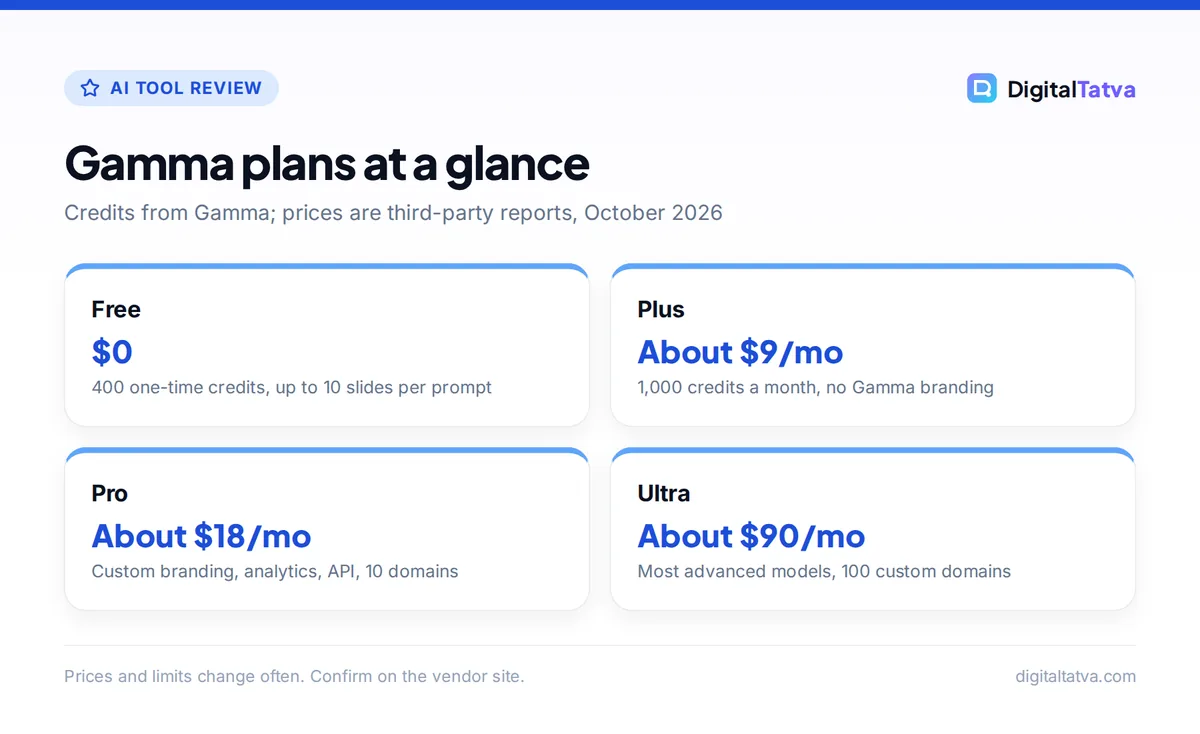
- Third-party sources list Plus at about $9 a month, Pro at about $18 and Ultra at about $90. Gamma’s pricing page did not display prices when we checked.
- Unused plan credits roll over up to double your monthly allowance, which softens the credit model for irregular users.
What is Gamma AI?
Gamma describes itself as an “all-in-one AI-powered design partner” that needs “no code or design experience”. You describe what you want, Gamma writes an outline, you edit the outline, and it then generates a full set of designed slides (Gamma calls them cards) with text, layouts and images.
The important difference from PowerPoint or Google Slides is the starting point. Traditional tools give you a blank slide and a template. Gamma gives you a finished first draft in about a minute, and your job becomes editing rather than building. That is why it tops our list of the best AI presentation makers.
Gamma says it supports 60+ languages, offers 100+ themes, uses “20+ AI models” under the hood, and claims more than 100 million users. It has grown well beyond slides. You can now generate:
- Presentations that export to PowerPoint, PDF, PNG and Google Slides.
- Websites: shareable, hosted pages you can publish without a developer, including on custom domains on Pro and Ultra.
- Documents such as one-pagers, proposals and white papers.
- Social media content sized and styled for each platform.
- Graphics such as infographics and illustrations.
Key Gamma features we liked
Generate from a prompt, outline or existing file
You can start three ways: type a short prompt (“10-slide pitch for a D2C skincare brand raising a seed round”), paste notes or an outline, or import an existing PDF or PPTX. The import route is the most useful for working professionals, because it turns a messy old deck or a long report into a clean, modern presentation without copying text by hand.
In everyday use, the outline step is where quality is won or lost. Gamma shows you the proposed card titles before it spends credits on the full design, so fix the structure there. If you struggle with structure, draft the storyline in Claude or ChatGPT first. Our prompt engineering guide shows how to ask for a tight, logical outline.
Editing with AI and the Gamma Agent
After generation, you can select a card and ask the AI to rewrite it, shorten it, change the layout, add an image or translate it. Gamma’s help center mentions “editing with Agent, adding cards with AI, and trying new layouts” as actions that use credits. This makes revisions fast, but it also means heavy editing eats into your allowance, so make big structural decisions before you start polishing.
Themes and brand import
Gamma has more than 100 themes and lets you import your own brand. Pro adds custom branding, which matters for agencies and consultants who send client-facing decks. On Free, exported PDF and PPTX files carry a “Made by Gamma” badge; Plus, Pro and Ultra remove it.
Exports and sharing
Gamma exports to PDF, PNG and PowerPoint, and you can move decks into Google Slides. Editable tables come through to PowerPoint and Google Slides. A few limits are worth knowing: there is no Word (.docx) export, PDFs are static rather than fillable, and Gamma’s help center notes that PDF and PowerPoint exports may not work reliably in mobile browsers, so export from a desktop. You can also share a live link, which is where Pro’s detailed analytics come in: you can see how viewers engage with a deck you send.
Websites and custom domains
Gamma’s website builder is simple but surprisingly useful for event pages, portfolios, product one-pagers and campaign microsites. Pro lets you publish to up to 10 custom domains and Ultra to up to 100. It is not a replacement for a full website platform, but it is quicker than any of the tools in our list of best AI app builders for a static page. If you need a real web app with logins and a database, look at our Lovable review instead.
Gamma pricing and credits explained
Gamma’s official pricing page lists Free, Plus, Pro and Ultra, with Team and Business options, but the dollar prices did not render when we checked in October 2026. The prices below come from a June 2026 third-party breakdown, so treat them as approximate and confirm at checkout.
| Plan | Reported price | Credits | Main additions |
|---|---|---|---|
| Free | $0 | 400 one-time (200 more per referral) | Up to 10 slides per prompt, exports with Gamma badge |
| Plus | About $9/month (about $108/year) | 1,000 per month | Up to 100 slides per prompt, remove Gamma branding, advanced image models |
| Pro | About $18/month (about $216/year) | Reportedly 4,000 per month | Premium image models, custom branding, analytics, 10 custom domains, API |
| Ultra | About $90/month | Reportedly 20,000 per month | Most advanced text, image and video models, 100 custom domains, early access |
| Team | About $240/seat/year (2-seat minimum) | Reportedly 6,000 per seat | Shared workspace for small teams |
| Business | About $480/seat/year (10-seat minimum) | Reportedly 10,000 per seat | Larger organizations |
How Gamma credits work
According to Gamma’s help center article on credits, generating a presentation with Create with AI is “metered per slide and per image”, and AI edits, AI-added cards and new layouts also use credits. Image models show their credit cost before you generate, so you can pick a cheaper model when quality does not matter.
Three rules are worth remembering:
- Free credits do not refresh. The 400 credits are a one-time grant, so Free is a trial, not a permanent plan for regular use.
- Plan credits roll over, up to 2x. On Plus, 1,000 monthly credits can build up to a maximum of 2,000. Purchased credits do not count toward that cap and never expire while your plan is active.
- Cancelling resets you. If you cancel, plan credits reset to 400, and purchased credits expire after one year.
Save money: Write and approve your outline before generating, and generate once rather than regenerating whole decks. Most wasted credits come from rerunning full presentations to fix problems that a single card edit would solve. If you only make a deck every month or two, the rollover rule on Plus means you rarely lose credits, so monthly billing may beat annual. Our guide to annual vs monthly AI plans explains when to commit.
Watch out: Gamma bills in USD and prices are subject to tax by location. Indian buyers should expect GST and possible foreign transaction fees from their card, and no official INR price was shown when we checked.
Gamma pros and cons
Pros
- Fastest route from idea to a polished deck, usually in about a minute.
- Imports PDF and PPTX, so old material becomes a modern deck quickly.
- Exports to PowerPoint, PDF, PNG and Google Slides on every plan.
- Websites, docs and social posts from the same editor and credits.
- Rollover of unused plan credits up to 2x the monthly allowance.
Cons
- Free credits are one-time, so the free plan runs out.
- Layouts can look similar across decks, and fine design control is limited.
- Exported PPTX files may need cleanup in PowerPoint before a big meeting.
- Prices were not shown on the official pricing page when we checked.
- No Word export, and PDFs are static.
Who should use Gamma (and who should skip it)
- Founders and consultants: pitch decks, proposals and client updates in minutes. Plus is usually enough; choose Pro if you want custom branding and viewer analytics on shared links.
- Marketers and agencies: campaign one-pagers, quick microsites and social graphics. Agencies sending branded client work will want Pro. Our guide to AI for marketing agencies shows where tools like Gamma fit in a delivery workflow.
- Students and teachers: the 400 free credits cover several class presentations. See our list of the best AI tools for students for other free options.
- Developers and product teams: Pro’s API access lets you generate decks programmatically, for example weekly report decks.
Skip Gamma if you are a designer who needs exact control over every element, your company requires strict PowerPoint master templates, or your decks are mostly complex charts and financial tables. In those cases you will spend more time fixing output than you save.
Gamma vs Canva, Copilot and other alternatives
| Tool | Best for | Free option | Where it beats Gamma |
|---|---|---|---|
| Gamma | Full decks from a prompt or file | 400 one-time credits | n/a |
| Canva | Brand-heavy visuals and social design | Up to 20 AI uses | Templates, Brand Kits, design control |
| Microsoft Copilot in PowerPoint | Teams already on Microsoft 365 | No (Copilot in apps needs a paid plan) | Works inside your existing PowerPoint files |
| Gemini in Google Slides | Teams on Google Workspace | No (needs an eligible Workspace plan) | Native to Slides and Drive |
| Claude or ChatGPT | Storyline, outline and speaker notes | Yes | Thinking, research and writing quality |
Canva is Gamma’s closest rival. Canva Pro costs US$144 a year and wins on templates, Brand Kits and visual control, while Gamma wins on speed from a blank page. Read our Canva Magic Studio review for the detail. Many marketers use both: Gamma for quick internal decks, Canva for client-facing design.
Microsoft Copilot makes sense if your company already pays for Microsoft 365, since it works inside PowerPoint. Check our Microsoft Copilot pricing guide before adding seats. Google Workspace users can follow our guide on how to use Gemini in Gmail, Docs and Sheets, where Slides features depend on your edition.
Claude is not a slide designer, but it is excellent at the thinking work. A practical workflow is to build the outline and speaker notes in Claude, then paste the outline into Gamma. Keeping your brand guidelines and past decks in a project helps; see how to use Claude Projects.
How to get the best results from Gamma
- Start with a clear brief. Include the audience, goal, number of slides and tone, for example “8 slides for a retail client, persuasive, simple language”.
- Edit the outline before generating. Reorder, merge or delete card titles at the outline stage, because it costs nothing compared with regenerating designed slides.
- Pick a theme that matches your brand. Choose fonts and colors close to your brand, or import your brand on Pro.
- Fix cards one at a time. Use targeted AI edits on single cards instead of regenerating the whole deck.
- Fact check every number. Gamma writes confidently. Replace any statistic you did not supply with a sourced figure, or remove it.
- Export from desktop and review. Open PPTX exports in PowerPoint or Google Slides and check fonts, spacing and image crops before you present.
Frequently asked questions
Is Gamma AI free?
Yes, Gamma has a free plan with 400 one-time credits, plus 200 more for each referral. Free lets you create up to 10 slides per prompt and export to PDF, PPTX, PNG and Google Slides, but PDF and PPTX exports carry a “Made by Gamma” badge. The credits do not refresh monthly, so regular users will eventually need Plus or above.
How much does Gamma cost per month?
Gamma’s pricing page did not show prices when we checked. Third-party sources from June 2026 list Plus at about $9 a month with 1,000 credits, Pro at about $18 with custom branding and API access, and Ultra at about $90 with the most advanced models. Team and Business are billed per seat yearly. Confirm the live price at checkout.
Can Gamma export to PowerPoint and Google Slides?
Yes. Gamma exports to PowerPoint (PPTX), PDF and PNG on every plan, and you can bring decks into Google Slides. Editable tables carry over. Exports on Free include a Gamma badge, there is no Word export, and PDFs are static. Always open the exported file and check spacing and fonts before presenting.
Is Gamma better than Canva for presentations?
Gamma is better when you want a complete, designed deck from a prompt or an imported document in about a minute. Canva is better when brand templates, precise visual control and social design matter more. If you already pay for Canva Pro, try its presentation tools first; if decks are your main need, Gamma is usually faster.
Is Gamma worth paying for?
Gamma Plus is worth it if you make presentations, proposals or one-pagers every week, because it removes branding and gives 1,000 monthly credits that roll over up to 2,000. Pro is worth it for agencies and consultants who need custom branding, viewer analytics or custom domains. Occasional users can stay on the free credits.
Final verdict on Gamma
Gamma earns its place as the default AI presentation tool for people who need a good-looking deck fast and do not want to touch a slide master. The import feature, wide export options and expanding website and social tools make it more than a novelty, and credit rollover makes the paid plans fairer than most credit systems. Its weaknesses are design sameness, limited fine control and unclear pricing on its own site. Start with the free credits, move to Plus if you use it weekly, and pair it with Claude or ChatGPT for the storyline. For a wider view of where your money goes, see our list of AI subscriptions worth paying for. Gamma’s plans and credit allowances change often, so confirm current pricing on the official Gamma pricing page before you buy.
Pricing and features are checked at the time of writing and can change. Some links may be affiliate links, which never affect our verdicts.