10 Best AI Tools for Students in 2026
The 10 best AI tools for students in 2026, from ChatGPT and NotebookLM to Claude and Perplexity, with free plans, student discounts and how to use AI without cheating.

On this page
- Key takeaways
- Quick picks: the 10 best AI tools for students compared
- The 10 best AI tools for students, reviewed
- Student discounts and free plans at a glance
- How to choose the right AI study tools
- Smart ways to use AI for studying (without cheating)
- Frequently asked questions
- Our verdict: the best AI tool kit for students
The best AI tools for students in 2026 are ChatGPT for all-round help, Google Gemini and NotebookLM for studying from your own notes, Claude for long readings and essay feedback, and Perplexity for research with sources. Most students can get everything they need from free plans plus one student offer, such as Google’s free year of AI Plus in India or ChatGPT’s US Back to School deal.
This list ranks 10 tools by how useful they are for real coursework: reading, writing, revising, coding, presenting and staying organized.
Key takeaways
- You do not need to pay for AI to study well. ChatGPT Free, Gemini Free, Claude Free and NotebookLM’s free tier cover most assignments.
- Claim student offers first: Google gives Indian students a free AI Plus plan for one year, and US college students a free AI Pro year.
- US students can get 4 free months of ChatGPT Plus through the Back to School offer if they claim it by October 31, 2026.
- Notion Plus is free for students with a school email, and GitHub has a dedicated free Copilot Student plan.
- Use AI to explain, quiz and give feedback, not to write graded work for you. Check your college’s AI policy before every assignment.
Quick picks: the 10 best AI tools for students compared
Prices are standard list prices in USD as of September 2026.
| Tool | Best for | Starting paid price | Free plan |
|---|---|---|---|
| ChatGPT | All-round study help | Go $8/mo, Plus $20/mo | Yes |
| Google Gemini | Students with free Google offers | AI Plus $4.99/mo (Rs 399 in India) | Yes |
| NotebookLM (Gemini Notebook) | Studying from your own notes | Via Google AI plans | Yes |
| Claude | Long readings and essay feedback | Pro $20/mo ($17/mo annual) | Yes |
| Perplexity | Research with citations | Pro $20/mo | Yes |
| Grammarly | Proofreading and clarity | Pro $12/mo (annual) | Yes |
| Notion | Notes and planning | Plus free for students | Yes |
| Otter.ai | Lecture transcription | Pro $6.67/mo annual with education discount | Yes |
| GitHub Copilot | Programming students | Free Copilot Student plan | Yes |
| Canva | Presentations and posters | Pro US$144/yr (Rs 4,000/yr in India) | Yes |
The 10 best AI tools for students, reviewed
1. ChatGPT: Best for all-round study help
- Starting price: Free; Go $8/mo; Plus $20/mo
- Free plan: Yes
- Best for: Explanations, practice questions, study plans
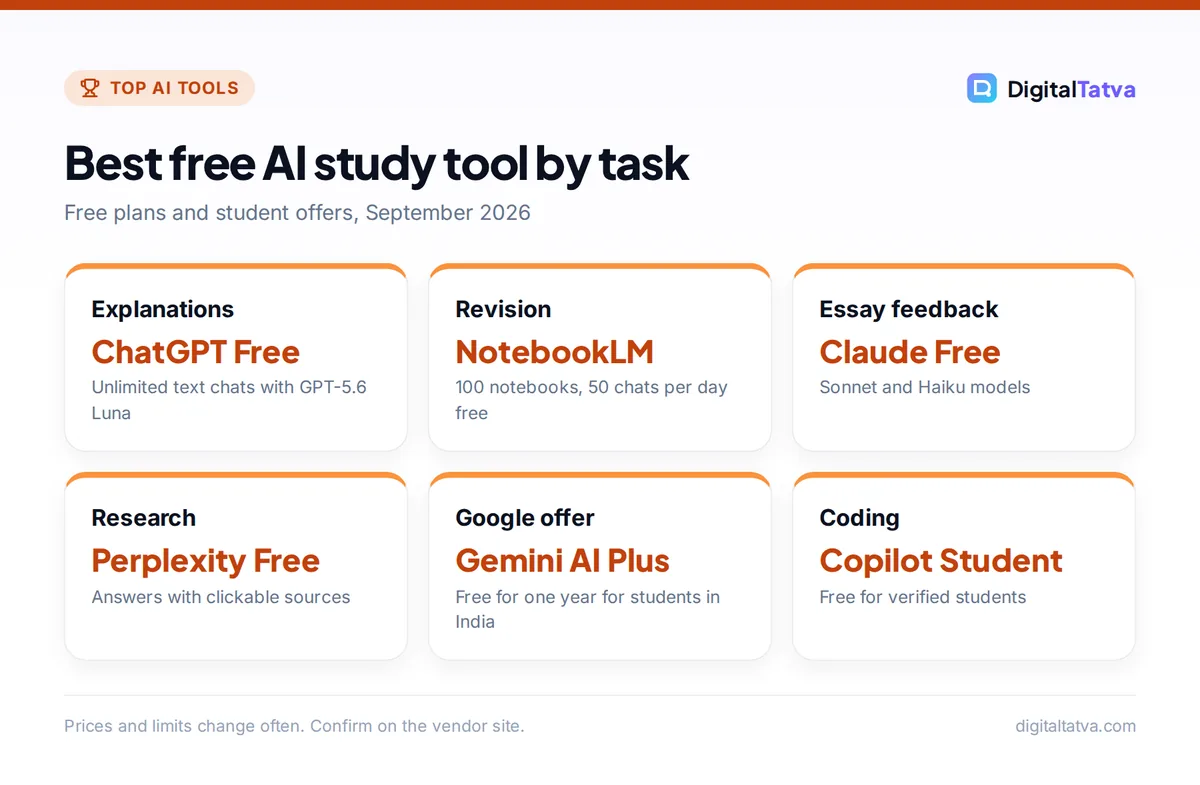
ChatGPT is still the most flexible study partner. The free plan gives unlimited text chats with GPT-5.6 Luna plus limited file uploads, image creation, voice and deep research, which is enough to explain a tough concept, turn your notes into flashcards or build a revision timetable.
ChatGPT Go at $8/month raises the limits on uploads and data analysis and adds projects, which help if you keep a separate chat space per subject. Plus at $20/month unlocks GPT-5.6 Sol with deeper thinking and expanded deep research, which matters for final-year projects and dissertations. OpenAI has said it will test ads on Free and Go in the US, while Plus and above stay ad-free.
If you are new to it, our complete beginner guide to using ChatGPT walks through the basics, and our ChatGPT pricing breakdown explains every plan in detail.
Save money: US college and graduate students can get 4 free monthly billing periods of ChatGPT Plus through OpenAI’s Back to School offer. It must be claimed by October 31, 2026, needs SheerID verification and a payment method, and renews at $20/month afterwards, so set a reminder to cancel if you do not want to continue.
2. Google Gemini: Best for students who can claim a free Google plan
- Starting price: Free; AI Plus $4.99/mo (Rs 399); AI Pro $19.99/mo (Rs 1,950)
- Free plan: Yes
- Best for: Students in India and the US with student offers
Gemini’s free plan already includes Gemini 3.6 Flash, varying access to 3.1 Pro, Deep Research, Gemini Live voice chats, Canvas and Gems. That is a generous free tier for summarizing chapters, drafting outlines and talking through problems out loud.
The real reason Gemini ranks so high is the student deal. Google’s India subscriptions page currently says students can get a Plus plan at no cost for one year, and the US page says college students get a free Pro plan for one year. AI Plus doubles the free usage limits and adds Gemini in Gmail and Docs plus 400 GB of storage, which is handy for project files.
See our Gemini pricing guide for a full plan comparison, and confirm the current student terms on the official Gemini India subscriptions page, which says the promotion “expires soon”.
3. NotebookLM (Gemini Notebook): Best for studying from your own material
- Starting price: Free; higher limits via Google AI Plus, Pro or Ultra
- Free plan: Yes
- Best for: Exam revision from lecture slides, PDFs and notes
NotebookLM, which Google now also calls Gemini Notebook, answers questions using only the sources you upload. That makes it far less likely to drift off topic than a general chatbot, and every answer points back to the passage it came from.
The free tier is strong: up to 100 notebooks, 50 sources per notebook, 50 chats per day, 3 Audio Overviews per day, 3 Video Overviews per day and 10 reports per day. Audio Overviews turn a stack of readings into a podcast-style discussion you can play on the bus. The Plus tier doubles most of these limits, so a free AI Plus student plan upgrades NotebookLM too.
Our step-by-step guide on how to use NotebookLM for study and research shows how to set up one notebook per course.
4. Claude: Best for long readings and essay feedback
- Starting price: Free; Pro $20/mo or $17/mo annual
- Free plan: Yes (Sonnet and Haiku models)
- Best for: Humanities, law, research papers, writing feedback
Claude is the tool we reach for when a reading is long and dense. The free plan includes web search, file creation, memory and Artifacts, and runs on the Sonnet and Haiku models. Paid plans get a 200K token base context window in chat, rising to 1M tokens on Sonnet 5.5 and Opus 5.5, so you can paste an entire thesis chapter and ask for structural feedback.
Where Claude stands out for students is tone. Ask it to act as a strict examiner and mark your essay against a rubric, and the feedback tends to be specific and honest rather than flattering. Pro at $20/month adds Opus models and Projects, where you can store a course syllabus and past assignments. In India, press reports put Pro at about Rs 2,000/month including GST since July 2026.
Read our Claude pricing guide for plan limits, or our ChatGPT vs Claude comparison if you are choosing just one.
5. Perplexity: Best for research with citations
- Starting price: Free; Pro $20/mo
- Free plan: Yes (limited daily Pro searches)
- Best for: Literature searches, current events, fact checking
Perplexity works like a search engine that writes the answer for you and shows its sources. For a student that is the key feature: you can click through to the original article or paper, which you must do before citing anything.
The free plan handles everyday research. Pro at $20/month adds deep research, a model picker and premium data sources such as Statista and PitchBook, which can be useful for business and economics projects. Third-party sources report an Education Pro price of around $10/month for verified students, but we could not confirm that on an official page, so check before you pay.
Learn the workflow in our guide on how to use Perplexity for research like a pro.
6. Grammarly: Best for proofreading and clear writing
- Starting price: Free; Pro $12/mo billed annually
- Free plan: Yes (100 AI prompts/month)
- Best for: International students and anyone writing in a second language
Grammarly catches grammar, spelling and clarity problems as you type in Google Docs, Word, email and most browsers. The free plan includes basic corrections, tone detection and 100 AI prompts per month.
Pro costs $12 per month on annual billing ($144/year) and adds full sentence rewrites, 2,000 AI prompts per month, plagiarism checks and AI text detection. The plagiarism check is the most useful Pro feature for students because it helps you spot passages you forgot to cite. A 50% student discount through SheerID is reported by a third party, but not confirmed by Grammarly, so treat it as possible rather than guaranteed.
Our full Grammarly review covers whether Pro is worth it.
7. Notion: Best for notes, planning and course organization
- Starting price: Plus free for students; Business $20/seat/mo for full AI
- Free plan: Yes
- Best for: Class notes, assignment trackers, group projects
Notion is a flexible workspace for notes, to-do lists and databases. Students and educators get the Plus plan free for one member with a school email, according to the official Notion pricing page.
The catch is that full Notion AI (chat, generate, autofill and AI Meeting Notes) now sits on the Business plan at $20 per seat per month. Free and Plus only include a limited AI trial. For most students the smart setup is free Notion Plus for organization, combined with a free chatbot for the AI part. Our Notion AI pricing guide explains the plan split.
8. Otter.ai: Best for lecture transcription
- Starting price: Free; Pro $6.67/mo annual with education discount
- Free plan: Yes (300 minutes/month)
- Best for: Recording lectures, seminars and group calls
Otter records and transcribes speech, then produces summaries you can search later. The free Basic plan includes 300 transcription minutes per month with a 30-minute limit per conversation, which covers short seminars but not a full 60 to 90 minute lecture.
Students and teachers with a .edu address get 20% off Pro, which works out to $6.67/month on annual billing ($79.99/year). Pro raises the allowance to 1,200 minutes per month and 90 minutes per conversation. Ask your lecturer before recording. Comparing options? Read Otter.ai vs Fireflies.ai.
9. GitHub Copilot: Best for programming students
- Starting price: Free Copilot Student plan for verified students
- Free plan: Yes
- Best for: Computer science, data science and engineering coursework
GitHub Copilot suggests code as you type and can explain errors inside your editor. GitHub now offers a dedicated free Copilot Student plan for verified students, which is a better deal than paying $10/month for Pro.
Since June 2026, paid Copilot plans run on usage-based AI Credits instead of premium requests, but code completions stay included on every plan. For learning, turn completions off for your first attempt at each exercise, then use Copilot to review your solution. Our GitHub Copilot pricing guide explains the credit system.
10. Canva: Best for presentations, posters and visual projects
- Starting price: Free; Pro US$144/year (Rs 4,000/year in India)
- Free plan: Yes (up to 20 AI uses)
- Best for: Slide decks, infographics, society posters
Canva’s templates and AI tools make it quick to turn a research summary into a clean slide deck or infographic. The free plan includes up to 20 uses of its Standard or Premium AI features and 5 GB of storage.
In India, Canva lists Pro at Rs 4,000 per year and a cheaper Pro Lite at Rs 1,590 per year, though Pro Lite keeps the same 20 AI uses as Free. If your main need is slides, also look at our list of the best AI presentation makers.
Student discounts and free plans at a glance
The biggest savings come from stacking free plans and verified student offers. These are the ones we could confirm on official pages in September 2026. For a longer, regularly updated list, see our guide to AI tool student discounts and free plans.
| Offer | Who qualifies | What you get |
|---|---|---|
| Google AI Plus (India) | Students, per Google’s India page | AI Plus free for one year (promotion “expires soon”) |
| Google AI Pro (US) | US college students | AI Pro free for one year |
| ChatGPT Back to School | US college and graduate students | 4 free months of Plus, claim by Oct 31, 2026 |
| Notion Plus | Students and educators with a school email | Plus plan free for 1 member |
| Otter.ai Education | .edu students and teachers | 20% off Pro ($79.99/year) |
| GitHub Copilot Student | Verified students | Dedicated free Copilot plan |
Watch out: We found no official ChatGPT student offer for India in September 2026. Be careful with websites promising “free ChatGPT Plus” codes, and only claim offers from the vendor’s own site or app.
How to choose the right AI study tools
You do not need all ten. Most students do well with one general chatbot, one tool grounded in their own notes, and one or two specialists for their subject. Use these steps to build your kit.
- Check your college’s AI policy. Many universities allow AI for brainstorming and feedback but not for writing graded work. Some require you to declare any AI use. Read the policy for each course.
- Claim free student plans first. Before paying for anything, check the Google, Notion, GitHub and OpenAI offers above. They cost nothing if you cancel in time.
- Pick one main chatbot. Choose ChatGPT if you want the widest feature set, Gemini if you already use Google Docs and have the student offer, or Claude if you read and write a lot of long text.
- Add a source-grounded tool. NotebookLM is the best free choice for revising from your own slides and readings.
- Add subject specialists. Copilot for coding, Otter for lecture-heavy courses, Grammarly for writing-heavy courses, Canva for design-heavy projects.
- Only pay when you hit a limit. If you keep running out of messages during exam season, a single $8 to $20 plan for those months is usually enough.
Smart ways to use AI for studying (without cheating)
Use AI like a patient tutor, not a ghostwriter. These habits improve learning and respect academic integrity rules.
Ask for explanations at your level
Try prompts like “Explain the Krebs cycle as if I am a first-year student, then give me three questions to check I understood.” Ask follow-ups until you can explain the idea back in your own words. Our prompt engineering guide has more techniques for getting clear answers.
Turn notes into active recall
Upload your lecture notes to NotebookLM or ChatGPT and ask for 20 practice questions with answers hidden at the end. Testing yourself beats rereading.
Get feedback, then rewrite yourself
Paste your own draft and ask Claude or ChatGPT to point out weak arguments, missing evidence and unclear paragraphs. Then make the changes yourself. This keeps the work yours and teaches you to spot the same issues next time.
Verify every fact and citation
AI tools can still produce confident mistakes, including references that do not exist. Use Perplexity or NotebookLM to find real sources, open each one, and cite the original document rather than the chatbot.
Frequently asked questions
What is the best free AI tool for students?
For most students, the best free combination is ChatGPT Free for explanations and practice questions plus NotebookLM for revising from your own notes. ChatGPT Free includes unlimited text chats with GPT-5.6 Luna, while NotebookLM’s free tier allows 100 notebooks and 50 chats per day. Add Gemini Free if you use Google Docs, since it includes Deep Research and Canvas at no cost.
Is there a free ChatGPT Plus offer for students?
Yes, but only in the US right now. OpenAI’s Back to School offer gives eligible US college and graduate students 4 free monthly billing periods of ChatGPT Plus. You must claim it by October 31, 2026, verify enrollment through SheerID and add a payment method. It renews at $20/month, so cancel before then if you do not plan to continue.
Can Indian students get Gemini for free?
Google’s India subscriptions page currently says students can get a Google AI Plus plan at no cost for one year, though it also notes that the promotion expires soon. AI Plus normally costs Rs 399/month and includes double the free usage limits, Gemini in Gmail and Docs, more Audio Overviews and 400 GB of storage. Check the official page for eligibility and deadlines.
Is using AI for homework considered cheating?
It depends on your college and the assignment. Using AI to explain concepts, quiz yourself or get feedback on your own draft is widely accepted. Submitting AI-written work as your own usually breaks academic integrity rules. Read your course’s AI policy, declare AI use when asked, and always verify facts and citations yourself.
Which AI is best for writing essays?
Claude is our pick for essay feedback because it handles long drafts well and gives specific, honest critique when you ask it to act as an examiner. Grammarly is best for final proofreading and plagiarism checks. Use these to improve your own writing rather than to generate the essay, which most colleges do not allow.
Do students need to pay for AI tools?
Usually not. Free plans from ChatGPT, Gemini, Claude, Perplexity and NotebookLM handle most coursework, and several vendors offer free student plans. Consider paying only when you consistently hit limits, for example during dissertation season, and choose one plan for a few months rather than several subscriptions at once.
Our verdict: the best AI tool kit for students
If you only set up three tools this semester, make them ChatGPT Free (or Plus through the US student offer), NotebookLM for revision, and either Claude or Gemini depending on whether you value long-document feedback or Google’s free student plan. Add GitHub Copilot Student if you code and Otter if you sit through long lectures.
Use AI to understand faster, practice more and write better drafts yourself, and you will get far more out of it than any shortcut could give you. Pricing and student offers change often, so confirm the current terms on each vendor’s official site before you sign up.
Related reading:
Pricing and features are checked at the time of writing and can change. Some links may be affiliate links, which never affect our verdicts.



