Canva Pricing 2026: Free vs Pro vs Teams for AI Features
Canva is free with 20 AI uses, Pro costs US$144 a year and Business, which replaces Teams, costs US$250 per person. Here is how AI allowances and India prices work.

On this page
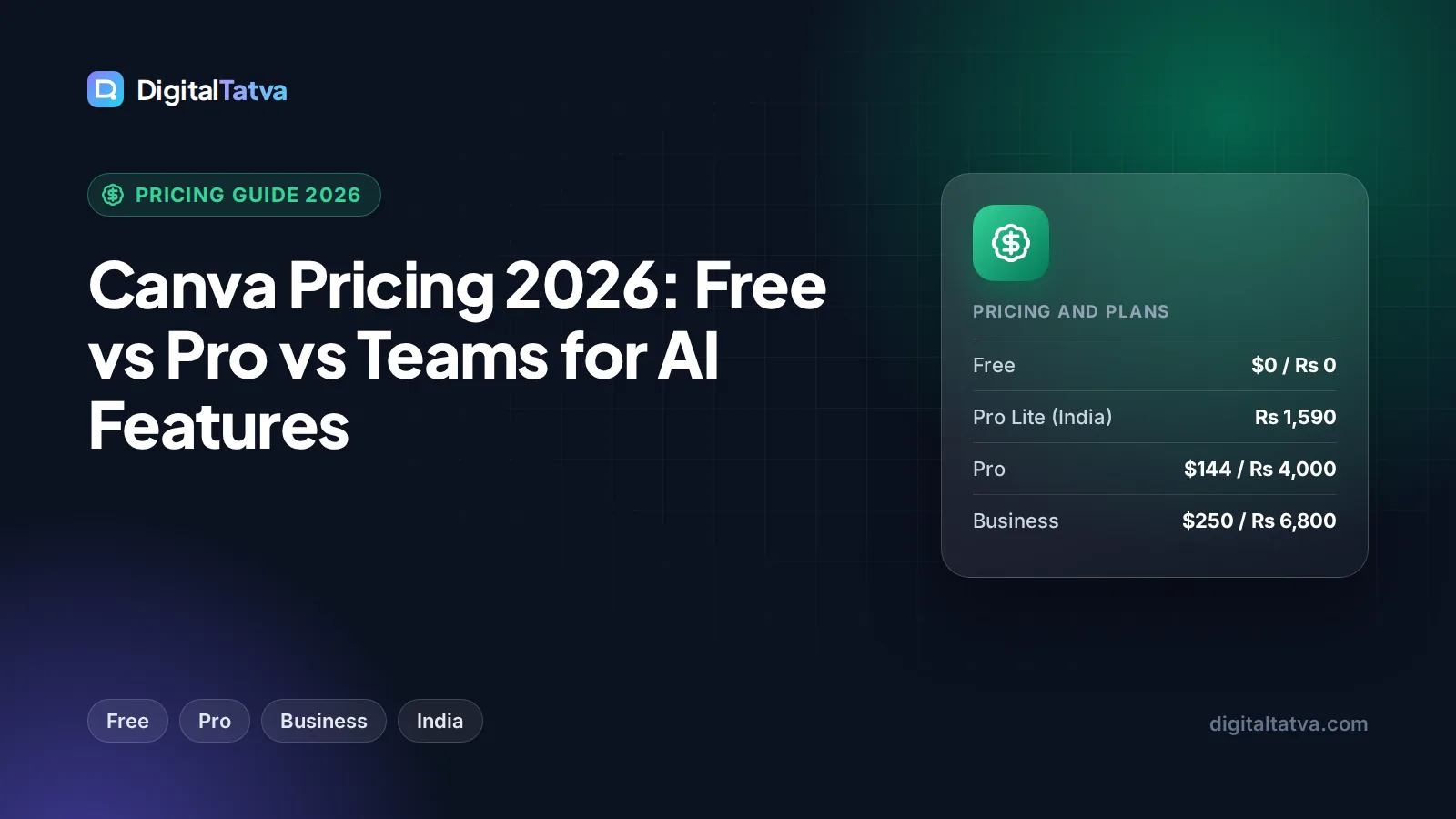
Canva pricing in 2026 starts with a free plan that includes up to 20 AI uses, then Canva Pro at US$144 per year for one person and Canva Business at US$250 per year per person. Canva Teams is no longer available for new sign-ups, because Business has replaced it. In India, the yearly prices are Rs 1,590 for Pro Lite, Rs 4,000 for Pro and Rs 6,800 per person for Business.
The biggest thing to understand is how much AI each plan includes. Canva no longer brands its AI as “Magic Studio” on the pricing page. Instead, AI tools are grouped into Standard, Premium and Ultra tiers that draw from one shared allowance. This guide breaks down every plan, explains the AI allowance, covers India pricing and tells you which plan to buy.
Key takeaways
- Canva Free costs $0 and includes up to 20 uses of Standard or Premium AI, 5GB of storage and 1 Brand Kit.
- Canva Pro costs US$144/year (about $12/month) with 10x more AI than Free, 5 Brand Kits and 100GB.
- Canva Business replaces Teams at US$250/year per person, with 20x more AI than Free, 100 Brand Kits and 500GB.
- In India, Pro costs Rs 4,000/year and Business Rs 6,800/year per person. Pro Lite (Rs 1,590/year) gets the same 20 AI uses as Free.
- AI uses come from one shared pool, and Premium and Ultra AI tools consume it faster than Standard tools.
Canva plans and prices compared
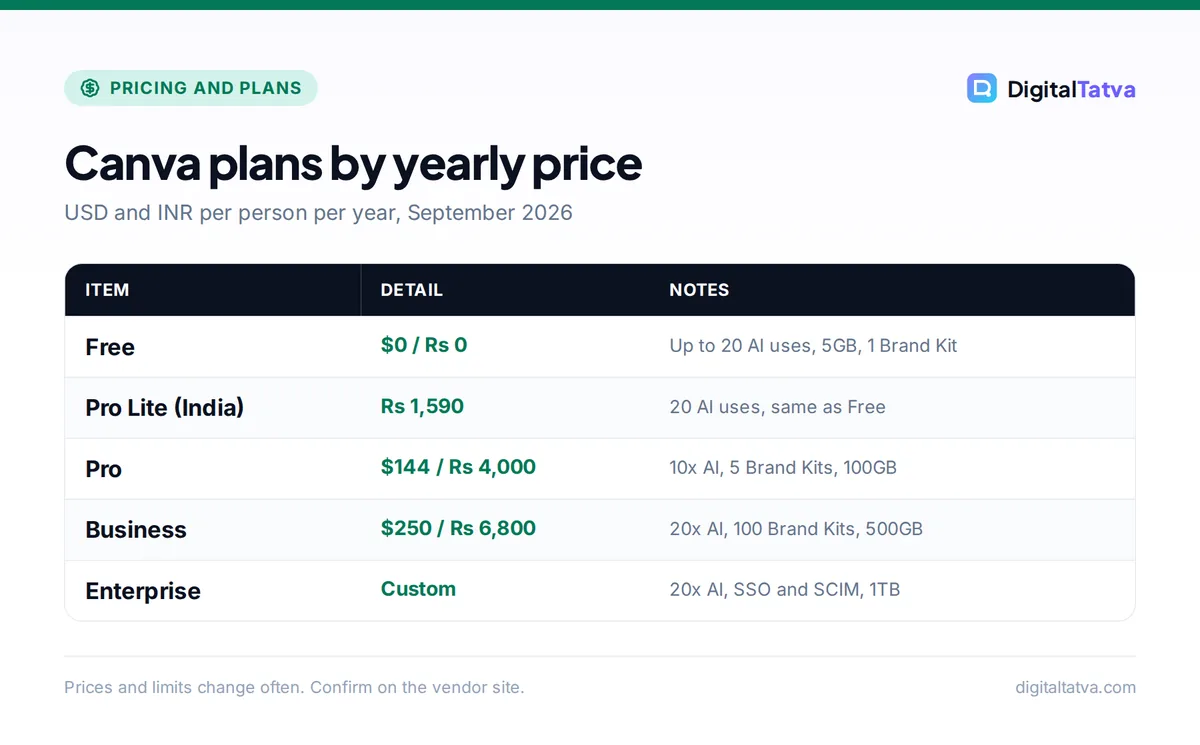
These figures come from Canva’s official US and India pricing pages as of September 2026. Canva lists yearly prices; monthly billing exists for Pro but the monthly USD price was not shown when we checked, so confirm it on the live page.
| Plan | US price (yearly) | India price (yearly) | AI allowance | Brand Kits | Storage |
|---|---|---|---|---|---|
| Free | $0 | Rs 0 | Up to 20 Standard or Premium AI uses | 1 | 5GB |
| Pro Lite (India only) | Not offered | Rs 1,590 | 20 AI uses (same as Free) | Check page | Check page |
| Pro | $144 per person | Rs 4,000 | 10x more than Free (Premium or Ultra AI) | 5 | 100GB |
| Business | $250 per person | Rs 6,800 per person | 20x more than Free | 100 | 500GB |
| Enterprise | Custom | Custom | 20x more than Free | Custom | 1TB |
See the official Canva pricing page for US prices and the Canva India pricing page for rupee prices.
How Canva AI allowances work in 2026
Canva now describes its AI features in three tiers: Standard, Premium and Ultra AI. Every plan gets one shared AI allowance, and each tool draws from that pool at a different rate. Standard AI tools use the least, while Premium and Ultra tools use more per action. A fair use policy applies on top.
Canva does not publish exact credit numbers per plan. It describes allowances relative to Free instead: Pro gets “10x more AI than Canva Free” and Business and Enterprise get “20x more AI than Canva Free.” In practice, that means:
- Free and Pro Lite are fine for trying AI features a handful of times a month.
- Pro suits a solo creator who uses AI image generation, background removal-style edits or text generation most weeks.
- Business suits marketers and teams who lean on AI daily across many designs.
AI Pass and AI top-ups
If you run out, Canva offers an AI Pass add-on on Pro and Business, and AI top-ups on Business. Canva did not show prices for either when we checked, so look inside your account before counting on them. For the bigger picture on image AI costs, see our list of the best AI image generators in 2026.
Tip: Use Standard AI tools for everyday edits and save Premium and Ultra tools for final assets. Because they all share one pool, choosing the lighter tool when it is good enough makes your allowance last much longer.
Every Canva plan in detail
Canva Free: $0
Free gives you the Canva editor, a large template library, up to 20 uses of Standard or Premium AI, 5GB of storage and 1 Brand Kit. For students, side projects and occasional social posts, it is one of the most generous free design tools available.
Who it is for: beginners, students and anyone making a few designs a month. Who should skip it: anyone who needs consistent brand assets across clients, or regular AI help. Our roundup of the best free AI tools lists other no-cost picks that pair well with Canva Free.
Canva Pro Lite (India only): Rs 1,590/year
Pro Lite appears on Canva’s India pricing page but not on the US page. It costs Rs 1,590 per year, about Rs 132.50 per month. The important detail is that Pro Lite includes 20 AI uses, exactly the same as Free.
Who it is for: Indian users who want paid, non-AI Pro features at a low price. Who should skip it: anyone buying for AI. Pro Lite does not give you more AI than Free.
Canva Pro: US$144/year or Rs 4,000/year
Pro is priced for one person. At US$144 per year, it works out to $12 per month. In India, Rs 4,000 per year is about Rs 333 per month. Pro gives you 10x more AI than Free, including Premium or Ultra AI tools, 5 Brand Kits and 100GB of storage.
Who it is for: freelancers, solo founders, content creators and small business owners handling their own marketing. If you are building a social content workflow, our guide to AI tools for social media marketing shows where Canva Pro fits alongside schedulers and writers.
Canva Business (replaces Teams): US$250/year per person
Business is Canva’s new plan for teams and replaces Canva Teams. It costs US$250 per person per year (about $20.83 per month), or Rs 6,800 per person per year in India (about Rs 567 per month). A useful detail: you pay only for members who accept an invite, not for pending ones.
Business includes 20x more AI than Free, 100 Brand Kits and 500GB of storage, plus access to AI top-ups. The 100 Brand Kits make it a natural fit for agencies managing many clients.
Who it is for: marketing teams, agencies and growing businesses. For agency workflows specifically, read our guide to AI for marketing agencies.
What happened to Canva Teams?
Canva’s pricing page states that Teams is “no longer available for new sign-ups or upgrades.” If you already have Teams, you can keep using it for now, but new teams must choose Business. When your Teams plan comes up for renewal, compare your current cost against Business at US$250 per person per year.
Watch out: Many older articles still quote Canva Teams pricing. Those prices do not apply to new customers in 2026. Budget using Business pricing instead.
Canva Enterprise: custom pricing
Enterprise includes 20x more AI than Free, SSO and SCIM for user management, and 1TB of storage. Pricing is quoted by Canva’s sales team and depends on seat count.
Real cost examples: Pro vs Business
Here is how the yearly costs add up for common setups, using Canva’s listed prices.
| Setup | Plan | US yearly cost | India yearly cost |
|---|---|---|---|
| Solo freelancer | Pro | $144 | Rs 4,000 |
| Two-person business | Business x 2 | $500 | Rs 13,600 |
| Five-person marketing team | Business x 5 | $1,250 | Rs 34,000 |
| Ten-person agency | Business x 10 | $2,500 | Rs 68,000 |
Notice the jump from Pro to Business: one Business seat costs $106 more per year than Pro in the US ($250 vs $144), and Rs 2,800 more in India. You are paying for double the AI, many more Brand Kits and team features. A solo creator rarely needs that. Our explainer on when AI team plans actually save money walks through this decision.
How to save money on Canva
- Start on Free. Use your 20 AI uses to test which AI tools you really need before paying.
- Pay yearly. Canva’s headline prices are yearly, and yearly billing is typically cheaper than paying month to month. Our guide to annual vs monthly AI plans explains when to commit.
- Buy Pro, not Business, if you work alone. Business mainly adds team features and more AI. One person rarely needs 100 Brand Kits.
- Do not buy Pro Lite for AI. In India, Pro Lite has the same 20 AI uses as Free. Go straight to Pro if AI is the reason you are upgrading.
- Invite only active members. Business charges only for members who accept, so avoid sending invites to people who will not use it.
- Check education and nonprofit programs. Canva has historically offered free access for eligible schools and nonprofits; see our roundup of AI student discounts and free plans and confirm eligibility on Canva’s site.
Save money: If you need a design tool plus a chat assistant, check what you already pay for. A Canva Pro plan plus a free chatbot often covers a small business’s content needs without a second paid AI subscription. See our 12 ways to save on AI subscriptions.
Which Canva plan should you pick?
Pros
- Generous free plan with real AI access
- Pro at $144/year is strong value for solo creators
- Business charges only for accepted members
- Rupee pricing makes Canva affordable in India
Cons
- Exact AI credit numbers are not published
- Pro Lite has no more AI than Free
- Teams is gone, so small teams pay Business prices
- AI Pass and top-up prices are not listed publicly
- Choose Free if you make a few designs a month and only occasionally want AI help.
- Choose Pro if you are a solo creator, freelancer or small business owner using AI weekly.
- Choose Business if two or more people design together, or you manage multiple client brands.
- Choose Enterprise if you need SSO, SCIM and central control across a large organization.
Comparing design tools? Our Canva AI vs Adobe Firefly comparison covers quality and price, and the Canva Magic Studio review looks at how well the AI tools actually perform. If presentations are your main use, see our list of the best AI presentation makers.
Frequently asked questions
Is Canva free to use?
Yes. Canva Free costs nothing and includes the full editor, templates, 5GB of storage, 1 Brand Kit and up to 20 uses of Standard or Premium AI. That is enough for students and occasional users. If you need more AI, more storage or multiple Brand Kits, Canva Pro at US$144 per year is the next step.
How much does Canva Pro cost in India?
Canva Pro costs Rs 4,000 per year in India, which works out to about Rs 333 per month. Canva Business costs Rs 6,800 per person per year. India also has a Pro Lite plan at Rs 1,590 per year, but it includes only 20 AI uses, the same as Free, so it is not the right choice if you want more AI.
Is Canva Teams still available?
No, not for new customers. Canva says Teams is no longer available for new sign-ups or upgrades, and Canva Business has replaced it. Business costs US$250 per person per year and includes 20x more AI than Free, 100 Brand Kits and 500GB of storage. You pay only for members who accept an invite.
How many AI uses do you get on Canva Pro?
Canva does not publish an exact number. It says Pro includes 10x more AI than Canva Free, and Free includes up to 20 uses of Standard or Premium AI. All AI tools draw from one shared pool at different rates, so Premium and Ultra tools use your allowance faster than Standard tools. Fair use limits also apply.
Is Canva Pro worth it for AI features?
For most solo creators and small business owners, yes. At US$144 per year you get 10x the AI allowance of Free, Premium and Ultra AI tools, 5 Brand Kits and 100GB of storage. If you only need AI occasionally, the Free plan may be enough. Teams sharing work should look at Business instead.
Our verdict on Canva pricing
Canva remains one of the best value design tools in 2026. Start with Free to learn which AI tools you use, then move to Pro at US$144 per year (Rs 4,000 in India) if you work alone and want regular AI help. Teams and agencies should go straight to Business, since Teams is closed to new sign-ups. Skip Pro Lite if AI is your reason for upgrading. Canva adjusts its plans and AI allowances regularly, so confirm the current prices on Canva’s official pricing page before you buy.
Related reading:
Pricing and features are checked at the time of writing and can change. Some links may be affiliate links, which never affect our verdicts.