10 Best AI Tools for Small Business Owners
The 10 best AI tools for small business owners in 2026, from ChatGPT and Claude to Canva, Zapier and WATI, with real prices, INR costs and ready-made stacks by business type.

On this page
The best AI tools for small business owners in 2026 are one general assistant (ChatGPT, Claude or Gemini), an AI design tool like Canva, an automation tool like Zapier, and a meeting note taker such as Fireflies. Together they cover writing, marketing, admin and customer follow ups for roughly $20 to $60 a month. You do not need all 10 tools on this list: pick the two or three that remove your biggest weekly time drain.
We ranked these tools for owners who run lean teams, often in India, and care about value more than enterprise features. Every price below comes from the vendor pricing pages as of September 2026, with INR shown where an official or clearly sourced Indian price exists.
Key takeaways
- Start with one assistant: ChatGPT Plus or Claude Pro at $20/month covers most writing, research and planning work. ChatGPT Go at $8/month is the budget option.
- If you already pay for Google Workspace or Microsoft 365, check the AI you already have before buying anything new.
- Canva is the best value design tool, with Pro at Rs 4,000/year in India (US$144/year elsewhere).
- Automation saves the most hours: Zapier’s free plan gives 100 tasks/month to test ideas.
- For Indian businesses, a WhatsApp tool like WATI often brings more revenue than another chatbot subscription.
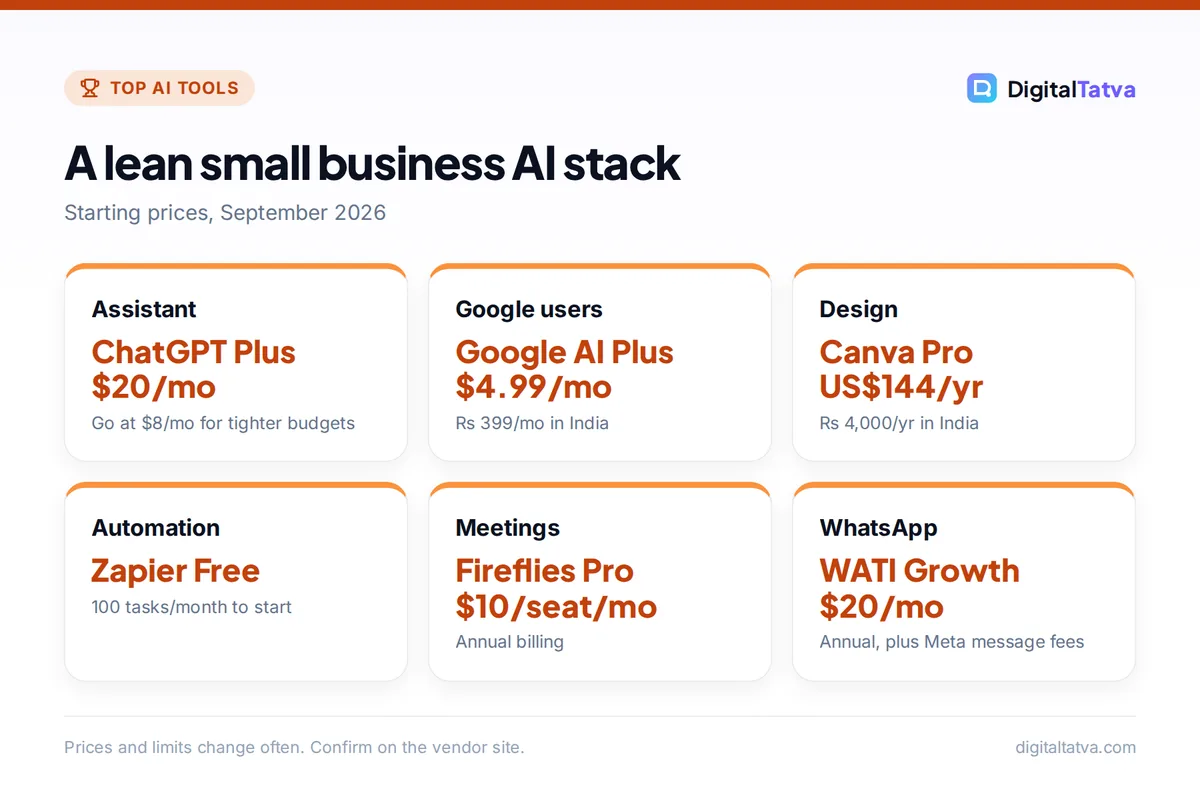
Quick picks: best AI tools for small business at a glance
| Tool | Best for | Starting price | Free plan |
|---|---|---|---|
| ChatGPT | All-round assistant | $8/mo (Go), $20/mo (Plus) | Yes |
| Claude | Writing, documents, proposals | $20/mo ($17 annual) | Yes |
| Gemini (Google AI and Workspace) | Gmail and Docs users | $4.99/mo (AI Plus), Rs 399/mo in India | Yes |
| Microsoft 365 Copilot | Word, Excel, Outlook and Teams users | $21/user/mo annual (Copilot Business) | Copilot Chat on eligible plans |
| Canva | Social posts, flyers, ads | US$144/yr, Rs 4,000/yr (Pro) | Yes |
| Notion AI | SOPs, wikis, project tracking | $20/seat/mo (Business, about $16 annual) | AI trial only |
| Zapier | Automating repetitive admin | $19.99/mo annual (Professional) | Yes, 100 tasks/mo |
| Grammarly | Polished emails and client docs | $12/mo annual (Pro) | Yes |
| Fireflies.ai | Meeting notes and follow ups | $10/seat/mo annual (Pro) | Yes |
| WATI | WhatsApp sales and support | $20/mo annual (Growth) | No |
The 10 best AI tools for small business owners
1. ChatGPT: Best all-round AI assistant for small business
- Starting price: $8/mo (Go), $20/mo (Plus)
- Free plan: Yes
- Best for: owners who want one tool for writing, research, spreadsheets and ideas
ChatGPT handles the widest range of small business work: product descriptions, customer email replies, job ads, pricing research, and analysis of your sales spreadsheet. Plus at $20/month gives you GPT-5.6 Sol with higher thinking levels, GPT-6 Astra in ChatGPT Work and Codex, deep research, projects and scheduled tasks. Go at $8/month is a good starter plan with unlimited everyday chats, projects and custom GPTs, but it does not include GPT-5.6 Sol.
If two or more people need it, ChatGPT Business costs $25/user/month monthly or $20 annual, with a two-seat minimum, admin controls and no training on your workspace data. Registered nonprofits can get up to 75% off Business. See our full ChatGPT pricing guide and the official ChatGPT pricing page.
2. Claude: Best for proposals, contracts and long documents
- Starting price: $20/mo, or $17/mo billed annually (Pro)
- Free plan: Yes
- Best for: consultants, agencies and service businesses that write a lot
Claude writes the most natural long-form business text of any assistant we use, which matters for proposals, website copy and client reports. Pro includes Projects (keep your price list, tone guide and past proposals loaded), Claude Design, Slides and Docs, and the Opus models. Press reports say Anthropic introduced rupee pricing in July 2026, with Pro at around Rs 2,000/month including GST.
Usage resets every five hours, so very heavy users may hit limits. For teams, Claude Team Standard seats cost $25/month or $20 annual with a two-seat minimum. Compare plans in our Claude pricing breakdown, and use our Claude prompts for writing and editing to get better drafts on day one.
3. Google Gemini: Best if your business runs on Gmail and Google Docs
- Starting price: $4.99/mo (Google AI Plus), Rs 399/mo in India
- Free plan: Yes
- Best for: businesses already on Gmail, Drive and Google Workspace
Gemini is the cheapest serious assistant for small businesses because of Google AI Plus: $4.99/month in the US, Rs 399/month in India, with Gemini in Gmail and Docs, 2x the Free usage limits and 400 GB of storage. Google AI Pro at $19.99/month (Rs 1,950 in India) adds 4x Free limits, Gemini in Vids, a 1M token context window and 5 TB of storage.
If you use Google Workspace business accounts, Gemini is bundled into the Business plans, with fuller access in Docs, Sheets, Slides, Meet and Chat from the Standard plan up. Third-party sources list Workspace Standard at about $14/user/month on annual billing, but confirm on Google’s site. Our Gemini pricing guide and tutorial on using Gemini in Gmail, Docs and Sheets cover the details.
4. Microsoft 365 Copilot: Best for Office and Teams businesses
- Starting price: $21/user/mo annual list (Copilot Business add-on)
- Free plan: Copilot Chat on eligible Microsoft 365 business plans
- Best for: firms that live in Excel, Outlook, Word and Teams
Microsoft 365 Copilot Business is the SMB add-on at $21/user/month annual list (shown at an $18 promo at the time of writing) or $25.20 on monthly billing. It includes the Researcher and Analyst agents. Microsoft also sells bundles: Business Standard with Copilot at $23.50/user/month annual and Business Premium with Copilot at $32.00.
For a one-person business, Microsoft 365 Personal at $9.99/month includes Copilot in the Office apps, and Microsoft 365 Premium at $19.99/month offers heavier AI use for up to six people. Our Microsoft Copilot pricing guide explains which bundle beats the add-on.
5. Canva: Best AI design tool for marketing on a budget
- Starting price: Pro US$144/yr; Rs 4,000/yr in India
- Free plan: Yes, up to 20 AI uses
- Best for: social posts, menus, flyers, ads and simple videos
Canva lets a non-designer produce on-brand marketing material in minutes. The free plan includes up to 20 uses of its AI tools. Pro (US$144/year, Rs 4,000/year in India) gives 10x more AI than Free, 5 Brand Kits and 100 GB storage. India also has a Pro Lite plan at Rs 1,590/year, but it has the same 20 AI uses as Free, so buy it for templates and assets, not AI.
Business replaces the old Teams plan at US$250/year per person (Rs 6,800/year in India) with 20x the Free AI allowance. Details in our Canva pricing guide and on the official Canva India pricing page.
6. Notion AI: Best for SOPs, wikis and team knowledge
- Starting price: $20/seat/mo, about $16 annual (Business)
- Free plan: Yes, with a limited AI trial
- Best for: small teams documenting processes and projects
Notion is where many small teams keep standard operating procedures, onboarding checklists and client project boards. Full Notion AI, including Notion Agent, AI Meeting Notes and Enterprise Search (beta), is on the Business plan at $20/seat/month monthly or about $16 annual. Free and Plus only get a limited AI trial. Custom Agents are free to try, then cost $10 per 1,000 monthly Notion credits.
It is worth it if your team already works in Notion. If not, a general assistant plus Google Docs is cheaper. Read our Notion AI review before upgrading.
7. Zapier: Best for automating repetitive admin
- Starting price: $19.99/mo annual (Professional)
- Free plan: Yes, 100 tasks/month, two-step Zaps
- Best for: connecting forms, CRM, email, sheets and invoices
Zapier connects the apps you already use and adds AI steps in between. Typical wins: new website lead goes to a Google Sheet, gets an AI-written reply draft, and lands in your inbox for approval. The free plan includes 100 tasks/month and Zapier Copilot. Professional starts at $19.99/month on annual billing for multi-step Zaps, premium apps, webhooks and AI fields.
Zapier Agents (400 free activities/month) and Zapier Chatbots (2 free bots) are useful extras. Start with our step-by-step guide on automating tasks with Zapier and AI, and compare costs in Zapier vs Make vs n8n. Make’s free plan offers 1,000 credits/month if you want a cheaper alternative.
8. Grammarly: Best for polished client communication
- Starting price: $12/member/mo billed annually (Pro)
- Free plan: Yes, 100 AI prompts/month
- Best for: owners writing emails, quotes and proposals in English every day
Grammarly works inside Gmail, Outlook, browsers and documents, so it fixes writing where you already type. The free plan includes basic corrections, tone detection and 100 AI prompts a month. Pro is $12/member/month on annual billing ($144/year) with 2,000 AI prompts, full sentence rewrites, tone adjustment, plagiarism and AI text detection, and a style guide.
If you already use ChatGPT or Claude, you may not need Pro. The free plan catches most mistakes. Our Grammarly review covers when Pro is worth it.
9. Fireflies.ai: Best for meeting notes and follow ups
- Starting price: $10/seat/mo annual, $18 monthly (Pro)
- Free plan: Yes
- Best for: owners on frequent client or sales calls
Fireflies joins your Zoom, Google Meet or Teams calls, transcribes them and writes a summary with action items. The free plan includes 400 minutes of storage per team and limited AI summaries. Pro at $10/seat/month annual adds unlimited transcription and 8,000 minutes of storage per seat. Business at $19 annual adds video recording and conversation intelligence.
Otter.ai is the main alternative, with 300 free minutes a month. See our Otter vs Fireflies comparison for a detailed pick.
10. WATI: Best for WhatsApp sales and support
- Starting price: $20/mo annual, $25 monthly (Growth)
- Free plan: No
- Best for: Indian and emerging-market businesses that sell on WhatsApp
In India, customers message businesses on WhatsApp far more than they fill in website forms. WATI is a WhatsApp Business API platform with a shared team inbox, broadcasts and chatbots. Growth costs $25/month or $20/month annual with 3 users. Pro at $99/month or $79 annual adds 500 AI credits/month and an optional AI agent add-on. Meta’s WhatsApp message charges are billed on top by country and template type.
If most of your enquiries come from your website instead, a website chatbot like Tidio (free plan with 50 conversations) may suit you better. Our guides on adding an AI chatbot to your website and the best AI customer support tools compare options. Check message fees on the WATI pricing page.
How to choose AI tools for your small business
The right stack depends on where your hours go each week. List your five most repeated tasks, estimate the time each takes, and only buy a tool that removes one of them.
- Check what you already pay for. Google Workspace and Microsoft 365 business plans include AI features. Many owners pay twice without realizing it.
- Pick one assistant, not three. ChatGPT, Claude and Gemini overlap heavily. Choose one, learn it well, and revisit in six months.
- Automate one workflow first. Lead capture to follow up is the classic. Prove it saves time on a free plan before upgrading.
- Test free plans for two weeks. Almost every tool here has a free tier or trial.
- Write simple AI rules for staff. Decide what customer data can go into AI tools. Our AI usage policy template takes 20 minutes to adapt.
Suggested stacks by business type
| Business type | Recommended stack | Approx. monthly cost |
|---|---|---|
| Solo freelancer or consultant | Claude Pro + Grammarly Free + Fireflies Free | $17 to $20 |
| Local shop or restaurant (India) | Google AI Plus + Canva Pro + WATI Growth | Rs 399 + Rs 4,000/yr + $20 |
| Online store | ChatGPT Plus + Canva Pro + Zapier Professional | $20 + $12 (US$144/yr) + $19.99 |
| Agency or service team of 5 | ChatGPT Business or Claude Team + Notion Business + Fireflies Pro | $100 + $80 + $50 (annual rates) |
Ecommerce owners should also read our list of practical AI uses that grow ecommerce sales.
Tip: Save a one-page “business brief” (what you sell, prices, tone, top customer questions) and paste it into a Claude Project, a custom GPT or a Gemini Gem. Every answer instantly sounds like your business. Our 60 AI prompts for small business owners are built around this idea.
Pros of AI for small business
- Hours saved on writing, admin and follow ups
- Professional marketing without hiring a designer
- Faster replies to customers on WhatsApp and email
- Low entry cost, many free plans
Cons
- Subscriptions pile up quietly
- AI drafts need a human check for facts and tone
- Customer data privacy needs clear rules
- USD billing adds bank fees for Indian cards
Pricing notes: how small businesses can pay less for AI
The biggest saving is avoiding overlap. If you pay for Google AI Pro, you already have Gemini in Gmail and Docs, so a separate writing tool is rarely needed. If you pay for Microsoft 365 Premium, you already have Copilot in Word and Excel.
Save money: Choose annual billing only on tools you have used for at least two months. Claude Pro drops from $20 to $17/month, Otter and Fireflies roughly halve, and Canva is annual by default in India. For teams, our guide on when AI team plans actually save money helps you decide between individual and business seats.
Watch out: WhatsApp platforms charge Meta’s per-message fees on top of the plan, and Zapier bills by tasks. Estimate volume before you scale campaigns.
To prove the spend is worth it, track hours saved and leads handled before and after. Our guide on measuring ROI from AI tools gives a simple spreadsheet method, and our broader guide on using AI without a big budget has more workflow ideas.
Frequently asked questions
What is the best AI tool for a small business?
For most small businesses the best single AI tool is a general assistant: ChatGPT Plus at $20/month for all-round work, Claude Pro for writing-heavy businesses, or Google AI Plus at $4.99/month (Rs 399 in India) if you live in Gmail and Docs. Add Canva for marketing design and Zapier when you are ready to automate repetitive admin.
Are there free AI tools for small business?
Yes. ChatGPT, Claude and Gemini all have free plans. Canva Free includes up to 20 AI uses, Zapier Free gives 100 tasks a month, Grammarly Free includes 100 AI prompts a month, and Fireflies has a free plan for meeting notes. A small business can run a useful stack at zero cost while testing, then upgrade the one tool that saves the most time.
How much do AI tools cost for a small business in India?
A lean Indian stack can cost under Rs 1,000 a month. Google AI Plus is Rs 399/month and Canva Pro is Rs 4,000/year, which works out to about Rs 333 a month. Claude Pro is reported at around Rs 2,000/month after its July 2026 rupee pricing. Tools billed in USD, such as Zapier and WATI, depend on exchange rates and card fees.
Is ChatGPT Business worth it for a small team?
ChatGPT Business is worth it if two or more people use ChatGPT daily and you want admin controls, shared workspace features and a promise that OpenAI does not train on your data. It costs $20/user/month on annual billing or $25 monthly, with a two-seat minimum. Solo owners are better off with Plus at $20/month.
Is it safe to put customer data into AI tools?
Be careful. Business plans such as ChatGPT Business and Claude Team state stronger data protections than consumer plans, but you should still avoid pasting sensitive personal data, payment details or passwords. Write a short AI usage policy for staff that lists what data is allowed, which tools are approved and who reviews AI-written customer messages before they go out.
Our verdict
Most small business owners should start with one general assistant (ChatGPT Plus, Claude Pro or Google AI Plus), add Canva for marketing, and use Zapier’s free plan to automate one workflow. Indian businesses that sell on WhatsApp should look at WATI before any other AI subscription. Build the stack one tool at a time, measure hours saved, and cut anything you do not use weekly. Prices and plans change often, so confirm current pricing on each vendor site before you subscribe.
Related reading: 10 best free AI tools you can use today, AI subscriptions actually worth paying for.
Pricing and features are checked at the time of writing and can change. Some links may be affiliate links, which never affect our verdicts.



