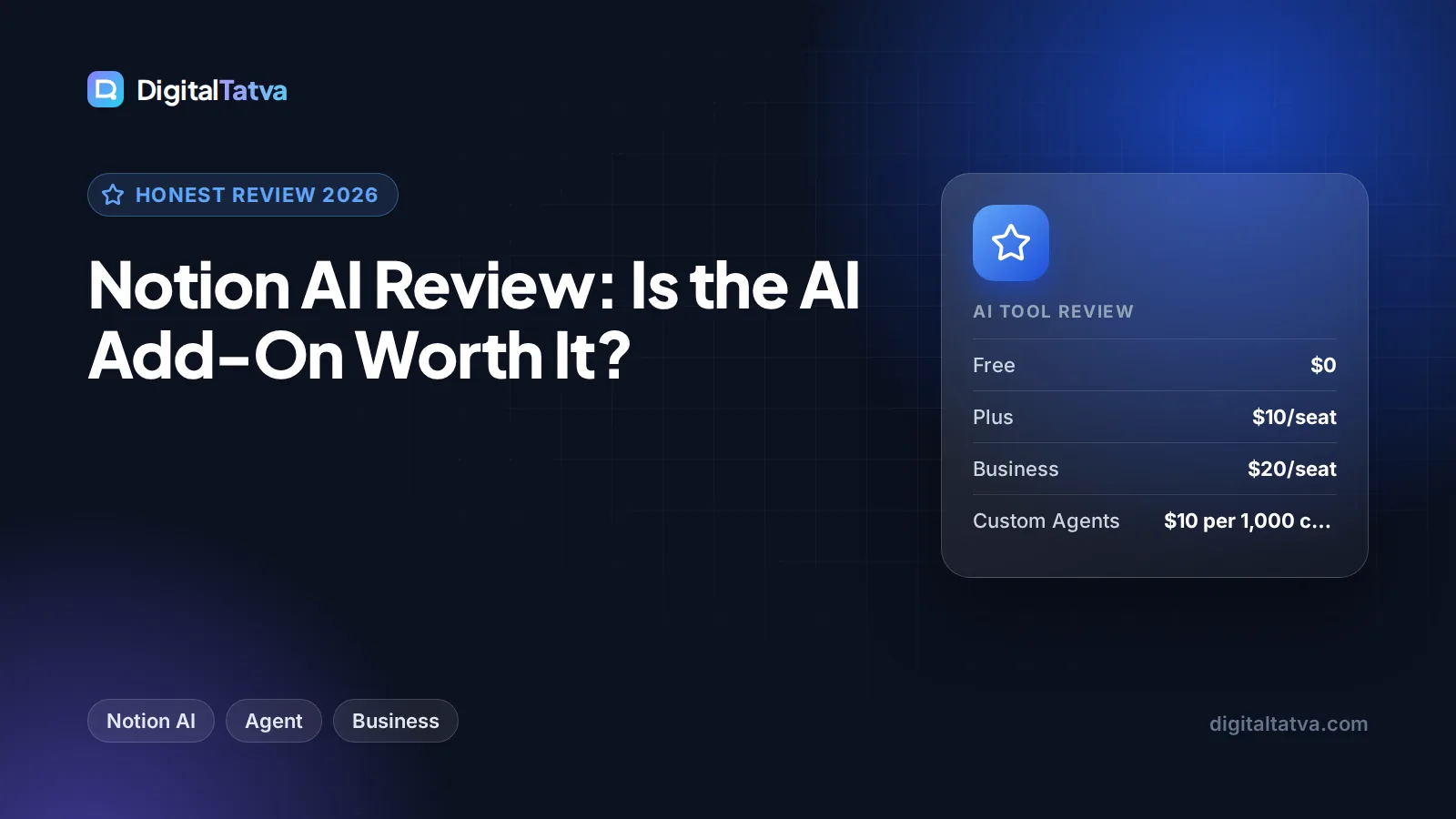
Notion AI Review: Is the AI Add-On Worth It?
Our Notion AI review for 2026: what Notion Agent, AI Meeting Notes and Enterprise Search do, why AI now needs the $20 Business plan, and who should pay.

On this page
Notion AI is worth it if your team already runs its docs, wikis and projects in Notion, because it can search, write and update pages using your own workspace as context. The catch is that the old standalone AI add-on is gone for new buyers: full Notion AI now comes with the Business plan at $20 per seat per month (about $16 on annual billing), while Free and Plus only get a limited trial. For solo users who just want a chatbot, ChatGPT or Claude is better value.
This review covers what Notion AI does in 2026, how the Business plan pricing works, where it shines, where it falls short, and which alternatives make more sense for different people.
Our verdict
7.5/10
Our rating: excellent for teams that live in Notion, thanks to workspace-aware answers, AI Meeting Notes and agents that edit pages and databases. Poor value for individuals who only want writing help, since you now pay for the full Business plan to get it.
Key takeaways
- Full Notion AI is bundled into the Business plan ($20 per seat monthly, about $16 annual) and Enterprise. Free and Plus get a trial only.
- Business includes Notion Agent (chat, generate, autofill, translate), AI Meeting Notes, Enterprise Search (beta) and a limited trial of Research Mode.
- Custom Agents are free to try, then cost $10 per 1,000 monthly Notion credits.
- Notion says its AI subprocessors are contractually barred from training on customer data. Enterprise adds zero data retention.
- The biggest value is context: Notion AI knows your pages, databases and connected apps, which general chatbots do not.
What is Notion AI?
Notion AI is the set of AI features built into Notion, the all-in-one workspace for notes, docs, wikis and project databases. Instead of a separate chatbot in another tab, it lives inside your pages. You can ask it questions about your workspace, have it draft or rewrite content, fill database properties automatically and run agents that create and edit pages for you.
The centerpiece is Notion Agent. According to Notion’s official AI product page, you can “chat with Notion Agent to take on entire tasks, using context from your workspace and connected apps to create and edit pages and databases.” That is a step beyond the old “write me a paragraph” assistant.
The headline question in this review’s title is whether the AI add-on is worth it. The honest answer in 2026 is that, for most new buyers, there is no add-on to buy any more. The real question is whether the Business plan is worth it for the AI. Our dedicated Notion AI pricing guide explains every plan in detail.
Key features of Notion AI in 2026
Notion Agent: chat, generate, autofill and translate
Notion Agent handles the everyday jobs: answering questions about your workspace, drafting pages, summarizing long documents, translating content and autofilling database properties. In everyday use, the workspace context is the advantage. Asking “What did we decide about the Q4 launch?” pulls from your actual meeting notes rather than guessing.
Custom Agents
Custom Agents automate recurring work. You set a trigger or schedule and the agent runs on its own, for example triaging a requests database every morning or compiling a weekly status page. They are free to try, then billed at $10 per 1,000 monthly Notion credits. Notion moved Custom Agents to this credit model from May 4, 2026.
AI Meeting Notes
AI Meeting Notes transcribes your meetings and produces a summary inside Notion. If your team already stores meeting notes in Notion, this can replace a separate notetaker. Teams that need deeper call analytics may still prefer a dedicated tool, which we compare in Otter.ai vs Fireflies.ai.
Enterprise Search
Enterprise Search (in beta) lets you search across your workspace and connected apps such as Slack, Google Drive and GitHub from one place. For teams with knowledge spread across tools, this can save real time hunting for files and threads.
Research Mode
Research Mode produces detailed reports and summaries on a topic. On the Business plan it is offered as a limited trial, so do not buy Business only for this feature.
| Feature | Free | Plus | Business | Enterprise |
|---|---|---|---|---|
| Notion AI (Agent: chat, generate, autofill, translate) | Trial | Trial | Yes | Yes |
| AI Meeting Notes | No | No | Yes | Yes |
| Enterprise Search | No | No | Yes (beta) | Yes |
| Research Mode | No | No | Limited trial | Check with sales |
| Zero data retention with AI providers | No | No | No | Yes |
| Price per seat (monthly billing) | $0 | $10 | $20 | Custom |
Notion AI pricing: what you actually pay
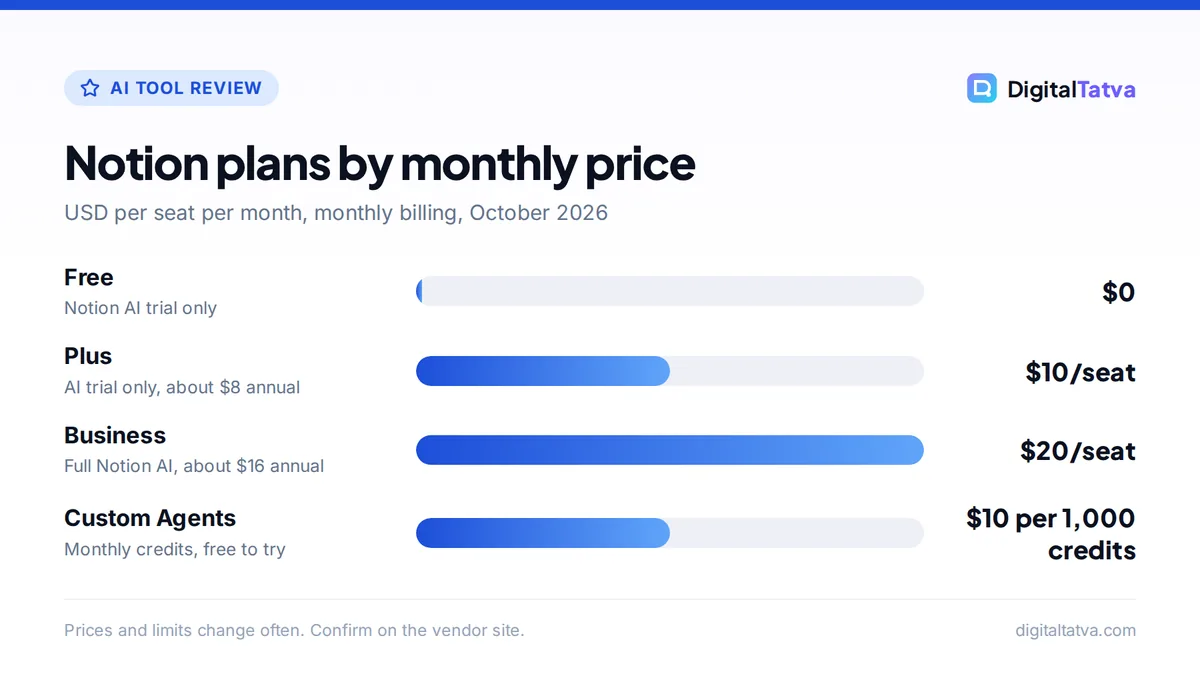
According to the official Notion pricing page, plans cost $0 (Free), $10 (Plus) and $20 (Business) per seat per month on monthly billing, with Enterprise on custom pricing. Notion says you can “save up to 20% with yearly” billing, which works out to about $8 for Plus and about $16 for Business.
Free
$0/seat
- Notion AI trial only
- Good for testing
Plus
$10/seat/mo
- About $8 annual
- AI trial only
Business
$20/seat/mo
- About $16 annual
- Full Notion AI, Meeting Notes, Enterprise Search
Enterprise
Custom
- Everything in Business
- Zero data retention with AI providers
Watch out: Notion bills per seat, so every member on Business pays the higher rate, even those who rarely use AI. A 10-person team moving from Plus to Business pays $100 more per month on monthly billing ($200 vs $100). Older articles quoting a separate $8 or $10 AI add-on are out of date.
Custom Agents are the one usage-based cost. They are free to try, then $10 per 1,000 monthly Notion credits. Start with one or two agents and watch credit use before rolling them out across the team. For broader advice on team seats, see our guide on when AI team plans actually save money.
Save money: Students and educators can get the Plus plan free for one member with a school email. It only includes the AI trial, but it is a free way to learn Notion. Our roundup of AI student discounts lists other free plans.
Pros and cons of Notion AI
Pros
- Answers and drafts use your real workspace content, not just generic knowledge.
- Agents can create and edit pages and databases, not just write text.
- AI Meeting Notes keeps transcripts and summaries where your team already works.
- Enterprise Search spans Slack, Google Drive, GitHub and more.
- Clear privacy position: AI subprocessors are contractually barred from training on customer data.
Cons
- No cheap AI add-on for Free or Plus users any more.
- Per-seat billing makes AI expensive for large teams with light users.
- Research Mode is only a limited trial on Business.
- Custom Agents add a separate credit cost on top of seats.
- For pure writing quality, dedicated assistants like Claude often need fewer edits.
Who should pay for Notion AI (and who should skip it)
Good fit
- Teams that already run on Notion. If your wiki, roadmap and meeting notes are in Notion, workspace-aware AI is genuinely useful.
- Agencies and operations teams. Autofill and Custom Agents can keep client databases and request queues tidy. Our guide to AI for marketing agencies covers similar workflows.
- Companies wanting fewer tools. Business can replace a separate notetaker and part of a search tool.
Skip it
- Solo users who want a chatbot. ChatGPT or Claude at around $20 a month gives you a stronger general assistant. Compare them in our ChatGPT vs Claude breakdown.
- Teams using Notion lightly. If Notion is just a to-do list, the Business upgrade is hard to justify.
- Budget-conscious large teams. Paying $20 per seat for everyone adds up fast.
Notion AI alternatives
| Alternative | Best for | Starting price |
|---|---|---|
| ChatGPT Plus | General writing, analysis and research | $20/month |
| Claude Pro | Long documents and polished writing, with Projects | $20/month ($17 annual) |
| Gemini in Google Workspace | Teams on Gmail and Docs | Bundled in Business plans |
| Microsoft 365 Copilot Business | Teams on Microsoft 365 | $21/user/month annual list |
| Otter.ai Pro | Meeting transcription only | $8.33/user/month annual |
If your company is on Google Workspace, Gemini may already be included, so check our guide on using Gemini in Gmail, Docs and Sheets. For organizing projects with a chatbot, Claude Projects is the closest experience to a workspace-aware assistant outside Notion. Our list of the best AI tools for small business covers more options.
Frequently asked questions
Is Notion AI worth it in 2026?
Yes, if your team already keeps its docs, projects and meeting notes in Notion, because Business adds workspace-aware answers, AI Meeting Notes and Enterprise Search for $20 per seat monthly. It is poor value for solo users who only want writing help, since a general assistant like ChatGPT or Claude costs about the same and does more.
Is there a free version of Notion AI?
Free and Plus plans include a limited trial of Notion AI, so you can test generating docs and autofilling databases. Ongoing, full Notion AI requires the Business or Enterprise plan. Custom Agents are also free to try before they switch to paid Notion credits at $10 per 1,000 monthly credits.
Can I still buy Notion AI as an add-on?
The standalone Notion AI add-on is no longer shown on Notion’s pricing page and appears to be discontinued for new buyers. Full AI now comes bundled with the Business plan. If you are an older customer with the add-on, check your billing settings, because legacy terms may differ.
Does Notion use my data to train AI models?
Notion says it has contractual agreements with its AI subprocessors that prohibit them from using customer data to train their models, and data is encrypted in transit. The Enterprise plan adds zero data retention with the AI model providers, which suits companies with strict compliance needs.
How much does Notion AI cost in India?
Notion lists its plan prices in US dollars, so Indian buyers typically pay the USD price of $20 per seat per month for Business (about $16 annually), plus any applicable taxes and currency conversion. Check the pricing page while signed in, since the final amount at checkout can vary by region.
Final verdict
Notion AI has grown from a writing helper into a genuine workspace assistant, with agents that edit pages, meeting notes, and search across connected apps. For teams already committed to Notion, upgrading to Business for these features is easy to justify, especially if it lets you drop a separate notetaker. For individuals, or teams that only dabble in Notion, a general assistant gives more for the money. Start with the free trial on your current plan, test it on real pages for a week, then decide. See our list of AI subscriptions actually worth paying for if you are weighing several tools. Notion’s plans and prices change, so confirm current details on the official Notion pricing page before upgrading.
Pricing and features are checked at the time of writing and can change. Some links may be affiliate links, which never affect our verdicts.