Midjourney vs ChatGPT Image Generation: Quality, Speed and Price
Midjourney wins on artistic quality and style control, ChatGPT wins on ease, text in images and value. Compare quality, speed, pricing and rights for 2026.

On this page
- Key takeaways
- Quick verdict: Midjourney vs ChatGPT at a glance
- Image quality: aesthetics vs accuracy
- Speed, control and workflow
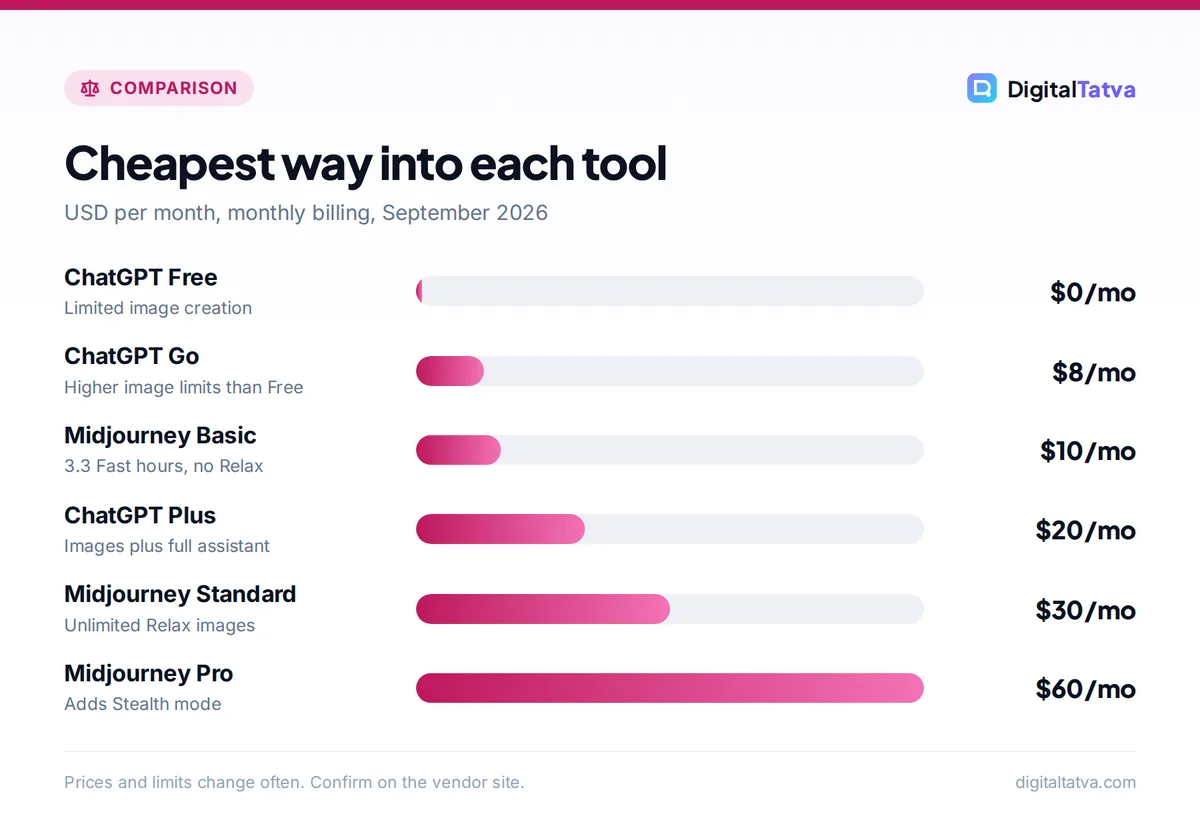
- Pricing compared: what you actually pay
- Commercial use, privacy and video
- Best tool by use case
- Choose Midjourney if, choose ChatGPT if
- Frequently asked questions
- Our verdict and next steps
Midjourney is still the better pick if you care most about striking, art-directed images and want fine control over style, while ChatGPT image generation is better if you want to describe an image in plain words, edit it through conversation and get text, layouts and product mockups right without learning parameters. On price, ChatGPT wins for casual use because image creation is included in every plan (even Free, with limits), whereas Midjourney starts at $10 a month with no free trial.
This guide compares the two on image quality, speed, control, pricing, commercial rights and workflow, using pricing and product facts checked in September 2026. If you only need a quick answer, jump to the “choose Midjourney if” section near the end.
Key takeaways
- Midjourney (default model V8.2 since July 24, 2026) produces the most polished, stylized images and gives you deep control over aesthetics.
- ChatGPT is easier: you chat, it generates, and you refine by asking for changes. It handles text inside images and practical marketing assets well.
- Midjourney plans cost $10, $30, $60 or $120 a month ($8 to $96 a month on annual billing). There is no free trial.
- ChatGPT includes limited image creation on Free, more on Go ($8) and Plus ($20), and “unlimited and faster image creation” on Pro.
- Many marketers use both: ChatGPT for quick, practical visuals and Midjourney for hero images and brand campaigns.
Quick verdict: Midjourney vs ChatGPT at a glance
Think of Midjourney as a specialist art studio and ChatGPT as a very capable generalist assistant that also draws. Midjourney’s whole product is image and short video generation, so its tools for style, variation and upscaling are deeper. ChatGPT folds image creation into a chatbot you may already pay for, which makes it the cheaper and more convenient option for most small businesses.
Neither tool is strictly better. The right choice depends on whether you value visual wow factor and control (Midjourney) or speed of iteration and plain-language editing (ChatGPT). If you want a wider view of the market first, see our ranking of the best AI image generators in 2026.
| Criterion | Midjourney | ChatGPT image generation |
|---|---|---|
| Best for | Artistic, cinematic, stylized visuals | Practical visuals, edits, text in images |
| Current model | V8.2 (default since July 24, 2026) | Built into ChatGPT; API model gpt-image-2 |
| Free option | No free trial listed | Yes, limited image creation on Free |
| Starting paid price | $10/mo (Basic) | $8/mo (Go) or $20/mo (Plus) |
| How you prompt | Prompt plus parameters, web or Discord | Natural conversation |
| Editing | Variations, remix, region edits, upscales | Ask for changes in chat |
| Video | Yes, up to 21 seconds with extensions | Not listed on current plans (Sora discontinued) |
| Privacy of images | Stealth mode on Pro and Mega only | Images stay in your chat history |
| API | No official self-serve API | Yes, gpt-image-2 billed per token |
Image quality: aesthetics vs accuracy
Where Midjourney pulls ahead
Midjourney’s strength has always been taste. Even a short prompt tends to return images with dramatic lighting, rich texture and a considered composition. The V8.x models continue that approach, and the output often looks like it came from a concept artist or an editorial photographer rather than a stock library.
It is also strong at consistent styles. Features such as style references, character references and stylize values let you push a set of images toward one look, which matters for brand campaigns, book covers, game art and mood boards. For a hands-on tour of those settings, read our guide on how to use Midjourney, with prompts, settings and tips.
Where ChatGPT pulls ahead
ChatGPT is better at following instructions literally. If you ask for “a flat lay of a blue water bottle, a yoga mat and a towel, with the words SUMMER SALE in bold white text at the top”, ChatGPT is more likely to place every object and spell the text correctly. That makes it the practical choice for social posts, ad drafts, infographics, thumbnails and product mockups.
It also understands context from the conversation. You can upload a product photo, a rough sketch or a screenshot and ask ChatGPT to restyle it, swap the background or add a caption. In everyday use, this back-and-forth editing is where ChatGPT saves the most time.
Tip: Use ChatGPT to write and refine your Midjourney prompts. Describe the image you want in plain words and ask for a Midjourney prompt with a suggested aspect ratio and style keywords. Our collection of 50 Midjourney prompts with styles and parameters is a good starting library.
Speed, control and workflow
How fast each tool feels
Speed in Midjourney depends on your plan. Every paid plan includes a set number of Fast GPU hours per month, and once those run out you either buy more or, on Standard and above, switch to Relax mode, which queues your jobs and is slower but unlimited for images. Basic has no Relax mode, so heavy users on Basic hit a wall quickly.
ChatGPT does not publish image limits or generation speeds. Free and Go users get limited image creation, Plus gets “more complex image creation”, and Pro is described as “unlimited and faster image creation”. OpenAI also notes that Plus users may still hit caps, especially at busy times. Our guide to ChatGPT limits by plan explains how these caps behave.
Control and parameters
Midjourney gives you more dials: aspect ratios, stylize, chaos, weird, seeds, style and character references, draft mode, variations and upscalers. Power users love this, but beginners can feel lost. ChatGPT hides the dials and relies on your words. You get less precise control over aesthetics but a much gentler learning curve.
Where you work
Midjourney runs on its website and in Discord. The web app is now the easier place to start, with an organized gallery and editor. ChatGPT runs in the same app you use for writing and research, on web, desktop and mobile, so images sit next to your copy, briefs and data. For teams already living in ChatGPT, that convenience is a real advantage.
Pricing compared: what you actually pay
This is where the two differ most. Midjourney is a dedicated subscription, while ChatGPT bundles images with everything else it does.
| Plan | Monthly price | Annual price | Image allowance |
|---|---|---|---|
| Midjourney Basic | $10 | $96/yr ($8/mo) | 3.3 Fast GPU hours (200 min), no Relax |
| Midjourney Standard | $30 | $288/yr ($24/mo) | 15 Fast hours, unlimited Relax images |
| Midjourney Pro | $60 | $576/yr ($48/mo) | 30 Fast hours, Relax images and SD video, Stealth |
| Midjourney Mega | $120 | $1,152/yr ($96/mo) | 60 Fast hours, Relax images and SD video, Stealth |
| ChatGPT Free | $0 | n/a | Limited image creation |
| ChatGPT Go | $8 | Not confirmed | Higher image limits than Free |
| ChatGPT Plus | $20 | Not confirmed | More complex image creation, higher limits |
| ChatGPT Pro | $100, $200 or $500 | Not confirmed | Unlimited and faster image creation |
For a solo marketer, the maths is simple. ChatGPT Plus at $20 gives you images plus writing, research, data analysis and coding help. Midjourney Standard at $30 gives you better art but nothing else. If you already pay for ChatGPT, adding Midjourney only makes sense when image quality directly affects revenue, such as ad creatives, product launches or client work. See our full Midjourney pricing breakdown and the complete ChatGPT pricing guide for plan details.
Save money: Midjourney’s annual billing cuts every plan by 20% (for example, Standard drops from $30 to $24 a month). Only commit once you know you will use it every month; our guide to annual vs monthly AI plans explains when it pays off.
Pricing in India
Midjourney bills in USD, and we could not find an official INR price. For ChatGPT, Go launched in India at Rs 399 a month in August 2025, and a third-party site lists Plus at around Rs 1,999 a month including GST. OpenAI’s official current INR prices could not be confirmed, so check the price shown at checkout.
API costs for developers
If you want to generate images inside your own app, OpenAI sells gpt-image-2 through its API. Standard pricing is $8 per million image input tokens, $2 cached and $30 per million image output tokens, with text input at $5 per million. Batch processing halves those rates. OpenAI does not publish a simple per-image price, so use its calculator or read our OpenAI API pricing guide. Midjourney does not offer an official self-serve developer API, so it is built for people rather than apps.
Commercial use, privacy and video
Commercial rights
All paid Midjourney plans come under its General Commercial Terms. There is an important catch: companies with more than $1M USD in annual revenue must use Pro or Mega. Freelancers and small shops can use Basic or Standard for client work, but a mid-sized business on Standard would be out of line with the terms.
For ChatGPT, review OpenAI’s current terms of use before using images commercially. Business plans also add admin controls and OpenAI does not train on Business workspace data, which matters for agencies handling client briefs.
Privacy of your images
By default, Midjourney images appear in its public gallery. Stealth mode, which keeps them private, is available only on Pro and Mega. If you are working on unreleased products or client campaigns, budget for Pro. ChatGPT images stay inside your chat history rather than a public feed.
Video
Midjourney can animate images into short clips of up to 21 seconds with extensions, on its website and Discord. All tiers can make video in Fast mode, and Relax video (SD only) is available on Pro and Mega. OpenAI discontinued the Sora app in April 2026 and its API in September 2026, and video generation does not appear on current ChatGPT plan listings. If video matters, see our list of the best AI video generators for creators.
Midjourney pros
- Best-in-class aesthetics and style control
- Strong for consistent brand looks and characters
- Unlimited Relax images from Standard up
- Short video from your images
Midjourney cons
- No free trial
- Steeper learning curve
- Public gallery unless you pay for Pro or Mega
- Only does images and video
ChatGPT pros
- Included in every plan, including Free
- Edit images by chatting
- Reliable text and layout following
- API available for developers
ChatGPT cons
- Less artistic range out of the box
- Image limits are not published
- No video generation on current plans
- Less control over fine style details
Best tool by use case
| Use case | Better pick | Why |
|---|---|---|
| Social media posts with text | ChatGPT | Follows layout and text instructions closely |
| Hero images and ad creatives | Midjourney | More striking, premium look |
| Product mockups from a photo | ChatGPT | Upload and edit through chat |
| Book covers, concept art, mood boards | Midjourney | Style references and artistic depth |
| Blog featured images on a budget | ChatGPT | Already included in your plan |
| Consistent characters across a series | Midjourney | Character and style reference tools |
| Images inside your own app | ChatGPT (API) | gpt-image-2 is available via API |
If neither fits your budget, there are good options between them. Our guide to cheaper alternatives to Midjourney covers tools like Leonardo, Ideogram and Adobe Firefly, and our Canva AI vs Adobe Firefly comparison helps if you mostly design marketing templates.
Choose Midjourney if, choose ChatGPT if
Choose Midjourney if you
- Sell visuals or visual quality drives your results (designers, agencies, authors, game studios).
- Need a consistent, premium look across many images.
- Will generate a lot and can use unlimited Relax images on Standard or above.
- Want short animated clips from your images.
Choose ChatGPT if you
- Need practical marketing visuals quickly, especially with text.
- Already pay for ChatGPT and want images at no extra cost.
- Prefer describing changes in plain words over learning parameters.
- Are a developer who needs an image API.
Whichever you choose, better prompts make a bigger difference than switching tools. Our prompt engineering guide covers techniques that work for both text and images.
Frequently asked questions
Is Midjourney better than ChatGPT for images?
For artistic quality and style control, yes. Midjourney V8.2 produces more polished, cinematic images and offers deeper tools for consistent styles. ChatGPT is better at following exact instructions, putting readable text into images and editing through conversation. Many creators use ChatGPT for everyday visuals and Midjourney for premium hero images and campaigns.
Is there a free version of Midjourney?
No. Midjourney’s plans page does not list a free trial, so you need at least the Basic plan at $10 a month ($8 a month billed annually). If you want to try AI images for free, ChatGPT’s Free plan includes limited image creation, and several other generators offer free daily credits.
Can I use ChatGPT images for commercial purposes?
OpenAI’s terms govern commercial use of ChatGPT outputs, so read the current terms before using images in ads or products. For client work, also check trademarks, logos and likenesses in the image. Business plans add admin controls, and OpenAI does not train on Business workspace data, which helps agencies protect client material.
Which is cheaper, Midjourney or ChatGPT Plus?
ChatGPT Plus costs $20 a month and includes images along with writing, research and analysis. Midjourney starts at $10 for Basic, but Basic has limited Fast hours and no Relax mode, so most regular users need Standard at $30. For casual image needs, ChatGPT is the better value.
Can Midjourney or ChatGPT make videos?
Midjourney can turn images into short videos of up to 21 seconds with extensions, on all paid plans in Fast mode. OpenAI discontinued Sora in 2026, and video generation is not listed on current ChatGPT plans. For longer or talking-head videos, a dedicated video tool is a better choice.
Our verdict and next steps
Pick ChatGPT if you want an easy, all-in-one assistant that makes good practical images and you do not want another subscription. Pick Midjourney if image quality is part of your product or your client promise, and budget for Pro if you need private images or your company earns more than $1M a year. Start with the tool you already have, and add the other only when you hit its limits.
For a deeper look at Midjourney alone, read our Midjourney review for 2026, or compare subscriptions on the official Midjourney plans page and the official ChatGPT pricing page. Pricing and limits change often, so confirm the latest details on each vendor’s site before you buy.
Pricing and features are checked at the time of writing and can change. Some links may be affiliate links, which never affect our verdicts.



