Suno vs Udio: Which AI Music Generator Should You Use?
Suno vs Udio in October 2026: pricing, credits, download limits, commercial rights, v6 quality and the label lawsuits, so you know which AI music generator to use.


On this page
- Key takeaways
- Quick verdict: Suno or Udio?
- Pricing and credits compared
- Downloads, ownership and commercial use
- Sound quality and features
- Licensing, lawsuits and risk
- Who should choose Suno, and who should choose Udio
- Tips to get better AI songs from either tool
- Frequently asked questions
- Verdict: Suno wins for creators who need real files
Suno is the better AI music generator for most people in October 2026 because you can still download your songs and use them commercially on a paid plan. Udio remains a strong tool for shaping and editing a track inside its own app, but downloads of audio, video and stems have been switched off since late October 2025, so anything you make there stays on Udio. If you need music you can publish on YouTube, Instagram or Spotify, pick Suno. If you only want to experiment and listen inside the app, Udio is still fun.
Both tools went through major legal changes over the past year, and that shapes what you can do with your songs. Below we compare Suno and Udio on pricing, credits, downloads, rights, quality and features, using each vendor’s current plan details as of 8 October 2026.
Key takeaways
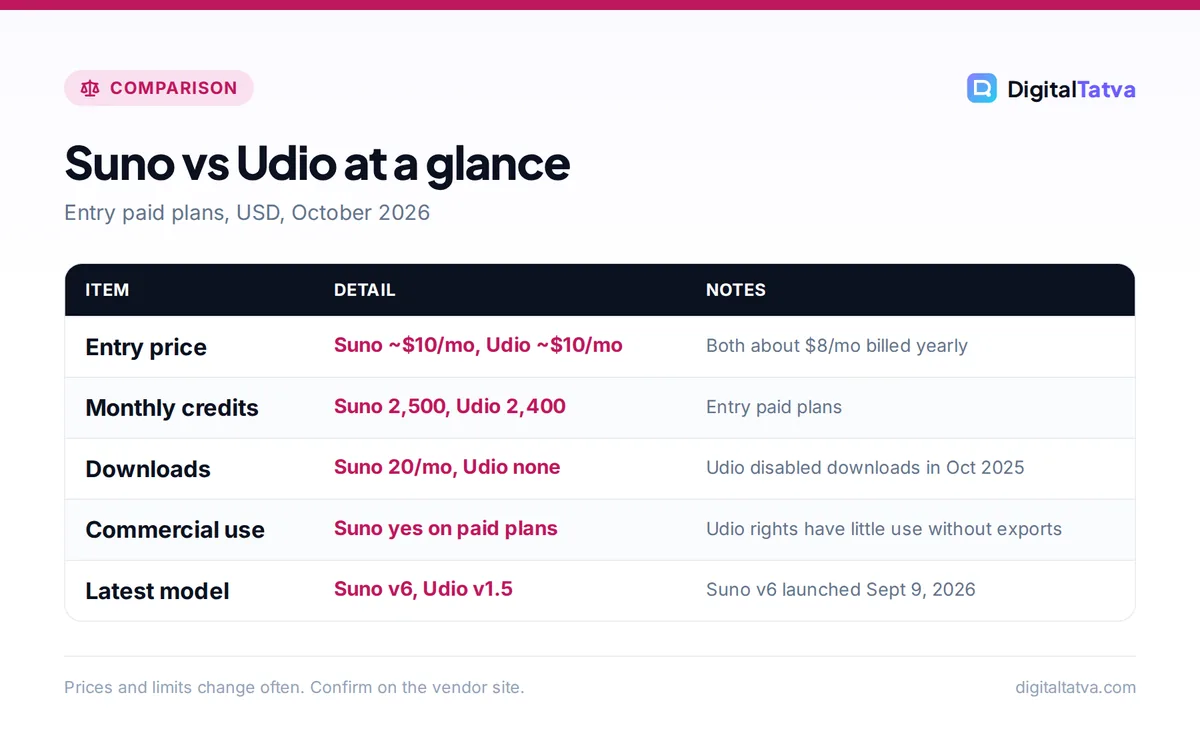
- Suno Pro costs about $10 a month ($8 billed yearly) and includes 2,500 credits, 20 song downloads a month and commercial use rights.
- Udio Standard is listed at about $10 a month ($8 yearly) for 2,400 credits, but downloads are disabled on every Udio plan.
- Suno launched its v6 model on September 9, 2026, with licensing partners Warner Music Group, BMG and Believe. Universal and Sony filed a fresh lawsuit against it on September 18, 2026.
- Udio settled with Universal and Warner in late 2025 and is building a licensed, streaming-style platform that had not launched publicly by the end of September 2026.
- Free plans on both tools are for testing only: no downloads and no commercial rights.
Quick verdict: Suno or Udio?
Think about where your music needs to end up. If the answer is “outside the app”, Suno is the only realistic choice of the two right now. Its paid plans let you download a fixed number of songs each month and give you commercial use rights for songs made while subscribed. Udio lets you create, edit, listen and share links, but it does not let you export files.
That single difference outweighs almost everything else for creators, marketers and small businesses. A YouTuber who needs a theme tune, a brand that wants a jingle for Reels, or a podcaster who wants an intro needs the actual audio file. For a broader shortlist, including licensed tools built for background music, see our guide to the best AI music generators for creators and brands.
| Criteria | Suno | Udio |
|---|---|---|
| Best for | Finished songs you can publish | In-app experimenting and editing |
| Free plan | 50 credits a day, no downloads, no commercial rights | About 10 credits a day (100 a month), up to 3 full songs a day |
| Entry paid plan | Pro, about $10/mo or $8/mo yearly | Standard, about $10/mo or $8/mo yearly |
| Top plan | Premier, about $30/mo or $24/mo yearly | Pro, about $30/mo or $24/mo yearly |
| Monthly credits (entry / top) | 2,500 / 10,000 | 2,400 / 6,000 |
| Downloads | 20 a month on Pro, 60 on Premier | Disabled on all plans |
| Commercial rights | Paid plans | Of little practical use without exports |
| Current model | v6, v6-wild, v6-mini (free) | v1.5 and v1.5 Allegro (latest named) |
| Legal status | Warner settlement; new Universal and Sony lawsuit | Settled with Universal and Warner; new platform pending |
Watch out: Udio’s own pricing page and help center would not load for us, so the Udio prices in this article come from 2026 third-party reviews that read the page in early October. Treat them as approximate and check the plan screen before you pay.
Pricing and credits compared
On paper, the two price ladders look almost identical. Both start at about $10 a month, both drop to about $8 a month on yearly billing, and both top out around $30 a month ($24 yearly). The value is in what those credits buy.
Suno plans
The official Suno pricing page lists three plans. Free gives 50 credits per day on the v6-mini model, with no song downloads and no commercial rights. Pro shows “$8/month” on yearly billing and says yearly saves $24, which implies about $10 on monthly billing. It includes 2,500 credits a month, 20 song downloads, the v6 and v6-wild models, two stem separation types, and the option to buy extra credits and downloads.
Premier shows “$24/month” on yearly billing and saves $72 a year, so about $30 monthly. You get 10,000 credits, 60 downloads a month, Suno Studio (its music workstation), three stem separation types, personas and advanced editing, and uploads of up to 30 minutes of audio. Subscription credits do not roll over to the next month.
Udio plans
Udio’s plans, as read by third-party reviewers on October 4, 2026, are Free (10 credits a day, up to 100 a month and three full songs a day), Standard ($10 a month or $8 yearly, 2,400 credits) and Pro ($30 a month or $24 yearly, 6,000 credits). Top-ups are listed at $3 for 100 credits or $25 for 1,000. Paid plans add editing, voice control, audio upload and style references, and more songs can run at once.
Save money: Start with one month of Suno Pro on monthly billing. If you use most of your 20 downloads, switch to yearly billing and save about $24. If you need more than 20 finished songs a month, Premier’s 60 downloads usually work out cheaper than buying extra downloads. Our guide to annual vs monthly AI plans explains when to commit.
Downloads, ownership and commercial use
This is the section that decides the comparison. Generating a song and owning a usable file are now two different things.
Suno: downloads are capped, not blocked
Suno now limits downloads separately from generation. Pro allows 20 song downloads a month and Premier 60, and you can buy more on paid plans. Free users cannot download songs at all and get no commercial rights. Stability AI’s competitor comparison says these caps took effect on September 3, 2026, and apply to your whole library, so plan your downloads rather than generating hundreds of tracks and expecting to export them all later.
Paid plans include commercial use rights. In practice, that means you can use songs made while subscribed in monetized videos, ads and client work, subject to Suno’s terms. If you also need a voiceover for those videos, our guide to the best AI voice generators covers tools with clear commercial licenses.
Udio: create and listen, but no exports
After its settlement with Universal Music Group in October 2025, Udio turned off downloads of audio, video and stems. Users got a short 48-hour window in early November 2025 to save existing songs, and downloads had not returned by late September 2026. Udio is moving toward a licensed platform that coverage describes as a “walled garden”: you make and stream music inside the service rather than taking files away.
Older Udio marketing promised commercial rights on paid plans, but without exports those rights have little practical value. Reviewers found no current Udio statement that explains how commercial use works without downloads.
Sound quality and features
Quality is subjective and changes with every model update, so we will not pretend to give you a score out of 100. Here is how the two tools feel in everyday use.
Suno v6
Suno released v6 on September 9, 2026, and says the model was “trained entirely from scratch”. Paid users get v6 and v6-wild (a more experimental variant), while Free uses v6-mini. Suno is fast at producing complete, radio-style songs with vocals, verses and choruses from a short prompt or your own lyrics. Paid plans also let you record or upload your own voice, create custom models and split songs into stems for mixing.
Udio’s editing tools
Udio built its reputation on detail. You can regenerate a single section, extend a track, remix it, guide it with style references and edit lyrics. Many musicians like that control for refining a short idea. The latest model Udio has named publicly is v1.5 (with the v1.5 Allegro update from March 2025), and there is no confirmed “v4”, despite what some blogs claim.
Suno pros
- Downloads and commercial rights on paid plans
- New v6 models and Suno Studio on Premier
- Stem separation and voice upload
Suno cons
- Monthly download caps
- Active lawsuit from Universal and Sony
- Credits do not roll over
Udio pros
- Fine-grained section editing and remixing
- Licensing deals with Universal and Warner
- Similar entry price to Suno
Udio cons
- No audio, video or stem downloads
- New licensed platform not yet public
- Official pricing details hard to confirm
Licensing, lawsuits and risk
Both companies were sued by major record labels in June 2024. Since then, their paths have split.
- Suno settled with Warner Music Group in November 2025 and signed BMG (August 2026) and Believe (September 2026). On September 18, 2026, Universal and Sony filed a second lawsuit in Boston federal court, arguing that v6 is “the fruit of the same poisoned tree”, according to Music Business Worldwide’s report.
- Udio settled with Universal in October 2025 and Warner in November 2025, with further deals reported with Merlin and Kobalt. The trade-off was the end of downloads while it builds a licensed service.
What does this mean for you? Lawsuits target the companies, not individual subscribers, but brands and agencies should still be careful. For client campaigns where legal risk matters, a tool trained on licensed data, such as Stable Audio or Adobe Firefly’s music generator, may be the safer route. The same logic applies to images: our comparison of Canva AI vs Adobe Firefly explains why “commercially safe” training matters.
Note: This is general information, not legal advice. If a song will anchor a paid ad campaign or a product, read the vendor’s terms and talk to your lawyer. Our AI data and privacy guide for businesses covers how to review AI vendor terms.
Who should choose Suno, and who should choose Udio
Choose Suno if
- You need downloadable songs for YouTube, Reels, podcasts or ads.
- You want full songs with vocals from a short prompt.
- You want stems to mix in your own editor. Our list of the best AI video editors for YouTube and Reels covers tools that handle audio well.
- You are a hobby songwriter who wants your own voice in the mix.
Choose Udio if
- You enjoy refining sections of a song and listening inside the app.
- You want to be early on a label-licensed platform when it launches.
- You do not need to export audio files.
Choose something else if
- You need background music for videos without vocals. Licensed libraries and generators like Mubert, Soundraw or Firefly may suit you better.
- You make videos with AI and want sound inside the same tool. See our guide on how to make an AI video from text, and our list of the best AI video generators, several of which now generate audio.
Tips to get better AI songs from either tool
- Write the structure into your prompt. Name the sections you want (intro, verse, chorus, bridge) and the mood of each, rather than one vague genre.
- Bring your own lyrics. AI lyrics are often generic. Draft them in a chatbot first; our guide to how to use ChatGPT covers writing and rewriting in plain steps.
- Generate short, then extend. Test ideas with short clips and only spend credits on full songs once a hook works.
- Save downloads for finals. On Suno, download only the versions you will publish, because downloads are capped monthly.
- Keep records. Note the plan you were on when you made each song, since commercial rights depend on being subscribed at the time.
Frequently asked questions
Is Suno better than Udio in 2026?
For most people, yes. Suno’s paid plans let you download songs (20 a month on Pro, 60 on Premier) and include commercial use rights, and its new v6 model launched in September 2026. Udio still has excellent editing tools, but downloads have been disabled on all plans since late October 2025, so you cannot take files out of the app.
Can you still download songs from Udio?
No. Udio disabled downloads of audio, video and stems after its October 2025 settlement with Universal Music Group. Users had a brief 48-hour window in early November 2025 to save existing songs. As of late September 2026, downloads had not returned, and Udio’s new licensed platform was not yet publicly available.
Is there a free version of Suno?
Yes. Suno Free gives you 50 credits a day on the v6-mini model, so you can test prompts and listen to results. It does not include song downloads or commercial rights, and you cannot buy extra credits on it. To use songs in videos or client work, you need Pro or Premier.
Can I use Suno songs on YouTube and make money?
Songs created while you are on a paid Suno plan come with commercial use rights, so you can use them in monetized videos under Suno’s terms. Songs made on the Free plan do not include commercial rights. Keep in mind that Suno is in active litigation with Universal and Sony, so cautious brands may prefer licensed alternatives.
How much does Suno cost in India?
Suno lists prices in USD: about $10 a month for Pro or $8 a month billed yearly, and about $30 a month for Premier or $24 yearly. We did not find an official rupee price. Your card will be charged in dollars, so check your bank’s foreign transaction fee before subscribing.
Verdict: Suno wins for creators who need real files
Suno is our pick for almost everyone who wants AI music they can actually use. Pro at about $10 a month (or $8 yearly) gives you 2,500 credits, 20 downloads and commercial rights, which covers most YouTubers and small brands. Udio is worth watching, and its editing tools are still enjoyable, but until downloads return or its licensed platform launches, it is a place to play rather than a production tool. Prices and rights in AI music are changing quickly, so confirm current plans and terms on each vendor’s site before you subscribe.
Related reading: 10 best AI tools for YouTubers and 12 ways to save money on AI subscriptions.
Pricing and features are checked at the time of writing and can change. Some links may be affiliate links, which never affect our verdicts.